
Finding the best AI tools for small business can be challenging. With so many options available, choosing the ones that actually save you time and improve your workflow is much harder.
That’s why we didn’t want to create another list of the best AI tools for small business based only on feature pages and marketing claims. For this guide, we tested 10 popular AI tools hands-on, using practical tasks that a small business owner might actually face — from writing and research to automation, productivity, marketing, and customer support.
We tested ChatGPT, Claude, Gemini, Canva, Zapier, HubSpot, Notion AI, Grammarly, Perplexity, and Tidio, paying attention not only to what each tool could do, but also to how easy it was to use, where it performed well, and where we ran into limitations.
The goal isn’t to find one “perfect” AI tool. It’s to help you understand which tools are genuinely useful for different business needs — based on what happened when we actually used them.
How We Tested These AI Tools
Because these tools serve different purposes, we didn’t test them using identical prompts. Instead, we gave each tool a practical task related to its main use case and evaluated the result based on usefulness, ease of use, and any limitations we encountered during testing. The screenshots throughout this guide come from those hands-on tests.
Quick Pick
🏆 Best for general use: ChatGPT
✍️ Best for writing & documents: Claude
🎨 Best for design: Canva
⚡ Best for automation: Zapier
Quick Comparison: Best AI Tools for Small Business
- ChatGPT
- Best for: All-around AI assistance
- What we tested: Practical business tasks
- Key takeaway: Versatile across multiple business needs
- Claude
- Best for: Writing and document analysis
- What we tested: Professional email and business document analysis
- Key takeaway: Strong with structured writing and documents
- Gemini
- Best for: Productivity and the Google ecosystem
- What we tested: Weekly productivity planning
- Key takeaway: Particularly useful for Google Workspace users
- Canva
- Best for: Visual content creation
- What we tested: AI-assisted design workflow
- Key takeaway: Makes business visuals easier to create
- Zapier
- Best for: Workflow automation
- What we tested: Gmail filtering and labeling automation
- Key takeaway: Powerful no-code automation between apps
- HubSpot
- Best for: CRM and sales management
- What we tested: Newsletter form, lead capture, and CRM contact management
- Key takeaway: Combines CRM workflows with marketing tools
- Notion AI
- Best for: Work organization
- What we tested: A weekly Prompt Atlas content workflow
- Key takeaway: Turns instructions into structured workspace content
- Grammarly
- Best for: Business writing
- What we tested: Grammar correction and AI rewriting
- Key takeaway: Improved our test score from 53 to 95
- Perplexity
- Best for: AI-powered research
- What we tested: 2026 AI trends research with cited sources
- Key takeaway: Fast research with visible citations and sources
- Tidio
- Best for: AI customer support
- What we tested: Lyro trained on Prompt Atlas content
- Key takeaway: Useful when given a well-configured knowledge base
1. ChatGPT — Best All-Around AI Assistant
What We Tested
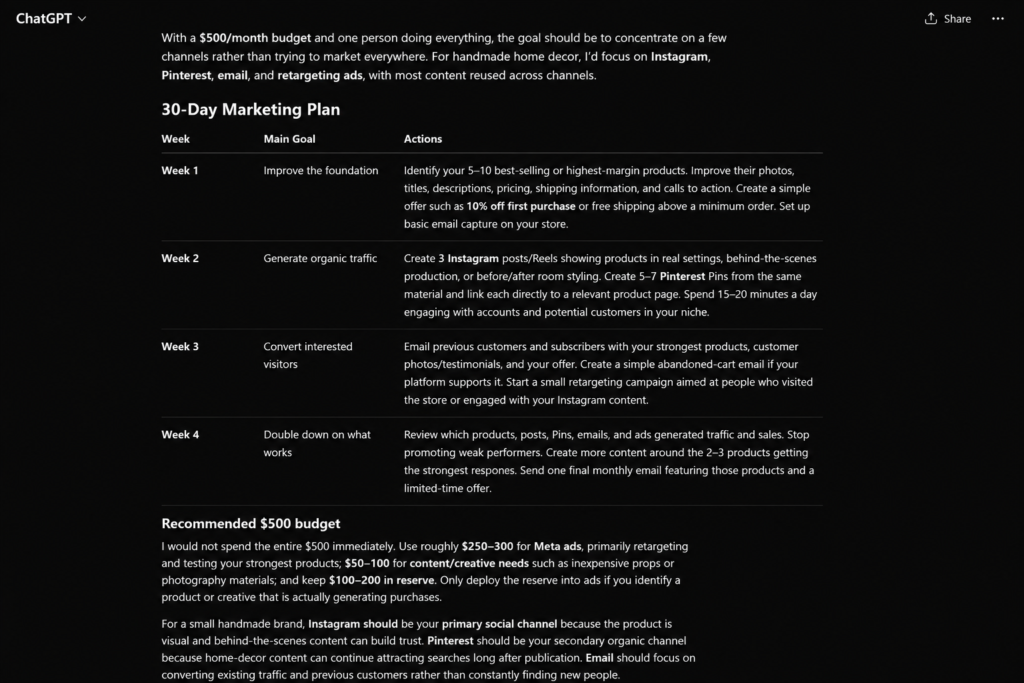
We asked ChatGPT to create a realistic 30-day marketing plan for a small handmade home decor business whose sales had been flat for three months. The business had a limited $500 monthly marketing budget, and we specifically told ChatGPT that the plan needed to be manageable by one person working alone.
What Happened
ChatGPT produced a four-week action plan instead of simply giving us a list of generic marketing ideas. It focused on Instagram, Pinterest, email, and retargeting, while recommending that the business avoid trying to market everywhere at once.
It also suggested how to allocate the $500 budget, recommending roughly $250–$300 for Meta ads, $50–$100 for content or creative needs, and keeping $100–$200 in reserve until the business identified products or creative campaigns that were actually generating purchases.
One detail we particularly liked was the emphasis on reusing content. ChatGPT suggested turning a single product photo or video session into content for Instagram, Pinterest, email, and advertising rather than creating separate material for every platform.
Finally, it provided three measurable KPIs: sales conversion rate, customer acquisition cost (CAC), and revenue generated by channel.
Our Take
In this test, ChatGPT’s biggest strength was its ability to turn a fairly detailed business situation into an organized, actionable plan. The recommendations took both the limited budget and the one-person workload into account, which made the response more practical than a generic marketing checklist.
The main limitation is that the plan is still a starting point. ChatGPT didn’t have access to the business’s actual sales data, margins, customer behavior, or previous campaign performance, so a real business owner would still need to validate the recommendations against their own numbers.
Best for: Small business owners who want a versatile AI assistant for planning, brainstorming, writing, analysis, and everyday business tasks.
Want to see how ChatGPT compares directly with Claude? Read our hands-on ChatGPT vs Claude comparison for small business.
2. Claude — Best for Writing & Document Analysis
What We Tested
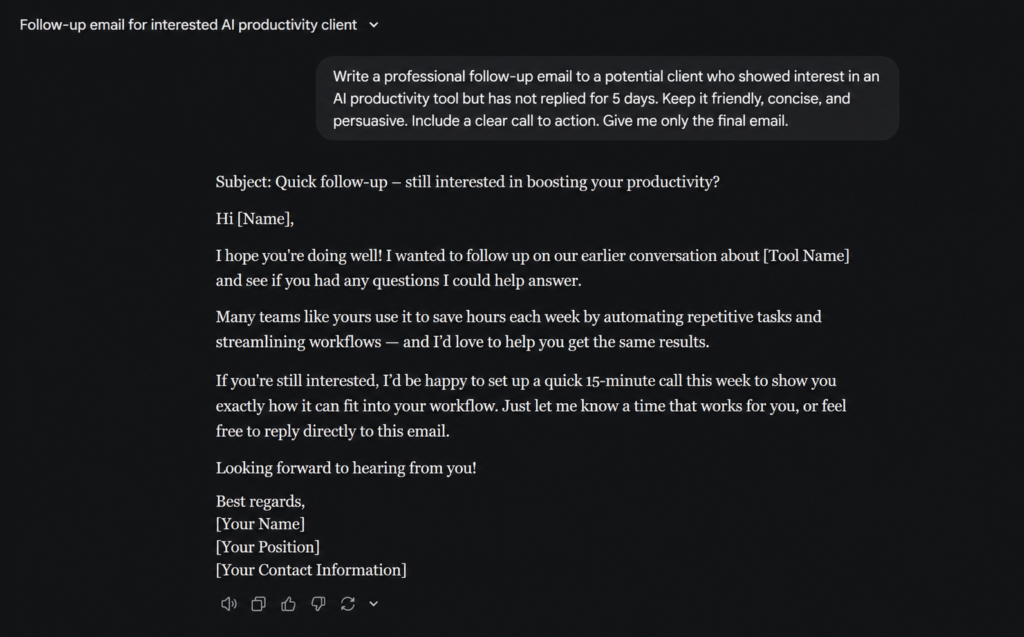
We tested Claude with two practical business tasks. First, we asked it to write a professional follow-up email for a realistic business situation. Then, we gave it a business document to analyze and asked it to identify the most important information and provide a clear, useful summary.
What Happened
Claude produced a concise, professional follow-up email with a clear subject line, a friendly opening, and a direct call to action. Instead of making the message overly aggressive, it kept the tone conversational while still encouraging the potential client to respond or schedule a short call.
We also tested Claude with a business document analysis task. It was able to identify the most relevant information, organize the key points, and turn a longer document into a clearer summary that would be easier to use for business decisions.
Our Take
Claude stood out for its ability to produce polished, natural-sounding business writing with very little prompting. The follow-up email was concise, professional, and usable with only minor personalization. Its document analysis was also strong, especially when the goal was to extract key information from longer content without losing the main context.
The main limitation is that Claude still depends heavily on the quality and context of the information provided. For business-specific decisions, its summaries and recommendations should be reviewed rather than treated as a substitute for human judgment.
Best for: Small business owners who regularly work with emails, reports, proposals, documents, and other text-heavy tasks.
3. Gemini — Best for Google Workspace & Productivity
What We Tested
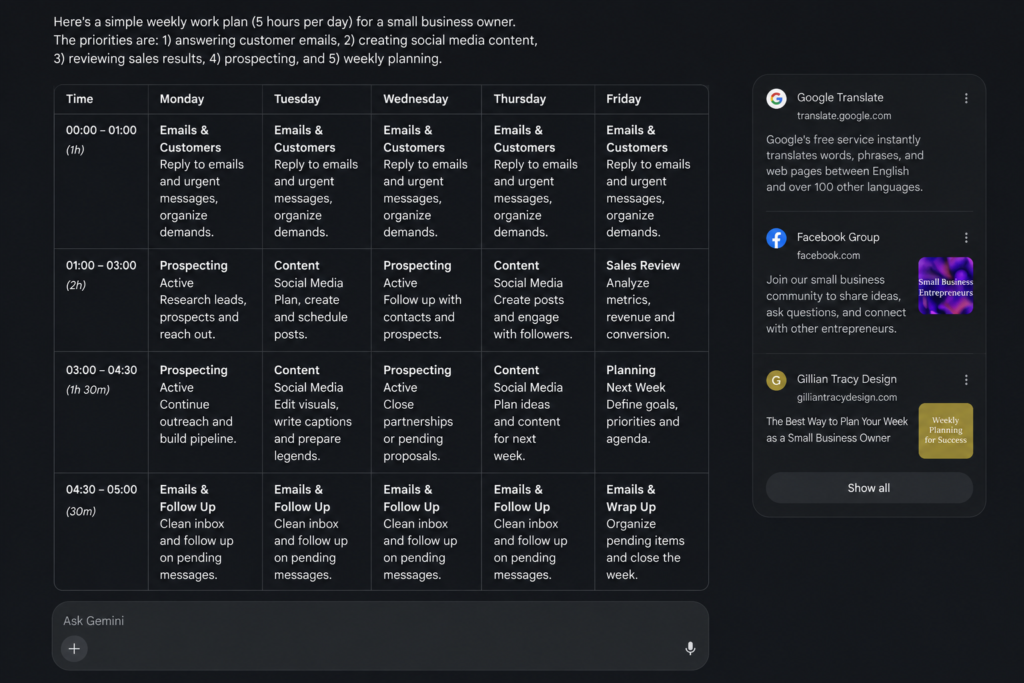
We tested Gemini with a practical productivity task designed around the needs of a small business owner. We asked it to create a realistic weekly work plan for someone with only five hours available per day, balancing customer emails, social media content, sales review, prospecting, and weekly planning.
What Happened
Gemini created a structured five-day work plan that divided the available time into clear blocks for customer emails, prospecting, social media content, sales review, and weekly planning. Instead of simply listing priorities, it assigned specific activities to different days and time periods, making the plan easier to follow.
The response was particularly useful for balancing recurring daily tasks with activities that do not need to happen every day. For example, prospecting was concentrated on selected days, while content creation and sales review were scheduled separately. This made the five-hour workday feel more realistic and manageable for a small business owner working alone.
Our Take
Gemini performed well as a productivity and planning assistant. Its biggest strength in this test was turning several competing business priorities into a clear weekly schedule without making the plan overly complicated. The time-block format made the recommendations practical and easy to understand.
One limitation is that the schedule was based entirely on the information we provided. A real business owner would still need to adjust the time blocks according to workload, customer demand, and unexpected tasks. Still, as a starting point for organizing a busy workweek, the result was useful and immediately actionable.
Best for: Small business owners who use Google Workspace and want AI assistance with planning, productivity, research, and everyday work tasks.
4. Canva — Best for AI-Assisted Visual Content
What We Tested
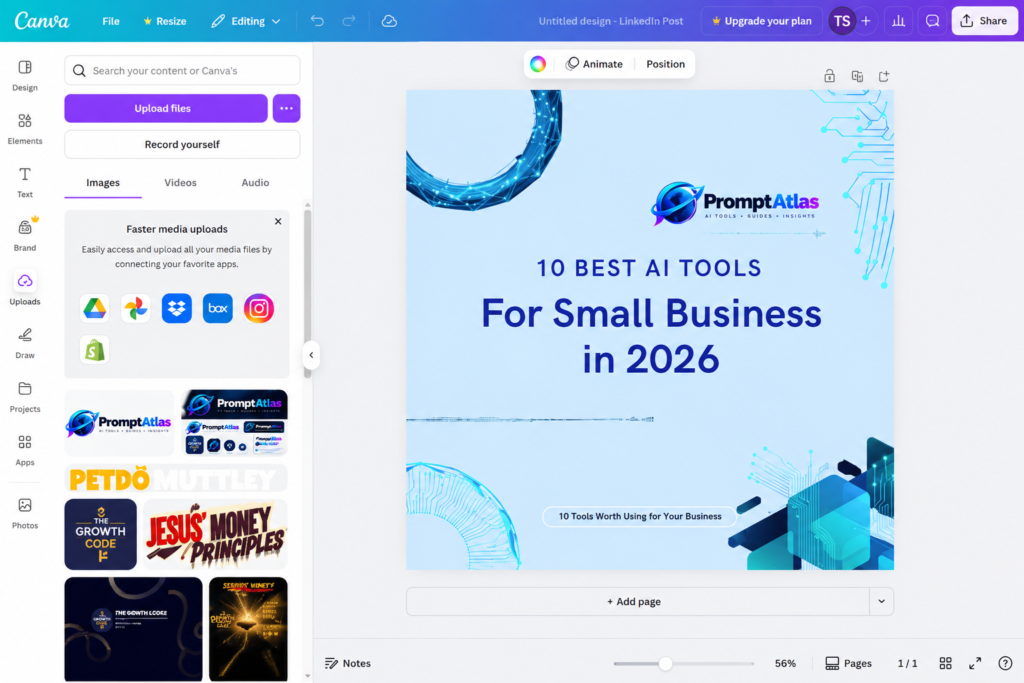
We tested Canva with a practical visual content task for a small business. The goal was to see how easily its AI-assisted design features could help create professional-looking marketing content without requiring advanced design skills.
What Happened
Canva made it surprisingly easy to turn a simple idea into a polished visual. We started with an AI-assisted design and then customized the layout, text, colors, and PromptAtlas branding to better match the article.
The biggest advantage was speed. Instead of building the graphic from scratch, Canva gave us a usable starting point that we could refine. The initial result still required manual adjustments, especially for branding and layout, but it significantly reduced the time needed to create the visual.
Our Take
Canva stood out for how quickly it turned a basic idea into a professional-looking visual. Its AI-assisted features are especially useful for small business owners who need social media graphics, marketing materials, or blog visuals but don’t have advanced design skills.
The main limitation is that the AI-generated result should be treated as a starting point rather than a finished design. We still needed to adjust the branding, positioning, and visual details to make the final graphic feel more polished and consistent with PromptAtlas.
Best for: Small business owners who need to create professional visual content quickly without hiring a designer.
5. Zapier — Best for Business Automation
What We Tested
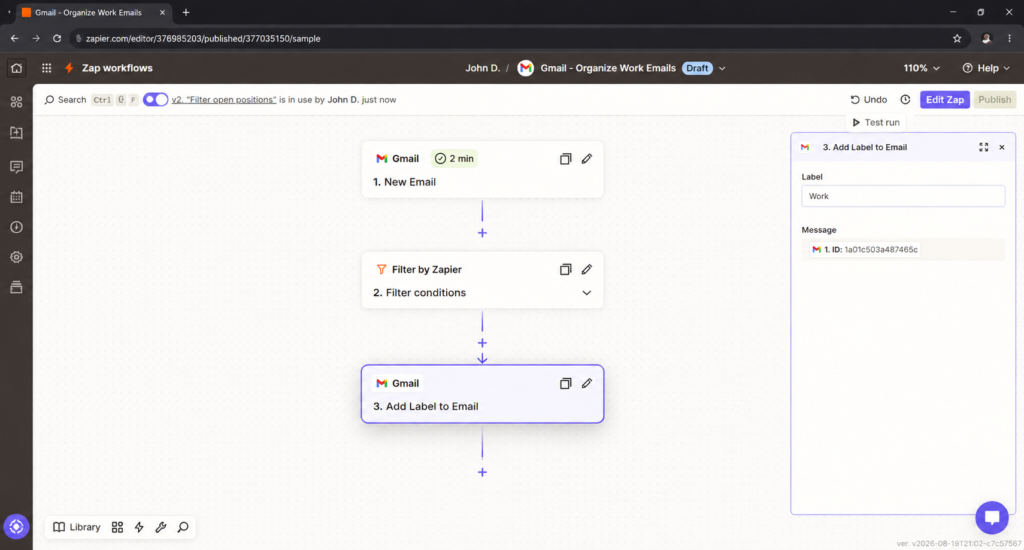
We tested Zapier by building a simple business automation designed to reduce repetitive email work. We created a workflow that starts when a new Gmail message arrives and uses filtering rules to determine which emails should continue through the automation.
Our Experience
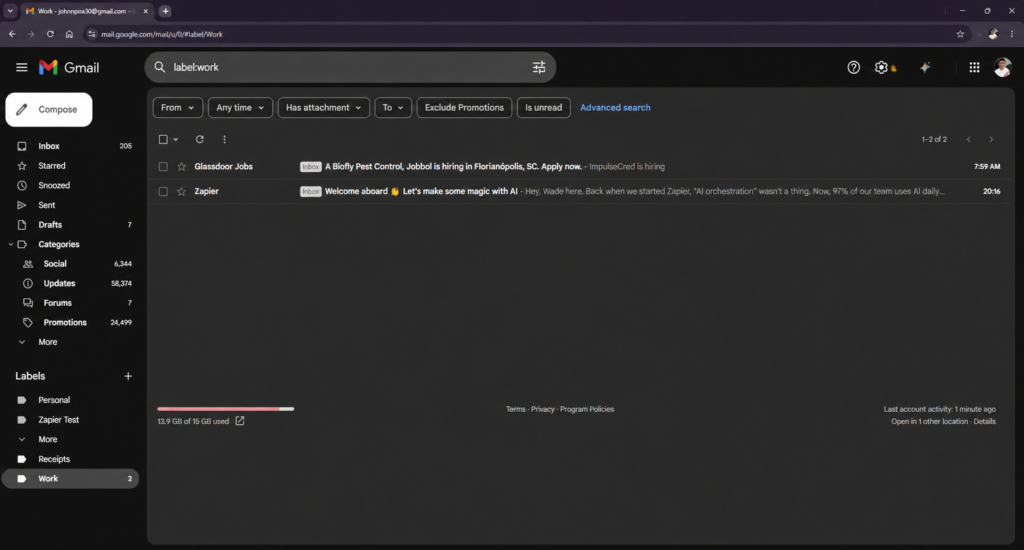
The setup was straightforward once the Gmail account was connected. We configured Zapier to check incoming emails for a specific keyword and automatically apply a “Work” label when the condition was met. In our test, the workflow successfully organized matching emails in Gmail without requiring manual sorting.
Best For
Small businesses that want to automate repetitive tasks between apps such as Gmail, Google Sheets, CRMs, forms, and other business tools.
Our Verdict
Zapier is one of the most practical automation tools we tested. It takes some initial setup, but even a simple workflow can eliminate repetitive manual tasks. For a small business owner working alone, that can translate into meaningful time savings.
6. HubSpot — CRM and Lead Management
What We Tested
We tested HubSpot by building a real newsletter signup workflow for Prompt Atlas.
Instead of simply exploring the interface, we created a newsletter form, configured how HubSpot should handle new contacts, connected the form to our WordPress website, submitted a real test signup, and checked whether the contact was successfully recorded inside the CRM.
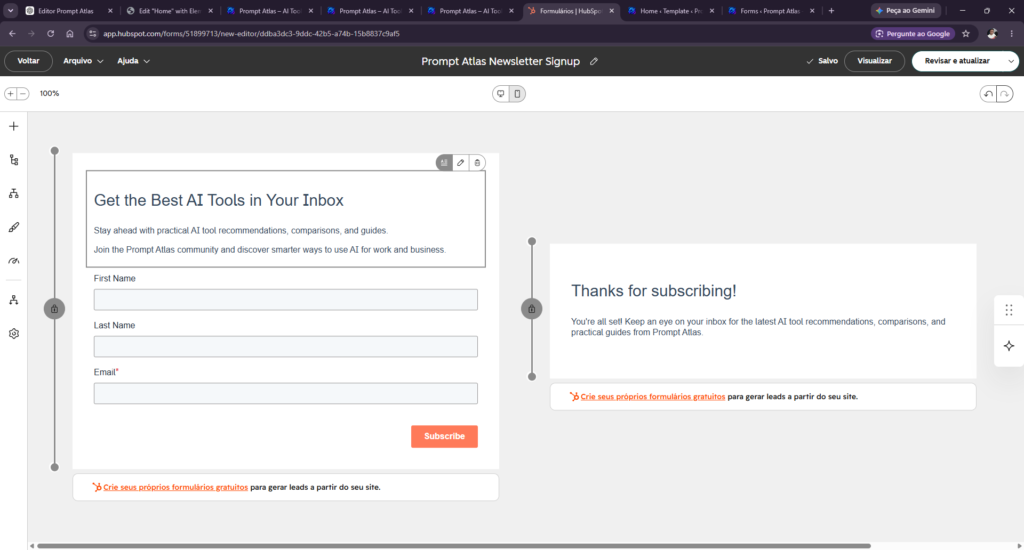
HubSpot newsletter signup form created and tested for Prompt Atlas.
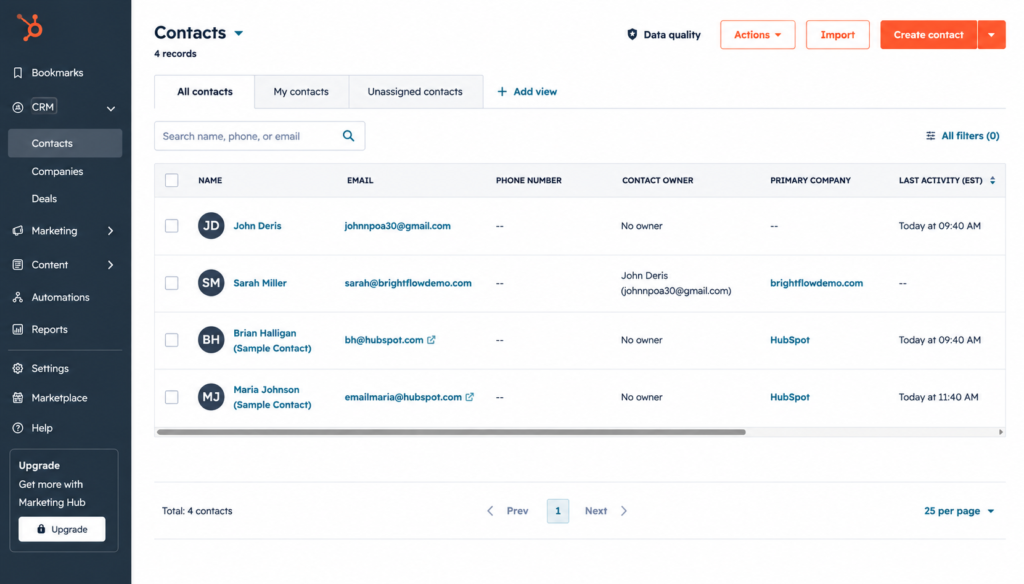
Test contact successfully recorded in HubSpot CRM after submitting the Prompt Atlas newsletter form.
What Happened
The setup was straightforward, and the test contact appeared correctly in HubSpot CRM after the form was submitted. This showed us how a small business could use HubSpot to capture leads from its website and keep contact information organized in one place.
Our Take
HubSpot stood out as a practical option for small businesses that want to organize leads and customer information without building a complicated CRM system from scratch. In our test, connecting a real website form to the CRM worked as expected, making it easy to see how the platform could support a growing business.
Best For
Small businesses that need a CRM to capture leads, organize contacts, and manage customer relationships as they grow.
7. Notion AI — Workspace and Content Planning
What We Tested
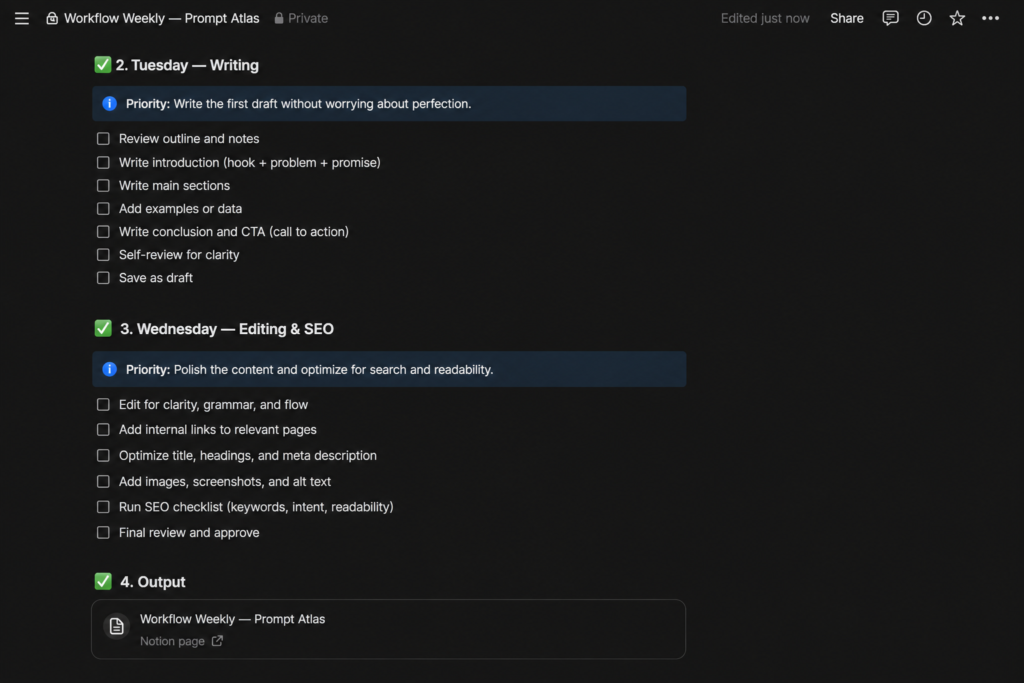
We tested Notion AI by asking it to build a practical weekly content production workflow for Prompt Atlas.
The prompt included real tasks from our publishing process, such as article ideation, keyword research, writing, editing, SEO optimization, image creation, publishing, and promotion.
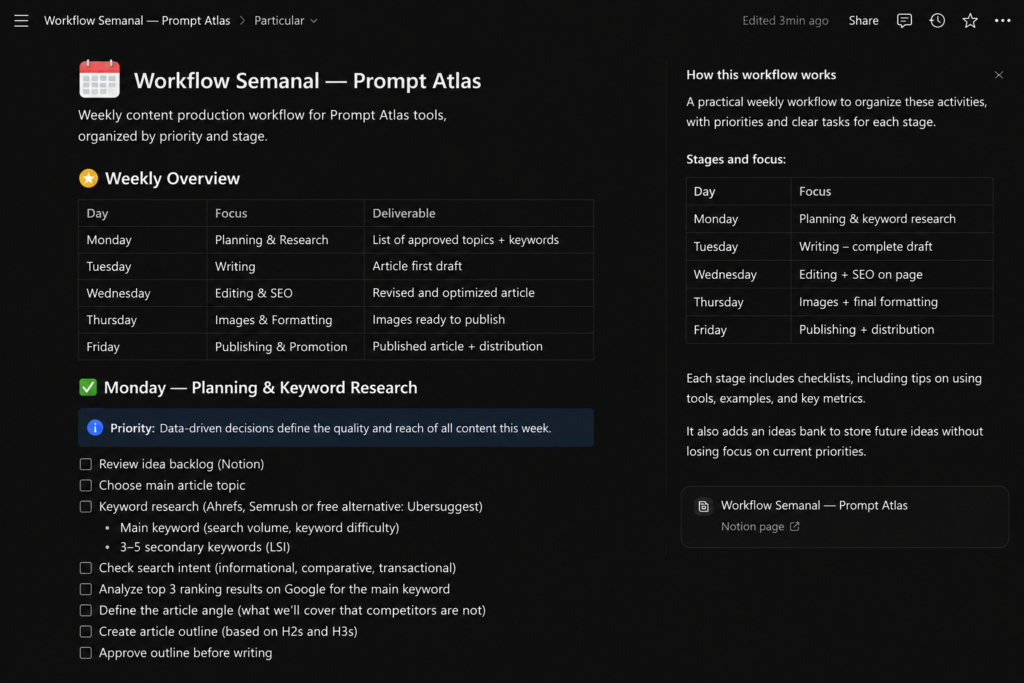
Notion AI turned those requirements into a structured weekly workflow, organizing each stage by day, priority, deliverables, and actionable checklists.
The Result
The generated workflow went beyond a simple weekly schedule. Notion AI created actionable checklists for each stage of the content process, making the plan immediately usable inside the workspace.
What We Liked
Notion AI stood out because it turned a relatively broad instruction into a structured workspace rather than simply returning a block of text. The weekly plan included priorities, deliverables, and actionable checklists that could be used immediately for managing content production.
What Could Be Better
The generated workflow still needed some human review and customization. Notion AI can create a strong structure quickly, but the priorities, deadlines, and workload need to be adjusted to match the reality of the business.
Best For
Small business owners and content teams that want to combine AI assistance with project planning, documentation, and task organization in one workspace.
Our Verdict
Notion AI was particularly useful for turning ideas into an organized system. In our test, it transformed the Prompt Atlas content process into a practical weekly workflow with clear stages and tasks.
For businesses already using Notion to manage projects and information, adding AI directly inside the workspace can reduce the time spent turning plans into actionable tasks.
8. Grammarly — Best for Business Writing
What We Tested
We tested Grammarly with a short business text containing intentional grammar, word choice, and clarity problems. Our goal was to see how effectively the free version could identify and correct common writing mistakes.
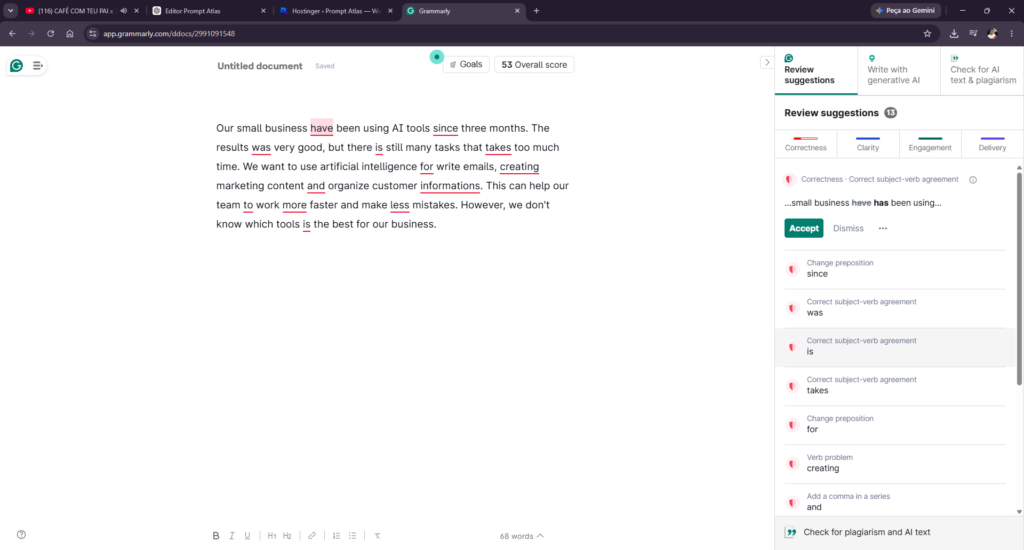
Grammarly identified 13 writing issues in our intentionally flawed test text, resulting in an initial score of 53.
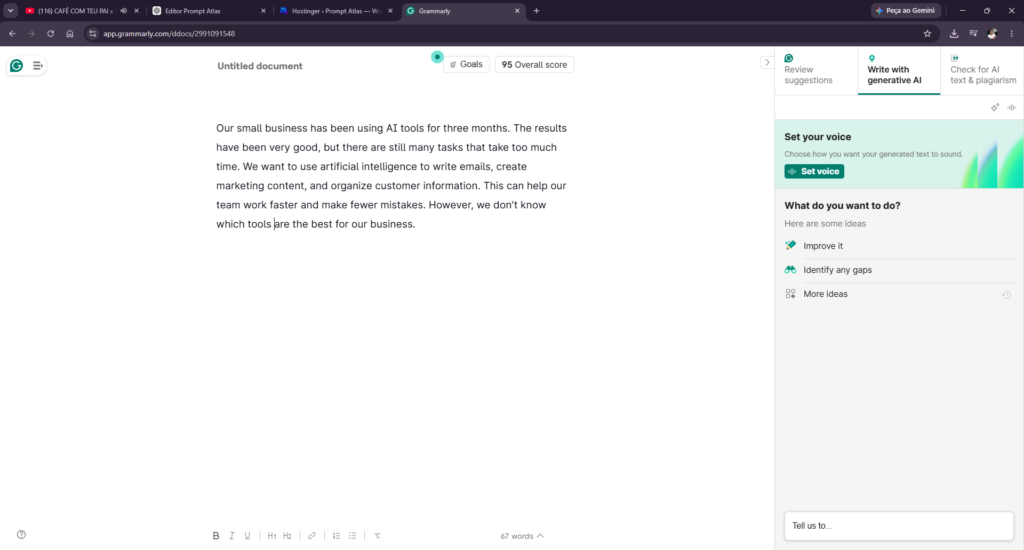
After correcting the identified issues, Grammarly increased the text’s overall score from 53 to 95.
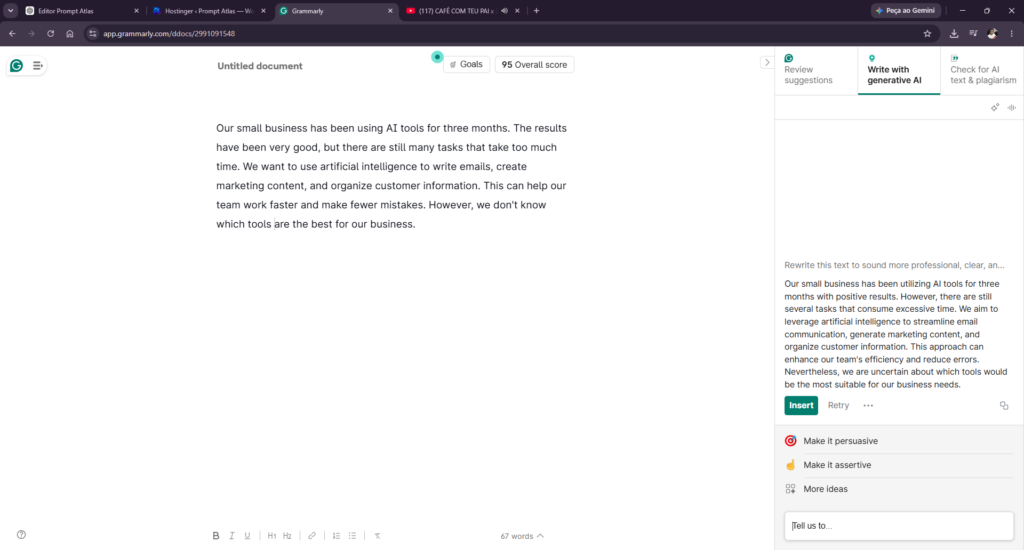
We then tested Grammarly’s generative AI feature by asking it to rewrite the corrected text to sound more professional, clear, and concise while preserving the original meaning.
Our Take
Grammarly performed especially well as a writing assistant rather than a general-purpose AI tool. In our test, it quickly identified grammar and clarity issues, helped improve the text’s score from 53 to 95, and generated a noticeably more professional rewrite. For small businesses that regularly create emails, marketing copy, or website content, it can save time during the editing process.
9. Perplexity — AI-Powered Research
What We Tested
We tested Perplexity by asking it to identify the three most important AI trends for small businesses in 2026. We specifically asked it to use recent and reliable sources, cite the evidence behind each trend, and explain how each one could help a small business save time or money.
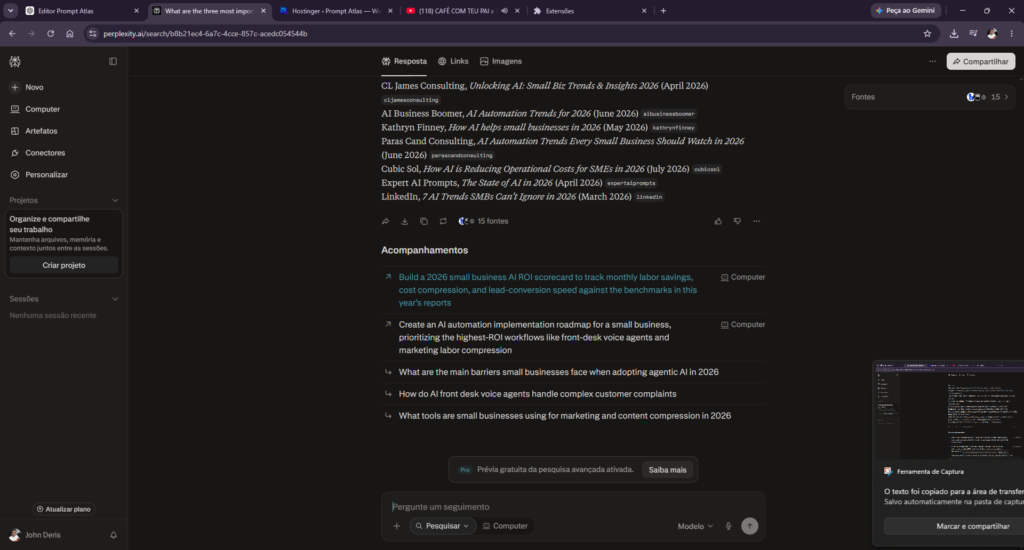
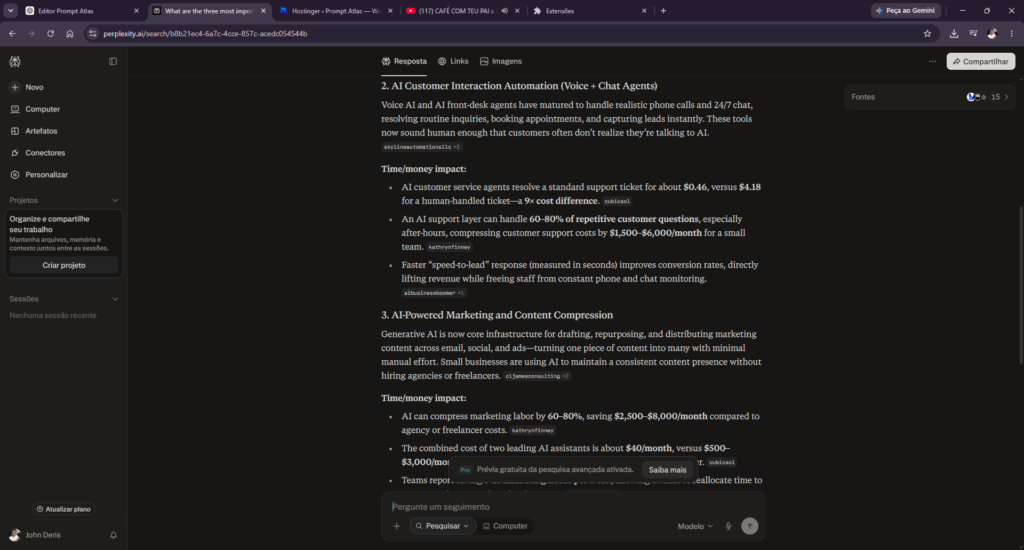
Perplexity returned three major AI trends for small businesses and supported its response with 15 cited sources. The citations were displayed directly alongside the claims, making it easy to trace the information back to its original sources. This made the research process faster and more transparent than manually searching for and comparing multiple articles.
Our Take
Perplexity stood out for its ability to combine AI-powered research with clearly visible source citations. In our test, it quickly gathered information from multiple sources and organized it into a useful overview of current AI trends. For small businesses, this can significantly reduce the time spent researching markets, competitors, and industry developments while still making it easy to verify where the information came from.
Want a closer look at how it performs in real-world research tasks? Read our hands-on Perplexity Review 2026.
10. Tidio — AI-Powered Customer Support
What We Tested
We tested Tidio by setting up its AI-powered customer support features for a small business scenario. Our goal was to see how easily the platform could automate common customer questions, assist visitors through live chat, and reduce the amount of time a small business owner needs to spend handling repetitive support requests.
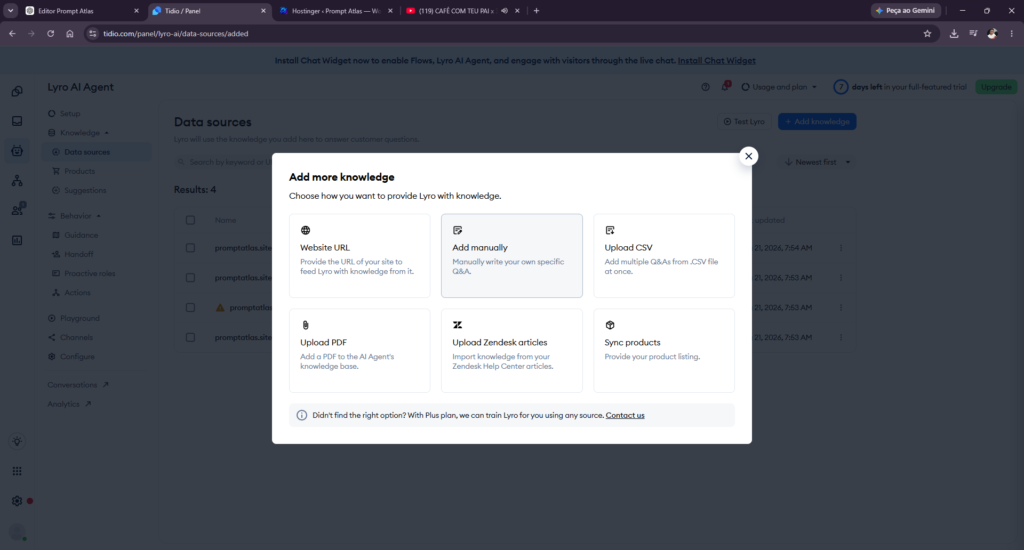
Test Results
We connected Tidio’s Lyro AI Agent to the Prompt Atlas website and used our own site content as its knowledge source. Lyro successfully imported multiple pages and was able to answer questions based on information published on the site.
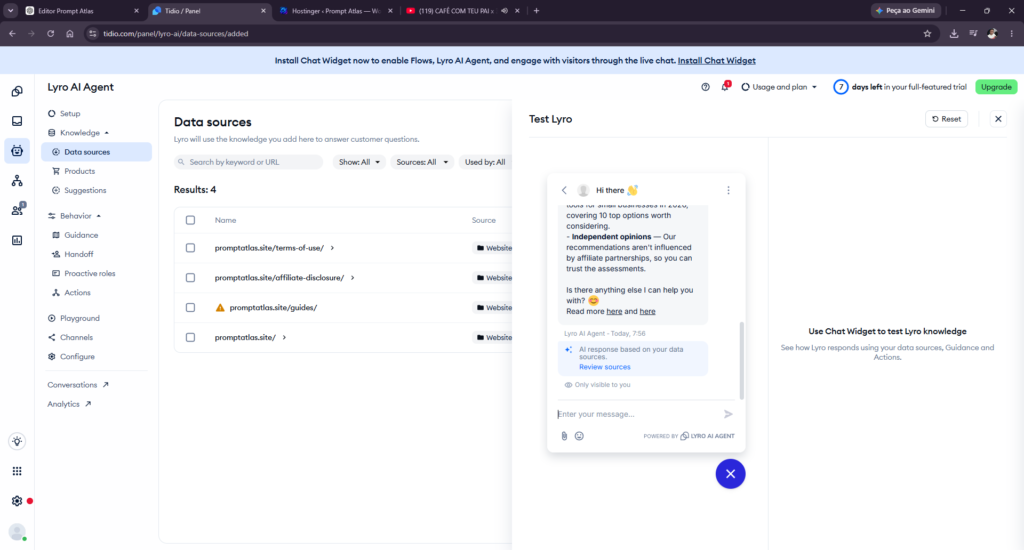
In one test, we asked the AI Agent about recommended AI tools for small businesses. It retrieved information from our article and correctly identified tools including ChatGPT, Claude, Gemini, Canva, Zapier, HubSpot, Notion AI, Grammarly, Perplexity, and Tidio.
We also found a limitation during testing: when we asked for information that was not sufficiently detailed in its available knowledge sources, Lyro acknowledged that it did not have the specific information instead of simply generating an unsupported answer.
Our Take
Tidio stood out as a practical AI customer support tool for small businesses that want to automate common questions without building a complex support system. In our test, Lyro was able to use content from our own website as a knowledge source and answer questions based on that information. We also liked that it acknowledged when specific information was unavailable rather than inventing an answer. For small businesses receiving repetitive customer questions, Tidio can be a useful way to reduce manual support work while still giving visitors quick answers.
Best for: Small businesses that want to automate repetitive customer support questions using their own website content.
Want to see the full hands-on test? Read our Tidio Review 2026, including how we trained and tested Lyro on a real website.
Final Thoughts: Which AI Tool Is Best for Your Small Business?
After testing all 10 tools ourselves, one thing became clear: there is no single AI tool that is best for every small business. The right choice depends on what you want to improve — writing, research, marketing, productivity, automation, sales, or customer support.
For general-purpose AI assistance, ChatGPT, Claude, and Gemini offer the most flexibility. Canva is a strong choice for creating visual content, while Grammarly can help polish everyday business writing. Perplexity is especially useful when research and source citations matter.
For more specific business workflows and other AI tools for business, Zapier can connect apps and automate repetitive tasks, HubSpot brings AI into sales and customer management, Notion AI works well for organizing information and productivity, and Tidio can help automate customer support using your own business content.
Our recommendation is to start with the problem that takes the most time in your business, choose one tool that addresses it, and test it in a real workflow before adding more AI tools. That approach is simpler, less expensive, and more likely to produce measurable results.
Frequently Asked Questions
Which AI tool should a small business try first?
There is no universal first choice. Start with one recurring task, compare the time and quality before and after, and expand only when the workflow is reliable.
Were these tools tested hands-on?
Yes. The article is based on practical tests, but the results reflect the selected prompts, product versions, and plans rather than every possible use case.
Can several AI tools work together?
Yes. A business may combine research, writing, design, and automation tools, provided each handoff is checked and the overall workflow remains manageable.
What should a business review before adopting an AI tool?
Check output accuracy, privacy terms, pricing, integrations, and the amount of human review required before using the tool with real customers or business data.
Leave a Reply