
Quick answer: In five draft lead-processing workflows on n8n’s 14-day Cloud trial, three passed and two partially passed. Tests confirmed field preservation, missing-data flags, priority routing, batch deduplication, and visible failure handling. A separate repeat-run check skipped all three inputs on a second execution, but did not establish reliability with live submissions. Automatic recovery from a temporary error remains unverified. The separate Agents preview returned no answer, so its behavior was not evaluated.
For a small business, the practical question is whether the workflow handles imperfect inputs before you connect a CRM or send messages. These tests examine that foundation. For broader options, see our AI tools for business guide.
Cover image: conceptual illustration. The integration and AI Agent nodes shown on the cover were not executed in this evaluation.
Quick Verdict
🎯 Best for: small teams with someone willing to inspect workflow rules, expressions, and execution history.
🔎 Strongest finding: the actual node outputs made it possible to verify each rule rather than rely on the Assistant’s summary.
⚠️ Main caveat: someone still needs to inspect the configuration and maintain the workflow rules.
n8n Review: Results at a Glance
Swipe horizontally to view the full table on mobile.
| Test | Result | Observed evidence |
|---|---|---|
| 1. Lead intake | Pass | Seven fields preserved; status Received. |
| 2. Missing information | Pass | Email and Service flagged; complete control marked Ready. |
| 3. Duplicate leads | Partial Pass | Three inputs became two; within one batch only. |
| 4. Priority routing | Pass | High, Medium, Low, and unknown each followed the correct route. |
| 5. Failure and recovery | Partial Pass | Failure stopped processing; a new run succeeded after manual correction. |
| Supplementary checks (outside tally) | Partial evidence | One Google Sheets append and one second-run dedup check succeeded; recovery from a temporary error remains unverified. |
What Is n8n?
n8n is a workflow automation platform built around connected nodes: a trigger receives data, processing steps apply rules, and later steps can pass the results to other services. It offers Cloud hosting and self-hosted options. The official integrations catalog includes services such as Google Sheets, Gmail, Airtable, Slack, Notion, and HubSpot.
For this evaluation, n8n Assistant (Preview) helped draft the five workflows from English instructions. The tested workflows used deterministic nodes and Code; no language-model node ran inside them.
Added during testing — October 5, 2026: n8n announced its separate Agents feature on September 25 and lists it in Preview. I created an unpublished lead-triage Agent draft with no tools or channels and attempted Preview. The preview stopped before returning an answer; n8n displayed a Gateway credits payment error. I could not verify whether the cause was the trial balance, instance settings, or a service issue. The draft stayed unpublished, so Agent behavior remains unevaluated.
Supplementary Live Checks
These checks are separate from the five core workflows and are not included in the 3 Pass / 2 Partial Pass tally. The article does not record comparable execution IDs, elapsed times, or screenshots for these supplementary checks.
Google Sheets: I connected a test Google Sheet and ran an Append Row workflow with one sample lead, Sarah Miller (sarah.miller@example.com). The node executed successfully, and the record appeared in the sheet. A pre-existing record occupied row 2, so Append Row correctly placed Sarah in row 3.
Cross-run deduplication: On a second execution with the same three input leads, the Remove Duplicates node—configured to “Remove Items Processed in Previous Executions” using the normalized emailKey—skipped all three input items as already seen.
Retry On Fail: I configured up to three attempts with a one-second wait, then triggered a persistent simulated error. The execution ended in failure. I did not verify the retry count or a successful recovery, so this check does not show whether retries can recover from a temporary error.
n8n Review: How I Tested
I tested the five core workflows on October 5, 2026, using fictional lead data for Harbor Desk Consulting and example.com email addresses. None of the five workflows was published. For Tests 1 and 2, I submitted leads through the Form Trigger’s test form; Tests 3 and 4 used batches generated by Code nodes to check duplicate removal and priority routing; Test 5 used a Manual Trigger and a deliberate Code-node error to observe failure handling. The cases covered lead intake and field preservation, missing-field validation, duplicate detection, priority routing, and a simulated processing failure. The separate Google Sheets, cross-run deduplication, and Retry On Fail checks are summarized in the supplementary live checks section above.
I inspected the executed node outputs and execution history. Each main case ran once, with a complete-data control in Test 2 and a fresh run after correction in Test 5. Execution times below describe only those observed runs. Per-workflow build time and difficulty for a non-technical user were not recorded; the Assistant drafted the workflows, so this was not an unguided usability test.
The Cloud account showed a 14-day free trial, 1,000 workflow executions, and 800 Assistant credits. No subscription was purchased. The header remained at 0/1000 Executions during manual testing even though the execution history recorded the runs; I did not use that counter to infer usage or billing. Per-prompt Assistant credit use was not measured.
What this review did not test
- Broader integrations: One Google Sheets Append Row test succeeded with a sample lead. Gmail and CRM integrations, and production-scale reliability, were not tested.
- Automatic recovery: This check used a persistent simulated error, so it does not show whether retries can recover from a temporary error. The retry count and successful recovery were not confirmed. Error Workflow was not tested.
- Usability: Workflow build times and usability for non-technical users were not systematically measured.
- Agents: Agent behavior remains unevaluated; see the testing note above.
Test 1: Does the Lead Form Preserve the Submitted Data?
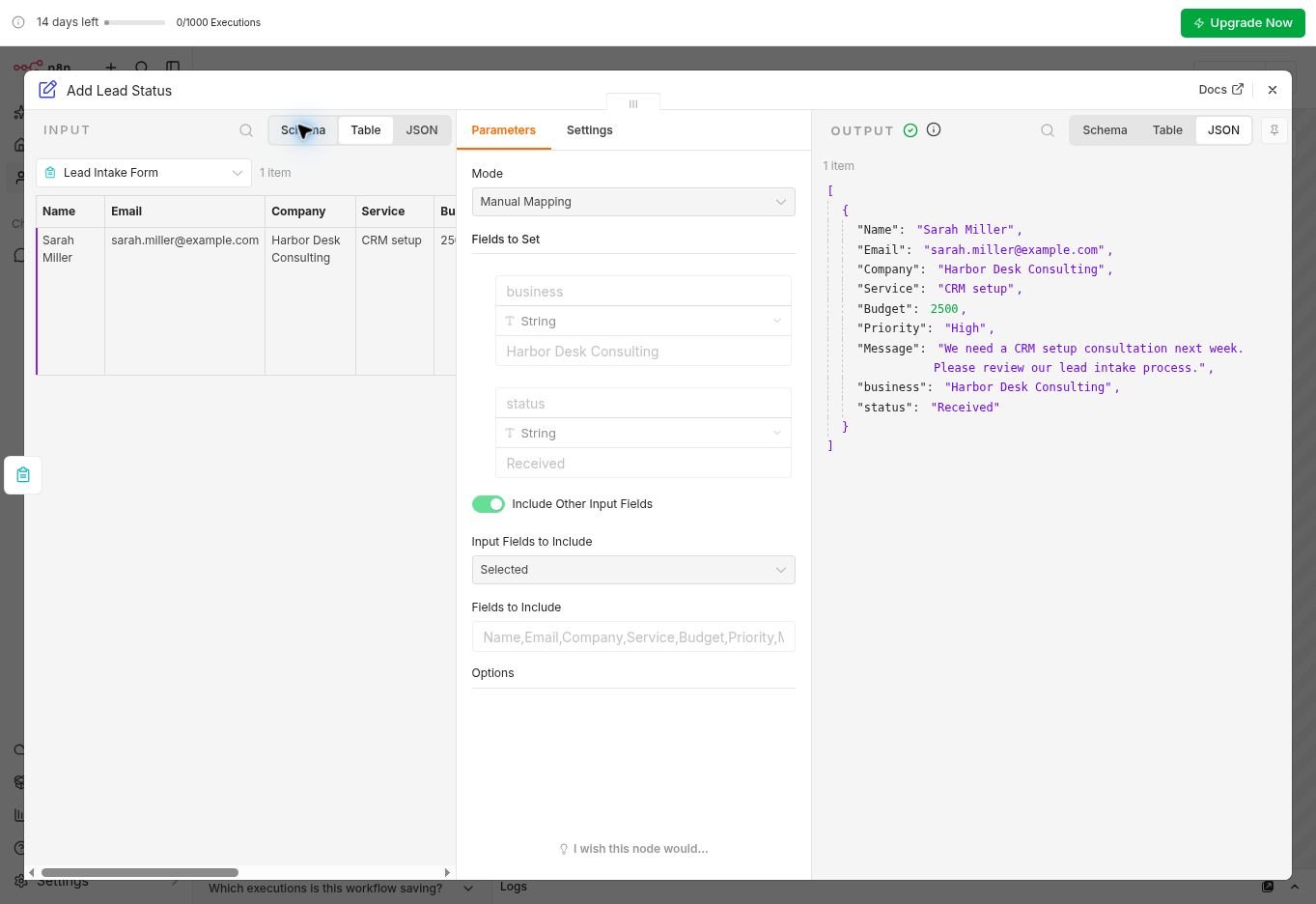
I submitted Sarah Miller through the Form Trigger with seven fields: Name, Email, Company, Service, Budget, Priority, and Message. The request was for CRM setup, with a numeric budget of 2500 and High priority. The form confirmed that the response had been recorded.
The Add Lead Status output preserved all seven fields and added business: Harbor Desk Consulting and status: Received. Execution #2 succeeded in 51ms. The original submittedAt and formMode metadata were excluded by the selected-field mapping, so this was not a claim that every input field survived.
Result: Pass. The seven submitted business fields were preserved. The earlier Assistant-generated run used injected data and was excluded; no CRM record or email was created.
Test 2: Will Missing Details Stay Missing?
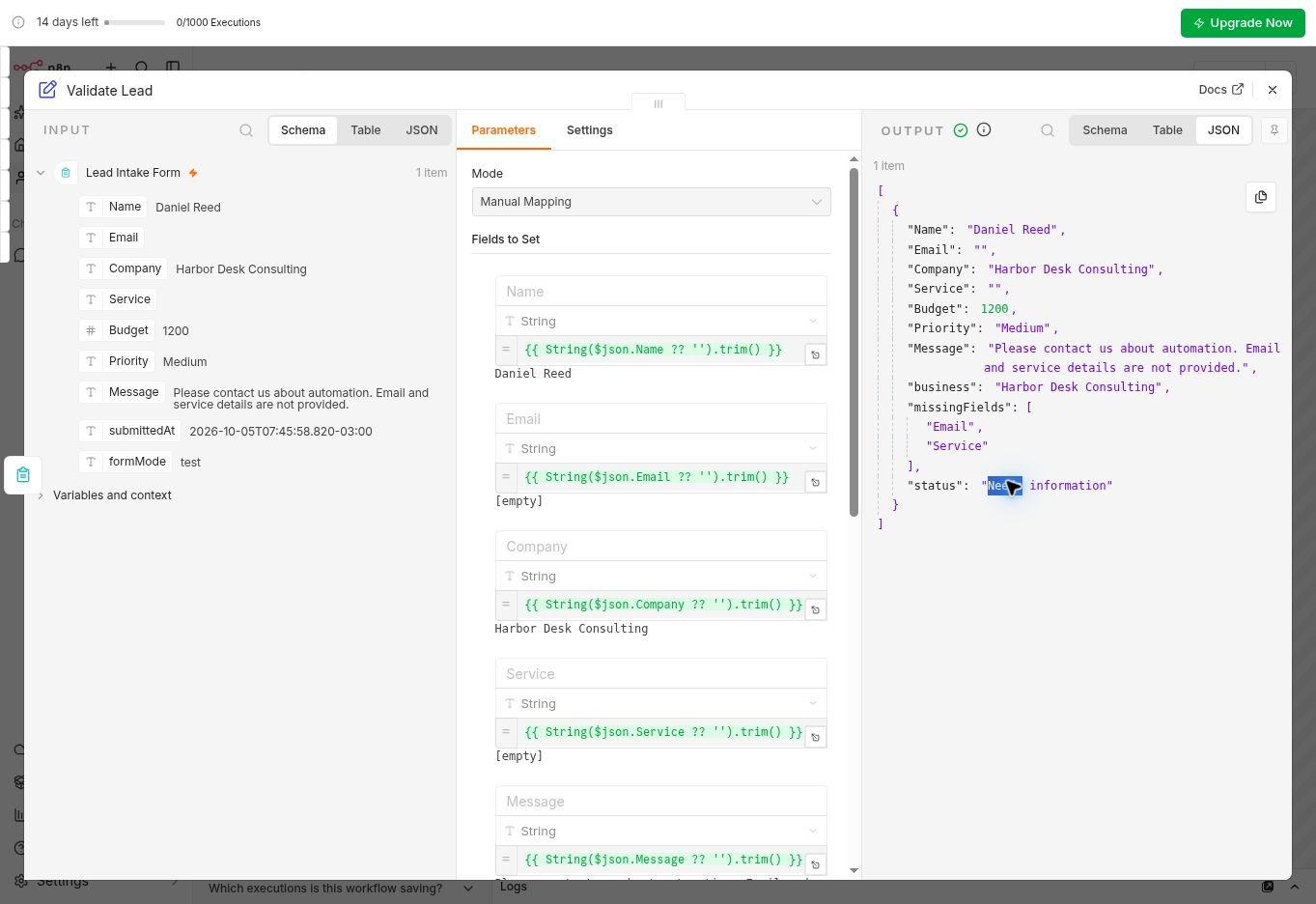
I submitted Daniel Reed with Email empty and Service containing spaces. Company, Budget 1200, Priority Medium, and a message explaining the missing details were provided. The output retained empty strings for Email and Service, listed both in missingFields, and assigned status: Needs information.
Execution #3 succeeded in 107ms. A complete control using Sarah’s email and CRM setup service returned missingFields: [] and status: Ready in execution #4, which succeeded in 53ms.
Result: Pass. The workflow marked the incomplete lead Needs information and the complete control Ready. It checked field presence; no follow-up was sent.
Test 3: Can n8n Remove an Email Duplicate?
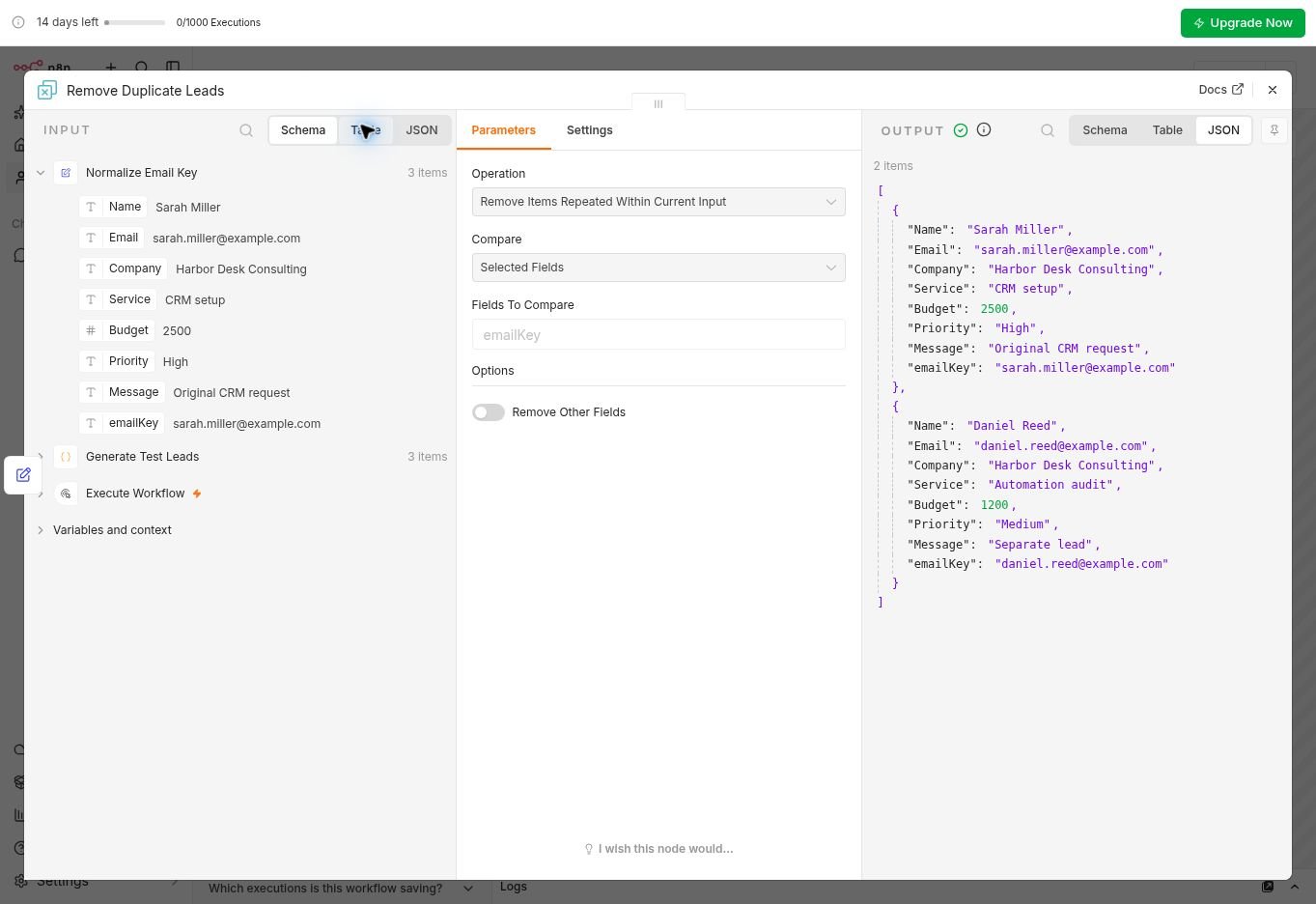
A Code node generated three leads: Sarah’s original request, a repeated Sarah request with uppercase email and surrounding spaces, and a separate Daniel lead. An Edit Fields step created emailKey using trim and lowercase. The native Remove Duplicates node compared that normalized key using Remove Items Repeated Within Current Input.
Execution #5 succeeded in 1.851s. Three input items became two. Sarah’s Original CRM request remained, her Repeated CRM request was removed, and Daniel’s Separate lead remained. The original fields and emailKey survived.
Result: Partial Pass for the core batch test. Duplicate removal worked within the generated batch. The separate repeat-run result is documented in Supplementary Live Checks.
Test 4: Does Priority Routing Keep Unknown Values Visible?
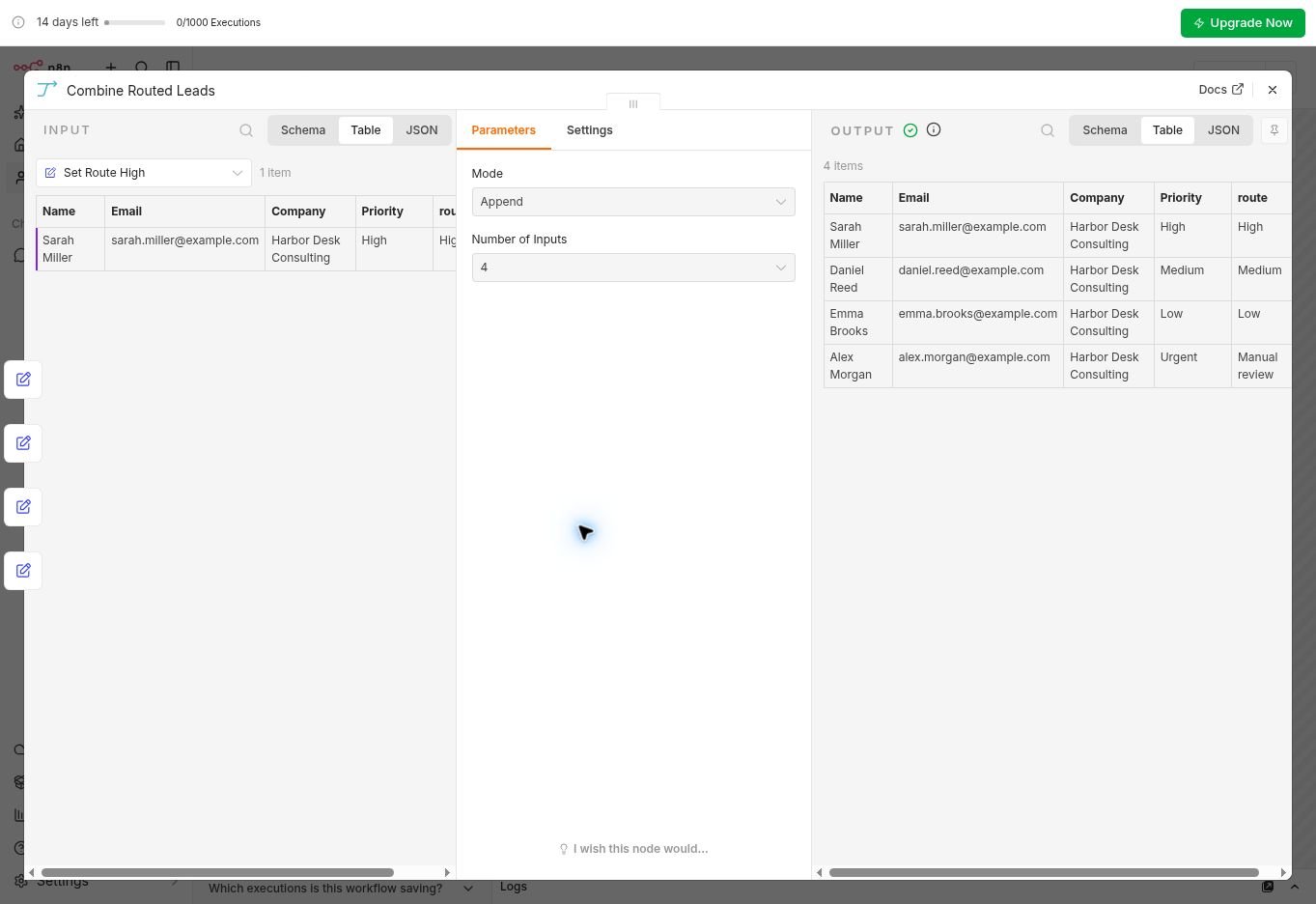
The next batch contained Sarah/High, Daniel/Medium, Emma/Low, and Alex/Urgent. A Switch node split the inputs into three recognized priorities and an Unknown branch. Edit Fields steps added route labels, then Merge combined the four branches.
Execution #6 succeeded in 1.834s. Each branch received one item. The final output contained Sarah → High, Daniel → Medium, Emma → Low, and Alex/Urgent → Manual review. Name, Email, Company, and the original Priority were preserved.
Result: Pass. The three named priorities routed as expected, and Urgent stayed visible in Manual review. No notification or task was sent.
Test 5: What Happens When Processing Fails?
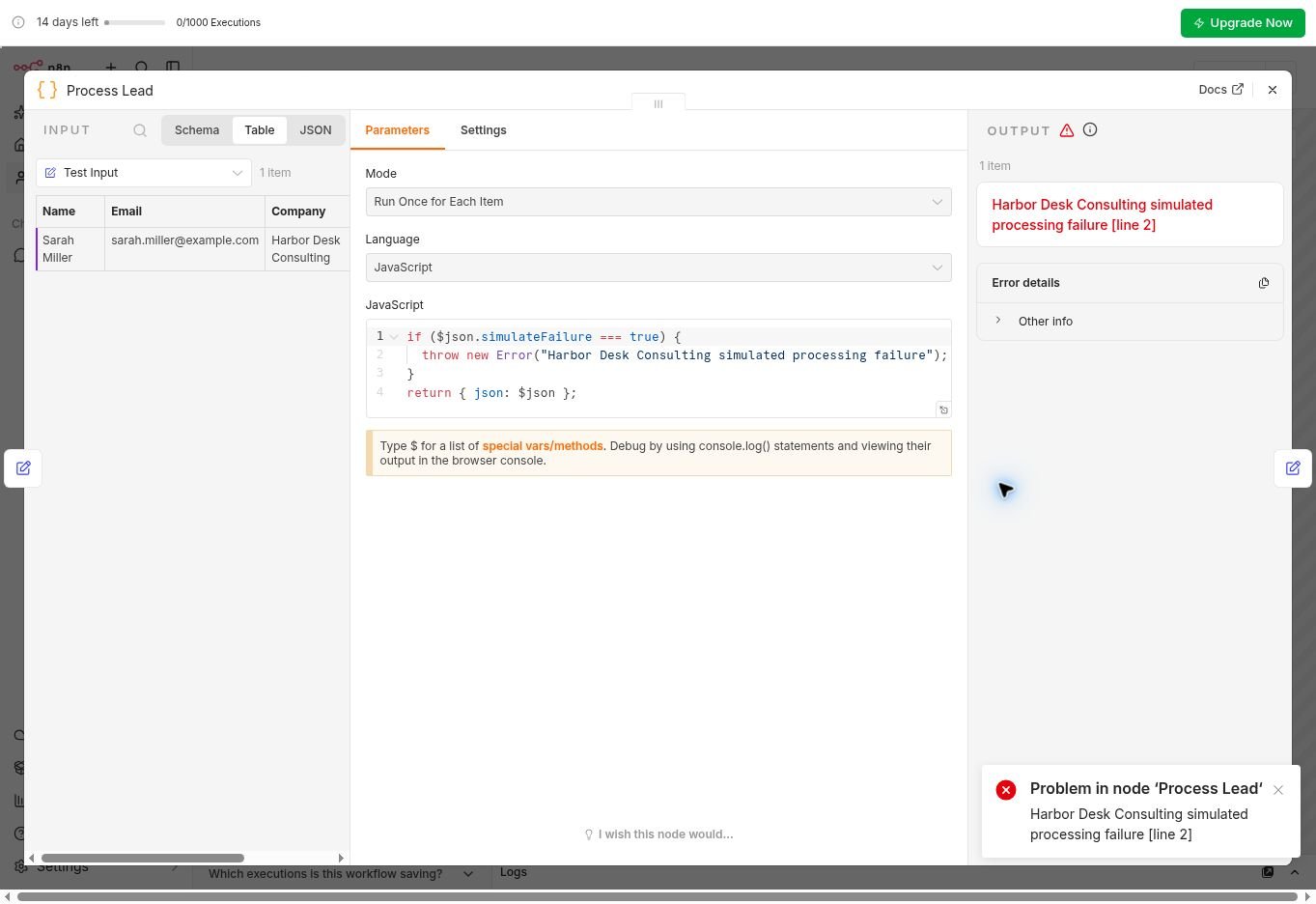
The last workflow used Manual Trigger → Test Input → Process Lead → Mark Processed. Test Input set simulateFailure to true. The Code node deliberately threw a Harbor Desk Consulting simulated processing failure error.
Execution #7 showed Error in 1.803s, identified Process Lead and line 2, and did not execute Mark Processed. That made the failure visible and prevented the final success label from being attached.
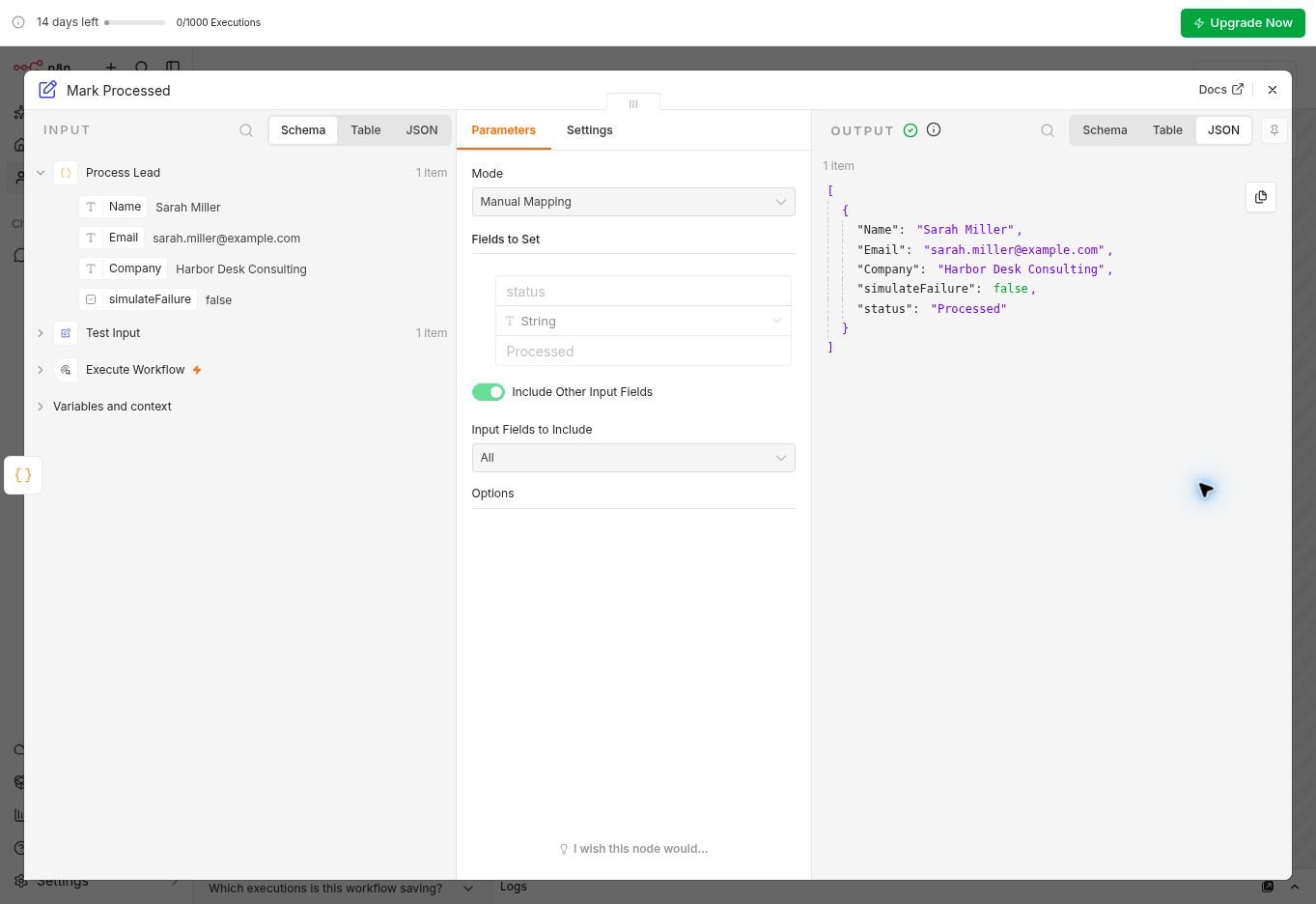
I manually changed simulateFailure to false and ran the whole workflow again. Execution #8 succeeded in 1.686s, preserving Sarah’s Name, Email, and Company while returning simulateFailure: false and status: Processed.
Result: Partial Pass. A fresh run succeeded after manual correction; automatic recovery was not confirmed.
What the n8n Assistant Did Well—and What Still Needed Checking
n8n Assistant drafted all five workflows from English instructions. I inspected each setup before manually running the evidence tests; an initial Assistant-generated intake run used injected data and was excluded.
In the executed cases, the outputs matched the requested rules. Manual review remained important for field mappings and priority routing.
n8n Pricing in 2026
Pricing last checked: October 5, 2026. The pricing screenshots captured during testing show dollar-denominated browser prices: $24/$60/$960 per month with monthly billing and $20/$50/$800 per month when billed annually (monthly equivalents, not annual totals). The dollar display is what the screenshots show, not a separately confirmed checkout quote. See the official n8n pricing page for current regional pricing and terms.
Swipe horizontally to view the full table on mobile.
| Plan | Monthly billing | Monthly equivalent, annual billing | Executions / hosting |
|---|---|---|---|
| Starter | $24/mo | $20/mo | 2.5K; hosted by n8n |
| Pro | $60/mo | $50/mo | 10K; hosted by n8n |
| Business | $960/mo | $800/mo | 40K; self-hosted |
| Enterprise | Contact Sales | Contact Sales | Custom; Cloud or self-hosted |
A separate retrieval of n8n’s public pricing page showed a euro display: €20/month Starter, €50/month Pro, and €667/month Business with annual billing. These are regional displays, not converted equivalents of the dollar amounts in the screenshots. Checkout, taxes, and the final charged total were not verified.
n8n counts workflow executions rather than individual steps. The 14-day Cloud trial showed a 1,000-execution allowance, with Pro-level concurrency (five simultaneous executions) and a 180-second timeout. The Pro plan’s 10,000-execution allowance is separate. The trial concurrency and timeout were not stress-tested. Assistant credits are separate from executions. Update — October 1, 2026: n8n set each Assistant credit at $0.01 and reduced monthly included credit counts, saying the lower balances should cover the same amount of Assistant work because each request now uses fewer credits. The trial’s 800 credits are a one-time allowance that does not reset. I did not measure credit use per prompt, so this is n8n’s claim, not a test result.
Who n8n Is Best For
Based on these tests, n8n is worth evaluating when your business has explicit data rules: which fields to retain, what counts as incomplete, how to normalize duplicate keys, and where unknown values should go. The node outputs make those decisions inspectable.
A consultant, small agency, or operations team with technical support can use this kind of trial to validate the processing layer before connecting live services. Our Airtable Automations vs Make evaluation explores a different approach to business automation.
n8n vs Make vs Zapier: What We Found
Make and Zapier were tested hands-on in earlier Prompt Atlas reviews. Those Gmail and customer-support scenarios differed from the lead-processing cases here, so this comparison summarizes observed strengths and friction rather than ranking the three on identical tasks.
Swipe horizontally to view the full table on mobile.
| Tool | What worked in our tests | Friction we encountered | When to consider it |
|---|---|---|---|
| n8n | Preserved lead fields, flagged missing data, removed a batch duplicate, and routed unknown priorities to manual review. A separate Google Sheets append succeeded. | Field mappings and rules needed inspection. The separate Agents preview stopped with a Gateway credits payment error before returning an answer. | Lead processing with explicit rules and someone available to inspect node outputs and maintain the setup. |
| Make | A Gmail → AI Agent workflow classified support requests, prepared internal triage, and created a customer-facing Gmail draft. The refund case requested verification before promising a refund. | A broad Gmail trigger picked up replies and triage messages. The query needed narrowing; polling and checkpoints also required troubleshooting. | Gmail-based AI support and triage when a visual scenario helps your team understand and modify the process. |
| Zapier | AI by Zapier returned structured issue, priority, summary, next-action, and reply fields. The personalized-order case recommended verification before a return or replacement. | Manual setup, an authentication error, and a tool-access tier restriction limited the tested workflow. | Teams that prefer a linear step editor or already use Zapier, after checking access to the actions their workflow needs. |
For the full evidence, read our Make vs Zapier hands-on comparison and Make AI review. My preference for Make in that earlier comparison concerned those support workflows; it does not establish that Make outperforms n8n on these lead tests.
Who Should Skip n8n
Skip it for now if you need a ready-made lead management application and have no time or support to maintain automation rules. These workflows did not provide a CRM, inbox, or completed follow-up system.
If you need a fully managed process with minimal configuration, first consider whether your team can own field mappings, exceptions, and maintenance. n8n made the rules inspectable in these tests, but someone still had to check them.
FAQ
Is the n8n Cloud trial a permanent free plan?
No. The account used here had a 14-day Cloud trial. n8n also lists a self-hosted Community Edition, which involves a different setup and operating responsibilities. This review did not test self-hosting.
Did this n8n review test AI agents?
See the testing note above: I attempted an unpublished Agents preview, but it stopped before returning a response; Agent behavior was not assessed.
Did the duplicate test prevent repeated form submissions?
Not directly. The batch test removed one duplicate, and a separate second execution skipped three previously seen inputs. Repeated live form submissions were not tested.
Did the error test recover automatically?
No automatic recovery was confirmed. Test 5 succeeded in a fresh run after manual correction; the separate Retry On Fail check ended in failure. See “What this review did not test” for the remaining limits.
Final Verdict
This n8n review produced three passes and two partial passes. The strongest evidence was straightforward: the real output showed preserved fields, explicit missing values, two correct records after batch deduplication, and a visible route for an unknown priority. The deliberate error also stopped the final processing step.
My recommendation is to shortlist n8n if your team has technical support and needs explicit, inspectable rules for lead validation, duplicate keys, and routing. The supplementary Google Sheets append provides a useful first integration result. Before subscribing for a CRM or Gmail process, validate that exact connection, repeated live submissions, and recovery from a temporary failure. For a Gmail-based AI support workflow, our earlier Make tests provide more directly relevant evidence; Zapier is also worth evaluating if its linear editor fits your team.
Editorial rating: 7/10 for small businesses with technical support
A useful trial candidate for teams that can configure and maintain their own lead-processing rules. The rating reflects the workflows tested here; use your intended business process to make the subscription decision.
Ready to test a lead workflow? Start with sample data in the n8n Cloud trial before connecting production accounts.
Recommended Reading
 AI Tool ComparisonsAirtable Automations vs Make: Small Business Evaluation
 AI for Small BusinessBest AI Tools for Small Business
Official Sources
n8n plans, pricing, and trial FAQ · n8n integrations catalog · n8n Agents announcement · n8n Agents documentation · Assistant credit update (Oct. 1)




Leave a Reply