
In this Notion AI Review 2026, I tested something that standalone AI tools cannot offer quite as naturally: AI that works inside the same workspace where your notes, projects, documents, and business information already live.
That sounds useful, especially for a small business owner who does not want to constantly copy information between different tools.
But how useful is it in practice?
For this Notion AI review, I tested it with five realistic small-business tasks. I asked it to create a marketing plan, summarize customer feedback, work with information stored elsewhere in my Notion workspace, write a product description, and turn meeting notes into a prioritized action plan.
The results were generally good, but they also revealed an important limitation: Notion AI can occasionally add plausible details that were never provided.
Quick Verdict
Notion AI impressed me most when it could use information already stored inside the workspace.
In my tests, it was particularly useful for summarizing information, organizing feedback, finding details from another Notion page, and turning scattered notes into actionable priorities.
Its biggest advantage is convenience. Instead of copying context into a separate AI chatbot, you can ask questions and generate content where your work already lives.
However, I would not use its output without review. In two tests, Notion AI introduced small details or assumptions that were not included in the source information.
Best for: people and small teams already using Notion regularly.
Main strength: using existing workspace context.
Main weakness: it can occasionally extrapolate beyond the information provided.
What Is Notion AI?
Notion AI is built directly into Notion rather than operating as a completely separate chatbot.
Notion AI is also one of the tools included in my guide to the best AI tools for small business.
Today, its capabilities extend well beyond basic writing assistance. Notion says its AI features can work with workspace context, generate and edit documents, search information, create and populate databases, analyze files, and work with information from connected applications.
Notion AI Connectors can also bring information from services such as Slack, Google Drive, GitHub, Gmail and other supported apps into searches, depending on the plan, permissions and connections configured.
For this review, however, I focused on practical tasks that a small business owner could realistically perform inside a Notion workspace.
How I Tested Notion AI
I used five different tasks rather than relying on a single writing prompt:
- Create a practical 30-day marketing plan.
- Analyze and summarize customer feedback.
- Retrieve and summarize information from another page in the workspace.
- Write a constrained product description without inventing missing product information.
- Turn meeting notes into a prioritized five-hour action plan.
I also checked whether Notion AI followed the information provided instead of simply judging whether its answers sounded good.
That distinction became important in the final two tests.
Test 1: Creating a Small Business Marketing Plan
For the first test, I gave Notion AI a fictional handmade home decor business with:
- $3,000 monthly revenue
- 1,200 website visits per month
- 450 email subscribers
- 3,800 Instagram followers
- a $500 monthly marketing budget
- only 10 hours per week available for marketing
I asked it to create a practical 30-day plan organized by week, prioritize low-cost actions, recommend marketing channels, and provide three measurable KPIs.
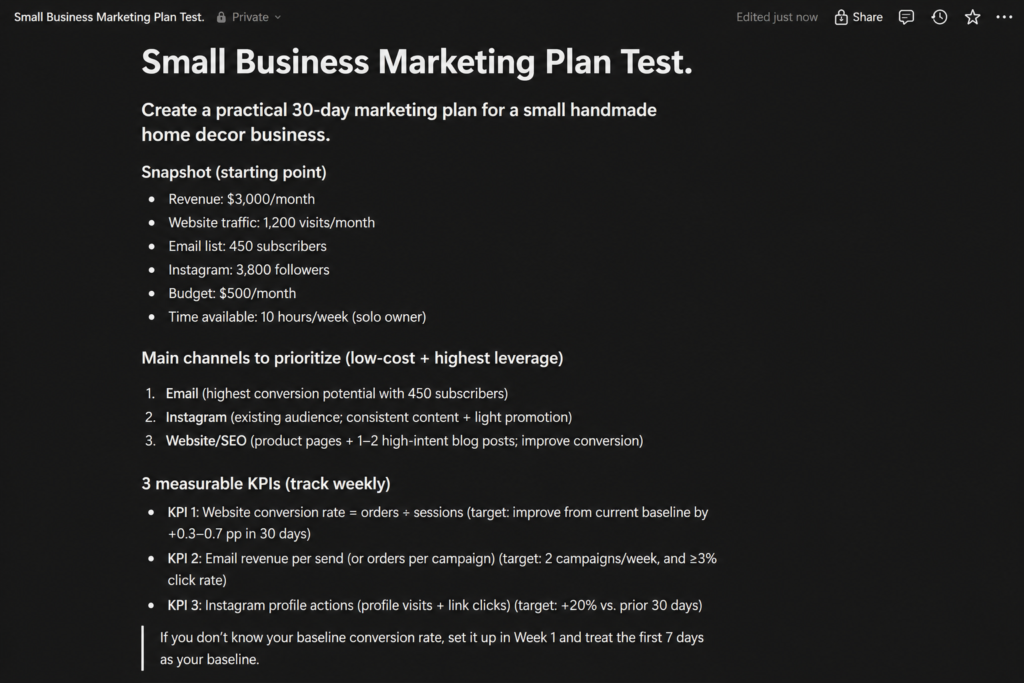
The response was extremely detailed.
Notion AI prioritized email, Instagram, and website/SEO improvements and created weekly actions, KPIs, budget suggestions, and a 10-hour weekly time allocation.
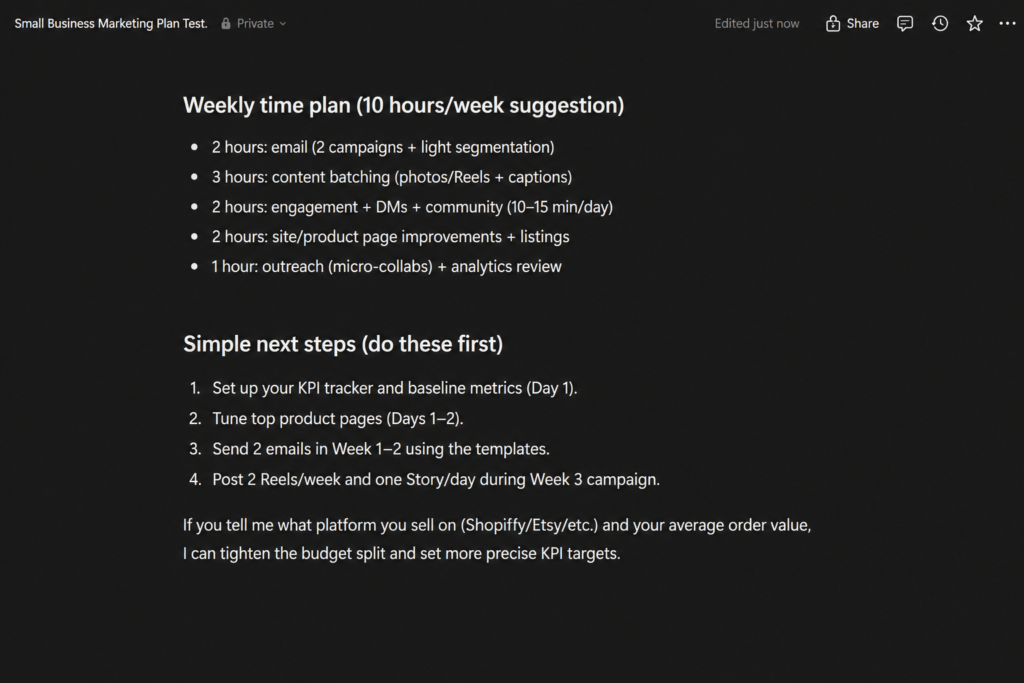
The plan was useful, but it was arguably more detailed than necessary for a solo business owner. For someone asking for a quick plan, the amount of information could feel overwhelming.
Still, it showed that Notion AI can turn a relatively small amount of business context into a structured operational plan.
Test 1 verdict: Strong organization and planning, but somewhat verbose.
Test 2: Summarizing Customer Feedback
Next, I gave Notion AI feedback from 18 fictional customers.
The notes contained both positive and negative information: customers liked the appearance and packaging, while several said the wall decorations looked smaller than expected from the photos. Some requested returns, and two reported late deliveries.
I asked Notion AI to identify the most important findings and recommend only two improvements because the business owner had limited time.
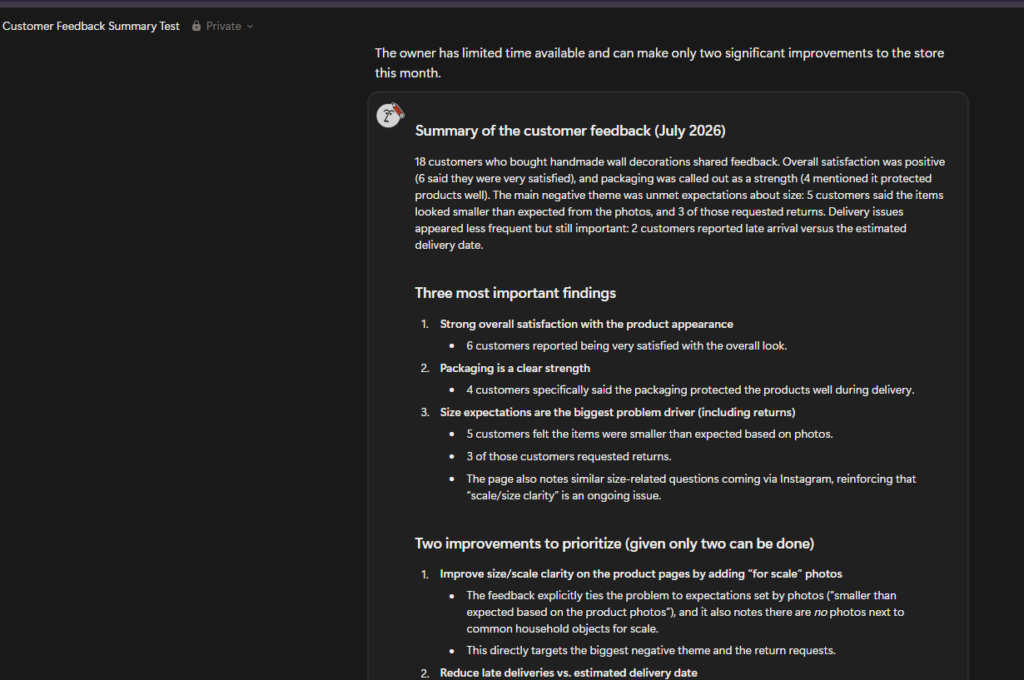
This was one of the stronger results.
Notion AI correctly identified size expectations as the main problem. It connected unclear product photos with customer expectations and return requests.
It then prioritized improving size and scale clarity on product pages and addressing late deliveries.
More importantly, the answer remained grounded in the feedback I provided.
This is the type of task where having AI directly alongside business notes makes sense: a long block of feedback can quickly become a short list of patterns and actions.
Test 2 verdict: Accurate, focused, and practical.
Test 3: Can Notion AI Actually Use Workspace Context?
This was the most interesting test.
Instead of giving Notion AI all the information directly in the prompt, I asked it to summarize a separate page in my workspace called “Workflow Semanal — Prompt Atlas.”
That page contained a weekly content-production workflow.
Notion AI successfully found the page and returned the five stages of the workflow:
- Monday — planning and keyword research
- Tuesday — writing
- Wednesday — editing and SEO
- Thursday — images and final formatting
- Friday — publishing and promotion
But it went further than simply reproducing the overview.
It retrieved specific details such as the 1,500–2,500-word writing target, SEO checks, a 1200×630 image format, table-of-contents guidance, Google Search Console submission, and distribution steps.
I manually returned to the original page and checked these details. They were actually there.
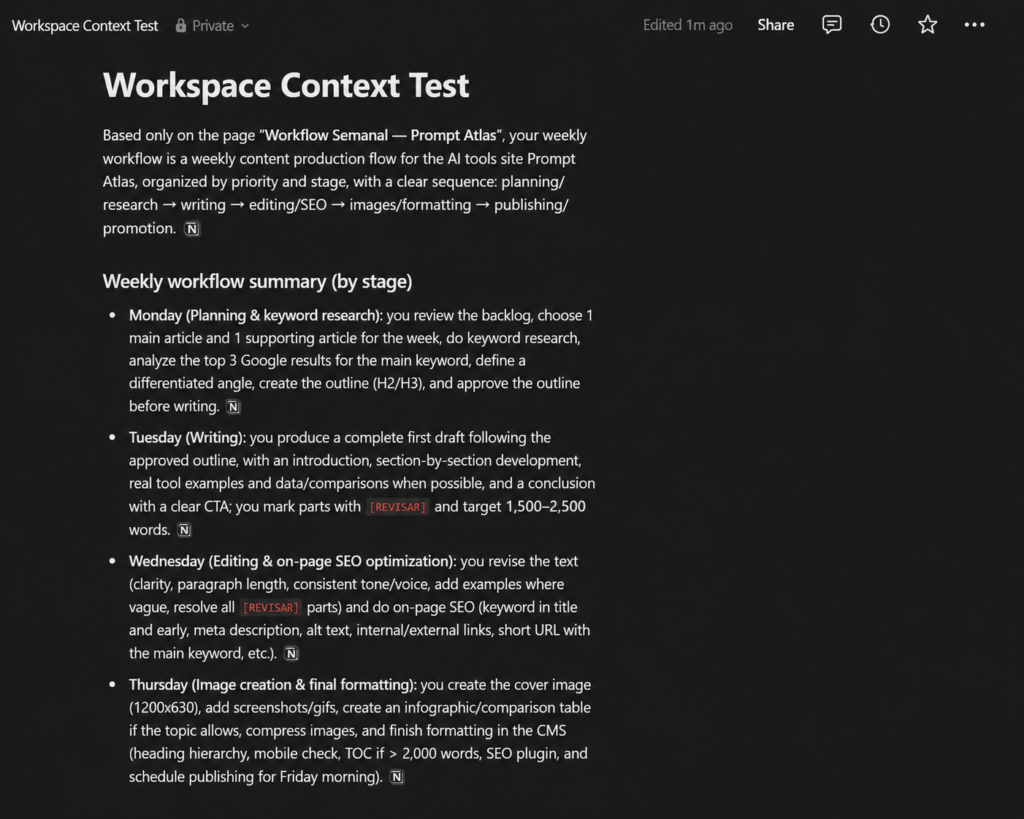
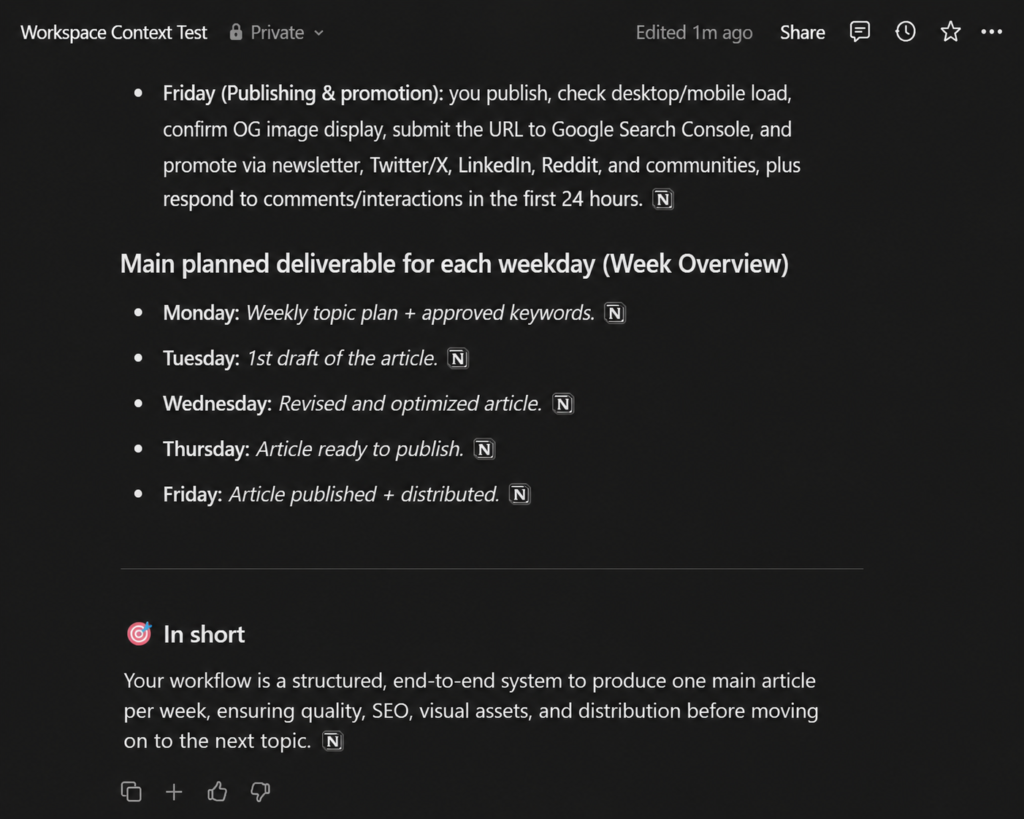
This was the clearest demonstration of Notion AI’s advantage over a standalone AI chat window.
The official product documentation also emphasizes this capability: Notion AI can use workspace information, and its search features can provide citations back to workspace or connected-app sources.
There was one issue during my test. The initial response came back in Portuguese, influenced by the source page, even though I wanted the output in English. A follow-up asking for the same answer in English corrected it.
Test 3 verdict: The strongest test. Workspace context is the feature that made Notion AI feel genuinely different.
Test 4: Writing a Product Description Without Inventing Details
For this test, I deliberately provided very little product information.
The product was a handmade personalized wall decoration. I provided its purpose, target customer, two verified features, and the desired brand tone.
I explicitly instructed Notion AI not to invent materials, dimensions, certifications, guarantees, prices, reviews, or other product details.
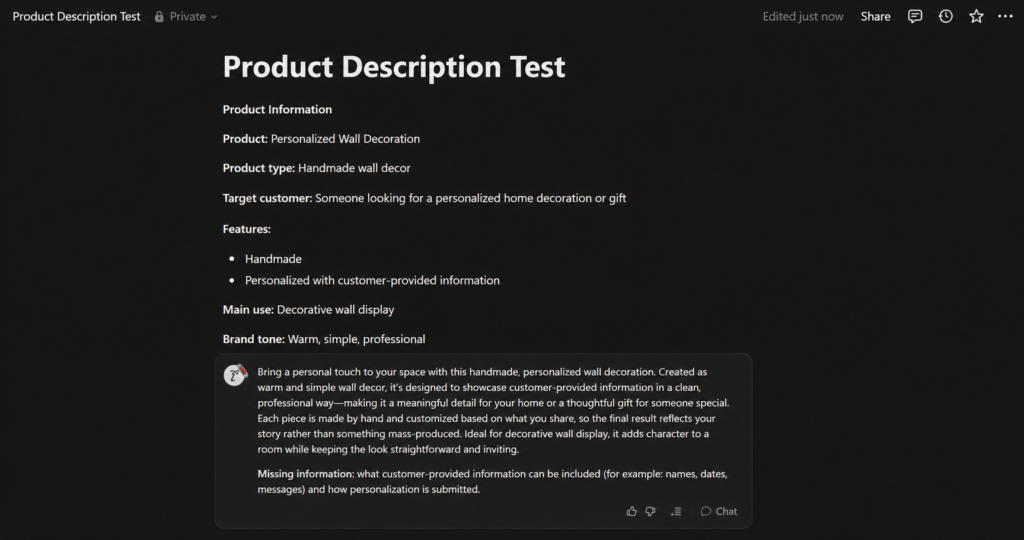
The result was mostly disciplined.
Notion AI avoided inventing the obvious factual details I prohibited and even added a “Missing information” section identifying information it would need to know, such as what types of customer-provided information could be included.
That was good behavior.
However, it also used some descriptive marketing language that went slightly beyond the supplied facts, such as describing the resulting look as “straightforward and inviting.”
That is not a serious factual hallucination, but it demonstrates why constrained business copy still needs human review.
Test 4 verdict: Good restraint overall, with minor extrapolation.
Test 5: Turning Meeting Notes Into an Action Plan
For the final test, I created a set of messy weekly business notes.
They included increased website traffic, questions from customers, late shipments, unfinished Instagram content, unclear product-size photos, a missed newsletter, a return, and only five available hours for the following week.
I asked Notion AI to select only three priorities and allocate the five hours between them.
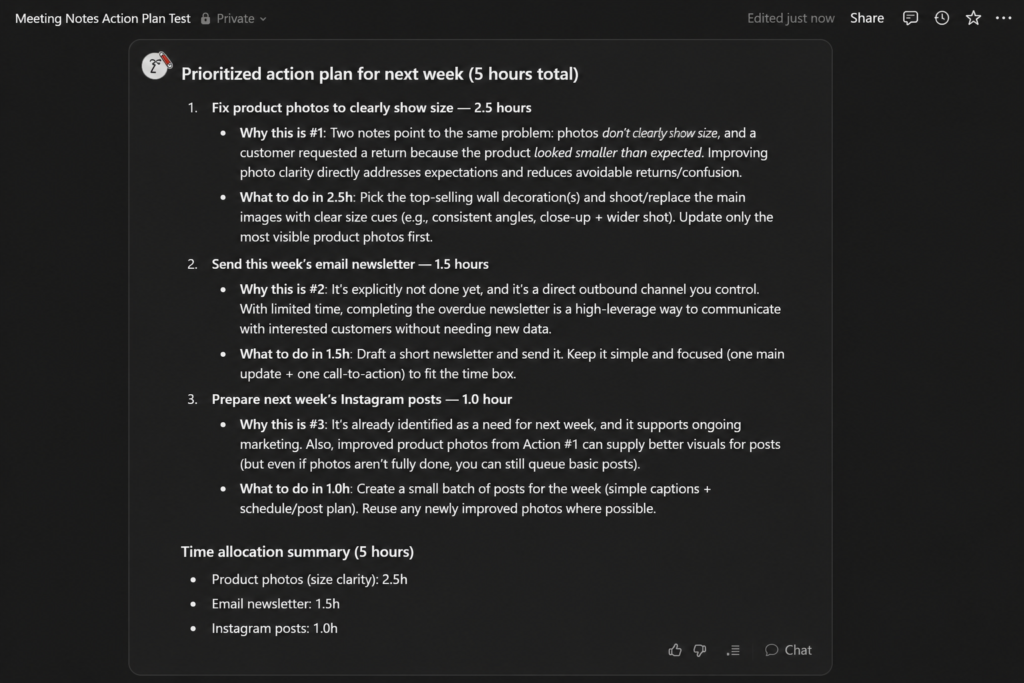
The prioritization was sensible.
Notion AI allocated:
- 2.5 hours to improving product photos
- 1.5 hours to the email newsletter
- 1 hour to Instagram content
The allocation added up correctly to the five-hour limit.
It also recognized that the product-photo issue deserved the highest priority because unclear size expectations appeared multiple times in the notes and had already contributed to a return.
However, this test exposed the same limitation I saw in the product-description test.
Notion AI suggested working on “top-selling” wall decorations even though I had never provided sales rankings. It also suggested specific photography approaches that were not included in the notes.
Those suggestions may be reasonable, but they were still new assumptions despite my instruction to use only the information on the page.
Test 5 verdict: Excellent prioritization, but not perfectly grounded in the provided information.
What Notion AI Did Well
After five tests, three strengths stood out.
1. Workspace context is genuinely useful
This was the biggest advantage I observed.
When the information already exists inside Notion, being able to ask questions about it without copying everything into another AI tool can save time.
Notion’s current AI search capabilities can also extend beyond the workspace through supported connectors, depending on your plan and configuration.
2. It is good at organizing messy information
Customer feedback and meeting notes were quickly transformed into structured findings, priorities, and actions.
For business owners who accumulate notes, research, project information, and customer feedback in Notion, this can be more valuable than generating generic marketing copy.
3. It generally followed complex instructions
Across the tests, Notion AI handled constraints such as limited budgets, limited working hours, priority limits, and missing information reasonably well.
It was not perfect, but it rarely ignored the core objective of a task.
Where Notion AI Fell Short
The tests also revealed several limitations.
It can still add assumptions
The biggest issue was not obvious fabricated statistics or fake facts.
It was subtler.
Notion AI sometimes introduced plausible details that sounded appropriate but were not actually present in the source material.
That makes the output read smoothly, but it means business-critical content should still be checked against the original information.
Interestingly, Notion itself advises users to double-check AI answers for accuracy in documentation for features such as Research Mode.
Some answers can be too long
The marketing-plan test produced far more detail than I needed.
For complex planning, that may be useful. For quick everyday work, tighter prompting may be necessary.
Language behavior was not always predictable
During the workspace-context test, Notion AI initially responded in Portuguese because the source content was in Portuguese.
Asking it to provide the same answer in English solved the problem, but it added an extra step.
Notion AI Pricing in 2026
Notion’s AI pricing has changed compared with older reviews you may find online.
At the time of this review, Notion lists:
| Plan | Current listed price | AI access |
|---|---|---|
| Free | $0/member/month | Limited AI trial |
| Plus | $10/member/month | Limited AI trial |
| Business | $20/member/month | Full Notion AI workspace features |
| Enterprise | Custom | Advanced enterprise features |
These are the currently displayed monthly USD prices; Notion also offers annual billing, so pricing can differ depending on billing choice.
Notion’s help documentation states that full Notion AI access is available on Business and Enterprise, while Free and Plus users receive a limited number of complimentary AI responses for testing.
That distinction matters.
If you only want an AI writing assistant, paying for a higher Notion plan may be difficult to justify.
If your documents, projects, databases, notes, and team knowledge already live in Notion, the value proposition is much stronger.
Check Notion’s current plans and pricing
Who Should Use Notion AI?
Based on my testing, I think Notion AI makes the most sense for:
Existing Notion users. The more useful information you already keep in the workspace, the more valuable contextual AI becomes.
Small teams managing shared knowledge. Searching and summarizing information without manually collecting it can save meaningful time.
Solo business owners who already organize their work in Notion. It can help convert notes, customer feedback, plans, and ideas into actionable work.
You can also explore more AI tools for work if productivity and everyday workflows are your main priority.
It makes less sense if you barely use Notion and primarily want a general-purpose chatbot.
In that situation, much of its biggest advantage — workspace context — disappears.
Notion AI vs ChatGPT for Small Business
I would not treat Notion AI and ChatGPT as identical products.
ChatGPT is the more natural choice when I want a general AI assistant for broad conversations, brainstorming, research, analysis, or tasks that do not depend on information stored inside Notion.
Notion AI becomes more compelling when the work already lives in Notion.
Its advantage is not simply that it can generate text. Many AI tools can do that.
The advantage is that it can work closer to your existing notes, pages, databases, projects, and — with supported connectors — information in other business applications.
That was exactly what Test 3 demonstrated.
If you’re comparing general-purpose AI assistants, you can also read my ChatGPT vs Claude for Small Business hands-on comparison.
Notion AI Review 2026: Final Verdict
After five hands-on tests, I came away more impressed by Notion AI as a workspace assistant than as a standalone writing tool.
Its writing capabilities were useful, but they were not what differentiated it.
The strongest moment in my testing came when Notion AI found another page in my workspace, understood a fairly detailed workflow, and returned specific information that I later verified against the original page.
That is where the product makes the most sense.
At the same time, the product-description and meeting-notes tests showed why human review still matters. Notion AI occasionally added reasonable-sounding details that were not explicitly provided.
My conclusion: Notion AI is worth considering if Notion is already central to how you organize your business. If you only need occasional AI writing or general-purpose assistance, its workspace integration may not provide enough additional value to justify upgrading solely for AI.
FAQ
Is Notion AI free?
Free and Plus users currently receive limited trial access to Notion AI. Full Notion AI functionality is positioned with Notion’s Business and Enterprise plans.
Can Notion AI search my workspace?
Yes. Notion AI can use information from pages and other content you have access to in your workspace. Its search capabilities can also work with supported connected apps.
Can Notion AI connect to other apps?
Yes. Supported AI Connectors currently include services such as Slack, Google Drive, GitHub, Gmail, Google Calendar and others. Availability and setup requirements depend on the connector and plan.
Does Notion AI replace ChatGPT?
Not necessarily. They overlap in writing and general AI assistance, but their strengths differ. Notion AI’s biggest advantage is its integration with information and workflows already stored in Notion.
Is Notion AI accurate?
In my five tests, it generally handled the supplied information well, especially when summarizing and organizing content. However, it occasionally introduced plausible details that were not present in the source material. I would verify important outputs before publishing them or using them for business decisions.
Leave a Reply