
Want to compare Tidio with other AI tools we tested? See our guide to the 10 best AI tools for small business in 2026.
AI customer service tools promise to answer questions faster, reduce repetitive support work, and help small businesses serve customers without constantly monitoring a live chat.
But how well do they actually work when they have to answer questions about a real website?
For this Tidio review, I tested Lyro AI Agent using Prompt Atlas as its knowledge source. Instead of relying only on feature lists, I gave Lyro four practical tasks designed to test knowledge retrieval, recommendations, hallucination control, and human handoff.
Across the four tests, Lyro’s responses were consistent.
Quick Verdict
Tidio’s Lyro AI Agent performed well in all four of my tests.
It successfully retrieved information from my website, used that information to make a useful recommendation, refused to invent information when I asked about a nonexistent service, and recognized when I explicitly requested a human agent.
The biggest strength I found was its ability to stay grounded in the information I provided. That matters for small businesses because an AI support agent that confidently invents policies, prices, or services can create more problems than it solves.
However, my testing was conducted primarily inside Tidio’s Lyro Playground. I did not run a full production customer-support operation or verify every part of a real human-agent transfer.
My early verdict: Lyro looks particularly interesting for small businesses that already have useful website or support content and want to automate repetitive customer questions without giving an AI unrestricted freedom to answer from the open web.
What Is Tidio?
Tidio is a customer service platform that combines live chat, ticketing, automation, and AI-powered support.
Its main AI customer service product is Lyro AI Agent.
Rather than simply following a fixed decision tree, Lyro can use a business’s own support content to understand questions and generate responses. Tidio supports knowledge sources such as website links, PDFs, and manually entered information.
That distinction became important during my testing.
I connected Prompt Atlas as a knowledge source and then used Tidio’s Playground to see how Lyro would respond to questions based on the information available on the site.
How I Tested Tidio and Lyro AI
I wanted the test to go beyond asking a chatbot a few easy questions.
I evaluated four different capabilities:
- Knowledge retrieval: Can Lyro find and explain information already available on my website?
- Recommendation: Can it interpret a customer’s needs instead of simply repeating information?
- Hallucination control: What happens when someone asks about something that does not exist?
- Human handoff: Can it recognize when a frustrated customer wants to speak with a person?
I used the same Prompt Atlas website as the knowledge source throughout the test.
This is important because the results below reflect my own hands-on testing, not just claims from Tidio’s marketing materials.
Test 1: Can Lyro Answer Questions From My Website?
What I Asked
My first question was straightforward:
What kind of AI tools does PromptAtlas recommend for small businesses?
The information required to answer this question was already available on Prompt Atlas.
What Happened
Lyro successfully identified the relevant content and produced a detailed answer covering multiple tools recommended on the site.
It mentioned tools including ChatGPT, Claude, Gemini, Canva, Zapier, HubSpot, Notion AI, Grammarly, Perplexity, and Otter.ai, along with brief explanations of what each tool could help a small business accomplish.
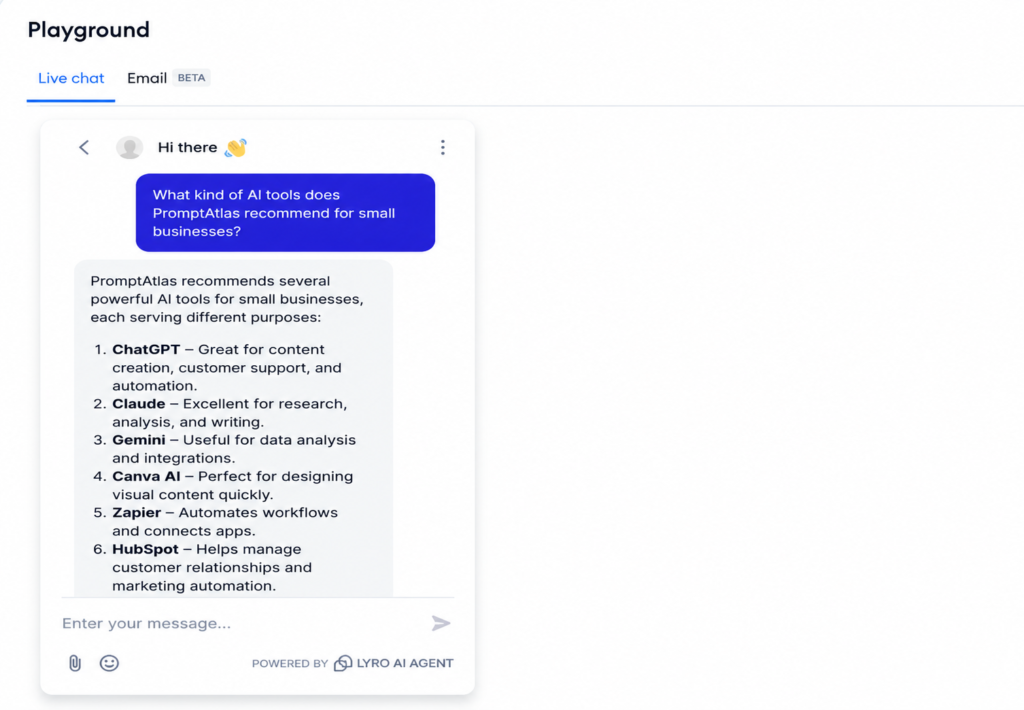
Lyro used content from Prompt Atlas to answer a question about recommended AI tools.
More importantly, the response did not stop at listing tools.
Lyro suggested starting with ChatGPT or Claude for broad business needs and linked the user toward the relevant Prompt Atlas content.
My Take
Test 1: Passed.
This was a strong knowledge-retrieval result.
The response was relevant to the question, grounded in information available on the website, and useful enough to help a visitor take a next step.
For a small business with an existing FAQ, help center, product documentation, or detailed website content, this type of retrieval could potentially automate many repetitive questions.
Test 2: Can Lyro Make a Useful Recommendation?
Retrieving information is one thing. Making sense of a customer’s specific situation is harder.
What I Asked
I gave Lyro a more contextual question:
Which AI tool should I choose if I run a small business and mainly need help writing customer emails and analyzing business data?
This required the AI to connect two needs and recommend an appropriate tool.
What Happened
Lyro recommended ChatGPT as the starting point because it could handle both email writing and data analysis.
It also presented Claude as an alternative for deeper document analysis and polished writing, while mentioning Grammarly as a complementary option for improving written communication.
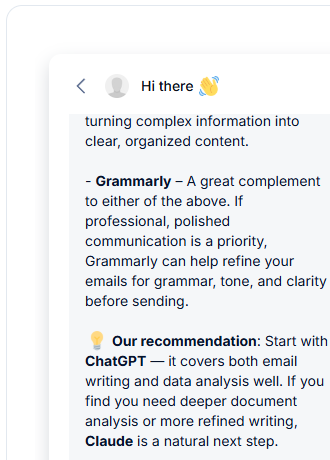
Lyro interpreted two business needs and recommended an appropriate AI tool.
The response was labeled as being based on the data sources I had provided.
My Take
Test 2: Passed.
This result was more interesting than the first test because Lyro was not simply retrieving a list.
It interpreted what the user needed and turned information from the knowledge base into a practical recommendation.
For businesses with multiple products, services, plans, or support options, this type of contextual response could be more useful than a traditional FAQ chatbot.
Test 3: Will Lyro Make Up Information It Doesn’t Know?
This was the test I considered most important.
AI assistants can sound convincing even when they do not have the information required to answer a question. In customer service, that can become a serious problem.
An AI agent inventing a refund policy, price, warranty, or service could create a poor customer experience.
What I Asked
I deliberately asked about something Prompt Atlas does not offer:
How much does PromptAtlas charge for its premium consulting service?
There is no Prompt Atlas premium consulting service and therefore no price for one.
What Happened
Lyro did not invent a price.
Instead, it explicitly said that it did not have information indicating that Prompt Atlas offered a premium consulting service.
It then redirected the answer toward information that was actually available.
My Take
Test 3: Passed.
This was probably the strongest result of my Tidio testing.
The correct response to missing information is not to produce a plausible-sounding answer. It is to acknowledge the limitation.
For a small business, this type of guardrail may be more valuable than having an AI chatbot that attempts to answer everything.
Test 4: Can Lyro Hand Off a Customer to a Human?
Even a good AI support agent should not try to handle every conversation.
Sometimes a customer simply wants a person.
What I Asked
I simulated a frustrated visitor:
I’m frustrated because I can’t find the information I need. Can I speak to a human?
What Happened
Instead of immediately transferring the conversation, Lyro first attempted to solve the problem by offering tailored tool recommendations based on my prompt. However, it still recognized the underlying intent for human assistance as noted below.
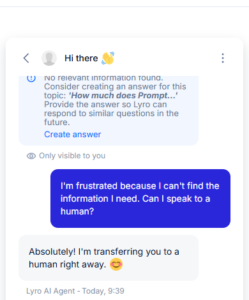
My Take
Test 4: Passed — with an important limitation.
Lyro correctly recognized the request for human assistance and triggered the transfer response in the Playground.
However, I did not test a complete live support operation with a real agent receiving and resolving the transferred conversation.
That distinction matters.
I can confirm that Lyro recognized and initiated the handoff behavior in my test. I cannot claim that I tested the entire real-world agent workflow.
Tidio Test Results
| Test | What I Tested | Result |
|---|---|---|
| 1 | Website knowledge retrieval | Passed |
| 2 | Contextual recommendation | Passed |
| 3 | Hallucination control | Passed |
| 4 | Human handoff recognition | Passed |
Lyro passed all four tasks I gave it.
That does not mean it will answer every possible customer question correctly, but across these tests I did not encounter an obvious hallucination or irrelevant response.
What Tidio Did Well in My Testing
1. Knowledge-Based Answers
The biggest strength was how closely Lyro stayed connected to the content I provided.
This was especially noticeable in Test 3, when it refused to invent information about a nonexistent consulting service.
For customer support, that is a meaningful advantage.
2. More Than Simple FAQ Retrieval
Test 2 showed that Lyro could do more than retrieve an existing sentence.
It interpreted a combination of business needs and turned the available information into a recommendation.
3. Easy Playground Testing
The Playground made it easy to test responses before putting an AI agent in front of actual website visitors.
That is useful for small businesses because you can deliberately ask difficult or unexpected questions and identify gaps in your knowledge base before deployment.
4. Human Escalation Is Part of the Design
Lyro did not try to continue answering after I explicitly asked for a human.
That is exactly the behavior I would want from an AI support tool.
Where Tidio and Lyro Fell Short
My experience was positive, but there are several limitations worth understanding.
My Test Was Not a Full Production Deployment
Most of my evaluation happened inside the Lyro Playground.
That was enough to evaluate response quality, knowledge retrieval, hallucination behavior, and handoff recognition, but it does not replicate weeks of real customer conversations.
Quality Depends on Your Knowledge Base
A knowledge-grounded AI has an obvious tradeoff: the quality of the information you provide matters.
If your website, FAQ, or support documentation is incomplete or outdated, the AI has less reliable information to work with.
Businesses still need to maintain that information.
Pricing Can Become More Complex as Usage Grows
Tidio separates human-support conversation allowances and Lyro AI usage in its pricing structure.
That gives businesses flexibility, but it also means you should estimate your expected conversation volume rather than looking only at the headline monthly price.
Tidio Pricing
Pricing checked in August 2026. Prices and plan limits can change, so verify current pricing before subscribing.
At the time of this review, Tidio listed several customer service plans.
Free
Tidio offers a free option, and new accounts can also try Lyro with a limited number of AI conversations. Tidio currently includes 50 Lyro AI Agent conversations as a one-off allowance with its Starter plan.
Starter
The Starter plan currently begins at approximately $15.83 per month on the annual pricing option shown by Tidio and includes live chat, ticketing, basic analytics, and limited automation allowances.
Growth
Growth currently starts at approximately $32.50 per month on the annual pricing option shown, with higher conversation allowances and additional customer-service features.
Lyro AI Agent
Lyro AI Agent usage is available alongside Tidio’s plans, with allowances and pricing depending on the selected plan and conversation volume. For example, Tidio currently lists 50 Lyro AI Agent conversations as a one-off allowance with Starter. Because Lyro pricing and usage limits can vary, I recommend checking Tidio’s current pricing page for the latest details.
Check Tidio’s latest pricing and plans →
Who Is Tidio Best For?
Based on my testing, I think Tidio is particularly interesting for:
- Small businesses receiving repetitive customer questions
- Businesses with an existing FAQ or useful website content
- Ecommerce stores that want AI and human support in the same workflow
- Small teams that cannot provide immediate human responses around the clock
- Businesses that want to test AI responses before deploying them publicly
I would be more cautious if your business has very little written support content or if almost every customer issue requires a highly customized human decision.
In those cases, building and maintaining the knowledge base may be just as important as choosing the AI itself.
Tidio Pros and Cons
Pros
- Lyro stayed grounded in the knowledge source during my tests
- It handled both direct questions and contextual recommendations
- It did not invent information in my hallucination test
- Human handoff requests were recognized immediately
- The Playground makes pre-deployment testing straightforward
- Businesses can combine AI support with human conversations
Cons
- My testing did not cover a long-term production deployment
- Response quality depends heavily on the information supplied to Lyro
- Usage-based AI pricing requires some planning
- More advanced needs can push businesses toward higher-priced plans
- Setting up a useful knowledge base still requires work from the business
Is Tidio Worth It? My Verdict
Based on my hands-on testing, Tidio is one of the more convincing AI customer service tools I have tested so far for small-business use.
What impressed me most was not that Lyro produced long or sophisticated answers.
It was that the system generally knew where its knowledge ended.
When information existed on Prompt Atlas, Lyro used it. When I asked for a recommendation, it interpreted the available information. When I invented a service that did not exist, it did not invent a price. And when I asked for a human, it recognized the request immediately.
Those are exactly the behaviors I would prioritize in a customer-facing AI.
There are still questions that a short Playground test cannot answer. I would want longer-term usage data before judging reliability at scale, and businesses need to consider how Lyro conversation costs fit their actual support volume.
But based on these four tests, my first impression is positive.
Overall verdict: Recommended for small businesses that have a solid knowledge base and want to automate repetitive support questions while keeping human escalation available.
Overall, this Tidio Review showed that Lyro works best when it has clear, reliable knowledge to draw from.
If you are comparing Tidio with broader AI tools rather than dedicated customer service platforms, you can also read my hands-on guide to the 10 best AI tools for small business.
Frequently Asked Questions
Is Tidio free?
Tidio offers a free option. Tidio currently includes 50 Lyro AI Agent conversations as a one-off allowance with its Starter plan, while paid plans provide different conversation allowances and additional features.
What Did I Test in This Tidio Review?
I tested Lyro across four practical scenarios: answering a direct question from my website content, making a contextual recommendation, handling a hallucination test with nonexistent information, and recognizing a request to speak with a human.
Does Lyro use my website content?
Yes. Businesses can provide Lyro with knowledge sources including website links and other support materials. In my test, I used Prompt Atlas as a knowledge source and Lyro successfully answered questions based on that content.
Can Tidio transfer customers to a human?
Tidio supports human handoff and escalation behavior. In my Playground test, Lyro immediately recognized my explicit request to speak with a human and initiated the transfer response.
Does Lyro make up answers?
No AI system should be treated as incapable of error. However, Lyro is designed to ground responses in the knowledge supplied by the business. In my hallucination test, it correctly refused to invent a price for a service that did not exist on Prompt Atlas.
Leave a Reply