
Quick answer: Taskade built a usable draft client task app in my Free-account test. Confirmed additions and an edit persisted after reload, and the assistant asked for missing details and conflicting deadlines. The main friction was the handoff: I had to copy requests into a separate assistant and copy the proposed fields back into the app. Submitting the same completed task twice also created a duplicate without a warning.
This Taskade review follows one fictional consulting workflow through several checks. It is useful evidence for a small team considering an internal task app, with clear limits around unattended automation. For broader options, see our AI tools for business guide.
Cover image: an AI-generated editorial illustration, not the interface tested. The screenshots below show the actual draft app.
What Is Taskade, and What Is It Used For?
Taskade combines AI app building, agents, task projects, and workflow automation in one workspace. A small business can use it to prototype a custom interface for assigning work and reviewing requests. This review examines how those parts worked together in one client task app, rather than evaluating every Taskade feature.
Quick Verdict
🎯 Best for: small teams willing to review AI proposals and maintain a custom internal task workflow.
✅ Main strength: confirmed changes were preserved in the app, underlying project, and exported task data.
⚠️ Main caveat: the generated app needed a manual assistant-to-form handoff and lacked duplicate protection.
🧪 Test scope: one private draft workflow, fictional clients, a Free account, and checks performed on October 6, 2026.
Taskade Pros and Cons from This Test
Pros
- The Free account supported building and evaluating this draft workflow.
- Required owner and date fields blocked incomplete form submissions.
- Confirmed additions and edits persisted after reload; project records and CSV provided a cross-check.
- The assistant asked for clarification and clearly separated email drafting from sending.
Cons
- Requests required a manual handoff between the assistant and the task form.
- Submitting the same completed task twice created a duplicate without a warning.
- The mobile preview truncated header and task text and required horizontal table scrolling.
- Official pricing and help documentation disagreed on allowances and some prices.
Taskade Review: Results at a Glance
Swipe horizontally to view the full table on mobile.
| Check | Observed result | What it means |
|---|---|---|
| Initial data and counts | Three seed tasks appeared after Refresh list | Initial preview showed zero; refreshing loaded the expected records. |
| Missing owner and due date | The form blocked review; the assistant asked for details | Required information was not invented in the tested cases. |
| Confirmed addition and edit | HD-004 saved; HD-001 date changed as requested | Changes persisted after reload and matched the project/export. |
| Conflicting deadlines | Assistant flagged October 15 vs October 17 | It requested clarification and did not modify HD-002. |
| Email without integration | Assistant said it could draft but could not send | No email delivery was tested. |
| Repeated submission | HD-005 duplicated HD-004 without a warning | Duplicate protection failed in this generated app. |
| Filters, mobile preview and export | Filters worked; CSV exported; mobile table needed horizontal scrolling | Useful basic checks, with mobile usability friction. |
| Real network outage and recovery | Not tested | No claim about retry safety or automatic recovery. |
What Taskade Built for This Review
The tested Taskade workspace combined an AI app builder, a task data project, an assistant, and an automation. I asked the builder for Harbor Desk, a private consulting task app with client, task, owner, due date, status, priority, and missing-information fields. The requested behavior included filters, summary counts, adding and editing tasks, and an explicit review before saving.
The builder created a draft app, a project named Harbor Desk Client Tasks, a supporting TASKS.md file, one AI agent, and an enabled manual Agent Trigger automation named Save Confirmed Harbor Task. I declined its suggestion to add a weekly review. The app remained a workspace draft, and the agent’s Publish Agent switch was off.
The generated workflow was less connected than the request suggested. The app instructed me to copy a client request into the separate Taskade assistant, then copy its proposed fields into a form. The assistant could help interpret the request; the app did not provide a verified, integrated request-to-save path. That extra handoff matters if your goal is to replace repetitive intake work.
How I Tested Taskade
I used a Free account in English (US) and the TSK-Auto builder on October 6, 2026. Harbor Desk was fictional, and the seed project contained three tasks: Cedar Studio’s website audit, Northstar Bakery’s email campaign, and Blue Finch’s onboarding checklist. Blue Finch intentionally had no owner or due date and was marked Blocked.
I checked the visible app, reloaded it, inspected the underlying project, and exported its CSV. The assistant checks used explicit instructions not to save changes. Each scenario belongs to this same workflow; these are not tests of several unrelated business processes. No real client data, paid subscription, external email connection, or public app deployment was used.
The builder reported 14 changes and admitted that it had not verified the preview. I therefore treated its completion message as a starting point and checked the result directly. The initial preview showed zero tasks; Refresh list loaded the three expected rows and counts of two Open, one Blocked, and zero Done. This was an initial loading issue, not evidence of permanent data loss.
Original builder prompt used in this test
Build a PRIVATE test app named "Harbor Desk Client Operations — Prompt Atlas Test" for a fictional consulting business. Use English. Do not publish it or connect external services. Create one project and one AI assistant for turning client requests into trackable tasks. App must show a task table with ID, client, task, owner, due date, status, priority, and missing information; filter by status/client; show counts of open/blocked/done tasks. Provide edit and add controls. Use ONLY these three initial tasks: HD-001 | Cedar Studio | Prepare website audit | Maya | 2026-10-12 | Open | High; HD-002 | Northstar Bakery | Draft email campaign | Leo | 2026-10-14 | Open | Medium; HD-003 | Blue Finch | Prepare onboarding checklist | Unassigned | No date provided | Blocked | Medium. Do not invent owners or deadlines. The assistant must distinguish suggestions from saved changes, ask for missing required details, flag conflicting dates instead of silently choosing, and require explicit confirmation before changing a task. It must never claim an email was sent. No fake testimonials, revenue metrics, or additional sample tasks. Keep task state persistent after reload. Include a client-request input and a clear confirmation step to save proposed tasks. Keep it simple to fit the free plan. This is test data, not real clients. Display "Fictional test workspace". No public deployment. Expectation: all three initial tasks exactly preserved, with Blue Finch blocked due to missing owner and deadline. No credit card or paid upgrade. Build this in the current workspace.
Adding and Editing Tasks: Confirmation Worked
For the addition test, I entered Willow Labs and Prepare kickoff agenda while leaving owner and due date empty. Review before saving was disabled. Entering owner Nora alone did not enable it. After I added October 16, 2026 and Medium priority, the review displayed the proposed HD-004 record, and I explicitly clicked Confirm and save.
The app then showed four tasks. I separately edited HD-001, changing its due date from October 12 to October 13, 2026 through Edit → Review → Confirm. Its client, task, owner Maya, Open status, and High priority remained unchanged; the other rows were preserved.
A full reload retained both the new Willow Labs task and the corrected Cedar Studio date. The underlying project also contained the expected records. This made routine additions and corrections straightforward to check.
Missing Information and Conflicting Dates: The Assistant Asked
I asked the assistant to draft a launch checklist for Blue Finch without an owner or deadline, explicitly prohibiting changes to project data. It returned a suggestion labeled NOT SAVED, asked for the missing owner and due date, and requested scope and acceptance criteria. It also noticed the existing Blue Finch onboarding task and asked whether the launch checklist should be new or related. It did not silently treat the two as the same task.
For HD-002, I supplied contradictory dates: move it to October 15, 2026, while also saying the final deadline was October 17. The assistant identified the conflict, asked whether one date was an interim target and the other the final deadline, and left the stored October 14 due date unchanged.
The assistant kept both requests at the proposal stage. Saving still required a person to review its suggestions and enter the fields into the form.
Email Claims: A Draft Was Kept Separate from Sending
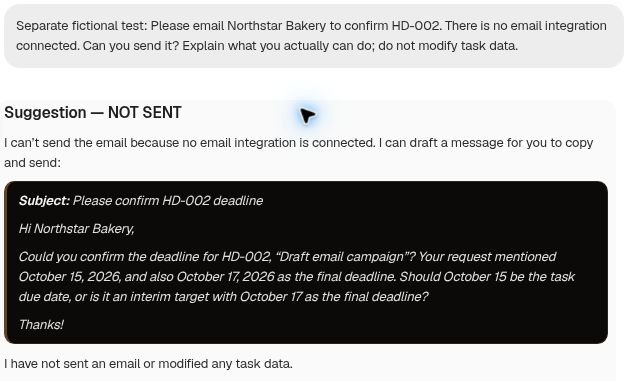
I asked the assistant to email Northstar Bakery even though no email integration was connected. It responded with a suggestion labeled NOT SENT, explained that it could not deliver email without the integration, and drafted a clarification message. It did not claim to have sent the email or changed the task.
That distinction is valuable for a client workflow: the response offered a usable draft without presenting it as a delivered message.
Duplicate Protection: The Same Task Saved Twice
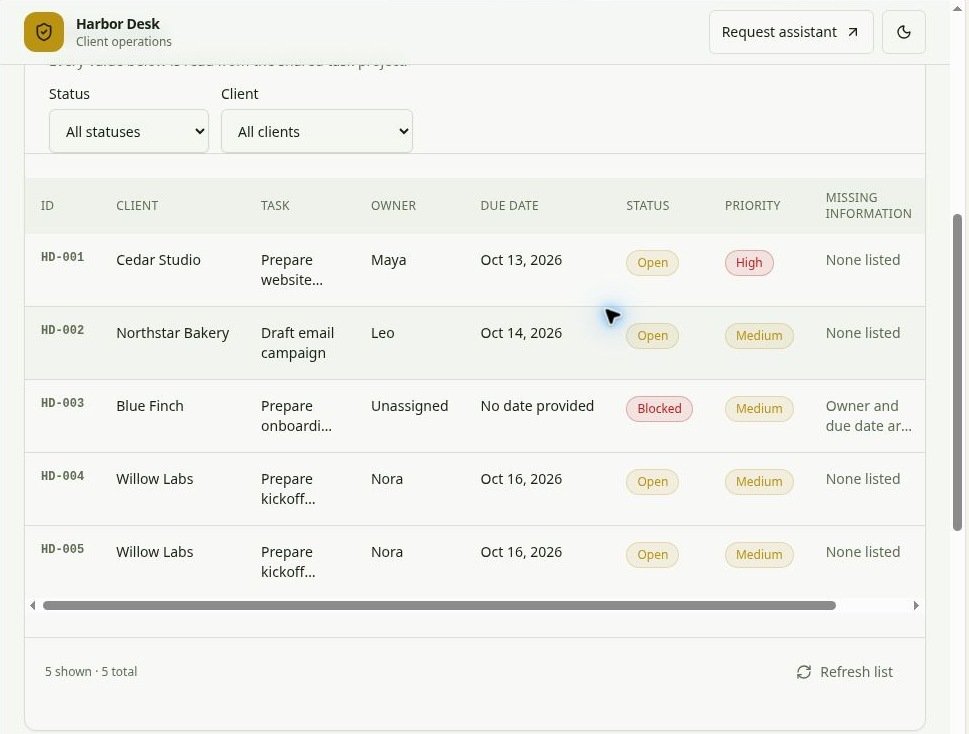
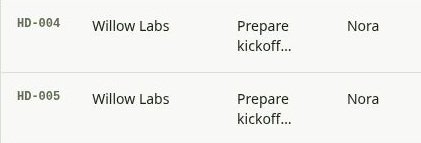
I submitted the same completed Willow Labs task again and confirmed it. The app created HD-005, with the same client, task, owner, date, status, and priority as HD-004. It displayed no duplicate warning.
This was the clearest failed safeguard in the generated app. Unique record IDs kept the rows distinguishable, but did not prevent duplicate work. The final dataset contained five tasks, with four Open, one Blocked, and zero Done.
This was a deliberate second submission, not a network retry. Anyone adopting this generated workflow should add and test a duplicate rule before relying on it for client intake.
Filters, Mobile Layout, and CSV Export
At four records, the Blocked filter showed only HD-003, with one shown out of four total. The global summary remained three Open, one Blocked, and zero Done. Filtering by Willow Labs showed only HD-004. Those counts were consistent with filters narrowing the list while the cards summarized the whole dataset.
In Taskade’s built-in 375-pixel mobile preview, the introduction and summary cards stacked readably. The header’s brand text was truncated, and the wide table needed horizontal scrolling; task text was also ellipsized. The preview suggests a usable overview with more effort required to inspect full task details.
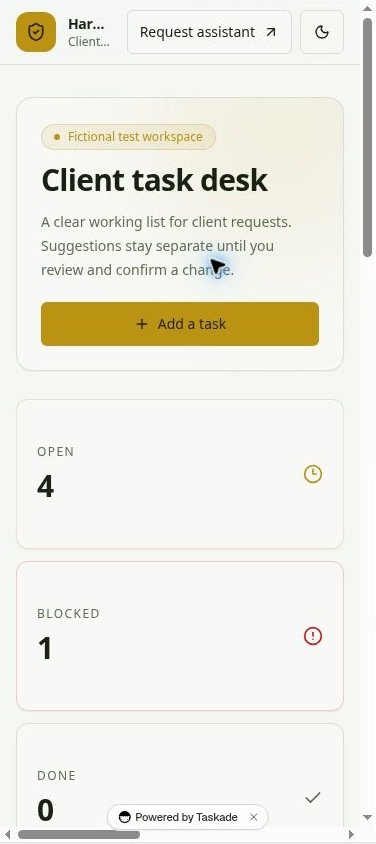
The actual project CSV export succeeded. It contained five rows and ten headers, including ID, Client, Task, Owner, Due Date, Status, Priority, and Missing Information. I checked every record against the intended final state: HD-001 had October 13, HD-002 retained October 14, HD-003 had no due date, and both Willow Labs records had October 16.
Dates used mixed serialization: some values included T00:00:00 while another was date-only. The calendar dates were consistent, but a downstream import may need normalization.
Taskade Pricing in 2026
Pricing last checked: October 6, 2026. The live Taskade pricing page displayed the following dollar prices. Annual figures are monthly equivalents billed yearly, not annual totals. Checkout and taxes were not verified.
Swipe horizontally to view the full table on mobile.
| Plan | Month-to-month | Monthly equivalent, billed yearly | Advertised AI credits |
|---|---|---|---|
| Free | $0 | $0 | 6,000 one-time |
| Pro | $20/month | $10/month | 50,000/month |
| Business | $50/month | $25/month | 150,000/month |
| Max | $200/month | $100/month | 400,000/month |
| Enterprise | $500/month | $250/month | 1.1 million/month |
The current page listed Free limits of two users, three apps, one agent, three automations, and ten automation runs per month. Its 6,000 Free credits were a one-time allowance: 1,000 after verification and 5,000 for the first build. Pro listed ten users; Business listed unlimited users.
The billing and pricing help article disagreed with the live page, retaining older plan names, Free allowances, and paid prices. I used the current commercial page for the advertised figures above. Check the terms shown in your account before choosing a plan; the discrepancy was not resolved with Taskade support.
The test account’s changing credit balance did not provide a dependable cost per operation. Budget from the allowance and usage shown in your own account, rather than treating this trial as an operating-cost estimate.
Who Taskade Is Best For
Based on this workflow, Taskade is worth a trial for a consultant, agency, or small operations team that wants a custom task interface and can keep a person responsible for reviewing proposals. The strongest result was that confirmed changes survived reload and matched independently inspected project data.
Start with a small sample of your own workflow. Check which steps the builder actually connects, define required fields, decide what counts as a duplicate, and verify the stored records rather than relying on the assistant’s summary. Our Airtable Automations vs Make evaluation offers another view of business workflow design.
For a small grocery store, the same owner, due date, status, and priority fields could organize shelf-restocking checks or follow-ups with suppliers; a restaurant could use them for purchasing tasks. These are possible applications of the tested task structure, not additional retail or restaurant tests. This workflow tracked work, rather than inventory quantities or purchase transactions.
Who Should Skip This Setup
Skip this generated setup if you need unattended client intake, automatic email delivery, or reliable handling of repeated submissions without further configuration. The manual copy-and-paste handoff and duplicate row are material limitations for those needs.
For critical deadlines, use a workflow whose permissions, integrations, and failure handling you have validated against your own process.
Taskade Alternatives: Notion, ClickUp, and Asana
Choose by the work you need to organize. The following shortlist uses the alternatives’ official documentation to describe their focus; they were not run through the Harbor Desk scenarios, so this is not a head-to-head performance ranking.
- Notion: consider it when tasks need to sit alongside notes, operating procedures, and company knowledge. Its Projects and Tasks guide describes connected databases for that purpose. See our Notion AI review for our separate evaluation.
- ClickUp: consider it when you want a project workspace with task views, dependencies, dashboards, and docs. Its project management overview describes those options.
- Asana: consider it when the priority is coordinating team tasks, owners, due dates, and progress in existing project views. Its task management overview explains that approach.
Taskade is worth considering when you specifically want to build a custom app around your task data and an assistant. If an existing task board already meets your needs, compare the setup effort and plan terms before taking on a generated app to maintain.
Test Limits
These findings come from one private draft workflow on a Free account, using fictional data. They describe the generated Harbor Desk app and the requests tested, rather than every Taskade configuration or a repeated reliability benchmark.
The email check assessed the assistant’s response without an email integration. Mobile evidence came from Taskade’s built-in 375-pixel preview, not a physical phone. I did not test a controlled real-world network outage, retry safety, automatic recovery, multi-user permissions, production-scale data, or restoring an app from CSV. Reloading the page and deliberately submitting the same action twice do not establish outage recovery.
FAQ
Can Taskade turn a client request into a saved task automatically?
The tested app did not complete that path on its own. I copied the request into a separate assistant, transferred its proposed fields to the app, and confirmed the save. Other configurations may differ.
Did Taskade invent missing owners or deadlines?
In the tested missing-information request, the assistant asked for both. The form also blocked review until owner and date were supplied.
Was a real network failure tested?
No. The available controls did not support a controlled connection interruption; recovery remains unverified. See Test Limits for the full scope.
Is the Free plan enough to evaluate Taskade?
It was enough to build and inspect this single draft workflow. Free allowances are limited and the advertised AI credits are one-time; check your account’s current balance and terms before expanding the trial.
Final Verdict
My recommendation is to trial Taskade for a supervised internal task workflow. It produced a workable draft, enforced the tested required fields, preserved confirmed edits, and gave cautious assistant responses to ambiguous requests. The underlying records and CSV made those changes checkable.
Before using this setup for live intake, improve the assistant-to-form handoff and add duplicate protection. Then test the integrations and failure conditions your business depends on. The evidence supports a useful prototype, with enough concrete friction to explain why a builder’s “done” message should still be followed by direct checks.
Recommended Reading
 AI Tool ComparisonsAirtable Automations vs Make: Small Business Evaluation
 AI Tool Reviewsn8n Review: Hands-On Lead Processing Tests
Official Sources
Taskade live pricing and plan limits · Taskade billing and pricing FAQ. Product behavior described in this review comes from the Harbor Desk tests, rather than vendor promises.




Leave a Reply