

Quick Verdict
Make stored two prepared fictional reminders, and a sequential repeat wrote neither one again. This demonstrates duplicate blocking for those two records, not live customer delivery. Keep the scenario inactive until production requirements are tested separately.
Make terminology: A bundle is one unit of data processed by a module; an operation counts a module run.
What I Built
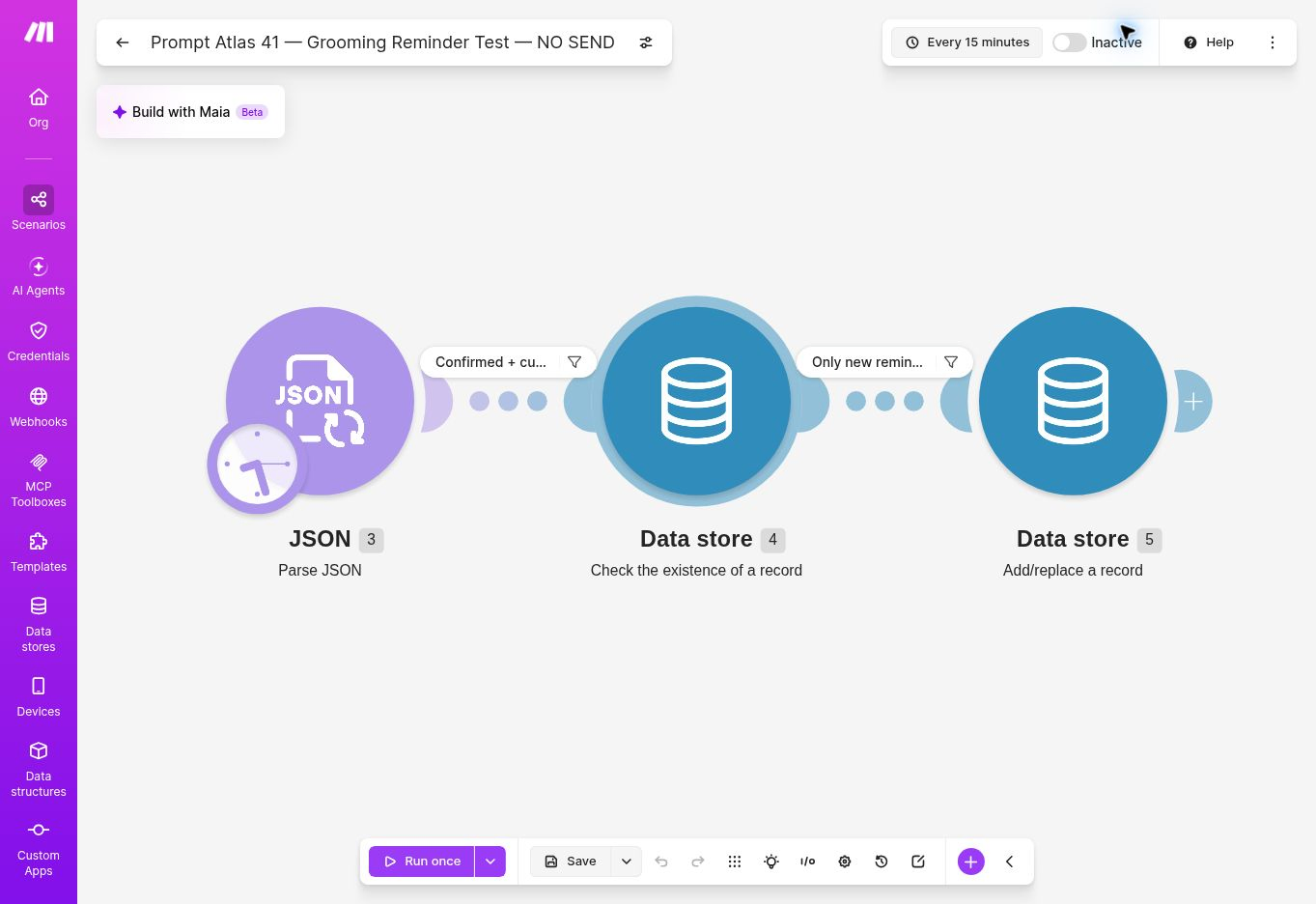
I used a dedicated scenario, Prompt Atlas 41 — Grooming Reminder Test — NO SEND (scenario ID 6594414), and the fictional-only data store PA41 Grooming Reminder Outbox — Fictional Only. An outbox is a queue of prepared reminders awaiting a separate sending step; this test had no sending step. The workflow parsed five JSON records, filtered for eligibility, checked a composite reminder key, allowed only keys that did not exist, and wrote the prepared reminder record.
The key combines appointment ID, scheduled time, and reminder interval:
Including scheduled time means a rescheduled appointment can have a new key. The write module had Overwrite an existing record set to No. This is useful for testing an outbox, but it does not make a check-then-write sequence atomic and does not prove exactly-once message delivery.
The scenario was inactive when reviewed. Its editor displayed an every-15-minute schedule setting, but the inactive state meant that schedule was not running. The visible flow contained a JSON parser and two Make Data store modules; it had no email, SMS, calendar, or booking module.
How I Tested
I preserved the existing fixture and executions instead of starting over. Each email address was fictitious and used the reserved .invalid domain. The due value and latest_at field were supplied in the fixture; neither was calculated from a live clock or fetched from a booking calendar.
On phones, swipe the table horizontally to view all columns.
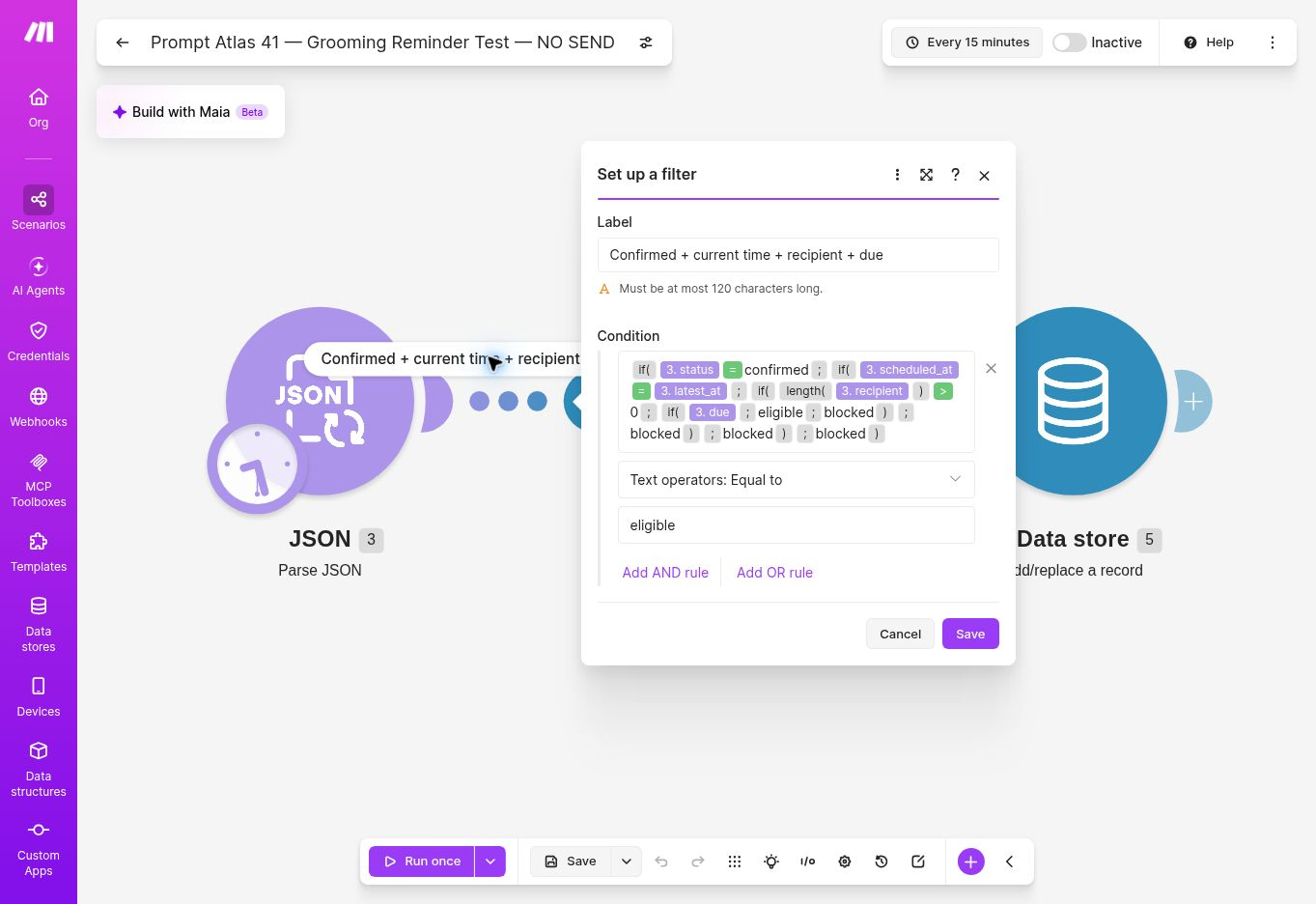
The first filter required all of the following: status = confirmed, scheduled_at = latest_at, a recipient string with length greater than zero, and a due value of eligible.
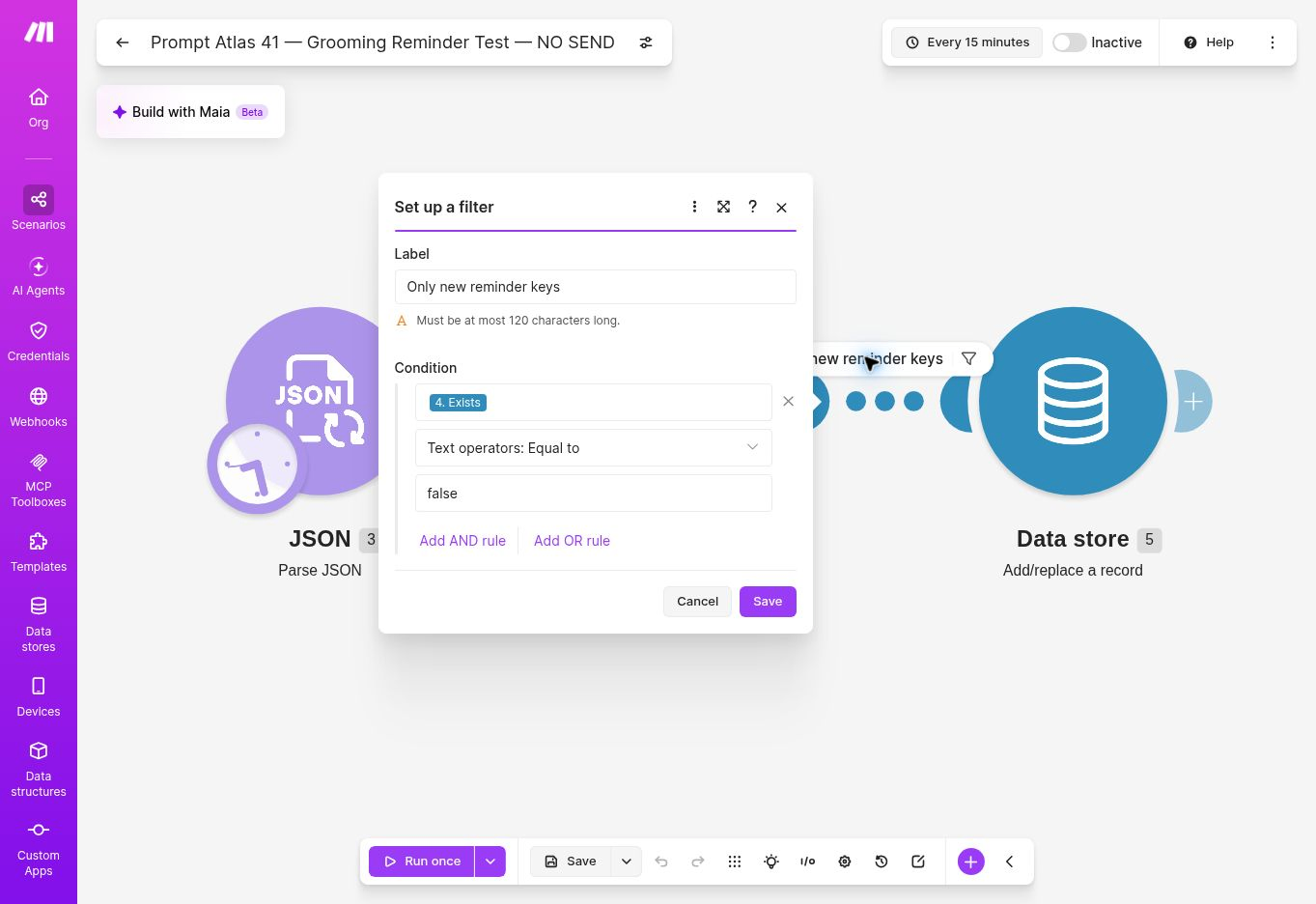
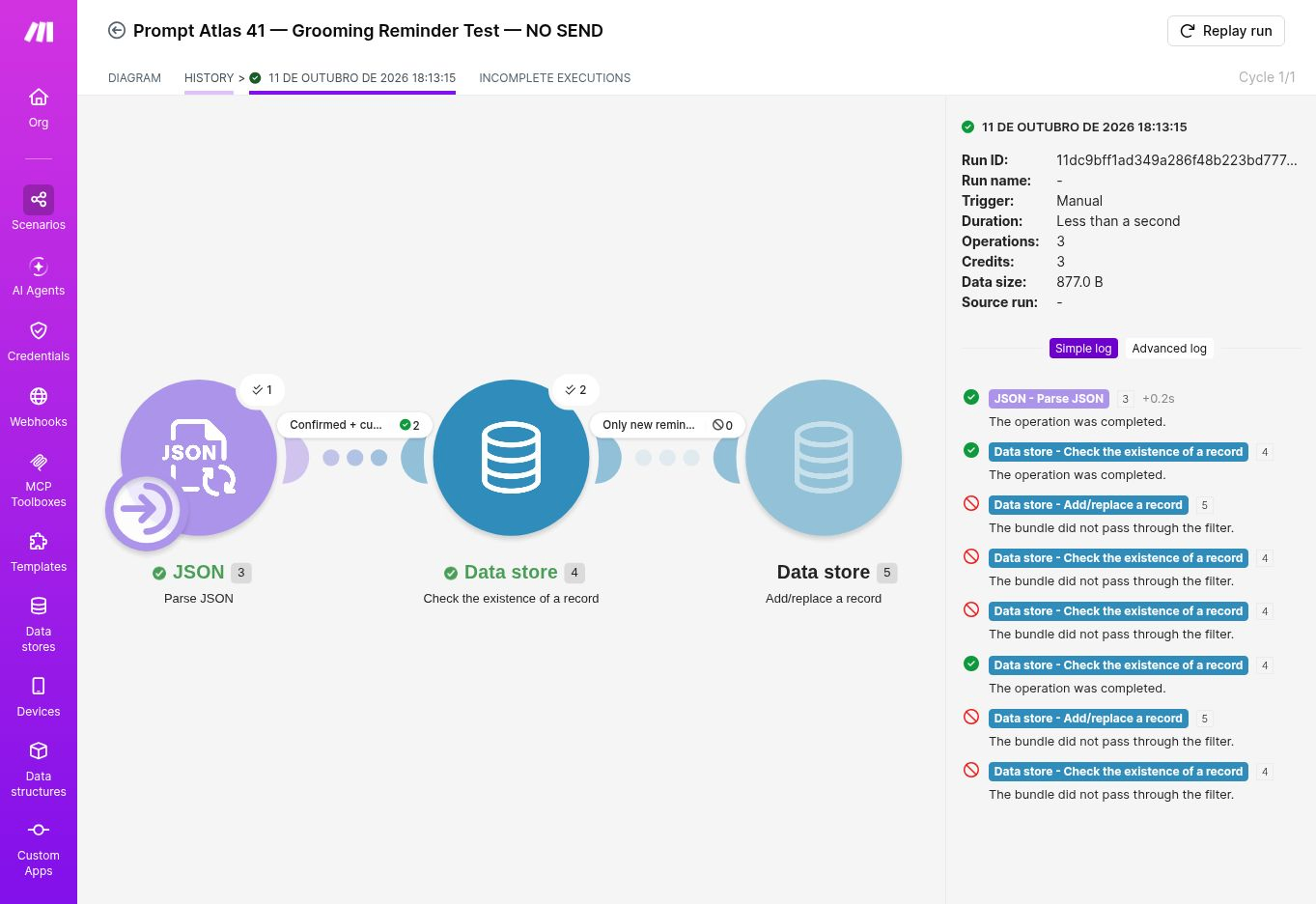
A second filter required the Data store existence result to equal false. The stored record used the same composite key checked by the existence module.
I reviewed the existing JSON-validation run, the first complete run, the repeat run, and the saved filter configuration. I did not replay the scenario, edit it, activate it, or connect a real booking or messaging service.
Results at a Glance
On phones, swipe the table horizontally to view all columns.
The first run’s two stored keys were:
PA41-N1|2026-10-12T14:00:00Z|24hPA41-R1|2026-10-13T14:00:00Z|24h
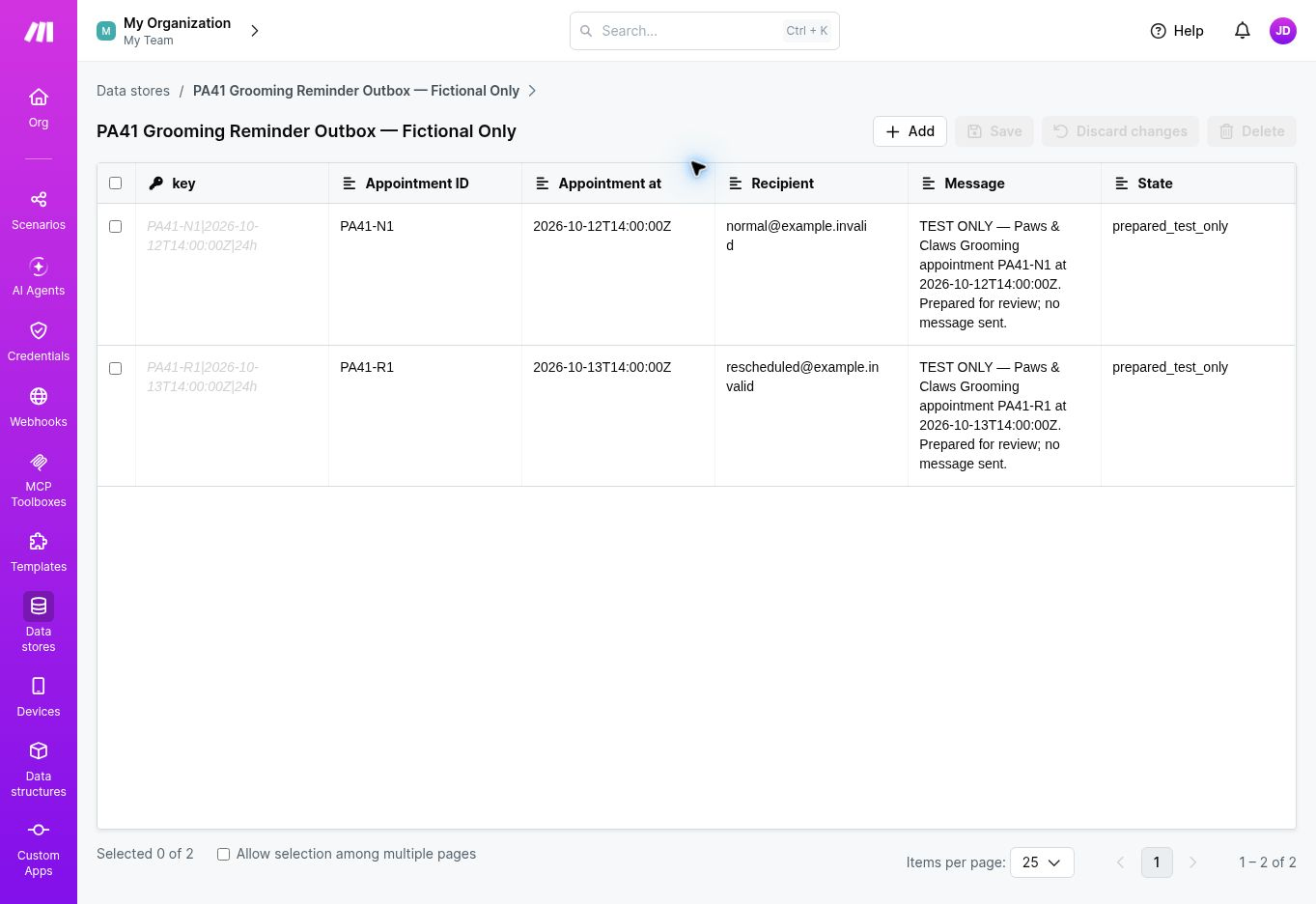
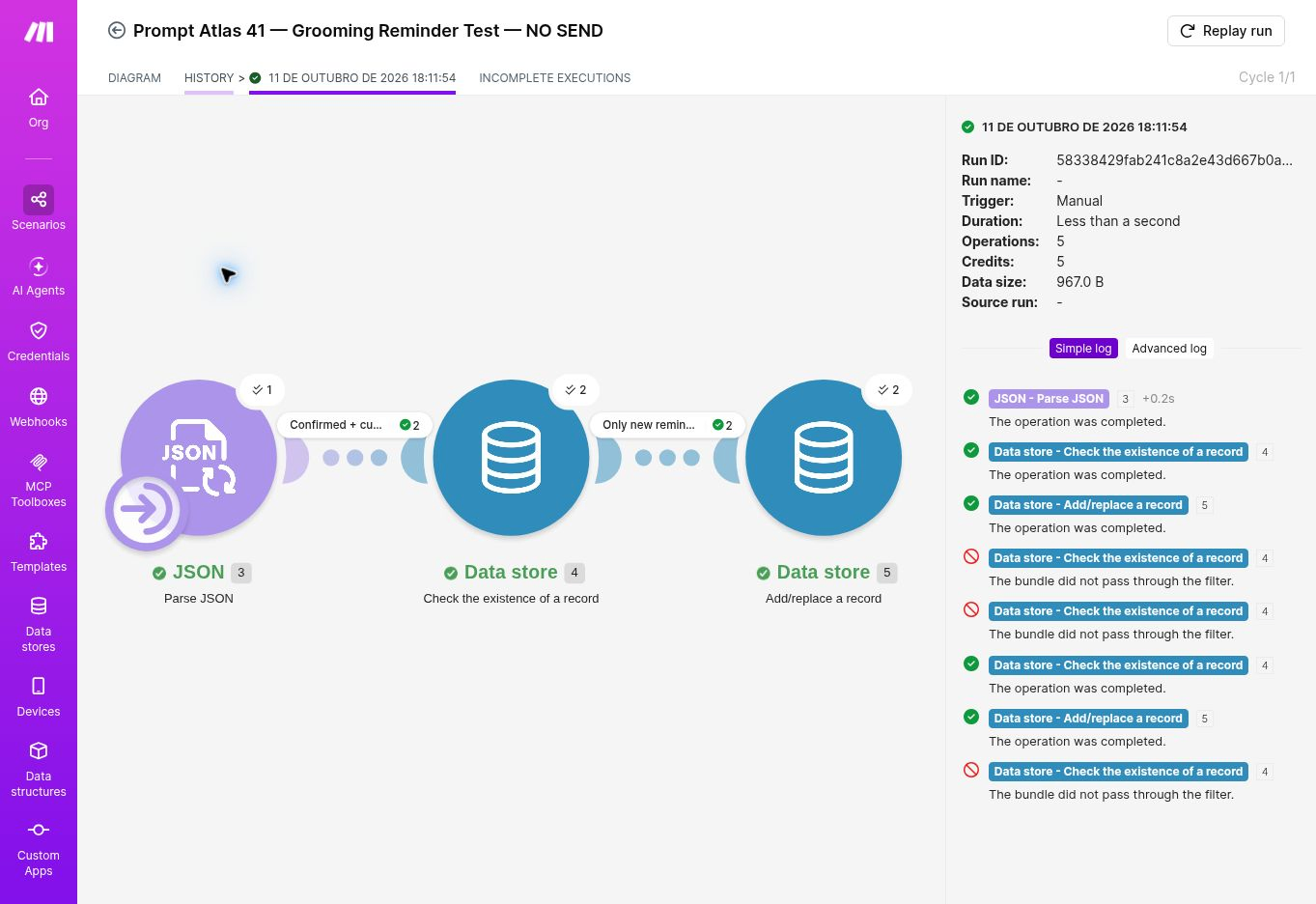
The corresponding prepared message text identified itself as TEST ONLY and explicitly stated that no message had been sent. Both writes showed overwrite disabled. On the repeat, both checks returned Exists: true, so the filter blocked both records and no add/replace operation ran.
The repeat used three operations: one JSON parser operation and two existence checks. Both checks returned Exists: true, so the new-key filter passed zero bundles and the write module did not run; the first complete run used five operations: one parser, two checks, and two writes.
The history timestamps are shown as Make displayed them; the time zone was not visible in the history panel. Fixture appointment times above are explicitly UTC.
What the Repeat Run Proves (and What It Doesn’t)
The repeat run confirms one important behavior: with the same two keys already stored and executions run sequentially, the scenario checked each key, found it, and passed zero bundles to the write module. That is a verified idempotent repeat for these two records: repeating the same input did not create another stored reminder for either key.
It does not establish protection from simultaneous runs. Two executions could both check a key before either writes it; this test did not simulate that race. Nor does a stored outbox record prove that a real email or text was delivered once, delivered at all, or retracted after a later cancellation.
Credits, Plan, and Access
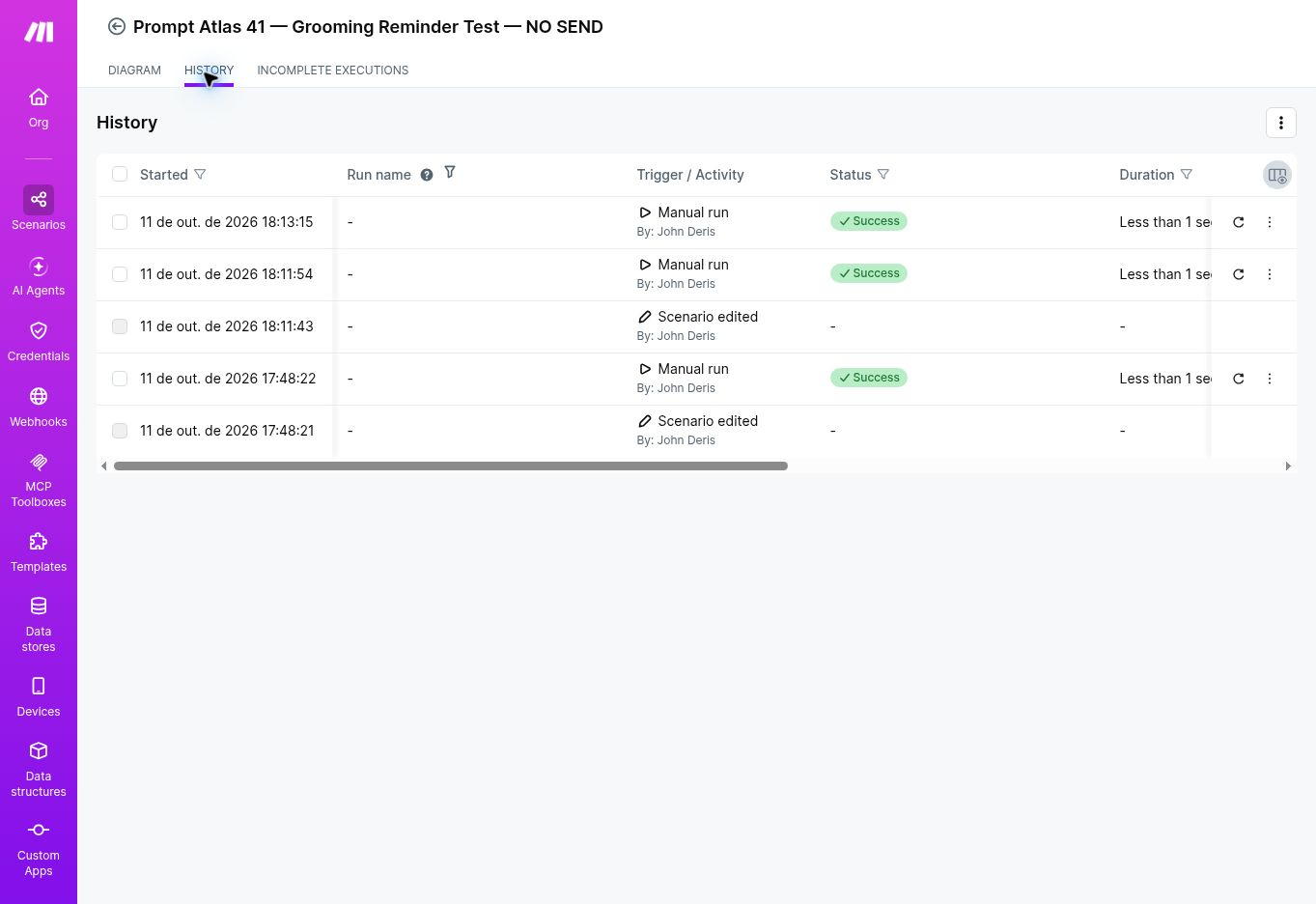
Make’s visible History recorded three successful manual executions:
On phones, swipe the table horizontally to view all columns.
All three history entries showed Success, and no failed or incomplete execution appeared in the visible history. Summing the three entries gives 9 credits and 2,697.0 B of transfer. However, when I reopened the scenario overview on October 12, its “Last 7 days” usage panel showed 4 credits and 1.3 KB. Make did not explain this mismatch in the screens available during review, so the history sum and overview figure should be treated as conflicting displays. No account balance was recorded before and after.
When I checked Make’s official pricing and help pages on October 12, 2026, the Free plan was listed with 1,000 credits per month, 1 MB of data-store storage, and one data store; the Free plan also requires a minimum 15-minute interval for scheduled scenarios. The test account displayed Free during setup. The scenario’s 15-minute schedule was inactive. Plan limits and prices can change, so check Make’s current pricing page, credits guide, and data store documentation before using the workflow. I did not verify paid-tier pricing or purchase a plan.
My Hands-On Experience
Configuration issues encountered:
- An initially disconnected JSON module was removed.
- A run could not proceed while a filter change was unsaved; saving the filter cleared the issue.
- An earlier sign-in error delayed access to History; access later worked and the existing repeat run could be inspected.
Separately, Make’s assistant displayed an ended-trial and upgrade prompt, so I assembled the scenario manually. These are setup and access notes, not failed executions in the three successful history entries reviewed for this article.
What This Means for a Grooming Business
For a grooming owner, the practical idea is to prepare a reminder for a current, confirmed appointment with a recipient, then avoid preparing the same reminder again when the workflow repeats. The test demonstrated two prepared records and no repeated writes for those same two keys. It did not contact customers, verify delivery, or measure fewer missed appointments. Treat this as a starting point for a custom integration, with further validation needed before relying on it for daily bookings.
Limitations and Production Risks
This test does not establish:
- a real 24-hour timing calculation or daylight-saving/time-zone behavior;
- a live booking-system lookup after cancellation or rescheduling;
- automatic activation, calendar synchronization, or a production schedule;
- email or SMS delivery, consent, provider permissions, retries, bounces, or delivery receipts;
- safe behavior when two executions process the same appointment at the same time;
- withdrawal of a reminder that was already sent before a later cancellation or reschedule.
Next validation step: Run a new fictional-only test and inspect the individual bundle and filter outcome for each cancelled appointment, old reschedule snapshot, and missing-recipient fixture. Record where each stops and confirm that no outbox record is created; the existing history review did not establish those individual traces.
The prototype should remain inactive. A production workflow would need a current appointment source, tested date arithmetic and time zones, appropriate messaging consent, delivery-result handling, retries, and concurrency safeguards. None of those capabilities was enabled or tested here.
Who Should Skip This Workflow?
Skip this prototype if you need a ready-to-enable grooming reminder system with live appointment synchronization, customer self-service, or confirmed email and SMS delivery. The test demonstrates fictional outbox preparation and a sequential duplicate check; it is not a complete scheduling product.
Final Verdict
The sequential repeat confirmed that both stored reminder keys were found and neither reminder was written again. This proves duplicate blocking for those two records under sequential execution; it does not prove atomic deduplication under concurrent execution or exactly-once message delivery.
Keep the prototype inactive. Before production use, inspect the excluded fixtures individually and separately test current booking data, real reminder timing, customer consent, delivery results, retries, and concurrent executions. No real messages were sent.
For other documented workflows beyond appointment reminders, explore our AI tools for business hub.
Recommended Reading
 AI for Small BusinessBest Pet Grooming Software for Small Businesses in 2026
 AI Tool ReviewsKennelBooker Review 2026
 AI Tool ComparisonsAirtable Automations vs Make
- Make vs Zapier for Small Business — a broader automation-platform comparison.




Leave a Reply