
Hands-on review for small clinics and allied health practices
Cliniko brings scheduling, patient records, treatment notes, payments, communications, and reporting into one practice management system. After testing a real 30-day trial account with fictional patient data, I found its strongest advantage is not one isolated feature. It is how quickly the core parts of a small clinic workflow connect to each other.
Quick Verdict: Cliniko is one of the most practical all-in-one systems I have tested for a small allied health practice. The calendar is easy to scan, patient records are logically organised, and the reporting menu covers both clinical and business operations. The main trade-off is that setup depth grows quickly once you move beyond the basics, and some automation or AI capabilities depend on connected third-party apps.
Cliniko Review 2026 At a Glance
| Area | What I found | Rating |
|---|---|---|
| Scheduling | Clear weekly calendar, fast appointment overview, wait list and availability controls | 9.0/10 |
| Patient records | Strong record structure with notes, forms, files, communications and billing links | 9.2/10 |
| Reports and setup | Broad reporting and configuration options, but meaningful trends require real usage data | 8.6/10 |
| Overall | A polished operational system for clinics that want one connected workflow | 8.9/10 |
How I Tested Cliniko
I created a Cliniko trial account and used the English interface with a fictional patient, appointment, and treatment note. I tested three connected workflows: appointment scheduling, patient records and treatment notes, and reports and practice configuration. I used only fictional information and did not send live messages, process real payments, or connect third-party services.
🧩 Main limitation: This was a single-practitioner trial account with a small fictional dataset. I could assess navigation, workflow design, available controls, and record structure, but not long-term reporting accuracy, team permissions at scale, real patient communication delivery, or high-volume clinic performance.
Test 1 Appointment Scheduling and Daily Workflow
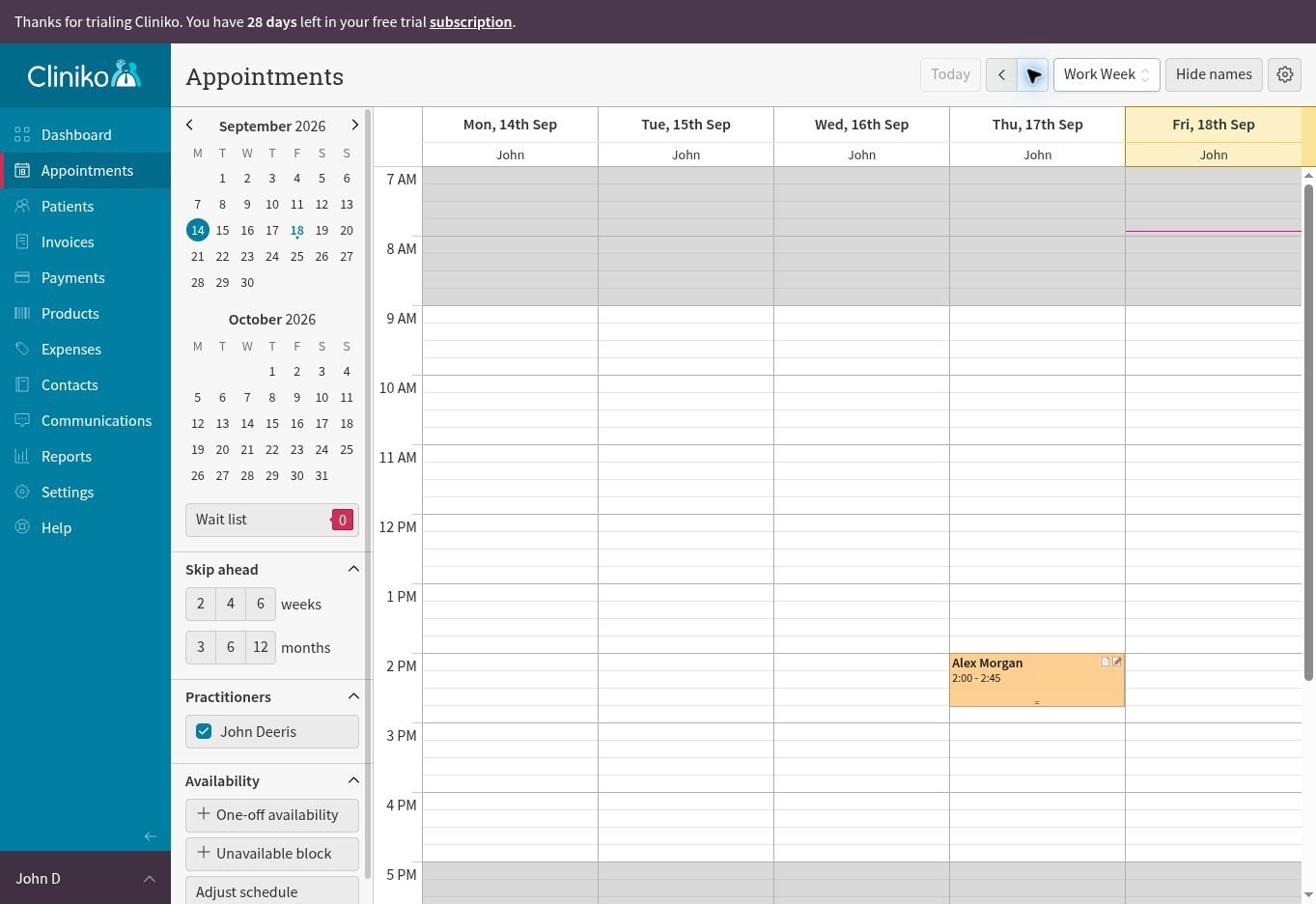
The appointment calendar was the quickest part of Cliniko to understand. The work-week view separates days and practitioners clearly, while the left panel keeps the date picker, wait list, skip-ahead controls, practitioner filters, and availability tools within reach. I could move between weeks without leaving the calendar or opening a separate scheduling screen.
What Worked Well
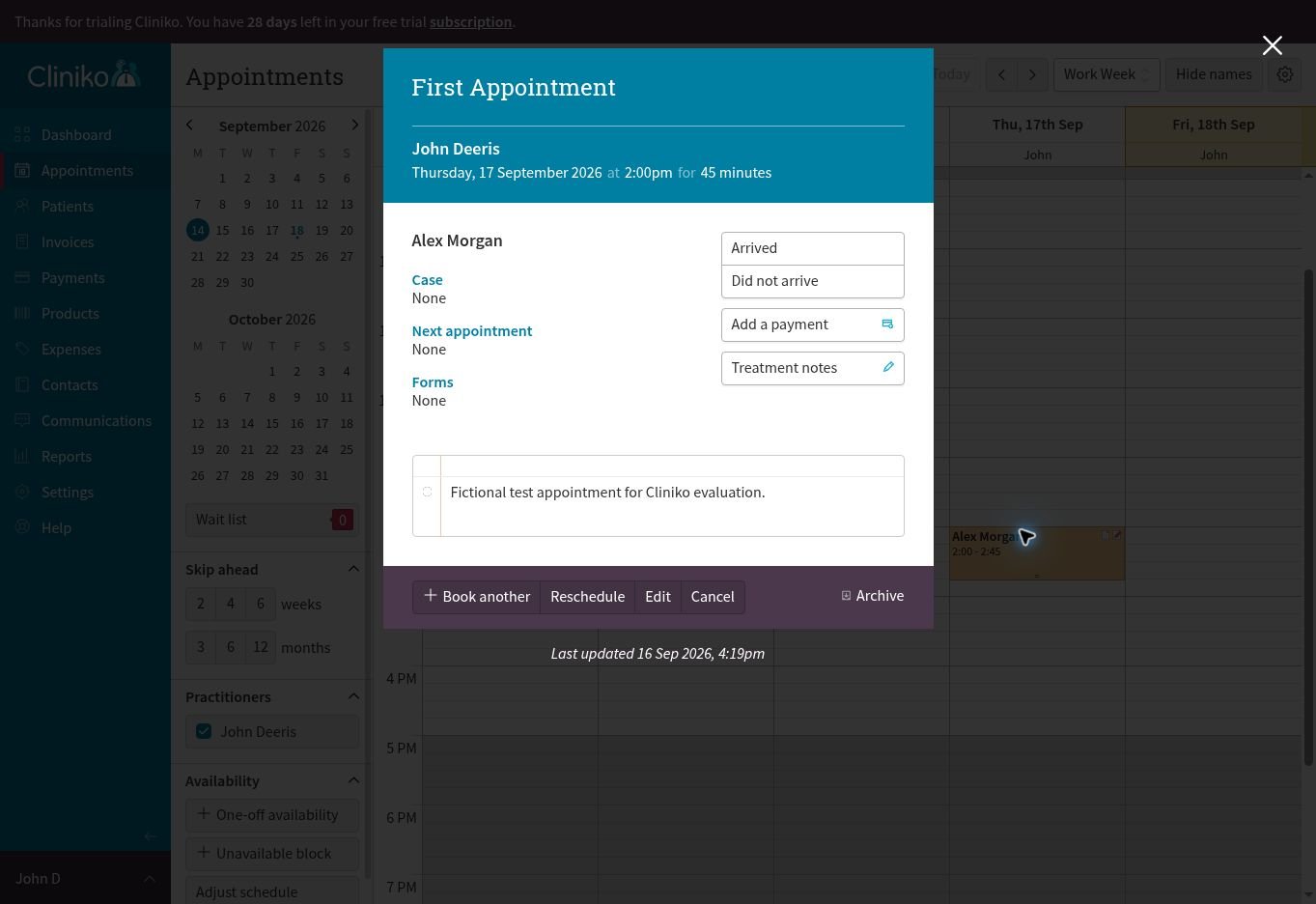
Opening the appointment revealed the details in a focused overlay instead of replacing the calendar. The panel showed the practitioner, date, duration, patient, appointment notes, and direct actions for arrival status, payment, treatment notes, rebooking, rescheduling, editing, cancellation, and archiving. This is a strong design choice for a receptionist or solo practitioner who needs context without losing the schedule.
- Flexible one-day, three-day, work-week, six-day, and seven-day calendar views
- Wait-list and availability controls visible from the main scheduling screen
- Appointment actions connect directly to payment and clinical documentation
- Patient names can be hidden when the calendar is displayed in a shared environment
Test result: 9.0/10. The workflow is clear and connected. A new user may need time to learn the smaller calendar controls, but the essential appointment actions are easy to find.
Test 2 Patient Records and Treatment Notes
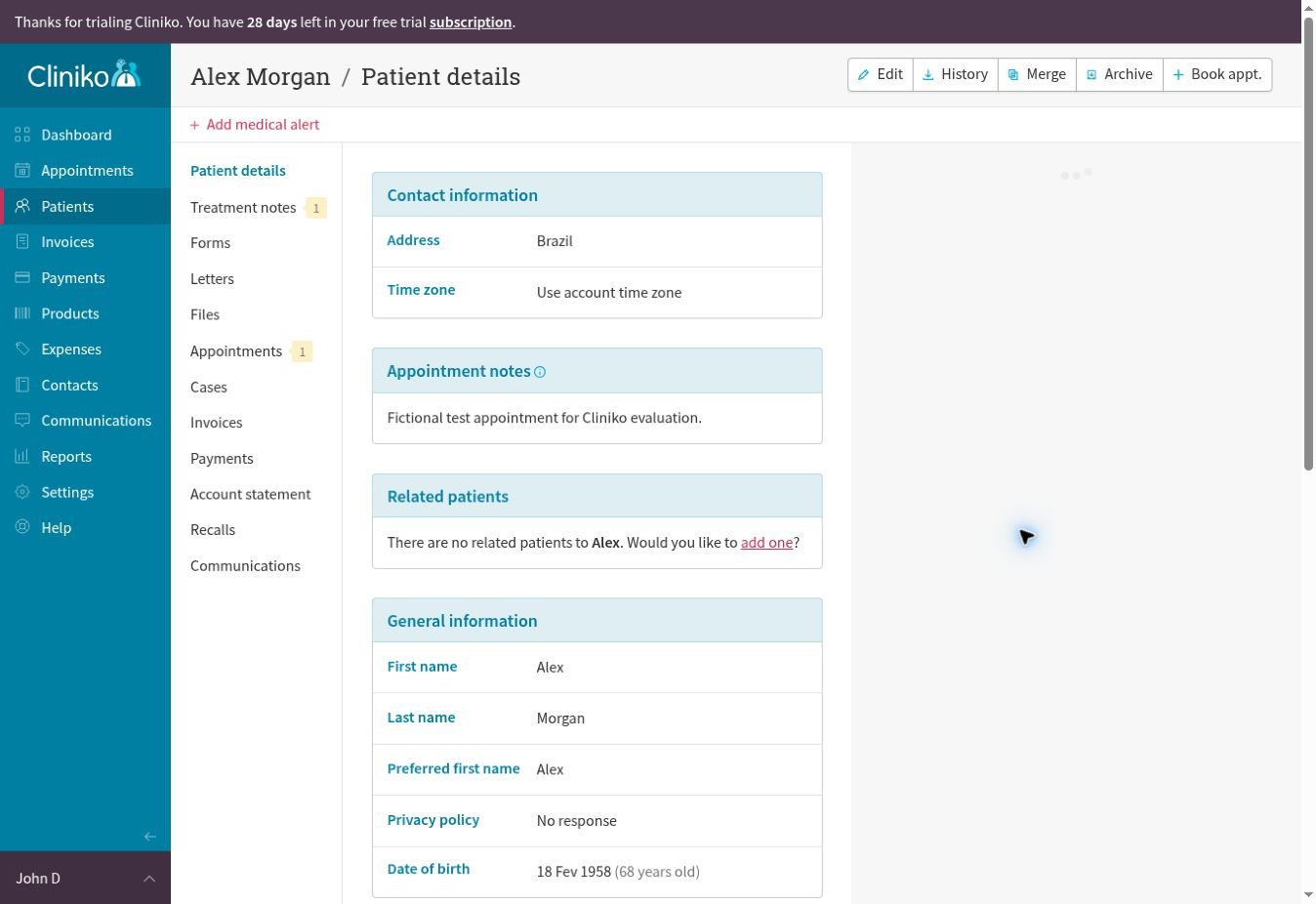
Cliniko gives each patient a central record with a consistent menu for details, treatment notes, forms, letters, files, appointments, cases, invoices, payments, account statements, recalls, and communications. That structure reduces the need to search different parts of the system for one patient’s history.
Clinical Documentation
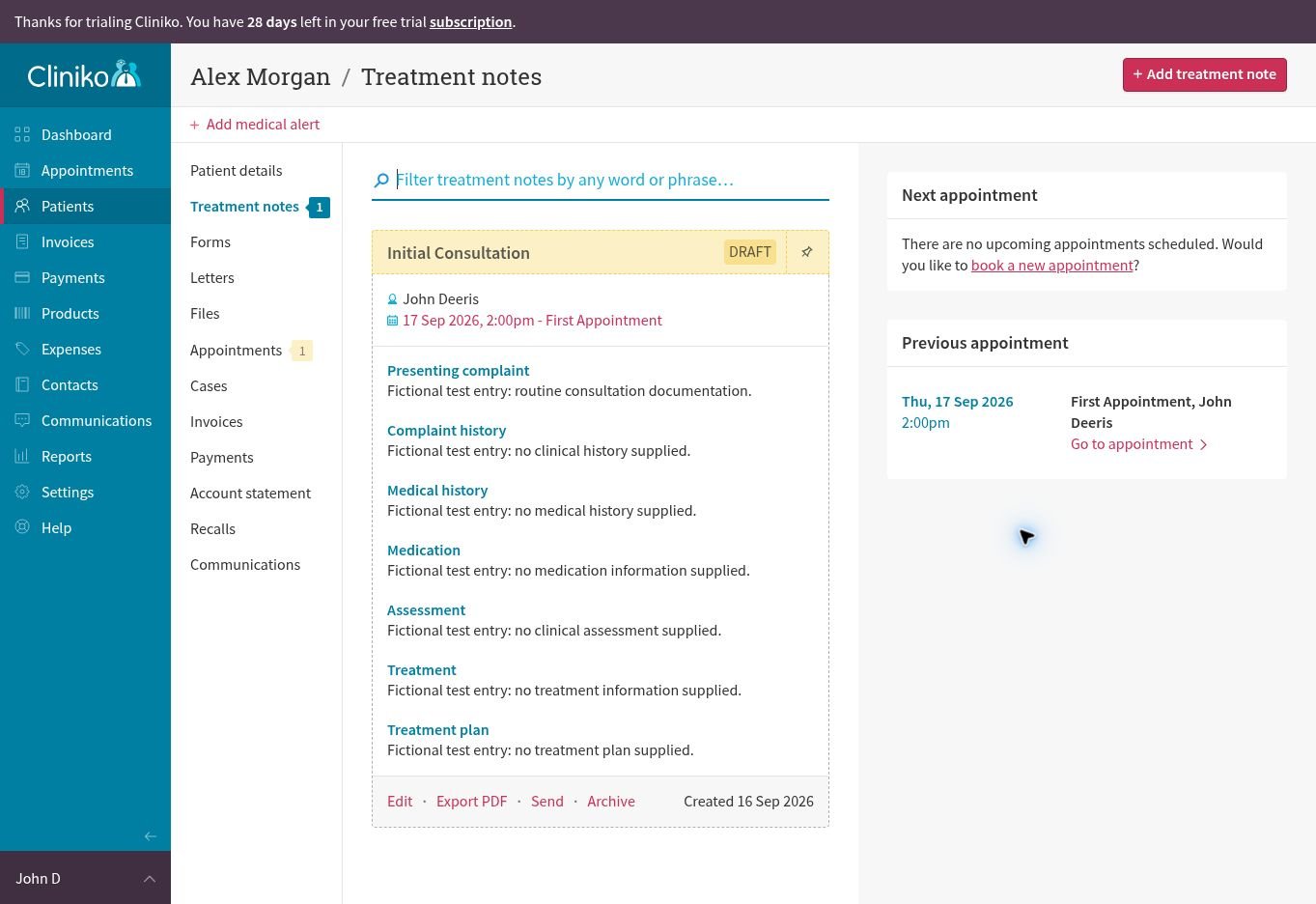
The treatment-note layout was the strongest part of this test. My fictional initial-consultation template separated the presenting complaint, complaint history, medical history, medication, assessment, treatment, and treatment plan. Cliniko also labelled the unfinished note as a draft and connected it back to the appointment.
The note could be edited, exported as a PDF, sent, or archived from the same screen. Search is available for finding words or phrases across treatment notes, which should become more valuable as the record grows.
- Customisable treatment-note templates for different disciplines and appointment types
- Forms, letters, files, body charts, medical alerts, and communications linked to the patient
- Draft status helps practitioners identify incomplete documentation
- PDF export and patient change logs support record management and accountability
Test result: 9.2/10. Patient information and clinical documentation feel like one workflow rather than separate modules. The number of sections may initially look dense, but the left-side patient menu stays consistent.
Test 3 Reports Settings and Practice Management
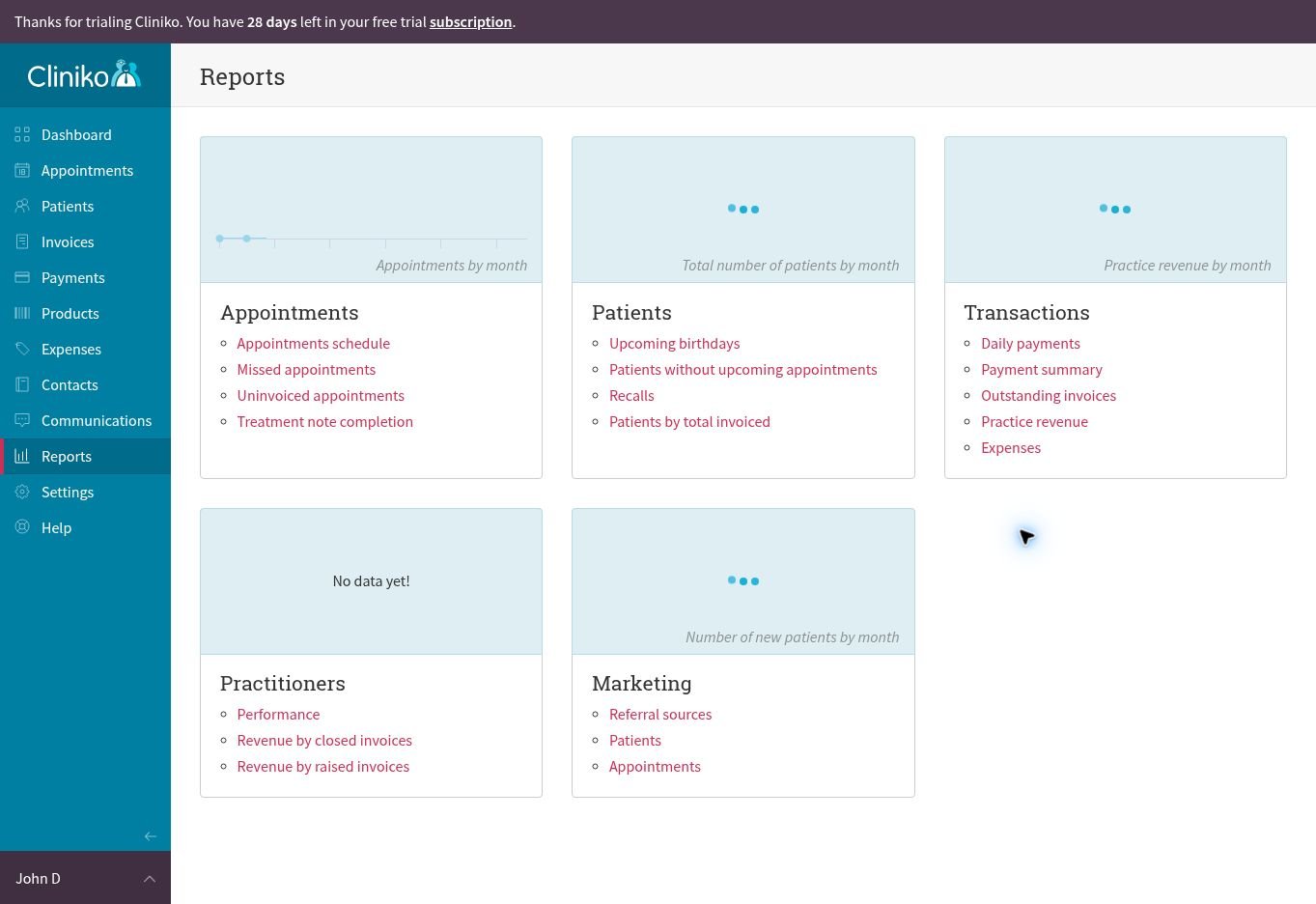
Cliniko’s reporting area is broader than a basic appointment dashboard. The account included report groups for appointments, patients, transactions, practitioners, and marketing. Available reports covered missed and uninvoiced appointments, treatment-note completion, recalls, patients without upcoming appointments, outstanding invoices, revenue, expenses, practitioner performance, and referral sources.
Configuration Depth
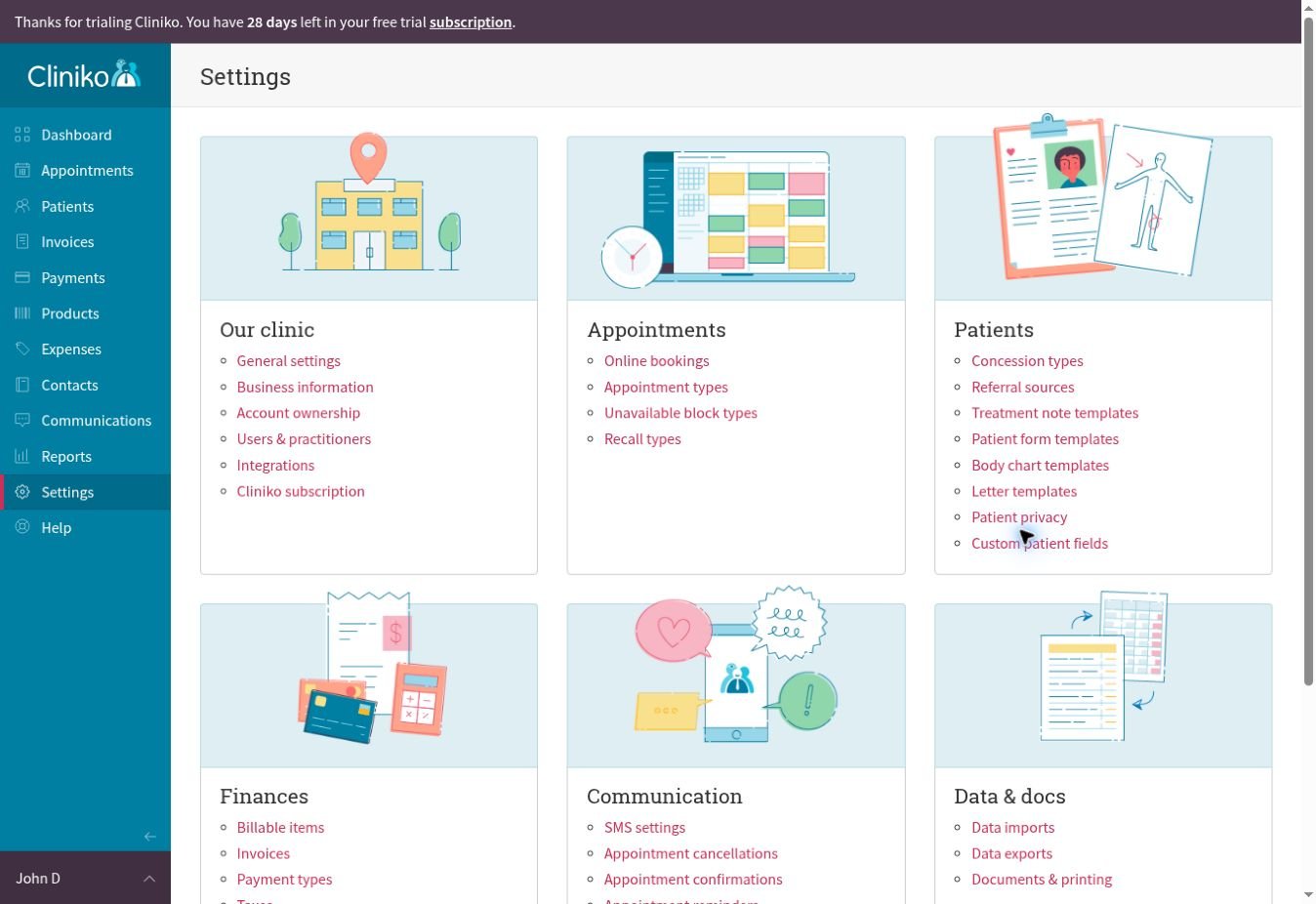
The settings area showed how much of the practice can be configured without leaving Cliniko. Options covered online bookings, appointment and recall types, treatment-note and patient-form templates, body charts, invoices, payment types, taxes, SMS, appointment confirmations, reminders, follow-up messages, imports, exports, and printing.
Test result: 8.6/10. The range is strong, especially for a clinic that wants clinical and business administration in one platform. However, a fresh trial account cannot demonstrate whether the charts and reports remain equally useful with months of real data.
Cliniko Features That Matter Most
- Booking and scheduling with online booking, repeat appointments, wait lists, and flexible calendar views
- Patient records with custom treatment notes, forms, files, letters, medical alerts, and body charts
- Finance tools for invoices, payments, expenses, taxes, products, and account statements
- Communication tools for confirmations, reminders, follow-up messages, SMS templates, and stored communication history
- Reports for appointments, patient activity, revenue, practitioner performance, and marketing sources
- Connected apps and an API for services such as accounting, forms, exercise programs, and AI assistants
Cliniko Pricing in 2026
Pricing last checked: September 18, 2026.
Cliniko offers a 30-day free trial without requiring payment details. The official monthly prices are in US dollars and depend on the number of practitioners. Every subscription includes all Cliniko features, unlimited administrative and reception users, unlimited locations, file storage, and patients. Optional SMS credits cost US$0.10 per message, and connected third-party apps may charge separately.
| Practitioners | Monthly price |
|---|---|
| 1 | US$45 |
| 2 to 5 | US$95 |
| 6 to 8 | US$145 |
| 9 to 12 | US$195 |
| 13 to 25 | US$295 |
| 26 to 200 | US$395 |
Official source: Cliniko pricing
How Cliniko Compares With Jane
Cliniko does not publish a fixed customer count, but the company says the platform is trusted by thousands of healthcare practitioners in more than 95 countries. For market context, Jane’s CAD$54 Balance plan is limited to one practitioner and 20 appointments per month, while unlimited appointments begin with its CAD$79 Practice plan. Cliniko starts at US$45 per month for one practitioner and scales through practitioner tiers.
Jane has an advantage for clinics that prioritise built-in telehealth, integrated payments, and an extensive chart-template library. Cliniko stands out for its connected clinical workflow, transparent practitioner-based pricing, and strong API and integration ecosystem. Because the products use different currencies and plan structures, I would compare their workflows and required features rather than treating the starting prices as a direct like-for-like result.
Official sources: Cliniko features and Jane pricing.
Where Cliniko Has Limitations
Cliniko is broad, but it is not a native AI-first platform. Many AI reception, clinical-scribe, marketing, and automation features come through connected apps rather than the core product. That gives clinics choice, but it can also add vendor decisions, extra subscriptions, and more privacy reviews.
The interface is functional and consistent, although some settings pages contain many options. A solo practitioner can start with the essentials, but a larger clinic should plan its appointment types, templates, permissions, communication rules, and reporting needs before rollout.
Who Cliniko Is Best For
- Allied health practitioners who need scheduling and clinical notes in one system
- Solo practitioners who want a clear operational workflow without paying for separate modules
- Small and growing clinics that need shared records, reception access, payments, reminders, and reports
- Practices that value connected apps and API access for specialised workflows
Who Should Consider an Alternative
- Clinics that need a highly specialised hospital-grade electronic medical record
- Teams that expect advanced native AI automation without adding connected services
- Businesses that only need a simple booking page and would not use clinical records, finance, or reporting tools
Final Verdict
🏆 Overall verdict: Cliniko earned 8.9/10 in this hands-on test. Its best quality is the connection between everyday tasks: an appointment opens the patient workflow, the patient record opens clinical and financial history, and reporting brings those activities back into practice management. For a small allied health clinic, that consistency can matter more than having the flashiest individual feature.
The calendar and treatment-note workflow were immediately usable, while the reports and settings showed enough depth for a growing practice. Cliniko is a strong choice for clinics that want a mature, organised system and are comfortable using integrations when they need specialised AI or automation.
Explore more: AI Tools for Business | AI for Work | Tidio Review 2026

Leave a Reply