

Bigin AI Record Summary summarized a fictional sales deal that changed from a proposed $2,400 project for 120 contacts to a revised $1,800 project for 80. The change first appeared in a note, while the deal fields kept the old amount until I updated them.
I tested the feature with one fictional business, one contact, and a small sales opportunity. The result was useful for catching the status of the deal, but still needed a human check against the underlying record.
Quick verdict: The Bigin AI Record Summary organized the deal amount, scope, approval status, and next steps clearly. When a note conflicted with the deal fields, it surfaced both versions and recommended reconciling them. After I updated the fields, the summary reflected the revised proposal. Its “Scheduled Actions” label needed care; see the wording issue below.
What I tested
This was a fictional Prompt Atlas test in a Bigin account showing a Premier trial. I created a test contact, Casey Morgan — TEST, and a deal called “Cedar Lane Studio onboarding.” No real customer record or payment information went into the test. The deal began as a proposed, one-time $2,400 project to migrate 120 contacts and configure one sales pipeline. Optional monthly support cost $150 and was not included. The proposal was not approved, no contract was signed, and no payment had been received.
I used Summarize on the deal record, then added a dated note that changed the requested scope and price. I ran the summary again while the Amount and Description fields still showed the original proposal. Finally, I updated those fields to the revised details and generated a third summary.
The note said the client now wanted 80 contacts migrated for $1,800, replacing the $2,400 proposal. It also said the client had requested a demo for October 15 at 2 PM Eastern. That time was not confirmed. The $150 monthly support remained optional and unaccepted. The next steps were for the owner to confirm availability and send a revised scope.
Results from the Bigin AI Record Summary test
| Run | What the record contained | What the summary did |
|---|---|---|
| Initial | $2,400 proposal; 120 contacts; optional $150 support; no approval or payment | Matched the supplied $2,400 scope and status, and suggested confirming data fields as a next step. |
| Revision note added; deal fields stale | Note changed the project to $1,800 and 80 contacts; demo requested but unconfirmed; Amount and Description still held the old proposal | Presented the old structured fields and the newer note, called out the mismatch, and recommended updating the deal fields. |
| Deal fields updated | Amount and Description changed to $1,800 and 80 contacts; note remained in history | Reflected the new amount and scope, kept support separate, and preserved the contract and payment status. |
The first Bigin AI Record Summary got the baseline right
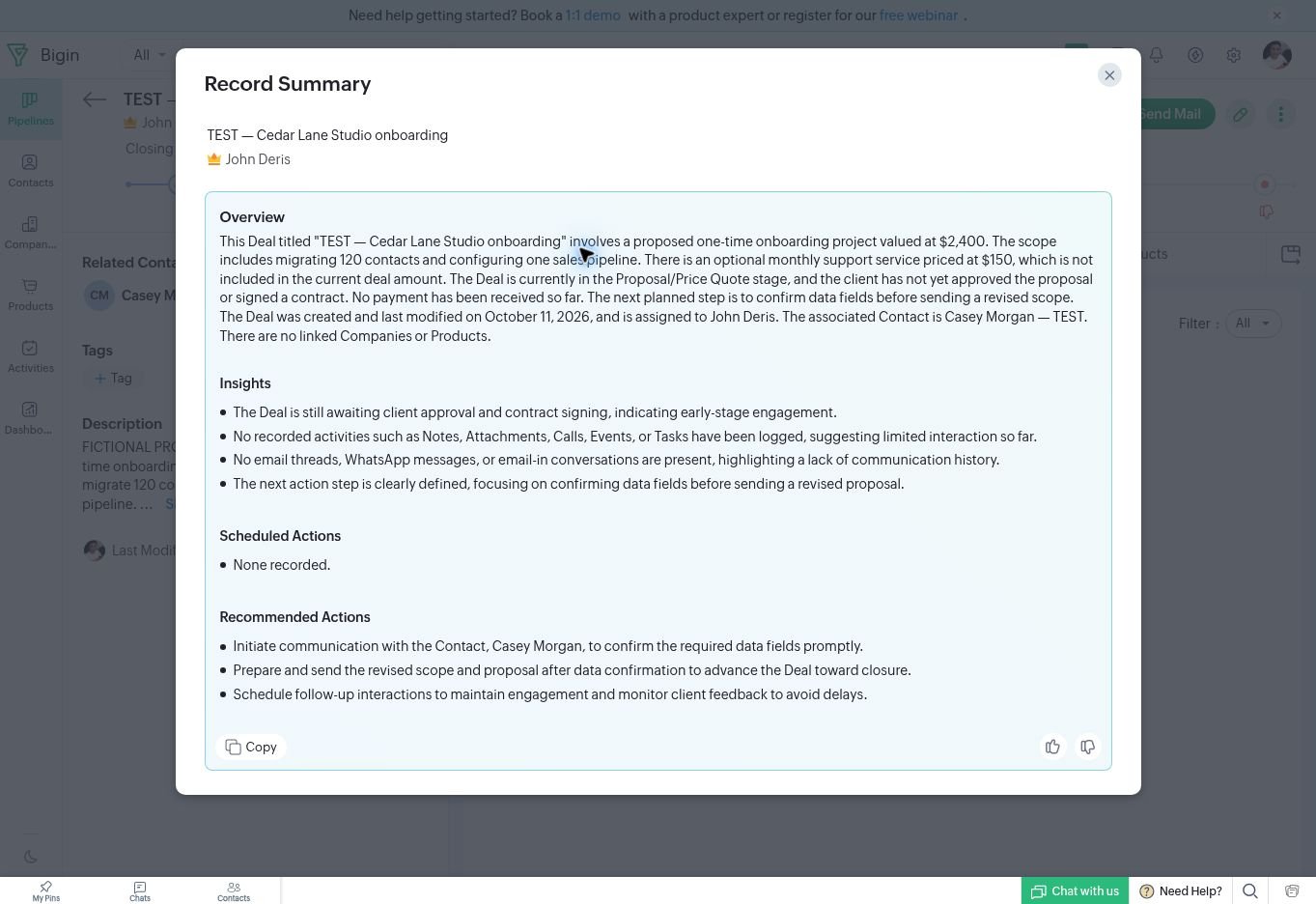
The initial overview identified the $2,400 one-time proposal, 120 contacts, one pipeline, and optional $150 monthly support. It also kept the deal in the Proposal/Price Quote stage and stated that the client had not approved it or signed a contract. It did not describe the amount as booked revenue or claim payment had arrived.
Exact excerpt: “The next planned step is to confirm data fields before sending a revised scope.”
Here, “revised scope” is a planned next step in the initial summary, not the later $1,800/80-contact change, which had not yet been added. The baseline remained $2,400 and 120 contacts; this wording does not show that Bigin anticipated the later revision.
The second summary surfaced the conflict
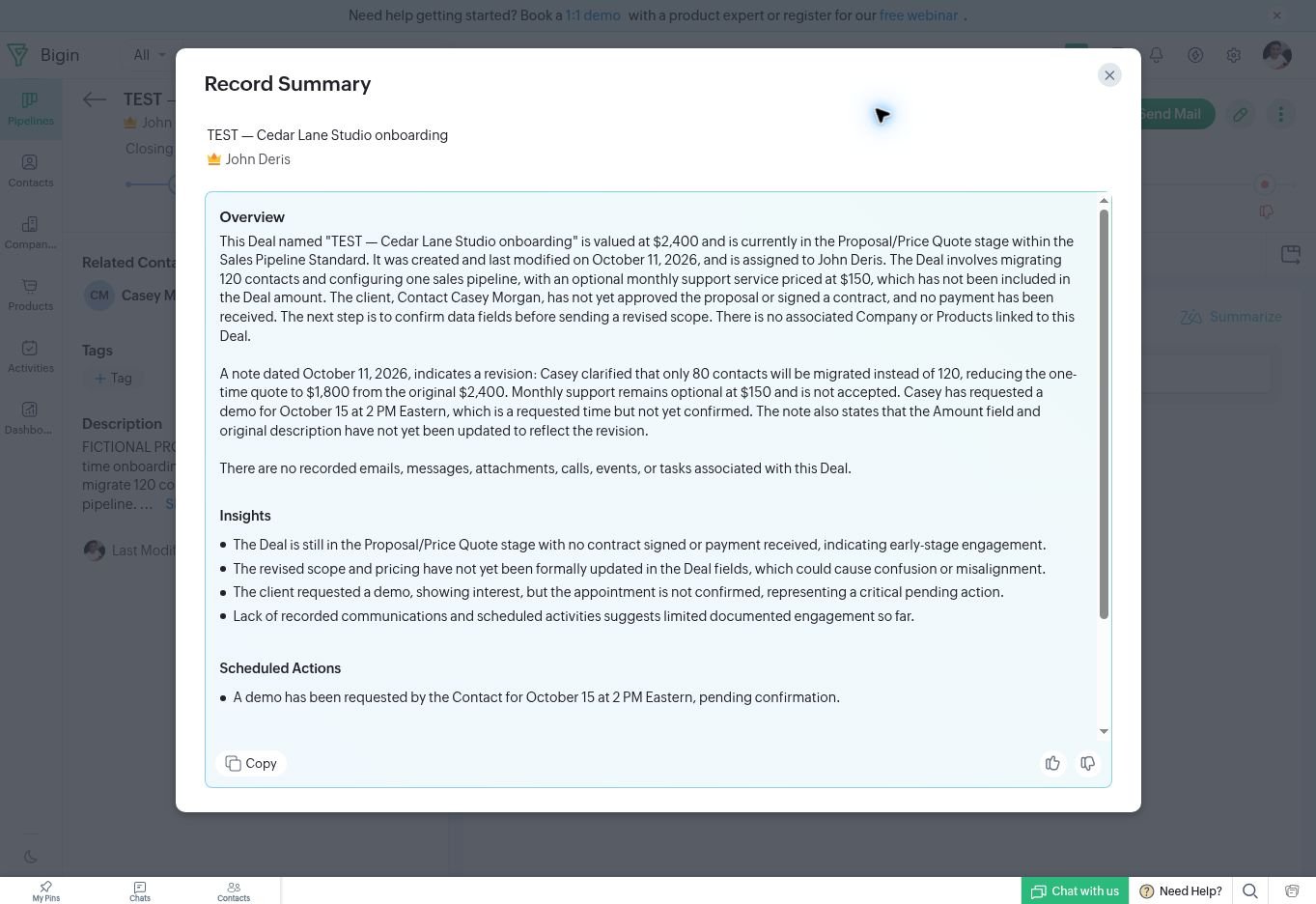
After I added the revision note but left the deal fields untouched, the overview still began with the old $2,400 amount and 120-contact scope. It then separately summarized the note’s revised $1,800 quote and 80-contact scope. The Insights section specifically warned that the fields had not been updated and could cause confusion.
Exact excerpt: “The revised scope and pricing have not yet been formally updated in the Deal fields, which could cause confusion or misalignment.”
That is a meaningful strength: the summary did not silently choose one version and erase the disagreement. It also did not resolve the record for me. The user still has to decide which information is current and update the fields deliberately.
There was one wording issue to watch. Bigin put the requested demo under Scheduled Actions, while explaining that it was awaiting confirmation. No calendar event had been created in this test. Readers should distinguish an action mentioned in a note from an appointment actually scheduled in a calendar.
Updating the record improved the final summary
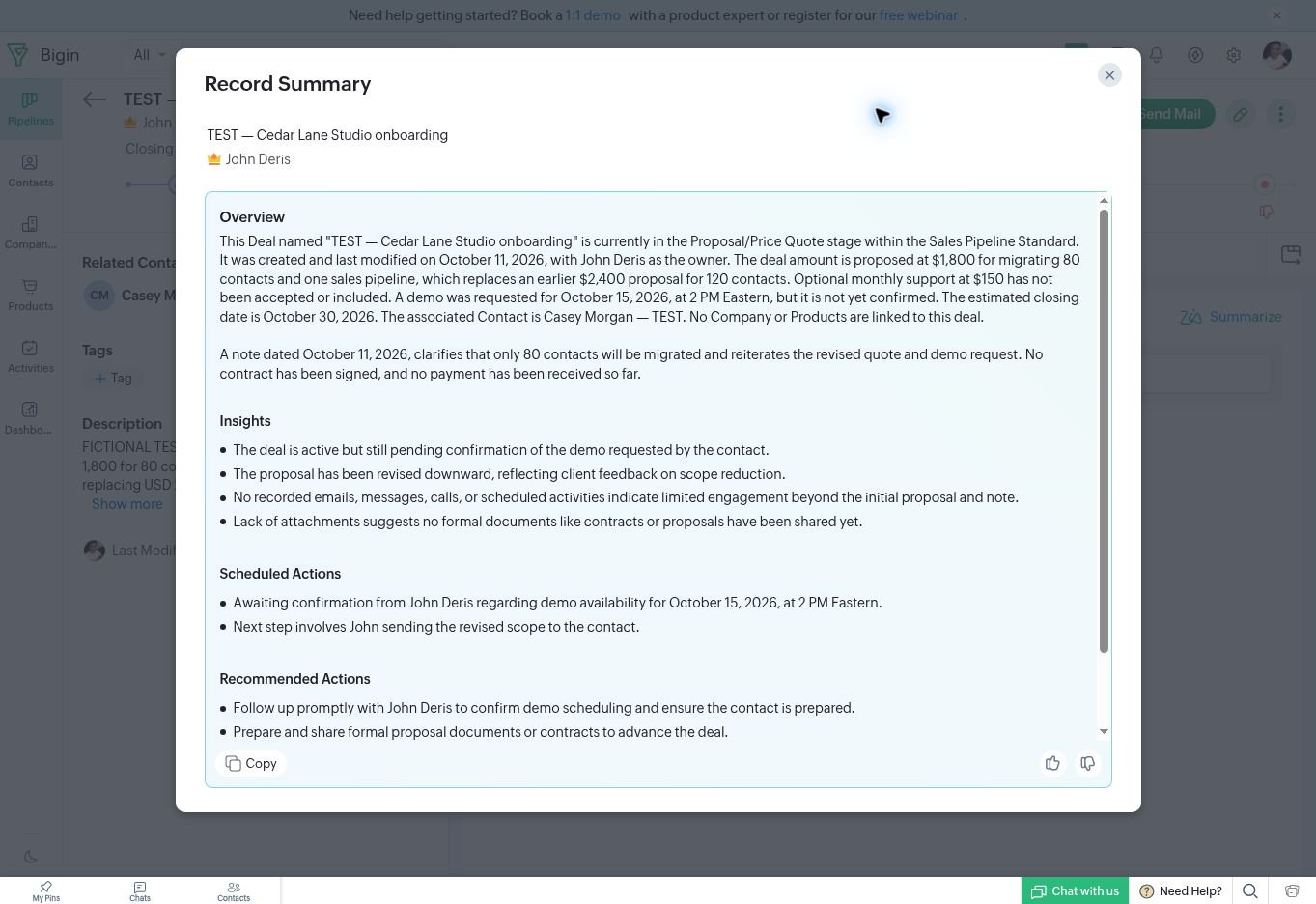
I changed the deal Amount to $1,800 and revised the Description to state the new 80-contact scope. I left the historical note intact and clearly marked the old-field statement as historical. The third summary then used the updated amount and scope in its overview. It retained the distinction between the $150 optional support and the one-time project, noted that no contract or payment existed, and described the October 15 demo as requested but not confirmed.
Exact excerpt: “The Deal amount is now proposed at $1,800 for migrating 80 contacts and one sales pipeline, which replaces an earlier $2,400 proposal for 120 contacts.”
What worked—and what needs review
Bigin did well at collecting facts spread between the deal fields and a note. It preserved the old and new values long enough to identify the inconsistency, then reflected the revised structured data after I corrected the record. It kept optional recurring support separate from the one-time proposal.
The main limitation is that the summary is only as orderly as the record history. An old amount can remain visible alongside a corrected value, and a reader must understand which entry is current. The “Scheduled Actions” heading also deserves a click-through to the actual calendar or activity record before anyone assumes an appointment exists.
Live-CRM testing caution: Creating the fictional $2,400 deal triggered a “Big Deal Alert” email from the account’s existing Big Deal Rule, not from AI Record Summary; check active automations before adding test records. I paused the rule for the record updates and confirmed it was active again afterward.
Plan and pricing
The account displayed 15 days left in a Premier trial during the test. Bigin’s official U.S. pricing page currently lists Premier at $15 per user per month on monthly billing or $12 per user per month when billed annually. The same page places Record Summary in the Premier feature list and includes 1,000 AI credits per month; it says credit use varies by feature and request, so credits cannot be translated into a fixed number of summaries. Confirm the current price, AI allowance, and any tax at checkout before subscribing.
AI-credit check — October 11, 2026: The original three runs did not have before-and-after credit readings. In a follow-up check during the same Premier trial, I recorded the AI settings counter, clicked Summarize once on the existing updated fictional deal without changing its fields or note, and checked the counter again after the summary appeared.
| Follow-up check | Observed reading |
|---|---|
| Before clicking Summarize | 21.14 / 100 credits used |
| After the summary appeared | 21.14 / 100 credits used |
| After reloading AI settings | 21.14 / 100 credits used |
| Visible change | 0.00 credits at the displayed precision |
The trial counter showed a 100-credit allowance, distinct from the published Premier allowance described above. This unchanged reading does not establish that a new summary costs zero credits: the record was unchanged, the displayed summary matched the earlier final output, and I could not verify whether Bigin reused that output or whether usage reporting was delayed. This is a measured counter observation for one repeat request, not a verified per-generation cost or a basis for estimating summaries per month.
Who should use it—and who should be cautious
Record Summary may help a small team that already stores deal scope, notes, and next steps in Bigin and wants a quick briefing before a follow-up. It is most useful when people keep structured fields synchronized with later notes.
Be cautious if your CRM routinely contains conflicting updates, if your team treats an AI-generated “next step” as a completed calendar booking, or if you need an audit-ready account of contract status. Open the original note, deal fields, and calendar before acting. Bigin’s own AI terms say summaries can omit details or misinterpret nuance, and they instruct users to verify generated content.
Final take
For this one fictional deal and its three summary runs, Bigin provided a useful briefing on the changing amount and scope. It handled a changing scope best when I kept the revision note and deal fields in sync. Before that correction, it displayed both versions and warned about the mismatch—a useful cue, but not a substitute for cleaning up the CRM record.
Use the summary to find what deserves attention. Use the original fields and activity history to decide what is true and what has actually happened.
Related reading
- ChatGPT for Weekly Sales Reports: Checking a CSV Before Using the Numbers explores another practical check in a sales workflow.
- Clay Lead Enrichment via ChatGPT: Company Facts Checked shows a separate hands-on test involving CRM prospect data.
Test limits and sources
This was one fictional deal in one account during a Premier trial, tested on October 11, 2026. It was not a benchmark of accuracy across accounts, industries, languages, or long histories. I did not test real client data, email reply generation, calendar booking, or long-term performance. I did not compare Record Summary with AI summaries in other small-business CRMs, so this test does not establish which tool performs better.
- Bigin official pricing and editions — checked October 11, 2026.
- Bigin AI features.
- Bigin in-product AI Terms of Use, displayed when I first used Record Summary. The terms describe third-party AI processing and warn that generated summaries can omit or misinterpret details.





Leave a Reply