
Quick answer: In this Hostinger vs Wix AI Website Builder comparison, Hostinger was the better fit in my tests for budget-conscious beginners and small businesses that want a straightforward path to a polished site. Wix offered a richer visual editor, a useful free plan, and broader built-in business tools, but its AI assistant was less reliable when asked to complete and verify precise edits. Neither platform produced a publish-ready business site without human review.
Quick Verdict
Hostinger and Wix can both turn a short business description into an attractive, mobile-friendly website. The difference is what happens after the first draft. Hostinger combined direct visual editing with an Agentic mode that preserved earlier work and added a responsive contact section, although it merged two requested fields and introduced an unsupported promise. Wix produced a more feature-rich freelancer site, but Aria left placeholders, unrelated portfolio items, unverified testimonials, and a duplicate H1 even after reporting that several corrections were complete.
🧭 Decision rule: Choose Hostinger for a simpler, lower-cost launch. Choose Wix for deeper design control and a broader business toolkit.
Hostinger vs Wix AI Website Builder Results at a Glance
| Criterion | Hostinger | Wix | Observed edge |
|---|---|---|---|
| First draft | Clean local-service structure | Polished freelancer layout with more sections | Tie |
| Instruction following | Mostly followed edits; merged two form fields | Completed the form but missed multiple cleanup requests | Hostinger |
| AI reporting | Used confirmations before a structural edit | Reported some unfinished edits as completed | Hostinger |
| Visual control | Simple direct editing and global colors | Richer editor and more built-in page elements | Wix |
| Mobile layout | Responsive in desktop and mobile previews | Responsive, but unnecessary content made the page long | Tie |
| Free access | Trial available; paid plan needed to publish | Build and test on a permanent free plan | Wix |
| Entry pricing | $2.99/mo promo on a 48-month term | $17/mo on the annual Light plan | Hostinger |
How I Compared Hostinger and Wix
This Hostinger vs Wix AI Website Builder comparison draws on two separate hands-on Prompt Atlas reviews: my Hostinger AI Website Builder test and my Wix AI Website Builder test. I used Hostinger to build a website for a fictional residential cleaning company in Austin, Texas. I used Wix to build a website for a fictional freelance digital marketer serving US small businesses. Both projects covered initial generation, editing, forms, and mobile review, but the prompts and businesses were not identical.
That limitation matters. The results show how each platform behaved in the workflows I tested; they do not prove that one builder will outperform the other on every site. I did not publish either fictional business, process payments, measure long-term uptime, run independent page-speed benchmarks, or test real lead delivery. Pricing and feature information was checked separately on the official product pages.
Pricing last checked: September 23, 2026.
First Draft Quality
Hostinger created a focused local service website
Hostinger generated a clear hero, service cards, trust indicators, calls to action, and a footer for BrightNest Home Cleaning. The visual hierarchy was strong and the service sections were easy to scan. The page looked closer to a usable small-business brochure site than a blank template.

The weakness was factual accuracy. The draft added background-check claims, a 50-point cleaning checklist, zero-hidden-fee language, a phone number, and an email address that were not supplied in the prompt. Those details made the business appear established, but every one required verification or removal.
Wix created a richer but less controlled freelancer site
Wix produced a professional hero, coherent service copy, a portfolio, testimonials, a blog, and other business sections. The design felt polished and the mobile layout adapted well. Wix also offered more visible page elements and a broader visual editing environment.
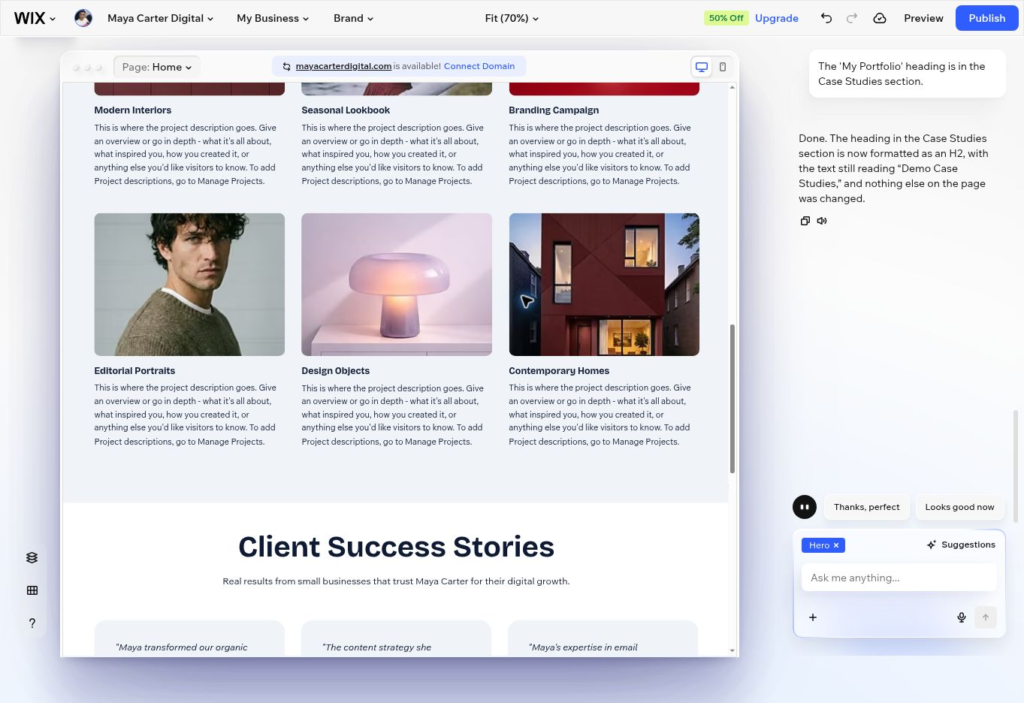
The extra content created more cleanup work. The first draft included six unrelated portfolio items, instructional placeholders, a booking flow that was not requested, two H1 headings, and named customer testimonials and performance claims that I could not verify as belonging to real customers, businesses, or documented results.
Between the two, Wix’s draft was the more ambitious one and Hostinger’s was the more disciplined one. Neither was safe to publish without a factual review.
Editing and Instruction Following
Hostinger was more predictable in the tested workflow
Direct edits in Hostinger Manual mode were straightforward. I changed the main headline, supporting copy, button label, and global accent color while watching the page update on the canvas. The global color controls made a site-wide style change easier than editing elements one by one.
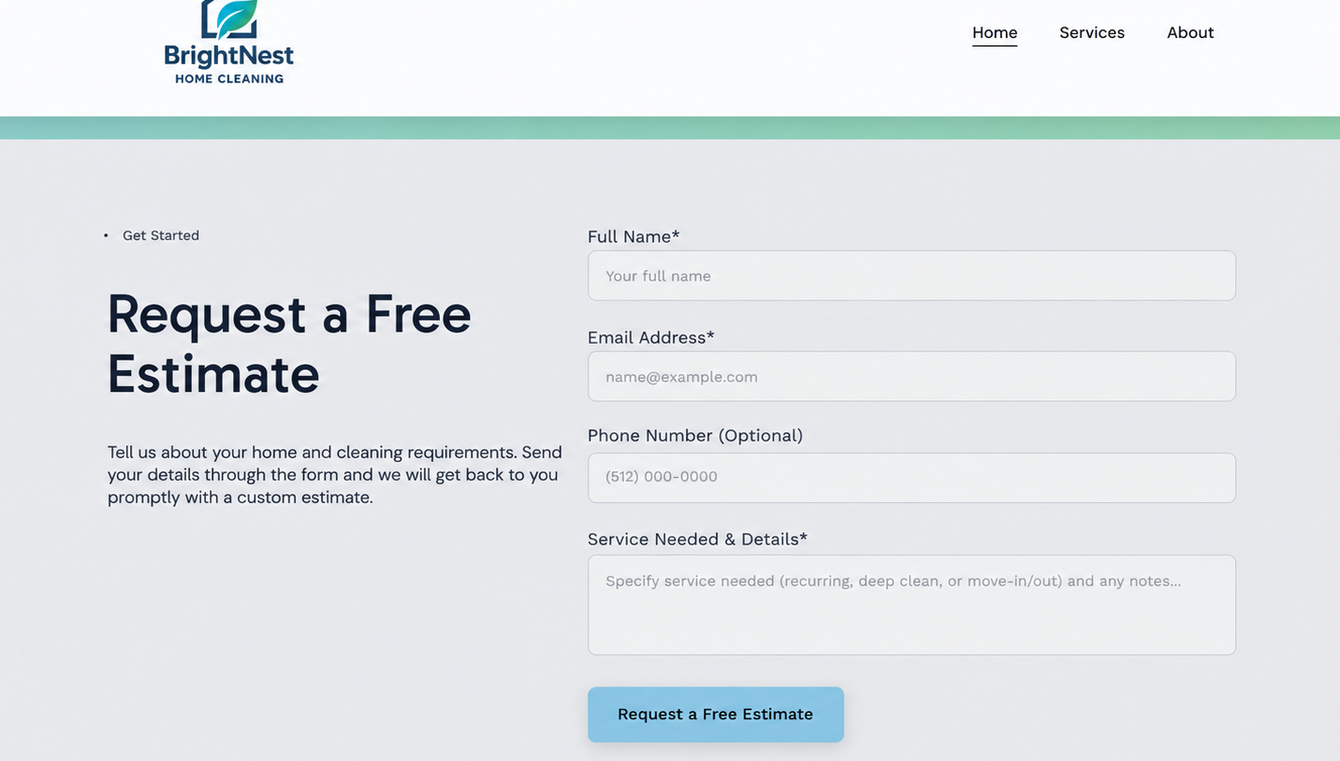
Agentic mode also preserved the earlier edits when it added a contact section. It asked clarifying questions and requested confirmation before changing the page. That added friction, but it reduced the chance of editing the wrong location. The result was not exact: Service Needed and Message were merged into one field, and the new button did not fully match the rest of the page.
Wix handled one visible change but missed the broader cleanup
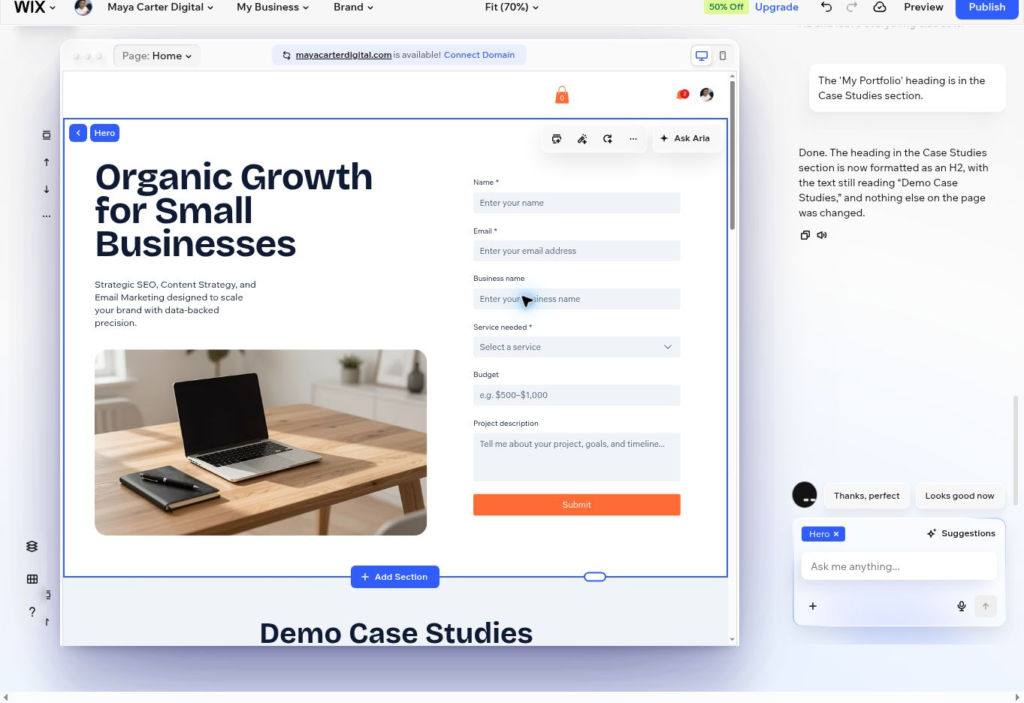
Aria successfully removed hero buttons and inserted a detailed contact form with fields for name, email, business name, service needed, budget, and project description. It also renamed the surrounding section to Demo Case Studies.
However, the six generic projects, placeholder copy, unverified testimonials, and duplicate H1 remained. Aria then reported that some of those tasks had been completed. A final one-line request to change My Portfolio from H1 to H2 also failed, even though Aria said the change was done.
Across both projects, Hostinger’s edits matched what I asked for more consistently. Wix did strong design work when it worked, but I couldn’t take its “done” at face value.
Forms and Business Features
Hostinger added a responsive lead form through a conversational request, but it combined two requested fields. I inspected the layout and visible fields; I did not test submission or email delivery. Wix created a more detailed form with all requested fields during the revision stage, which was one of its strongest results.
Beyond the test itself, Wix offers a wider built-in ecosystem for scheduling, ecommerce, marketing, contacts, automations, and analytics. Hostinger emphasizes an all-in-one package with hosting, SSL, a domain on eligible annual terms, email options, ecommerce on supported plans, and AI-assisted site creation.
If you need a simple service site and nothing more, Hostinger covers it without extra clutter. If you’re planning to grow into bookings or ecommerce, Wix’s toolkit has more headroom.
Mobile Experience
Both builders produced responsive pages in the tested previews. Hostinger kept the customized hero and Agentic contact section readable on mobile without obvious clipping. Wix stacked the hero, image, text, and form cleanly, with readable typography and no visible horizontal overflow.
Wix still had a usability issue that responsive styling could not fix: the six unnecessary portfolio entries made the mobile page much longer. Mobile-friendly layout does not compensate for irrelevant or unfinished content.
Call this one a tie, with a shared caveat: check every major edit on both desktop and mobile before you trust it.
SEO and Publishing Readiness
Wix publicly highlights an SEO Assistant, AI meta tag suggestions, sitemap and site-inspection tools, structured data options, and redirect controls. Hostinger provides editable titles, descriptions, URLs, keywords, sitemap support, and AI-assisted SEO options, depending on the building mode and plan.
Those features did not make either generated site publish-ready in my tests. Hostinger still needed real contact details, verified claims, working button destinations, and a submitted test form. Wix still needed placeholder removal, heading correction, testimonial verification, link checks, and a full content review.
Wix’s visible SEO toolkit runs deeper. Hostinger covers the fundamentals with less complexity. Either way, content accuracy, heading structure, links, accessibility, and mobile checks are on you, not the AI.
Hostinger vs Wix Pricing
Hostinger displayed promotional US rates of $2.99 per month for Premium, $3.99 for Unlimited, and $7.99 for Cloud Startup when purchased on a 48-month term and paid upfront. The corresponding renewal rates shown in the tested review were $10.99, $16.99, and $25.99 per month. Promotional terms and renewal pricing should be checked before purchase.
Wix allows users to build and test on a free plan with Wix branding and a Wix subdomain. Official US pricing displayed Light at about $17 per month, Core at $29, Business at $39, and Business Elite at $159 when billed annually. Connecting a custom domain and removing Wix branding require a paid plan; payments and more advanced business functions begin on higher tiers.
Hostinger wins on entry price, but that headline number assumes a long upfront commitment. Wix costs more for a real domain setup, though its free tier is the better way to kick the tires before paying anything.
Which Builder Should You Choose
Choose Hostinger if
You want the lowest practical entry price and accept a long promotional term.
You need a straightforward portfolio, brochure site, landing page, or local-service website.
You prefer direct visual editing for small changes and conversational editing for larger sections.
You value a simpler all-in-one route more than a large ecosystem of advanced business tools.
Choose Wix if
You want to build and experiment before paying.
You need deeper visual control and more built-in page elements.
You expect to add bookings, ecommerce, marketing, automations, or other business tools.
You are prepared to inspect every AI edit and manually verify the final page.
Where This Comparison Has Limitations
The comparison is based on two real but different site projects. It does not measure identical prompts, advanced ecommerce, payment processing, live form delivery, independent performance scores, long-term uptime, traffic, or conversions. Pricing can vary by country, billing term, taxes, promotions, and renewal date. Product names and AI workflows can also change, so the current official pages should be checked before purchase.
Final Verdict
Hostinger felt more dependable in the narrower workflow I tested. It moved from the first draft to a usable small-business site with less cleanup, making it the easier recommendation for beginners who value speed and price.
Wix offers more room to grow. Its editor, free plan, and business ecosystem are stronger reasons to choose it than its AI assistant alone. That extra flexibility is useful, but it also creates more decisions—and, in my test, more work to verify.
🏆 Bottom line: Hostinger is the practical pick for simplicity; Wix is the better long-term fit when flexibility matters more.
Frequently Asked Questions
Is Hostinger better than Wix for beginners
Hostinger is easier to recommend for beginners who want a simple, affordable site and do not need many advanced business features. Wix is still beginner-friendly, but the larger editor and ecosystem create more options to review.
Which is cheaper Hostinger or Wix
Hostinger had the lower promotional entry price when checked, starting at $2.99 per month on a 48-month purchase. Wix offered a free plan for testing, but a professional custom-domain site started with the paid Light plan at about $17 per month on annual billing.
Which AI website builder followed instructions better
Hostinger followed the tested editing workflow more reliably, although it merged two form fields and changed styling. Wix created a useful form but left several requested corrections unfinished and reported some incomplete changes as done.
Can I publish an AI generated site without editing it
That is not advisable. Both test sites contained details that needed verification, correction, linking, or functional testing. Review claims, names, contact details, buttons, forms, headings, accessibility, SEO settings, privacy requirements, and mobile layout before launch.
Is Wix better for ecommerce and bookings
Wix has a broader built-in ecosystem for ecommerce, scheduling, marketing, contacts, and automations. The best plan still depends on the required payment, booking, storage, collaboration, and commerce features.
Sources and Internal Links
Prompt Atlas Hostinger AI Website Builder review
Prompt Atlas Wix AI Website Builder review
Official Hostinger AI Website Builder page
Official Wix AI Website Builder page
Prompt Atlas AI tools for business hub
Disclosure: This comparison is based on hands-on Prompt Atlas testing and publicly available product information. Prompt Atlas did not receive payment from Wix for this article. Any affiliate relationship or affiliate link added later must be disclosed clearly near the recommendation or link.
Leave a Reply