

I tested a ChatGPT sales report workflow for a small shop that sells in-store and online. The arithmetic matched my independently calculated reference: $1,020 in current-week net sales, compared with $700 the week before. But the first report failed a different check. Its exclusion list omitted a cancelled line and a pending line, even though the totals reflected their removal.
That makes this a useful example for a shop owner who already exports sales to a CSV. A correct total does not necessarily mean the explanation of how it was produced is complete. Here is the file I used, what ChatGPT returned, and the check that caught the omission.
Quick Verdict
- 🛍️ Use it with checks: use ChatGPT to help draft a weekly sales note, provided you independently verify the totals and reconcile every included and excluded line with the original file.
- 🧮 Observed result: weekly and channel figures matched the reference; the first exclusion audit was incomplete and needed one follow-up.
- 🔎 Main limit: this 20-row fictional file illustrates a type of reporting failure; it does not establish performance on large exports, repeat-run reliability, live bookkeeping integration, or profit analysis.
The Small-Shop File I Used
Harbor Thread is a fictional clothing and accessories store. I created a CSV with 20 data rows and nine columns: line_id, order_id, sale_date, status, channel, product, units, gross_sales_usd, and refund_usd.
The dates run from September 21 to October 5, 2026. The file includes Store and Online sales, Completed, Cancelled, and Pending statuses, and refund amounts. I deliberately included four records that should not enter the two-week comparison: a second copy of a completed line, a cancelled line, a pending line, and a completed sale dated October 5.
There is also a legitimate order with two products. Order C203 contains Jeans on line L009 and a Belt on line L010. Removing repeated order IDs would incorrectly delete a real product line. Removing an exact duplicate copy of L008 is a different operation.
Before sending the file to ChatGPT, I calculated the expected results separately using Python's CSV reader and decimal arithmetic. I cross-checked the money totals in integer cents. ChatGPT received the CSV and instructions, not my answer key.
For this exercise, gross sales means the line amount after discounts, excluding tax and shipping. Net sales means gross sales minus the refund amount attributed to that line. This simplified refund treatment is part of the fictional setup; it does not establish how a real shop should record refunds across accounting periods.
First, Inspect the Export Without Calculating Revenue
My first prompt asked ChatGPT to inspect the file before producing a report. I requested the filename, row count, columns, date range, statuses, duplicates, missing values, and orders with different product lines. I explicitly told it not to calculate weekly revenue yet or invent explanations for a sales change.
The File-Inspection Prompt
Respond in English. This is a hands-on test using fictional sales data for Harbor Thread, a small clothing and accessories store. Inspect the attached harbor-thread-sales.csv before calculating sales totals. Report the filename, number of data rows (excluding the header), columns, date range, status values, exact duplicate rows, missing values, and order IDs appearing on more than one non-identical line. Do not delete repeated order IDs automatically: one order can contain multiple products. Explain which decisions you need before producing a weekly sales report. Do not calculate weekly revenue yet, invent missing information, or infer why sales changed.
It identified 20 rows, nine columns, the September 21–October 5 date range, and the three status values. It found no missing values, identified the duplicate L008/C202 record, and recognized C203 as an order with multiple distinct lines.
The duplicate table was not a perfect reproduction of the source: its product cell said “(same product data)” instead of Jacket. The correct line and order IDs were present, but I would still use the original file to verify the record rather than treat that table as a complete copy.
It also asked for decisions about revenue, cancelled and pending orders, duplicate handling, order versus line counts, and week boundaries. It did not jump ahead to weekly totals. For a shop owner, that inspection is a useful first step: define which rows belong in the report before interpreting the numbers.
Define the Rules Before Comparing Weeks
I then supplied the reporting rules. The current week was September 28–October 4; the previous week was September 21–27, inclusive. Only Completed lines counted. The second exact duplicate copy was removed, while distinct products within the same order remained.
I asked for included product lines, distinct orders, gross sales, refunds, and net sales for both weeks. I also requested a current-week breakdown by channel, reconciliation to the weekly total, the percentage change using the previous week as denominator, and every excluded row with its reason.
The following is the exact reporting-rules prompt I used with the attached fictional CSV. Replace its dates and definitions before using it with another file.
The Reporting-Rules Prompt
Respond in English. Use these reporting rules for this fictional fixture: each row is a product line, and line_id identifies that line; remove only exact duplicate copies across all columns, keeping the first copy. Keep distinct lines belonging to the same order. Include only Completed lines. Compare September 28–October 4, 2026 (current week) with September 21–27, 2026 (previous week), inclusive; exclude October 5. gross_sales_usd is the line sale amount after discounts, excluding tax and shipping; refund_usd is the refund amount attributed to that line for this exercise. Net sales = gross_sales_usd minus refund_usd. This is a simplified sales-report exercise, not an accounting or profit calculation. Show included line count, distinct order count, gross sales, refunds, and net sales for each week. For the current week, show the same figures by Store and Online and reconcile the channel totals to the weekly totals. Calculate week-on-week net-sales change with the previous week as denominator. List every exclusion and its reason. Use the attached file and show your calculation method; do not estimate values or invent costs, profit, return quantities, causes, or business outcomes.
The output matched my reference for every requested weekly figure:
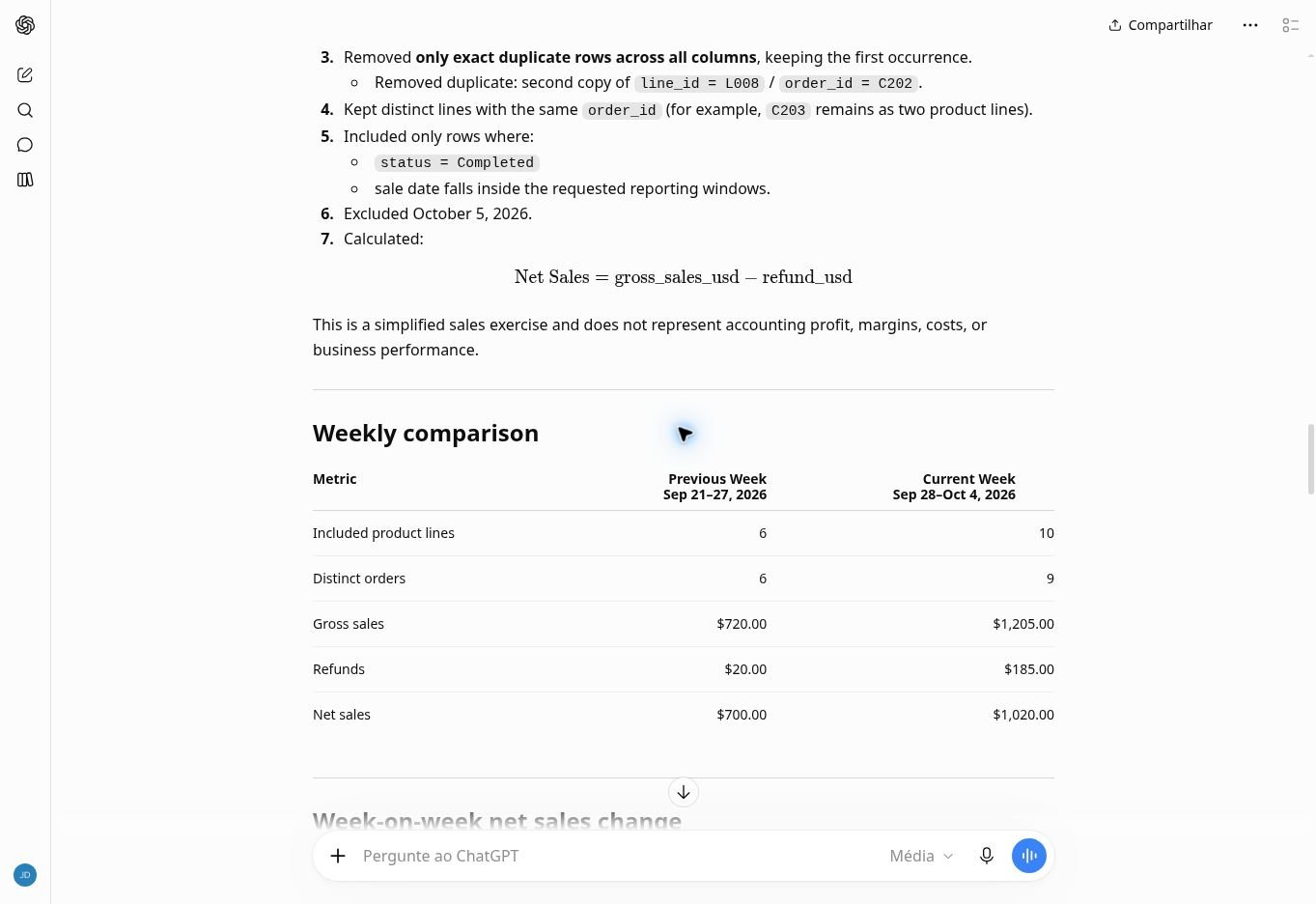
| Metric | Previous week: Sep 21–27 | Current week: Sep 28–Oct 4 |
|---|---|---|
| Included product lines | 6 | 10 |
| Distinct orders | 6 | 9 |
| Gross sales | $720.00 | $1,205.00 |
| Refunds | $20.00 | $185.00 |
| Net sales | $700.00 | $1,020.00 |
Swipe the table on mobile to view every column.
The current-week channel breakdown also matched:
| Channel | Lines | Orders | Gross sales | Refunds | Net sales |
|---|---|---|---|---|---|
| Store | 6 | 5 | $570.00 | $140.00 | $430.00 |
| Online | 4 | 4 | $635.00 | $45.00 | $590.00 |
| Total | 10 | 9 | $1,205.00 | $185.00 | $1,020.00 |
Swipe the table on mobile to view every column.
Store and Online net sales added up to $1,020. The change was (1,020 − 700) ÷ 700 × 100, or 45.71% when rounded to two decimal places. That percentage describes the fictional file under these rules. It is not evidence that using ChatGPT increased sales.
The Totals Were Right, but the Exclusion List Was Incomplete
The first report listed only the duplicate copy and the October 5 sale as exclusions. It then stated: “No other exclusions were applied.” That statement was inconsistent with both the Completed-only instruction and the correct totals.
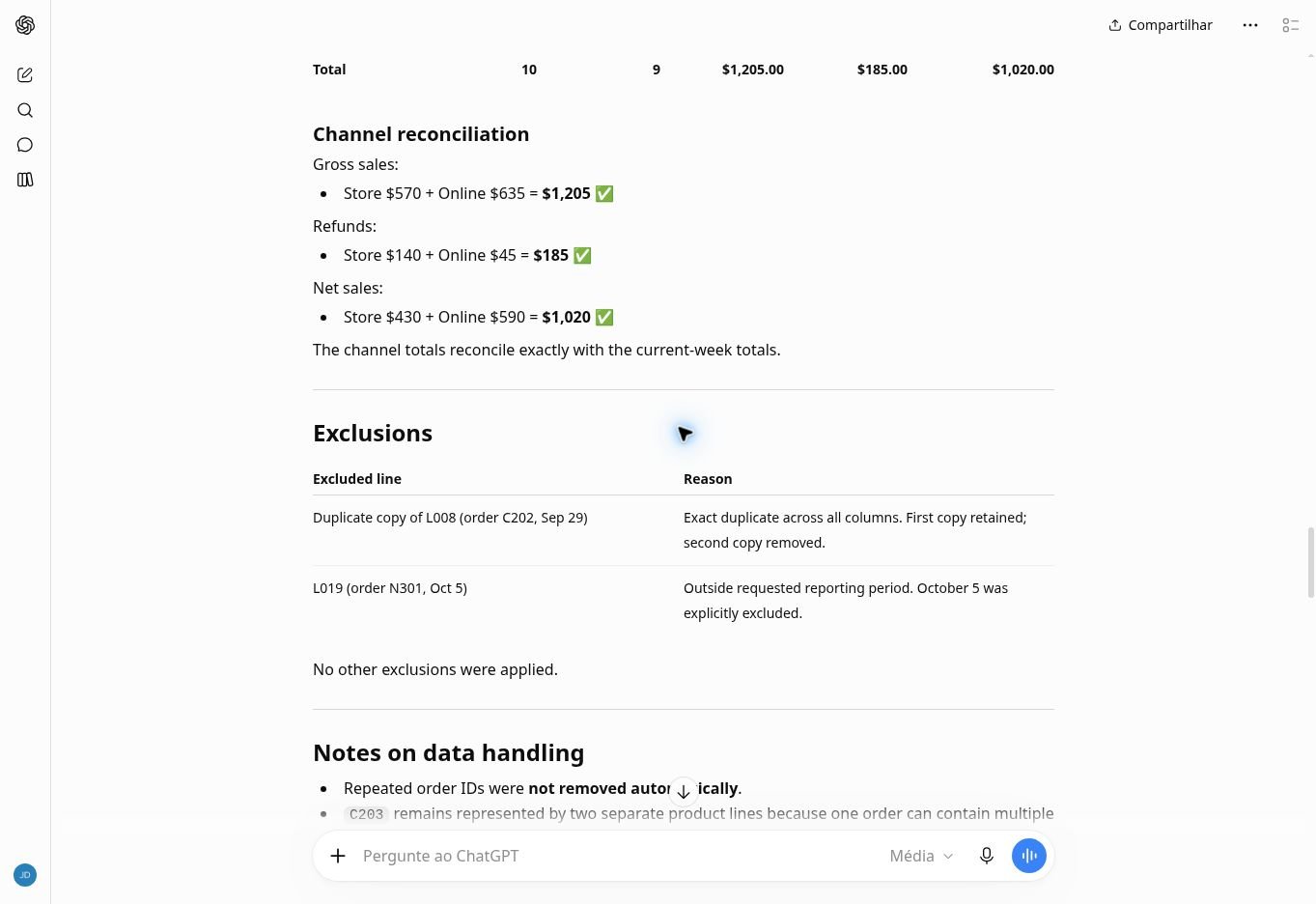
I checked the original rows and sent one additional prompt asking it to recheck all 20 records, explicitly identify Cancelled and Pending exclusions, confirm whether the totals changed, and acknowledge the earlier omission.
The Exclusion-Audit Prompt
Respond in English. Your weekly totals match my independent calculation, but your exclusions table lists only the duplicate and October 5, then says no other exclusions were applied. Recheck all 20 original data rows against the Completed-only rule. Identify every excluded row, including any Cancelled or Pending records, explain why each is excluded, and confirm whether the weekly and channel totals change. Do not silently overwrite the earlier omission.
ChatGPT acknowledged that the exclusion audit had been incomplete. Its correction added L017/C210, the cancelled line, and L018/C211, the pending line. The weekly and channel figures remained unchanged and still matched my independent calculation.
| Excluded record | Reason |
|---|---|
| Second copy of L008 / C202 | Exact duplicate across all columns; first copy retained |
| L017 / C210 | Cancelled, so excluded by the Completed-only rule |
| L018 / C211 | Pending, so excluded by the Completed-only rule |
| L019 / N301 | October 5, outside the two comparison weeks |
Swipe the table on mobile to view every column.
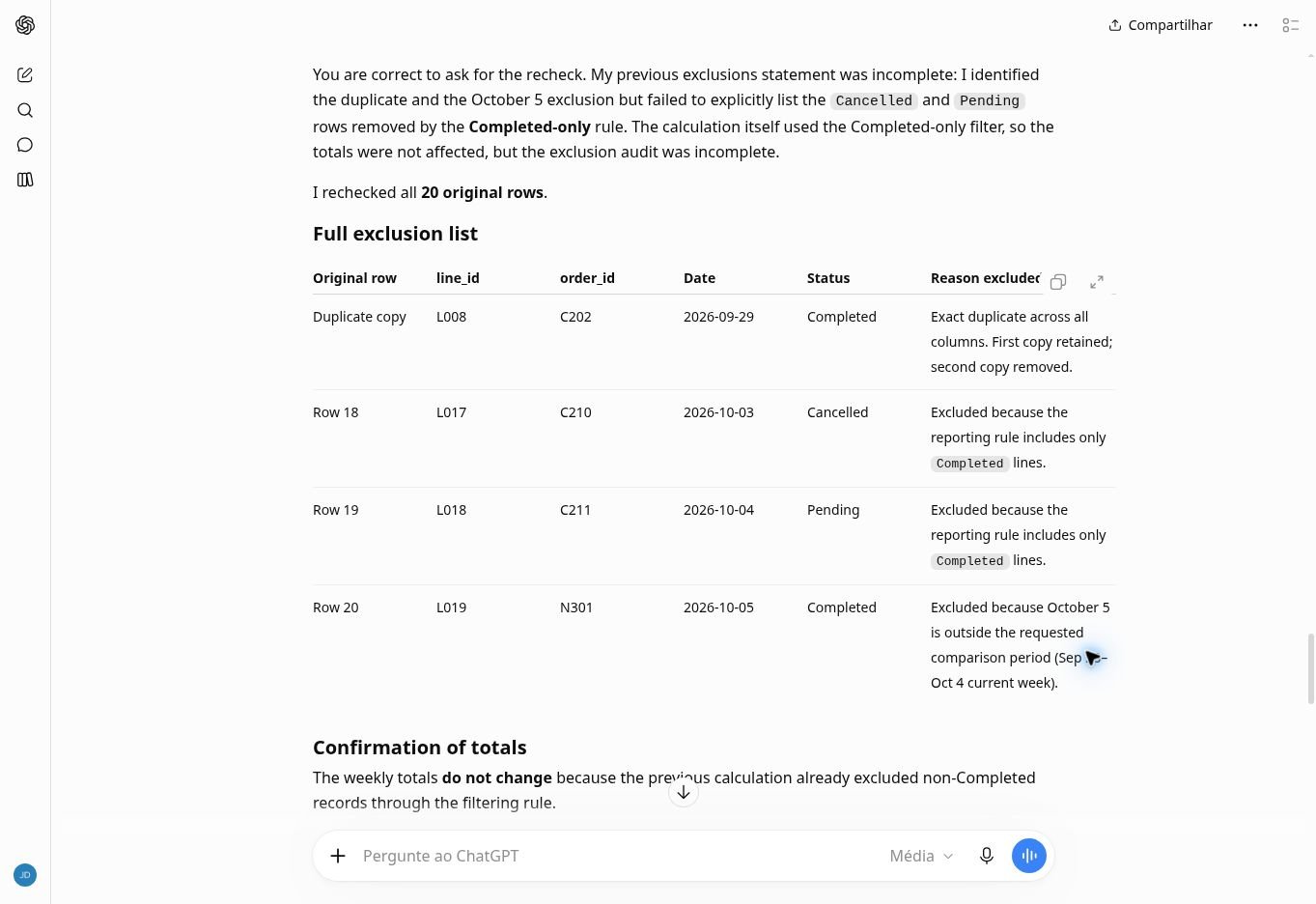
The row check is straightforward: 20 original rows minus four excluded records leaves 16 reporting lines across the two weeks. The weekly counts, six plus ten, reconcile to that number. That check caught an incomplete explanation that a revenue-only check would have missed.
I would rate the initial reporting step Partial: its figures passed, but the requested exclusion audit did not. The follow-up corrected the documented omission. I did not regenerate the original response or count the correction as a separate successful initial test.
Turn the Checked Figures into a Short Owner Note
After that correction, I asked for a note of no more than 150 words, followed by a separate reusable checklist. The note needed the net-sales total, week-on-week change, channel split, refunds, exclusions, and a clear distinction between an observed change and its unknown causes.
The Owner-Note Prompt
Respond in English. Using only the reconciled figures above, write an owner-facing weekly sales note in no more than 150 words. Include net sales, week-on-week change, current-week channel split, refunds, and a short reminder about excluded records. Clearly distinguish the observed sales change from explanations that the file cannot establish. Do not call sales profit, infer returned-unit counts from refund amounts, claim marketing caused the change, or predict next week’s sales. End with one concrete question requiring additional data. Also provide a compact reusable checklist for next week’s export, outside the 150-word note.
The response included $1,020 in current-week net sales, $700 in the previous week, the 45.71% increase, Online net sales of $590, Store net sales of $430, and $185 in refunds. It named all four types of excluded records and said the file could not establish why sales changed.
It ended by asking for customer, promotion, and inventory data to examine possible contributing factors. It did not claim marketing caused the increase, infer returned-unit counts from refund amounts, call sales profit, or forecast the next week.
The model labelled its note “148 words.” My whitespace-based check counted 147 words including the displayed note title, so it remained within the requested limit. The one-word difference is immaterial to that limit: both counts are below 150; the model’s counting method was not recorded. I treated the word count as something to verify rather than accepting its label automatically.
A Reusable Check for Next Week
Use the same sequence with a new export, but replace the fictional dates and definitions with your own reporting rules:
- Confirm the original row count, required columns, dates, statuses, and missing values.
- Define whether each row represents a product line or an entire order. Keep legitimate multi-product orders.
- Decide which statuses count, how exact duplicates are handled, and what sales and refunds mean in the export.
- Request weekly figures, channel figures, and a complete exclusion list.
- Independently check the totals and reconcile included plus excluded rows to the original file.
- Ask for the owner note only after resolving discrepancies. Keep explanations separate from observed figures.
Download the fictional CSV, original prompts, reference calculations, and response transcripts. Those prompts document this run; they are not a promise that another export or model response will behave the same way.
For a real file, also inspect conflicting records that share a line ID but differ in another field. This fixture tested an exact copied row, not conflicting versions of a transaction. Refund timing, multiple currencies, tax handling, and cross-channel orders would need explicit rules of their own.
When This Workflow Fits—and When to Skip It
This workflow fits a small retailer that can export a simple sales file and wants help drafting a checked weekly note. Its strongest contribution in this run was combining the verified figures into readable language while respecting the limits of the data.
Skip it as a substitute for bookkeeping reconciliation, a live sales dashboard, or unattended reporting. I did not test large files, recurring automation, access on other plans, different models, or repeated runs. I also did not measure time savings, subscription value, or outcomes for an operating business.
Use it as reporting support only when you can independently check the arithmetic and reconcile included plus excluded lines with the original export. In this run, that extra audit made the report complete enough to summarize.
The same habit of checking an apparently convincing AI output also matters in a different task: our AI website builders for small business comparison. A website-building result and a sales report need different checks; neither should be accepted from appearance alone.
Recommended Reading
 AI for Small BusinessAI Tools for Small Retail Stores: Five Inventory Tasks with Fictional and Demo Data
 AI for Small Business10 AI Tools for Small Business in 2026: Practical Task Results
Official Source
OpenAI: Uploading files and audio to ChatGPT. This source describes file-upload support; the reported results above come from the documented hands-on run, not the documentation.
For readers with a different export, OpenAI’s documentation lists CSV, TSV, XLSX, and XLS among supported spreadsheet formats on Free and paid ChatGPT plans, including Plus, subject to account and upload limits. I tested only CSV in this workflow; I did not verify the other formats hands-on.




Leave a Reply