
Can customers reschedule an appointment themselves—and does the old time slot become available again? I tested that workflow in Setmore and SimplyBook.me, including overlap checks, cancellations, and received confirmation emails.
Rescheduling matters for a solo consultant or service business: a confirmed booking is only part of the job. Customers also need to move appointments, the old slot needs to reopen, and the new slot must stop being offered to someone else.
I checked those steps with 30-minute and 60-minute services. This Setmore vs SimplyBook.me comparison covers the recorded booking workflow, not every integration or industry-specific requirement.
Quick Verdict
✓ For the basic workflow tested, start with Setmore Free. SimplyBook.me also supports customer rescheduling after enabling Client Rescheduling.
⚠ Setmore was tested on permanent Free; SimplyBook.me was tested on Trial. Its permanent Free workflow remains unverified.
What I Tested—and What Counted as Success
I used Prompt Atlas Test Studio, explicitly labeled as a fictional business, with Alex Morgan as the provider and Taylor Reed as the test customer. No real services were offered. The services were Test Consultation — 30 min and Test Planning Session — 60 min, each priced at $0.
Both business calendars used America/Chicago. A controlled Prompt Atlas inbox received the notifications. In Setmore, provider and customer notifications went to that same inbox under different recipient names; this was not a test of delivery between independent email providers.
The independent checks were straightforward:
- A reservation should show the selected date, duration, and provider after completion.
- A second service should not offer a start time that overlaps the provider’s confirmed appointment.
- After rescheduling, the old interval should reopen and the new interval should become unavailable.
- After cancellation, the released interval should become bookable again.
- Email receipt must be checked in the inbox, rather than inferred from a success message.
The tests were not identical in every setting. Setmore’s observed business hours were 9 AM–5 PM on weekdays; SimplyBook.me’s were 9 AM–6 PM. The public slot intervals also differed: 15 minutes in Setmore and 30 minutes in the configured SimplyBook.me account. I did not treat a larger list of times as a performance advantage.
Browser-assisted automation performed the UI actions. Account creation and verification required secure user interaction. I did not measure setup time or web-app version numbers, and I did not use AI assistants inside either product to run these booking tests.
Results at a Glance
Swipe horizontally if the columns extend beyond your screen.
| Check | Setmore Free | SimplyBook.me Trial |
|---|---|---|
| Service setup | Saved 30-minute and 60-minute test services; verified them publicly | Saved the two test services; verified them publicly |
| Public reservation | Confirmed October 21, 10–11 AM | Confirmed October 21, 10–11 AM |
| Public overlap check | Removed overlapping starts for the same provider, including a 9:45 AM start for a 30-minute service | Removed 10 AM and 10:30 AM starts for the 30-minute service |
| Customer rescheduling | Email Manage link changed 10–11 AM to noon–1 PM | After enabling Client Rescheduling, My Bookings changed October 22, 10:30–11:30 AM to noon–1 PM |
| Availability after moving | Old starts reopened; starts overlapping noon–1 PM disappeared | Old starts reopened; noon and 12:30 PM disappeared |
| Customer cancellation | Confirmed; noon interval reopened | Confirmed; first public cancellation reopened the original interval |
| Emails | Creation, rescheduling, and cancellation notifications received | Creation and cancellation notifications received; the customer rescheduled via My Bookings, and the resulting email was received and read |
Setmore: The Customer Could Manage the Appointment from Email
I completed Setmore’s manual onboarding without connecting a real Google Business Profile. I set the business timezone to Chicago and the currency to USD, then renamed its existing 30-minute and one-hour services and added descriptions identifying them as fictional tests. The unused default 15-minute service remained in the account.
The account offered a Pro trial, which I closed without activating. Billing subsequently identified Free as the current plan. That account state is stronger evidence of the access used than a generic “free signup” label.
I booked the 60-minute service as a guest for October 21, 2026, 10–11 AM America/Chicago. The confirmation showed $0 and booking ID LCYVPCAX. The corresponding customer email arrived and contained the correct service, provider, and time.
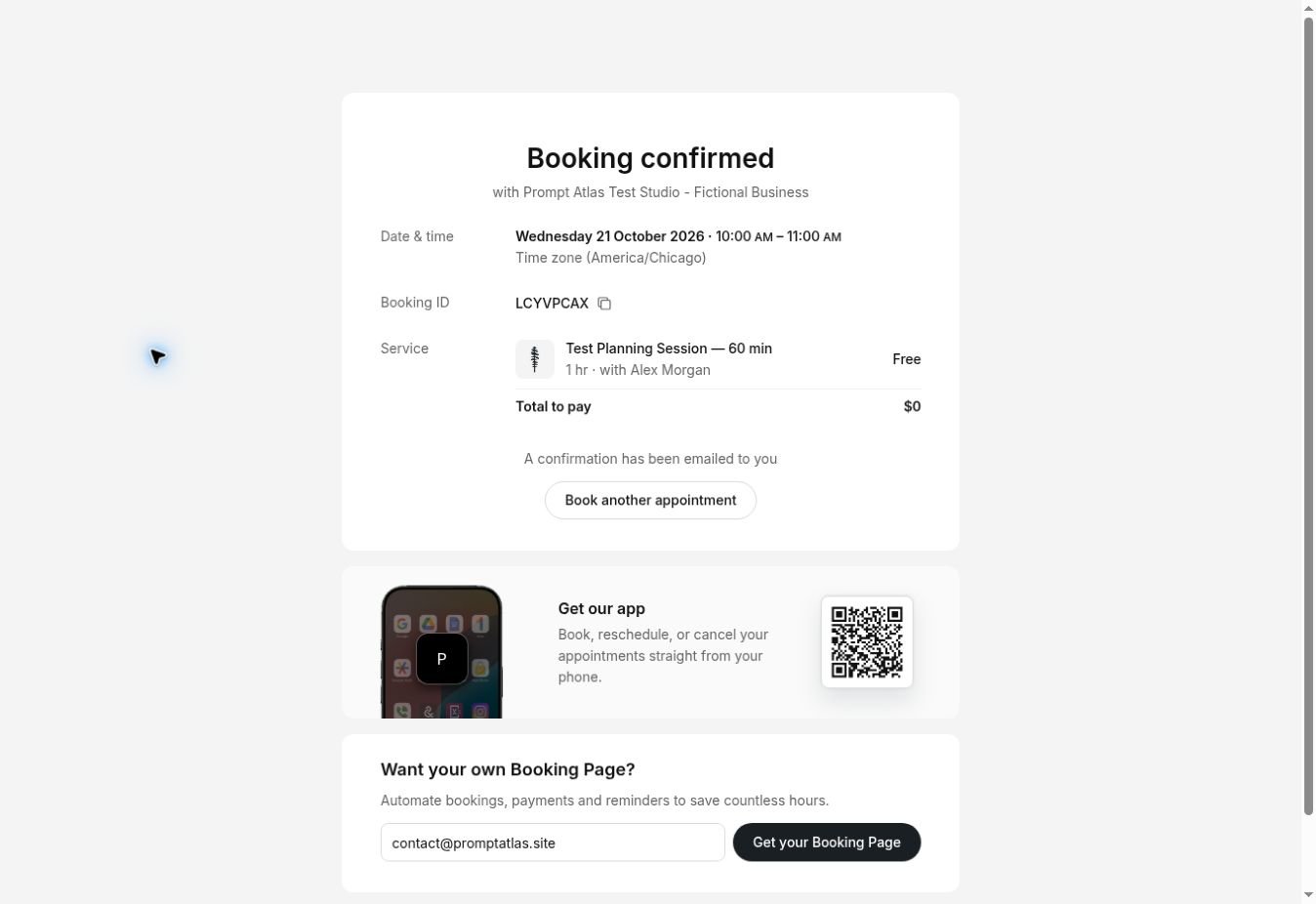
Original capture: the Setmore reservation completed on Free. The $0 service price is separate from the account’s subscription status.
Overlap protection included the edge of the appointment
With that hour occupied, I opened the public 30-minute service for the same provider. It offered 9 AM, 9:15 AM, and 9:30 AM, then resumed at 11 AM. It did not offer 9:45 AM, which would have ended at 10:15 AM and overlapped the booking. Starts inside 10–11 AM were also absent.
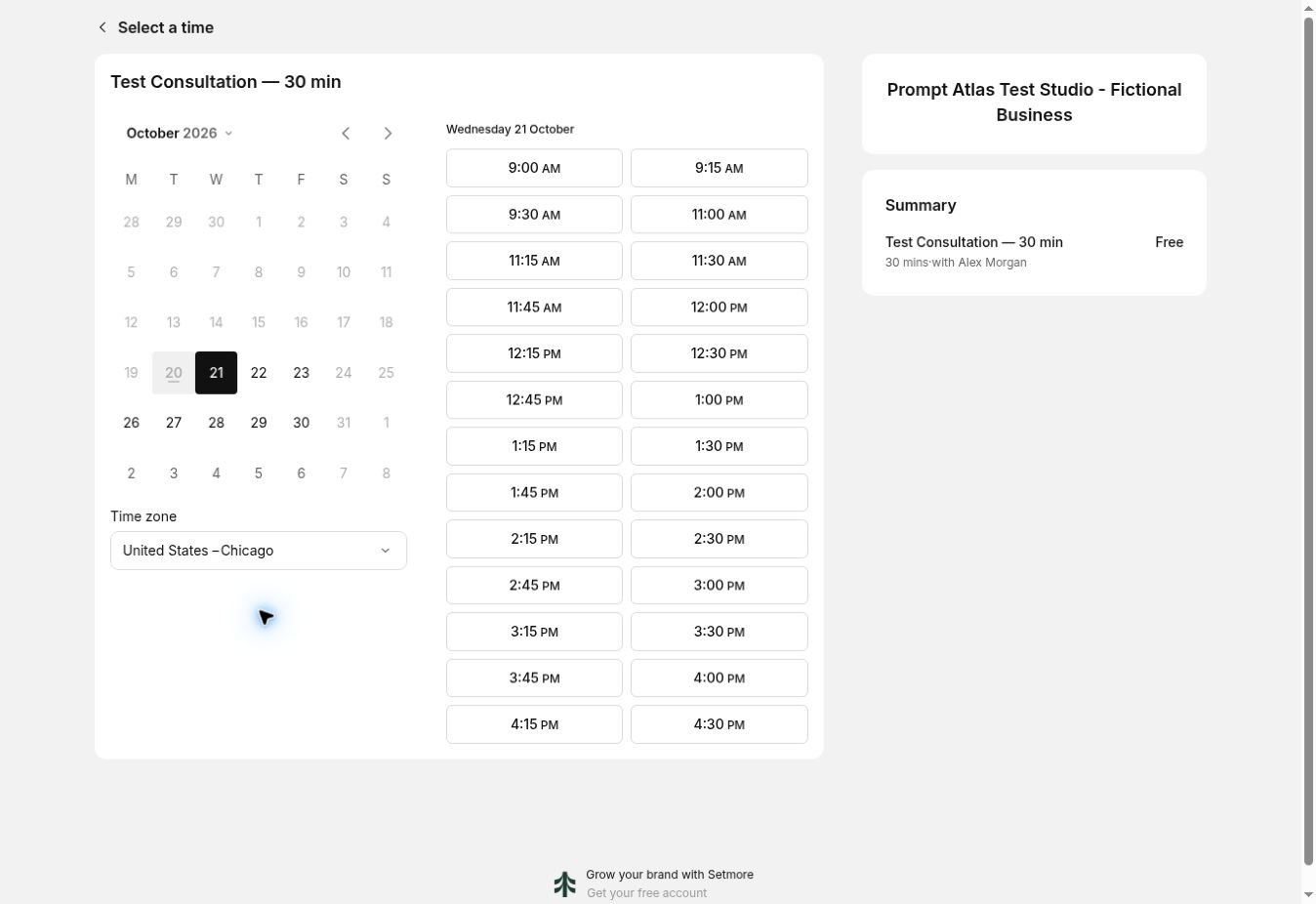
This checks the public availability interface. It does not establish protection against two simultaneous submissions.
Rescheduling worked, but the old email link expired
From the customer confirmation email, I opened Manage, selected Reschedule appointment, and moved the booking to noon–1 PM on October 21. Setmore displayed Booking rescheduled, retaining ID LCYVPCAX. The new email showed the previous and replacement times.
The availability check matched the change: 10 AM and the other old starts returned. For the 30-minute service, starts from 11:45 AM through 12:45 PM disappeared; 11:30 AM and 1 PM remained available.
After that change, reopening the original email’s management link produced an expired-link message. The replacement link in the rescheduling email worked and showed the updated appointment. I used that newer link to cancel successfully, then verified that noon, 12:15 PM, 12:30 PM, and 12:45 PM were available again.
For customers, the practical instruction is to use the newest appointment email after a change. The old-link behavior did not prevent cancellation through the current link.
SimplyBook.me: Client Rescheduling Needed Its Own Feature
SimplyBook.me confirmed the initial public 60-minute booking for October 21, 10–11 AM, code 4ol80kuu. The 30-minute service stopped offering 10 AM and 10:30 AM, while 9:30 AM and 11 AM remained available. Customer cancellation then returned the blocked starts to the public page.
I also checked an administrator-created appointment: editing it from 10–11 AM to noon–1 PM updated the calendar and public availability. That established administrator rescheduling, but it did not answer whether a customer could do the same thing.
The customer-facing check required another step. Client Rescheduling was initially disabled. I enabled it under Custom Features. The Trial account’s counted-feature usage rose from three to four, and the feature settings showed a one-hour minimum notice. I kept that setting and used a future appointment well outside the restriction.
For this additional test, I created booking 4ol82137 for October 22, 10:30–11:30 AM. Its confirmation email contained My Bookings, rather than a direct link labeled Reschedule. Opening My Bookings displayed the reservation and a Reschedule control.
Using that customer page, I selected October 22 and 12 PM. The site completed the change and displayed Booking is successfully rescheduled. The result retained the same booking code, showed 12–1 PM, and remained Confirmed. I did not use the administrator editor to make this change.

Original capture: customer rescheduling succeeded after Client Rescheduling was enabled. Access was the promotional Trial.
The email received in the controlled inbox confirmed October 22 at 12 PM. A separate public availability check offered 10:30 AM, 11 AM, and 11:30 AM, while 12 PM and 12:30 PM were absent. The first available start after the new booking was 1 PM. I canceled the fictional appointment after completing the check.
The vendor’s Client Rescheduling instructions describe this feature and the optional notification-link variable. In this test, My Bookings supplied the working route. I did not customize the email template or test the vendor’s listed exceptions for recurring, group, membership, or gift-card bookings.
Free Plans: What Was Observed and What Remains Unverified
Plan information below was checked on October 21, 2026. The limits are plan descriptions unless explicitly identified as tested. I did not create enough users or appointments to exhaust either product’s allowance.
| Item | Setmore | SimplyBook.me |
|---|---|---|
| Access used for functional tests | Permanent Free; Pro trial not activated | Promotional 14-day Trial |
| Free plan description | $0, up to four users, unlimited appointments | 50 bookings per month, one provider, one counted custom feature |
| Directly observed restriction | Service-specific custom availability and Forms displayed Get Pro | Free selection disabled during the current Trial |
| Booking-counter snapshot | No comparable counter snapshot recorded | 48 bookings remaining after the first two creations and cancellations. This snapshot preceded the third booking used for the customer-rescheduling follow-up; no final counter reading was recorded. |
| Feature usage after customer rescheduling setup | No separate feature activation was needed for the tested customer route | Enabling Client Rescheduling increased counted usage from three to four features on Trial. Permanent Free lists one counted feature; the usable combination remains unverified. |
| Still to validate | Maximum-volume and multi-user behavior | The complete workflow after activation of permanent Free |
Setmore’s official pricing page matched the Free account’s advertised allowance. I encountered Pro gates in the service editor; I did not test those paid features or purchase access.
SimplyBook.me’s official pricing page lists its permanent Free allowance separately from the 14-day trial. The saved subscription screen displayed November 3, 2026 as the Trial end date and said Free could be selected seven days before that date. Seven days before November 3 is October 27, the earliest date suggested by the account’s message for checking Free-plan availability. That date is calculated from the displayed end date, not from a verified Trial start timestamp. It is not confirmation that activation has already happened.
The counter and feature-usage observations above concern Trial access. They do not establish how permanent Free counts canceled bookings or which feature combination it permits. Do not substitute Trial evidence for a permanent Free test.
What I Learned from Testing
Check the customer’s route, not only the administrator calendar. My first SimplyBook.me rescheduling check worked from the administrator side. It took enabling a separate feature and following the customer email to establish self-service rescheduling. Those are different claims, and the article now has evidence for both.
Normalize timezones before comparing slots. Setmore initially displayed public times in São Paulo, matching the visiting browser, although the business was configured for Chicago. It reverted to that visitor timezone when I reloaded or entered another stage. I selected Chicago before comparing times and checked the timezone on the confirmations. The two-hour difference was a display conversion, not evidence of an appointment outside business hours.
Inspect what happens after the change. A success page alone would not have shown whether the original slot reopened. Checking a second service for the same provider gave a more useful operational result: old availability returned and the replacement interval stopped appearing.
Separate scheduling automation from AI. These tests exercised configured services, calendars, availability rules, and notifications. They do not demonstrate that an AI assistant created a better schedule or made a business decision.
Which Should a Small Business Try First?
For a solo consultant or a small service team seeking a basic public booking page, I would begin with Setmore Free, provided its current plan fits the business. This test demonstrated the customer booking lifecycle without activating paid or promotional access. It does not establish suitability for a four-person team, payment collection, or external-calendar synchronization.
SimplyBook.me is worth evaluating when its configurable booking workflow fits your requirements. Customer rescheduling worked after the feature was enabled. However, I would check the required feature combination against the intended permanent plan before moving real customers to it.
If your main problem is protecting work time around existing calendar commitments, that is a different question from this public service-booking test. My Reclaim AI review covers a separate calendar-automation experiment.
Test Limitations
This was a small controlled test, not a reliability study. I used one provider per product, a fictional business, a 30-minute companion service, and a 60-minute appointment. SimplyBook.me had three booking records across the original and follow-up checks; Setmore had one reservation that was moved and canceled. There is no statistical accuracy score or measured setup-speed comparison.
I did not test simultaneous booking races, payment processing, deposits, SMS, future reminder delivery, external calendar conflicts, multiple providers, recurring reservations, mobile apps, or long-term use. A received confirmation is not proof that every reminder or every customer’s email will arrive.
Final Verdict
Both products completed the tested booking lifecycle. Setmore has the stronger evidence here for starting this basic workflow on permanent Free, because that is the access I actually used. SimplyBook.me’s customer rescheduling also worked; its initial absence was a configuration issue, not a demonstrated product failure.
Choose by the workflow and plan you can verify for your business. These results support a limited pilot, not a claim that either system is the universal winner.
Frequently Asked Questions
Can customers reschedule in both tools?
Yes, in the tested configurations. Setmore’s customer used the email Manage link. SimplyBook.me’s customer used My Bookings after Client Rescheduling was enabled, with a one-hour minimum notice setting.
Did both tools prevent double-booking?
Their public pages removed starts that would overlap the confirmed appointment for the same provider. I did not test simultaneous submissions or external calendar conflicts, so this is narrower than a blanket guarantee against double-booking.
Is SimplyBook.me’s trial the same as its Free plan?
No. The Trial and permanent Free have different feature allowances. See the Free Plans section for the limits recorded during testing.
Were the email confirmations actually received?
Yes. I checked creation, change, and cancellation messages in the controlled inbox. For SimplyBook.me’s customer rescheduling, I also read the message confirming the new noon start. Future reminder delivery was not tested.
Official Sources
Accessed October 21, 2026. These sources support vendor plan and setup information; the operational findings above come from the recorded tests.
- Setmore pricing and plan comparison
- SimplyBook.me pricing and Trial information
- SimplyBook.me Client Rescheduling setup





Leave a Reply