

The first blank quantity exposed more than a missing number. My AI-built quote calculator replaced every monetary result with NaN—“not a number.” Its ordinary calculations had matched my independent checks, including a $198 discounted quote. But a working calculation for valid inputs was not enough to make the form ready for customers.
This checks Tally calculated fields in an AI-generated configuration: its arithmetic, answer changes, and input safeguards. The results do not establish a general Tally product limit. A separate numeric follow-up below checks the configured bounds.
Quick Verdict
Arithmetic: Six initial valid-input scenarios matched independent totals; the $220 quote became $198 with TEST10.
Initial defects: Blank quantity produced NaN, the quantity label was “1,” and optional add-ons were required.
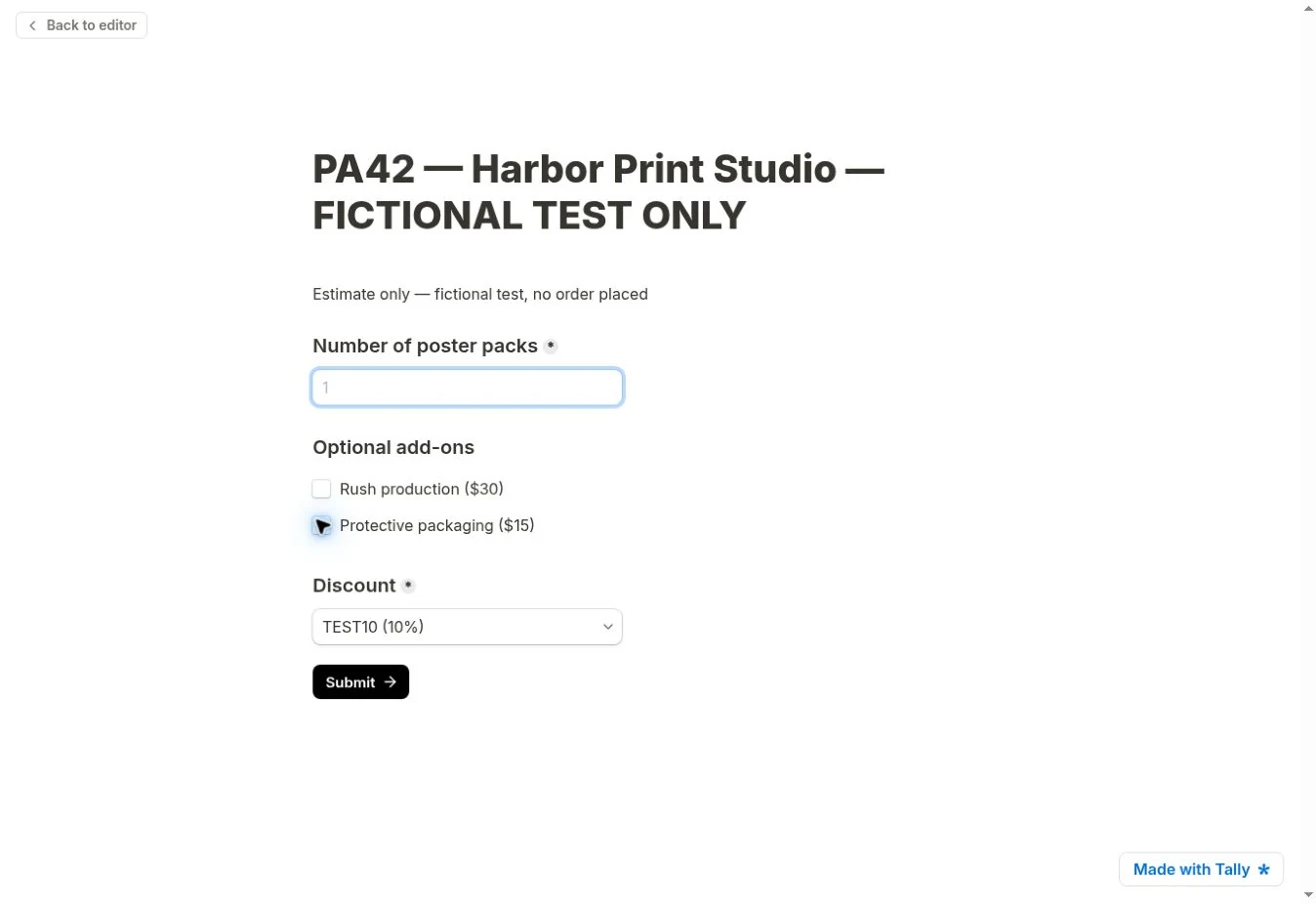
AI repair: Labels, optional settings, and the discount default improved. The summary hid for blank or zero quantity, but the blank warning was absent and fractional quantities still received prices.
Numeric follow-up: Minimum and maximum showed warnings; 1.5 still calculated a price. Blank input displayed NaN and advanced to preview completion.
Verdict: The original build remains a prototype; correct arithmetic did not establish adequate input validation.
How I Tested Tally Calculated Fields
I supplied the fictional rules in Tally’s anonymous /create editor using Create with AI / Ask Tally Beta. Both the original build and one repair were AI-applied; I did not manually edit their formulas.
The fictional business was Harbor Print Studio, a small US printing company. The amounts below are deliberately assigned test prices; they are not market prices or a real company’s offer. Tax and shipping were excluded to keep the calculation transparent.
Swipe horizontally to view all columns.
| Component | Fictional rule |
|---|---|
| Setup fee | $100 once per quote |
| Poster packs | $25 each; intended quantity is an integer of at least 1 |
| Rush production | Optional $30 once per quote |
| Protective packaging | Optional $15 once per quote |
| Discount | None, or TEST10: 10% off the entire subtotal |
I checked expected totals independently with Python decimal arithmetic: (100 + 25 × quantity + extras) × (1 − discount rate). Invalid quantities were judged against the whole-pack business rule, not assigned legitimate quote values.
One linked sequence covered quantity, add-ons, discounts, removal of charges, blank input, and recovery. Zero and fractional quantities were boundary checks. After one AI repair I repeated the affected cases. A later, separate numeric diagnostic is identified below.
The Formula and Logic Tally AI Created
The original editor had eight numeric calculated fields: base_fee initially 100, all others initially 0. The quantity label changed from “1” to “Number of poster packs” after the repair.
Swipe horizontally to view all columns.
| Field | Initial value | Observed calculation or condition |
|---|---|---|
| base_fee | 100 | Fixed setup charge |
| pack_cost | 0 | Quantity × 25 when quantity is not empty |
| rush_cost | 0 | Formula assigns 30 when Rush is selected; 0 when not selected |
| packaging_cost | 0 | Formula assigns 15 when Packaging is selected; 0 when not selected |
| subtotal | 0 | base_fee + pack_cost + rush_cost + packaging_cost |
| discount_rate | 0 | Formula assigns 0 for None; 0.1 for TEST10 |
| discount_amount | 0 | subtotal × discount_rate |
| final_total | 0 | subtotal − discount_amount |
The following expressions are transcribed from the captured editor record using its displayed field names and operators, not presented as paste-ready Tally code. Each belongs to a conditional Calculate action. The add-on and discount branches assign the constants shown in the table.
pack_cost = Number of poster packs × 25
subtotal = base_fee + pack_cost + rush_cost + packaging_cost
discount_amount = subtotal × discount_rate
final_total = subtotal − discount_amount
The recorded quantity-dependent actions use “Number of poster packs is not empty.” Rush assigns 30 or 0; Packaging assigns 15 or 0; Discount assigns 0 or 0.1. These are the original form’s rules; the blank-state test shows that their presence alone did not guarantee safe output.
Results: Valid Inputs and Changing Answers
The table separates the initial build from the AI-revised build. All amounts are USD. “Match” means the displayed amount equaled the independent expected result for that case.
Swipe horizontally to view all columns.
| Version / check | Inputs | Expected final quote | Tally preview | Finding |
|---|---|---|---|---|
| Initial: base fee | 1 pack; no extras; no discount selected | $125.00 | $125 | Arithmetic matched; discount choice was initially blank |
| Initial: quantity | 3 packs; no extras; no discount selected | $175.00 | $175 | Match |
| Initial: extras | 3 packs; both extras; no discount | $220.00 | $220 | Both fixed extras added once |
| Initial: discount | 3 packs; both extras; TEST10 | $198.00 | $198 | $22 discount on the full $220 subtotal |
| Initial: remove Rush | 3 packs; Packaging only; TEST10 | $171.00 | $171 | Subtotal fell to $190; discount became $19 |
| Initial: restore quantity | 2 packs; Packaging only; TEST10 | $148.50 | $148.50 | Recovered after a blank input |
| Revised: base / quantity | 1, then 3 packs; no extras; None | $125.00 → $175.00 | $125 → $175 | Retest matched |
| Revised: extras + discount | 3 packs; both extras; TEST10 | $198.00 | $198 | Retest matched |
| Revised: remove both extras | 3 packs; no extras; TEST10 | $157.50 | $157.50 | Both charges removed; subtotal $175 |
| Revised: return to 2 packs | 2 packs; no extras; TEST10 | $135.00 | $135 | Valid input restored the summary |
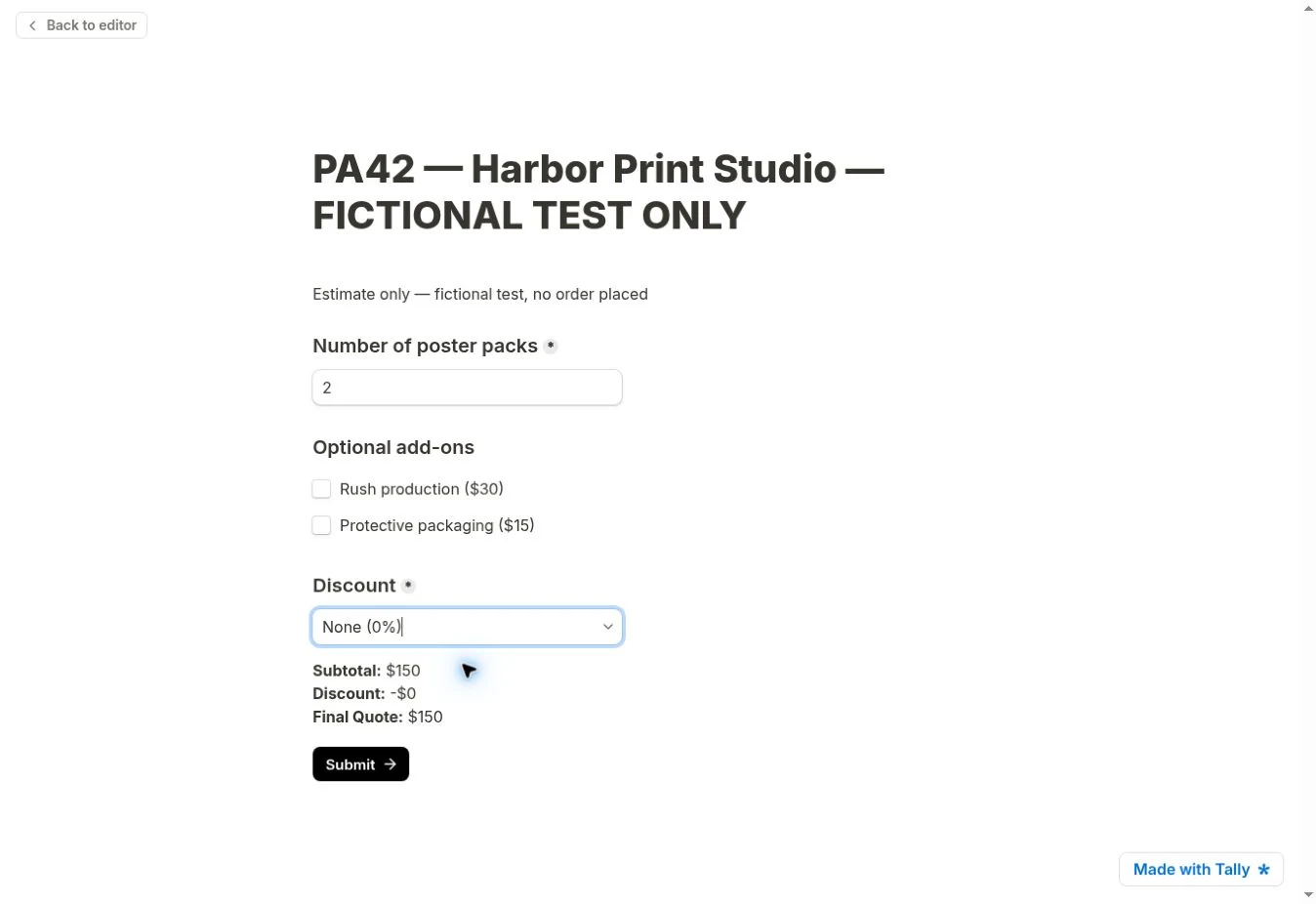
| Revised: remove discount | 2 packs; no extras; None | $150.00 | $150 | Discount reset to $0 |
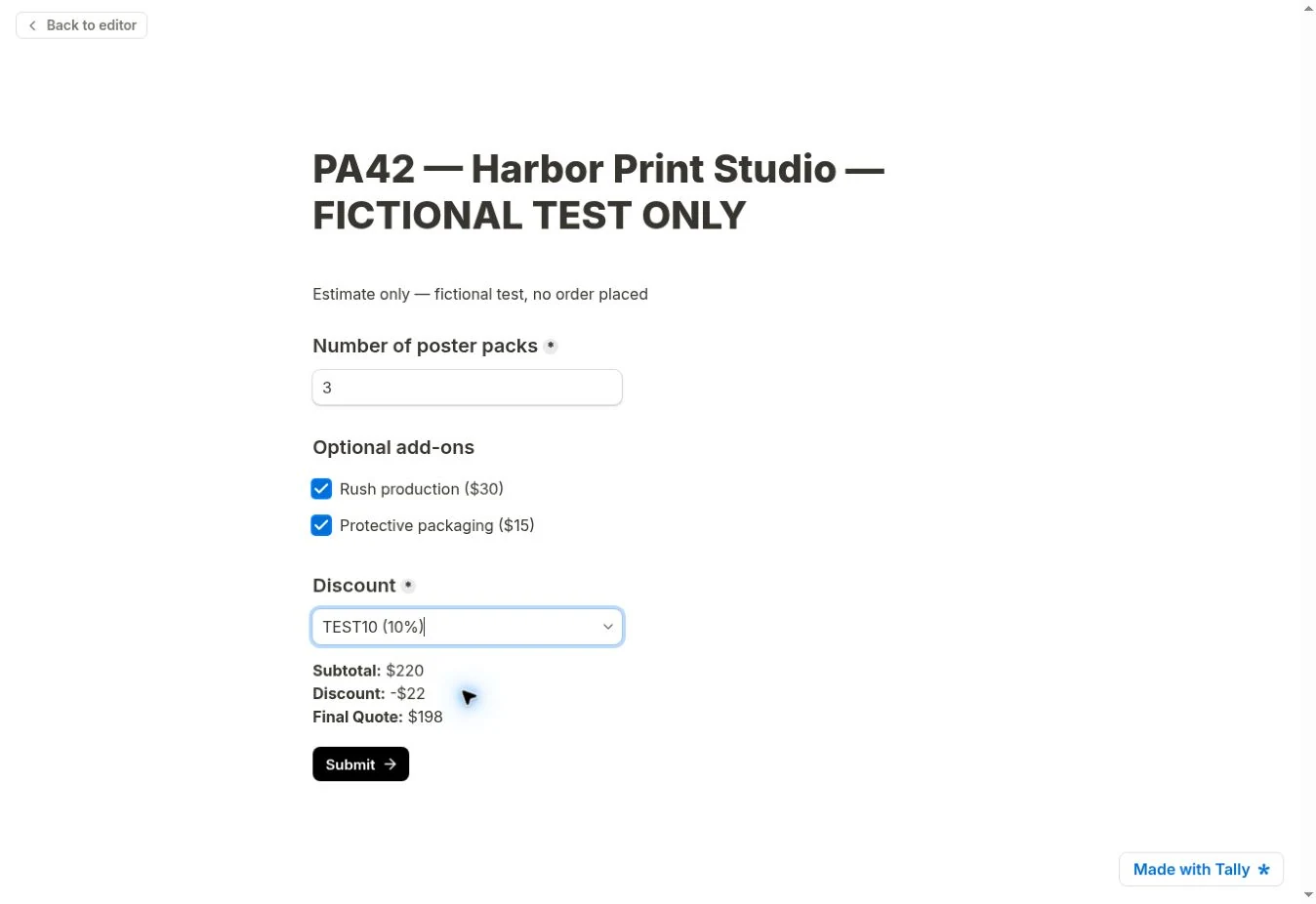
For three packs with both extras and TEST10, (100 + 3 × 25 + 30 + 15) × 0.90 = 198. Removing Rush recalculated both subtotal and discount, rather than subtracting $30 from the discounted total.
The revised sequence also removed both extras, changed quantity to 2, then removed the discount. The table preserves the corresponding $157.50 → $135 → $150 results.
The Blank-Input Failure and AI Repair
Clearing the quantity from the $171 case changed subtotal, discount, and final quote to NaN. I did not determine the root cause. The recorded logic included an “Is not empty” condition for pack_cost, yet that condition did not prevent the observed blank-state result. I did not trace Tally’s evaluation order or internal empty-value handling, so I cannot say which rule or dependency caused NaN. This is an observed failure of this AI-generated configuration, not a diagnosed engine defect.
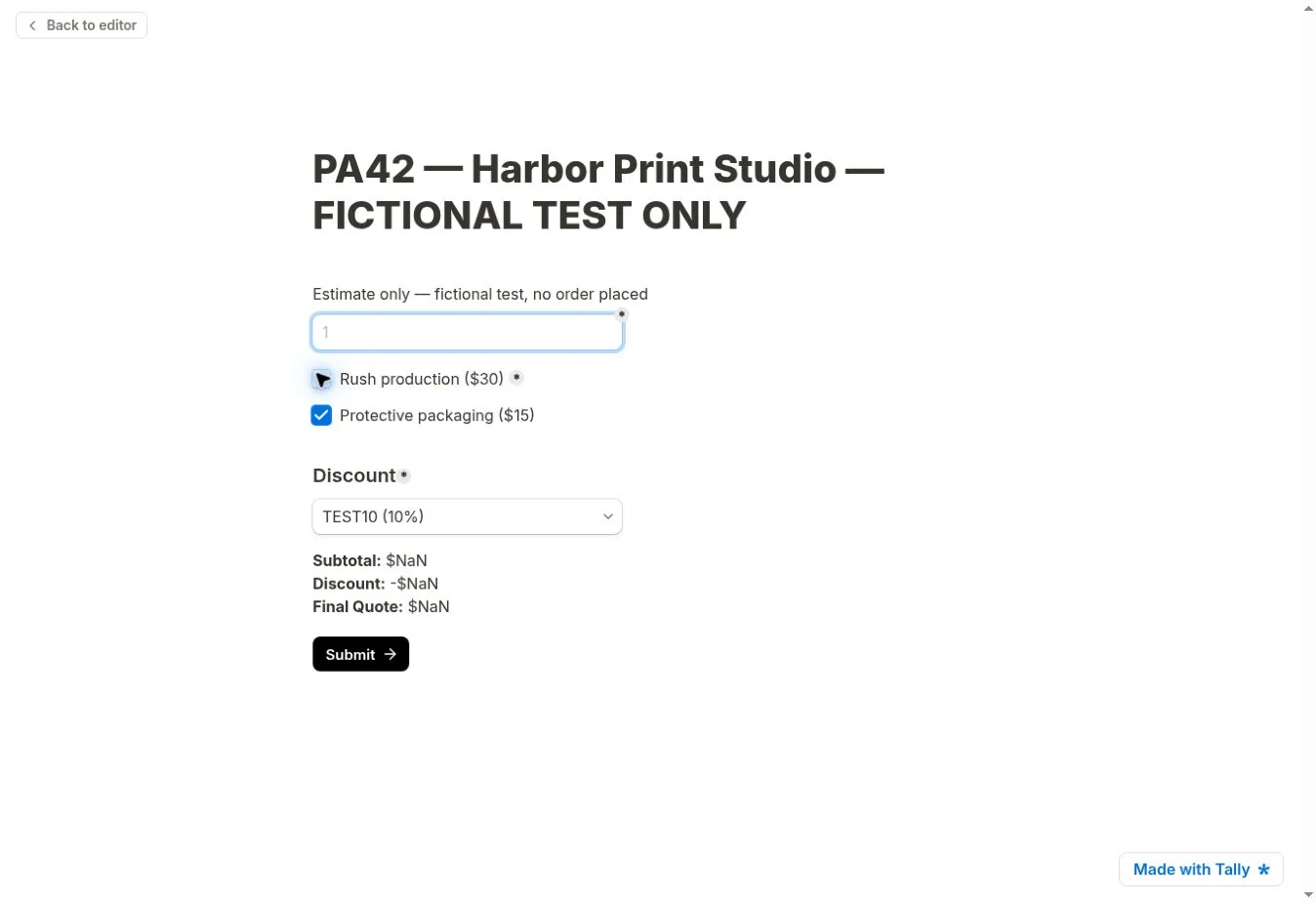
Restoring quantity to 2 recovered subtotal $165, discount $16.50, and final quote $148.50. The blank transition was a bad display state, not a permanent failure after valid input returned.
The initially required add-ons group also contradicted the brief. Preview requested add-on and discount selections and offered “Continue anyway,” which I did not use. These editor controls are another reason not to infer live submission enforcement from preview completion.
I asked Tally AI to correct labels, optional settings, the discount default, and invalid-quantity display while preserving the price rules.
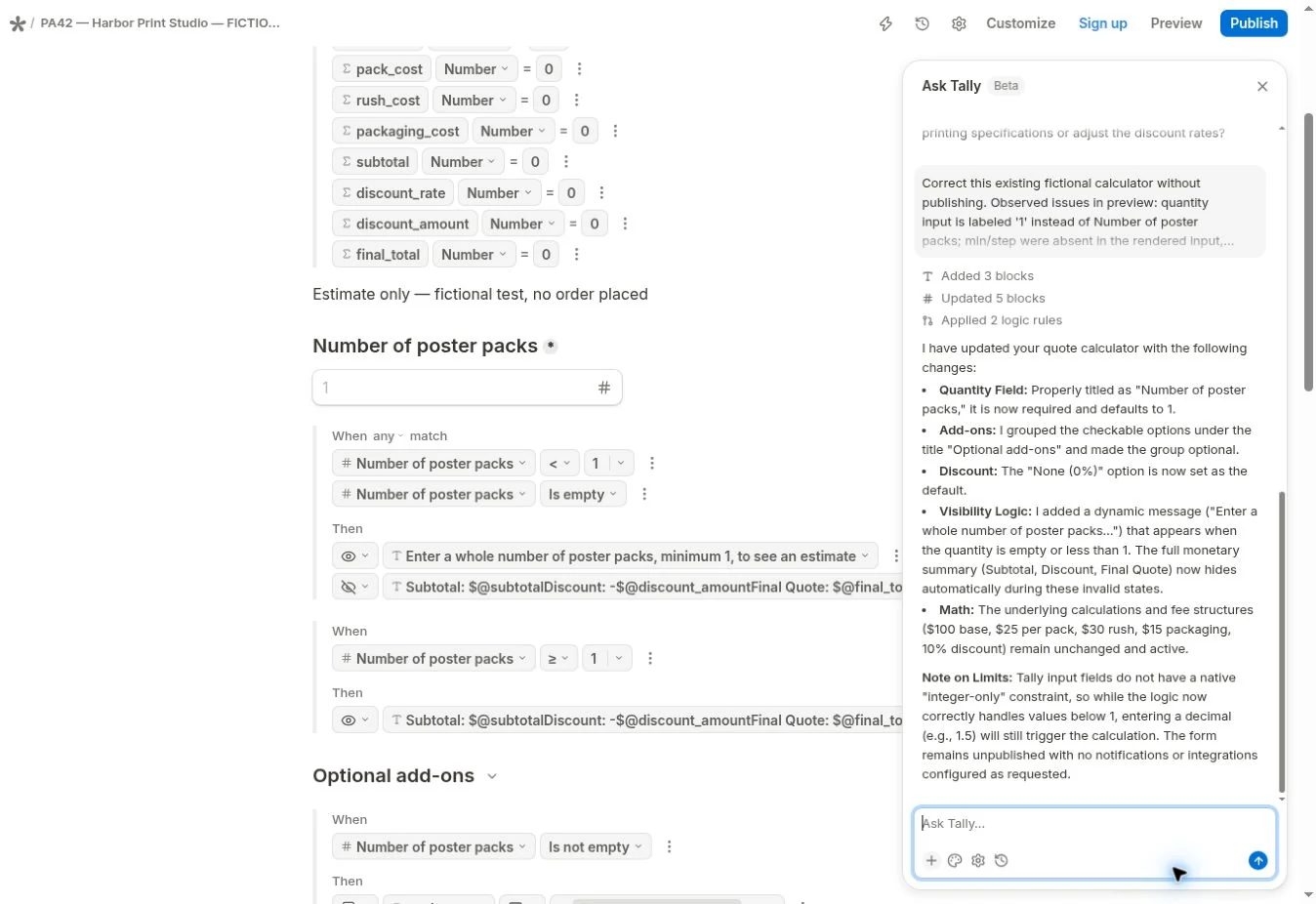
The repaired labels were clearer, add-ons lost their required marker, and None became the default. A valid two-pack preview completed without extras; no live submission record was inspected.
Remaining Input Limits
Swipe horizontally to view all columns.
| Boundary check | Intended behavior | Initial build | AI-revised build |
|---|---|---|---|
| Empty quantity | Withhold estimate; explain what is needed | All monetary values showed NaN | Summary hidden, but explanatory message absent in captured blank state |
| Quantity 0 | No valid estimate for zero packs | Displayed $103.50 with Packaging and TEST10 | Summary hidden and minimum-quantity message shown |
| Quantity 1.5 | Reject or withhold a quote for fractional packs | Displayed $137.25 with Packaging and TEST10 | Displayed $123.75 with no extras and TEST10 |
| Return to valid quantity | Restore a quote based on current answers | 2 packs + Packaging + TEST10: $148.50 | 2 packs, no extras, TEST10: $135 |
The fractional result followed the arithmetic: (100 + 1.5 × 25) × 0.90 = 123.75. It still violated the requested whole-pack rule.
The repair showed the summary for quantity ≥ 1, without a verified integer check. That explains why 1.5 passed this configuration’s display rule; it does not demonstrate that Tally cannot restrict quantities in another design.
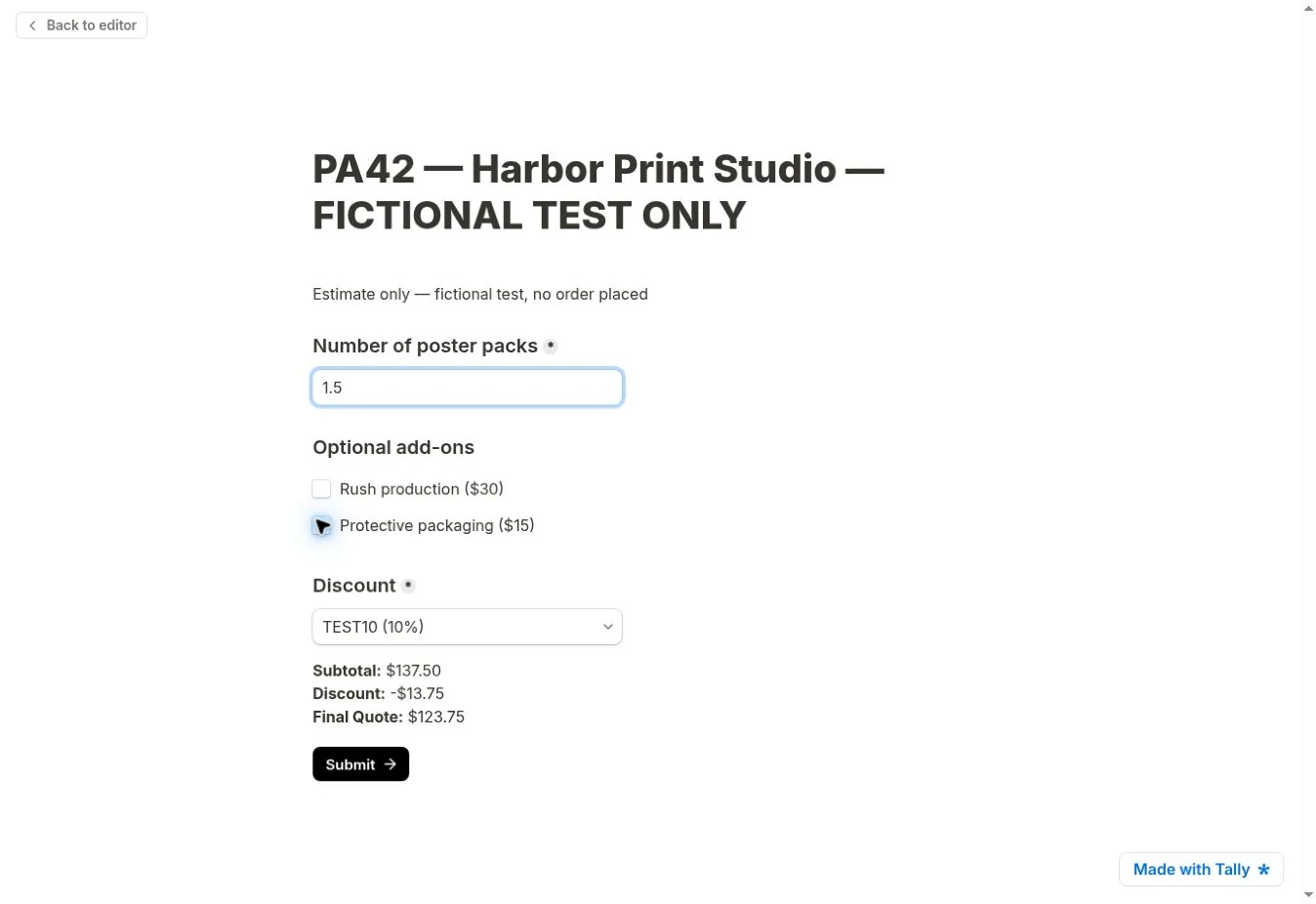
Clearing quantity hid NaN but still showed no instructional warning; zero did show the warning. Hiding an invalid estimate and explaining the next step are separate requirements.
Numeric Quantity: Minimum, Maximum, and Decimals
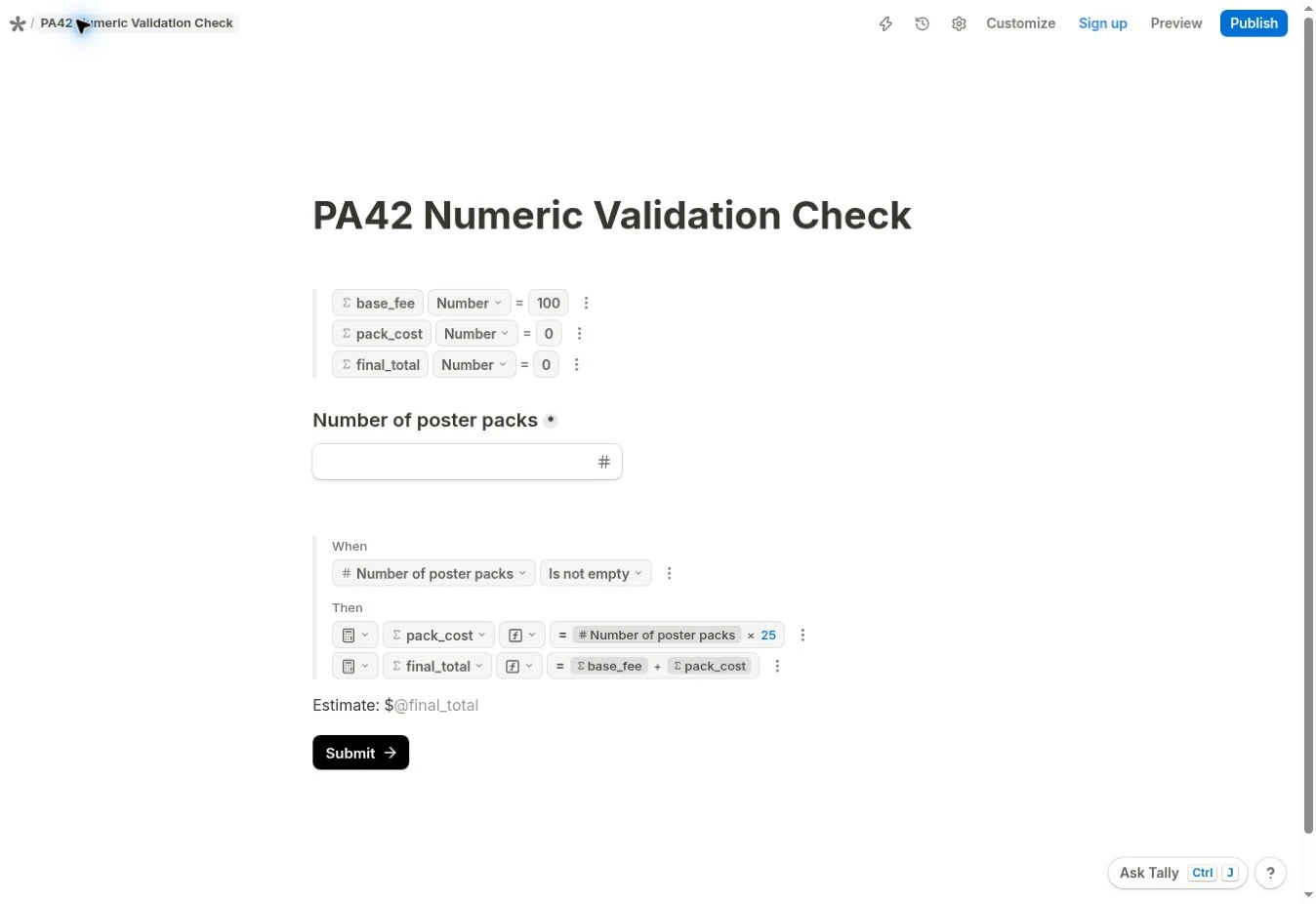
To check numeric input safeguards, I built a separate diagnostic because the original anonymous session was no longer available. I asked Tally AI for a required number field, default 1, minimum 1, maximum 10, and whole numbers if an actual integer constraint was available. The editor settings confirmed the minimum, maximum, and required marker. The inspected Format menu controlled decimal and thousands separators; I did not find or verify an integer-only setting. No rounding or manual formula changes were applied.
This reconstruction isolates a $100 base fee and $25 per pack, without extras or discounts. It does not modify the original calculator. The screenshot shows its actual conditional actions: when quantity is not empty, pack_cost = Number of poster packs × 25 and final_total = base_fee + pack_cost.
Swipe horizontally to view all columns.
| Quantity | Independent expectation | Observed preview | Validation finding |
|---|---|---|---|
| 1 (default) | $125.00 | $125 | Valid lower boundary matched |
| 10 | $350.00 | $350 | Valid upper boundary matched |
| 0 | No valid quote; raw arithmetic $100.00 | $100; “Please enter 1 or more” after Submit | Minimum warning appeared, but estimate remained visible |
| 11 | No valid quote; raw arithmetic $375.00 | $375; “Please enter 10 or less” after Submit | Maximum warning appeared, but estimate remained visible |
| 1.5 | No whole-pack quote; raw arithmetic $137.50 | $137.50; Submit advanced to the completion screen | Minimum and maximum did not enforce integers |
| Empty | Withhold estimate and request quantity | $NaN; Submit advanced to the completion screen | The required marker did not establish reliable preview enforcement |
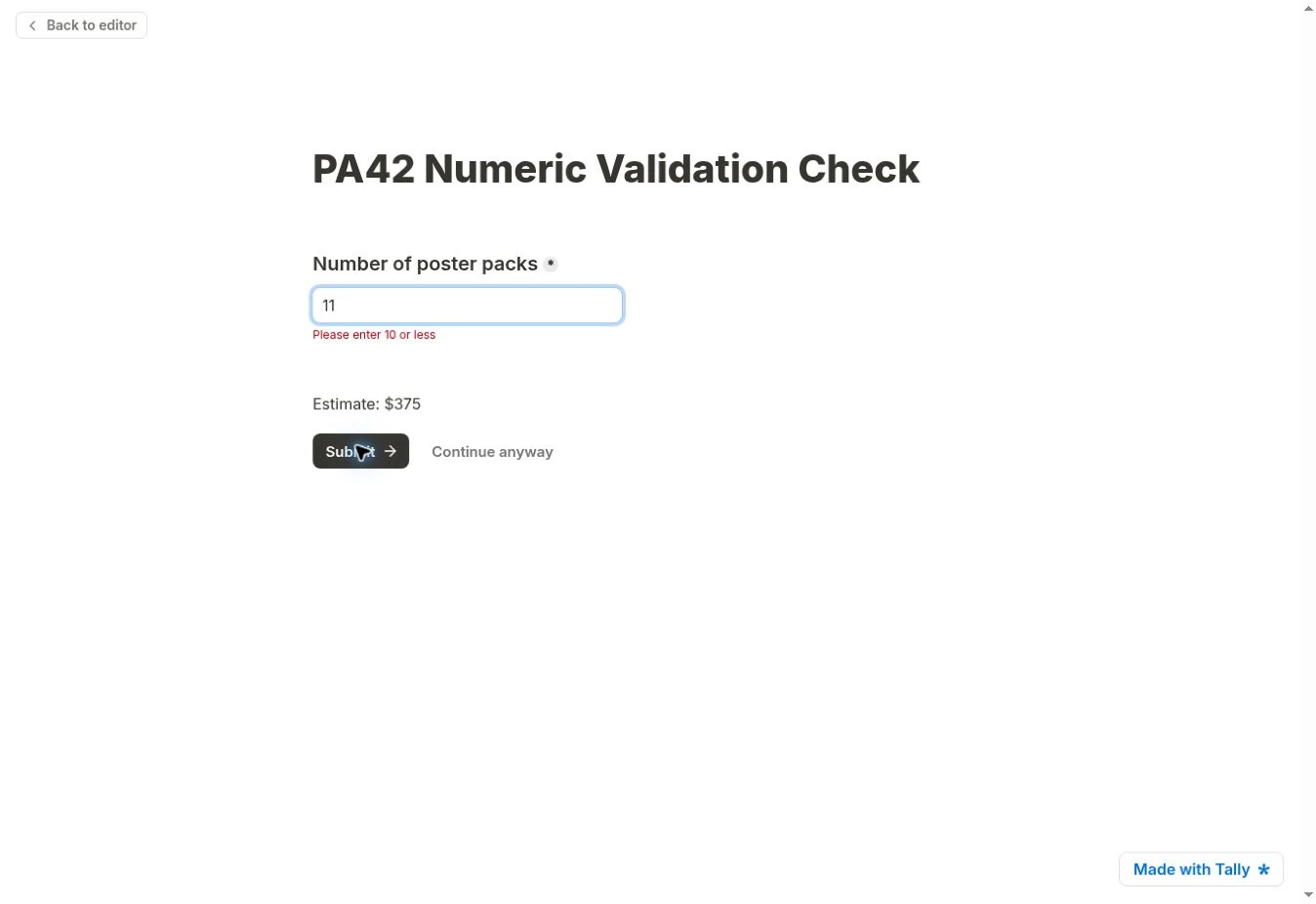
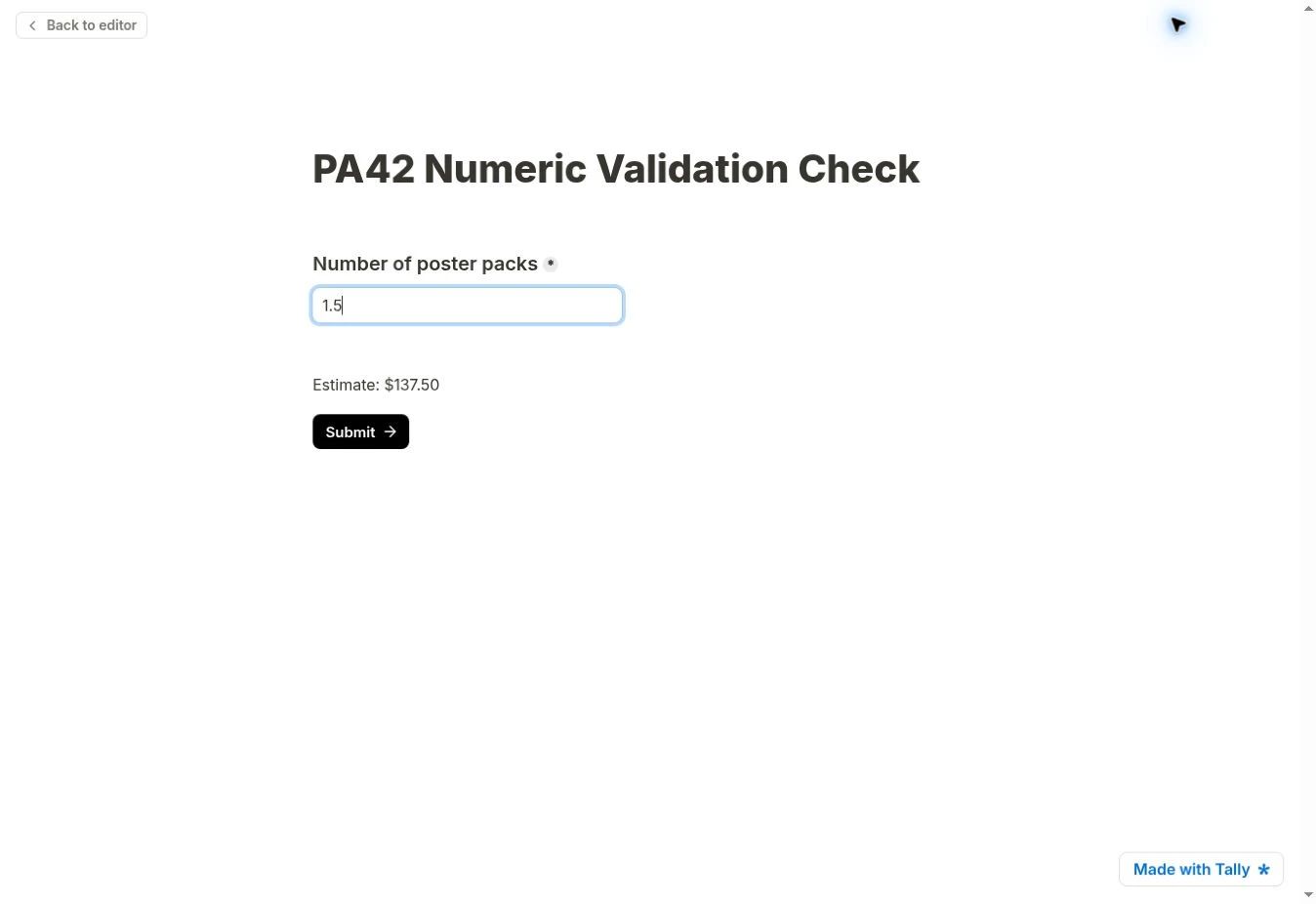
I did not use “Continue anyway” for the out-of-range cases. Preview completion is not evidence of a recorded live submission. These results establish that the configured bounds produced warnings, while an integer restriction remained unverified. Silently rounding 1.5 would change the requested quantity; it would not demonstrate rejection of an invalid order.
My Experience Testing This
I first saw the gap when I cleared the quantity after checking a $171 quote: the subtotal, discount, and final amount all became NaN. I asked Tally AI for a repair, then cleared the field again. The summary disappeared, but the promised guidance did not appear. In the separate numeric diagnostic, I saw warnings for 0 and 11, yet 1.5 still produced $137.50 and reached the preview completion screen. Checking those transitions showed me why a matching total and an assistant’s description are not enough to confirm safe input handling.
Currency presentation: Outputs such as $125 and $198 omitted cents, while $148.50 retained them. This was a display inconsistency, not an arithmetic mismatch; standardized currency formatting remained unverified.
Free Access, Pricing, and Limits
Pricing last checked: October 13, 2026. Official Tally documentation lists calculations and conditional logic as free features subject to fair use, and Tally AI as available on Free.
The official plans guide lists Pro at $29 per month and Business at $89 per month. The pricing page also offers yearly billing with a different displayed rate; check the selected billing option before purchasing. Neither paid plan was purchased or needed for the demonstrated checks. Branding removal, custom domains, and advanced business settings were outside this test.
Limitations and Who Should Skip This Prototype
Final Verdict
Use Tally AI to draft a simple calculator whose arithmetic you can independently check. Avoid using this tested configuration for customer-facing whole-pack quotes: the repair left fractional quantities and blank guidance unresolved, and native bounds in the separate preview did not establish integer enforcement. Before publishing your own form, verify blank, zero, fractional and out-of-range inputs, changed answers, currency formatting, and actual submission validation.
For a small, fixed range of pack quantities, a list of predefined whole-number options is a possible alternative to unrestricted numeric entry. That approach was not tested in this numeric diagnostic; its pricing logic and submission behavior would still need verification.
Recommended Reading
 AI for Small BusinessWix AI Tutorial: Build a Service Website With a Quote Form
 AI for Small BusinessChatGPT Sales Dashboard: Finding and Fixing a $60 Error
 AI Tool ComparisonsAirtable Automations vs Make




Leave a Reply