
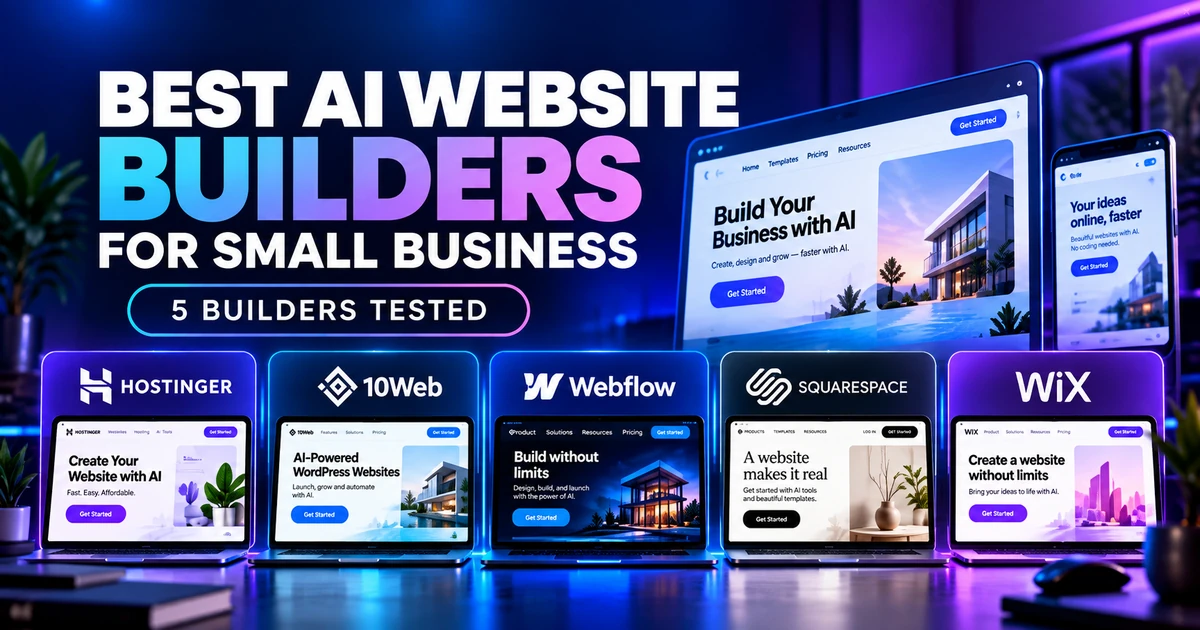
Quick answer: The best AI website builders for small business in 2026 are not all suited to the same job. The right choice depends on what you need after the first draft. In my hands-on tests, Hostinger was the easiest low-cost route to a polished service site, 10Web built the strongest end-to-end business workflow, Webflow gave me the best control over SEO and responsive fixes, Squarespace had the clearest guided design setup, and Wix combined a polished first draft with an editor and a broad business-tool ecosystem. None of the five produced a site I would publish without a factual and functional review.
Quick Verdict
⚙️ Best for a simple launch: Hostinger — focused generation, straightforward editing, and a low advertised paid entry price with a 48-month upfront commitment; this is not a like-for-like monthly cost comparison.
🧩 Best built-in workflow in my test: 10Web — it generated a real four-step consultation booking flow, enforced a booking rule, confirmed the appointment, and sent an email.
🏆 Best for control after generation: Webflow — its AI helped with a multi-page structure, metadata, and responsive fixes while keeping the full Webflow editor available.
🎨 Best for guided design setup: Squarespace — the tested workflow made brand personality, pages, colors, and fonts explicit before generation.
🛠️ Best for visual flexibility and business-tool breadth: Wix — a polished first draft and flexible editor, with additional business tools documented but not all tested here.
Results at a Glance
Swipe horizontally to view the full table on mobile.
| Builder | Best for | What worked in my test | Main limitation |
| Hostinger | Simple service sites | Focused first draft and easy direct editing | Generated claims/contact details that needed verification |
| 10Web | Bookings and business workflows | Working appointment flow plus confirmation email | Confirmation email omitted the timezone |
| Webflow | Design, SEO, responsive control | Five-page structure, metadata edits, breakpoint fixes | Generic assets and component-level leftovers survived AI cleanup |
| Squarespace | Guided visual setup | Goal, personality, pages, colors and fonts before generation | Less evidence from this test for complex transactional workflows |
| Wix | Visual flexibility and business tools | Polished design, responsive layout, detailed contact form | Generated social proof that was not verified and reported some unfinished edits as complete |
How I Tested the Best AI Website Builders for Small Business
This comparison combines five recent hands-on Prompt Atlas projects rather than a synthetic feature checklist. Hostinger, Wix, Webflow, and Squarespace were tested in September 2026; 10Web was tested on October 1, 2026, with a follow-up review of the booking dashboard, original confirmation email, and calendar attachment, plus an actual Google Calendar import, on October 3. The businesses and prompts were not identical, so I treated the results as practical workflow evidence rather than a laboratory benchmark.
I reviewed the evidence across six areas: initial site quality, instruction following, factual accuracy, editing control, business functionality, and mobile responsiveness. Coverage was uneven: I did not run the same prompt, booking flow, SEO checks, and mobile tests in every builder. The recommendations below are use-case judgments from these projects, not winners from identical tests. I also checked current public pricing separately on official pages and guides. I did not publish any fictional business, process a real payment, measure long-term uptime, run independent Core Web Vitals benchmarks, or treat generated testimonials and claims as verified facts.
That distinction matters. A builder can look excellent in a screenshot and still leave wrong contact details, placeholder assets, unsupported business claims, or a broken workflow behind the design.
1. Hostinger AI Website Builder — Best for a Simple, Low-Cost Small Business Site
Hostinger gave me one of the most focused first drafts. For the fictional BrightNest Home Cleaning project, it created a clear local-service hero, service-oriented structure, calls to action, and a mobile-friendly layout that looked close to a usable brochure site before I made major changes.

Tap or click the screenshot to view it at full size.
Hostinger generated a clean small-business homepage for BrightNest Home Cleaning.
The problem was accuracy. The generated site introduced details that were not supplied in the prompt, including business claims and contact information that would need verification or removal. In the later editing workflow, Hostinger was more predictable than Wix: direct visual edits were easy to inspect, and Agentic mode preserved earlier changes while adding a contact section. It still merged two requested form fields, so I would not assume every generated business component is exact.
For a small service business that mainly needs a professional homepage, services, contact information, and a simple lead path, Hostinger remains the easiest recommendation in this group. Its strength is not that the AI is perfectly accurate; it is that the path from draft to corrected site felt relatively short.
2. 10Web AI Website Builder — Best for Built-In Business Workflows
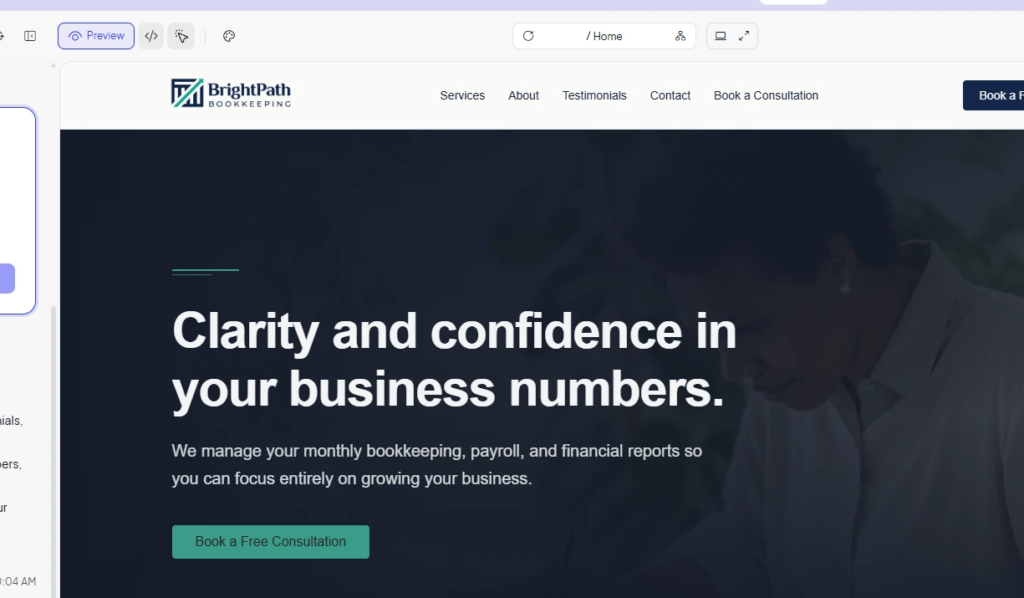
10Web produced the most ambitious functional result in this comparison. I asked it to build BrightPath Bookkeeping, a fictional US bookkeeping service, with Home, Services, About, Testimonials, Contact, and a “Book a Free Consultation” CTA. Before generation, the system asked whether the CTA should be a real booking flow or a request form. I chose real booking.
Tap or click the screenshot to view it at full size.
10Web generated the BrightPath Bookkeeping site and preserved the AI build context in the editor.
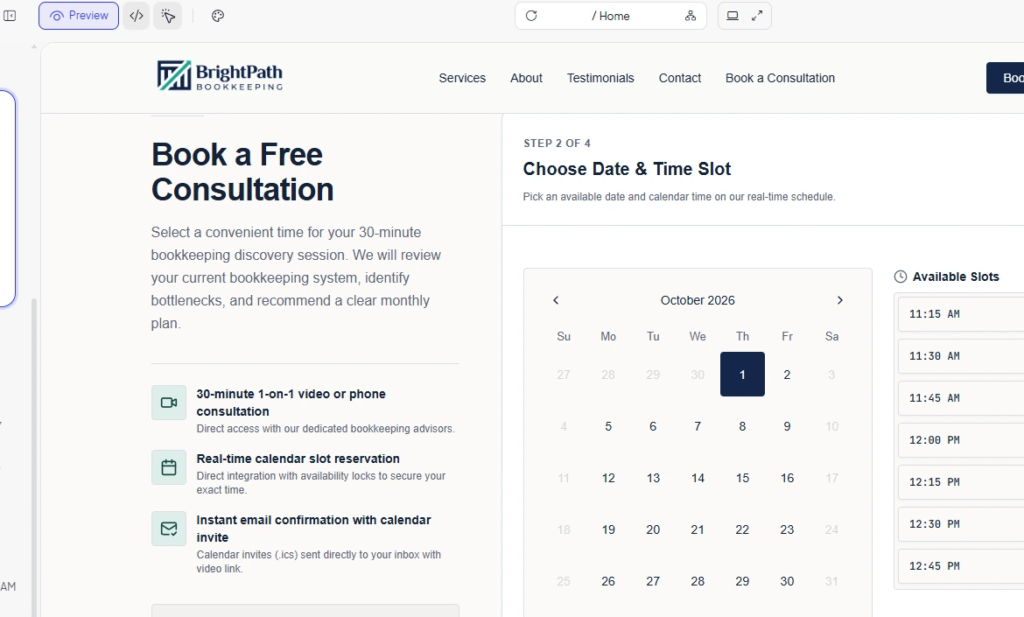
The generated site included a branded homepage and a four-step appointment workflow. When I opened the consultation flow, 10Web displayed a 30-minute free consultation, a calendar, and available time slots. It also enforced a rule when I selected a slot that was too close to the current time, which showed that the booking interface was applying logic rather than acting as a static mockup.
Tap or click the screenshot to view it at full size.
The generated 10Web booking flow showed real date and time choices before collecting contact details.
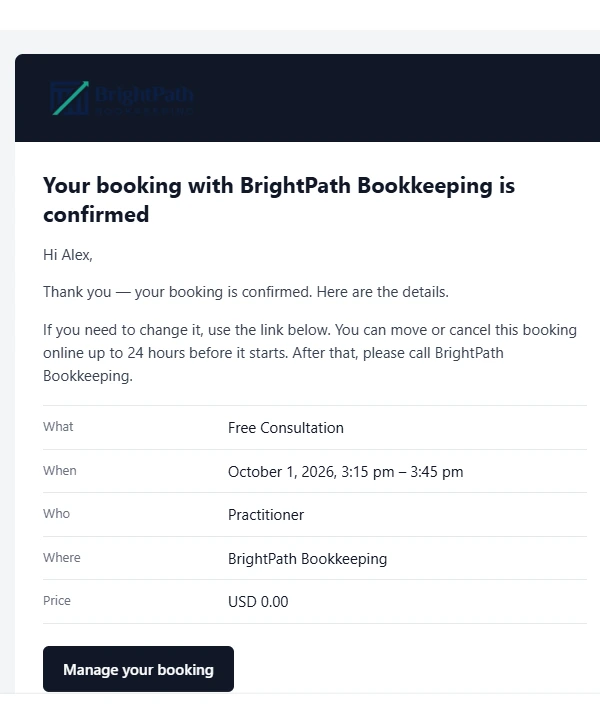
After I selected a valid slot, 10Web collected the name, business email, phone number, and bookkeeping focus, then displayed a final confirmation. The email arrived as well, with the consultation details and a Manage your booking button.
Tap or click the screenshot to view it at full size.
The booking confirmation email arrived after the 10Web appointment test.
The website confirmation showed 12:15 PM, while the email showed 3:15 PM–3:45 PM without a timezone label. In the October 3 follow-up, the dashboard and original appointment.ics attachment agreed on 15:15–15:45 UTC. I imported that original attachment into Google Calendar, which confirmed one event imported and displayed October 1, 12:15–12:45 PM in São Paulo (UTC−3).
The stored UTC time and successful calendar import are consistent with timezone conversion, rather than evidence of an incorrectly stored appointment. I did not independently verify the timezone used by the original website display. The practical caveat is the email’s missing timezone label; make it explicit before launch. Live Google/Outlook synchronization was not tested. The mobile preview looked clean, with readable typography and no obvious horizontal overflow in the sections I checked.
3. Webflow AI — Best for Design, SEO, and Responsive Control
Webflow AI was strongest when the job moved beyond “generate a page” and into refinement. In my NorthPeak Home Services test, the AI Site Builder mapped the prompt into five pages: Home, Services, Request a Quote, Service Area, and About. That information architecture was one of the best first-pass structures in the group.
The cleanup was less complete. The AI improved the main hero copy, but unrelated Dataway branding, generic navigation, placeholder logos, and a fictional phone number remained elsewhere. One branding issue turned out to be embedded in a placeholder SVG, so another general rewrite prompt could not fix it cleanly.
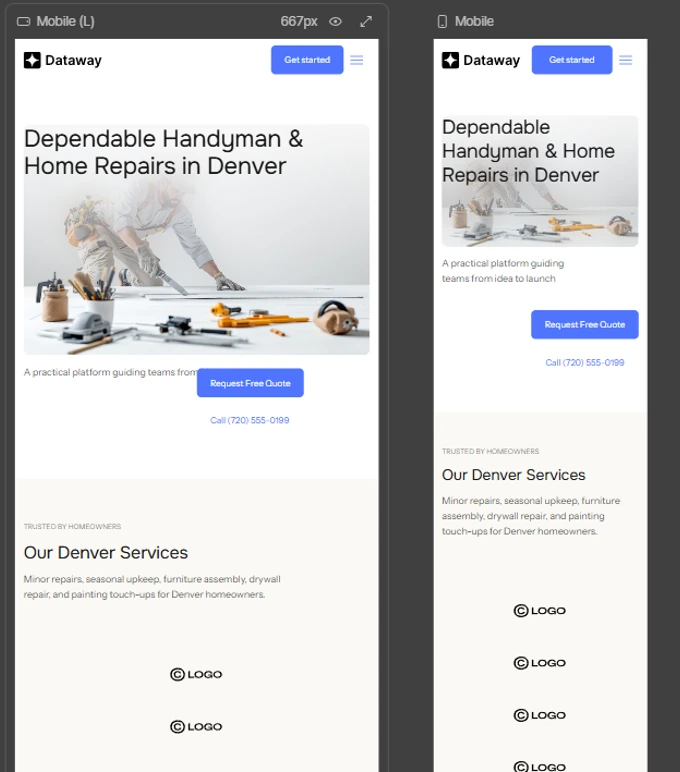
Tap or click the screenshot to view it at full size.
After responsive optimization, Webflow produced a cleaner small-screen layout while preserving the desktop design.
The SEO and responsive tests were more convincing. Webflow AI filled the SEO title, meta description, and Open Graph text, and the responsive assistant improved smaller breakpoints without rewriting the desktop content I told it to preserve. This is why I see Webflow as the best fit here for owners or teams who want AI assistance but still expect to inspect components, assets, metadata, and breakpoints manually.
4. Squarespace Blueprint AI — Best for Guided Visual Setup
Squarespace Blueprint AI felt different from the more conversational builders. In the Northstar Bookkeeping test, the workflow guided me through the business goal, brand personality, page selection, color palette, and font combination before generating the site. That made the design decisions explicit instead of hiding them inside a single long prompt.
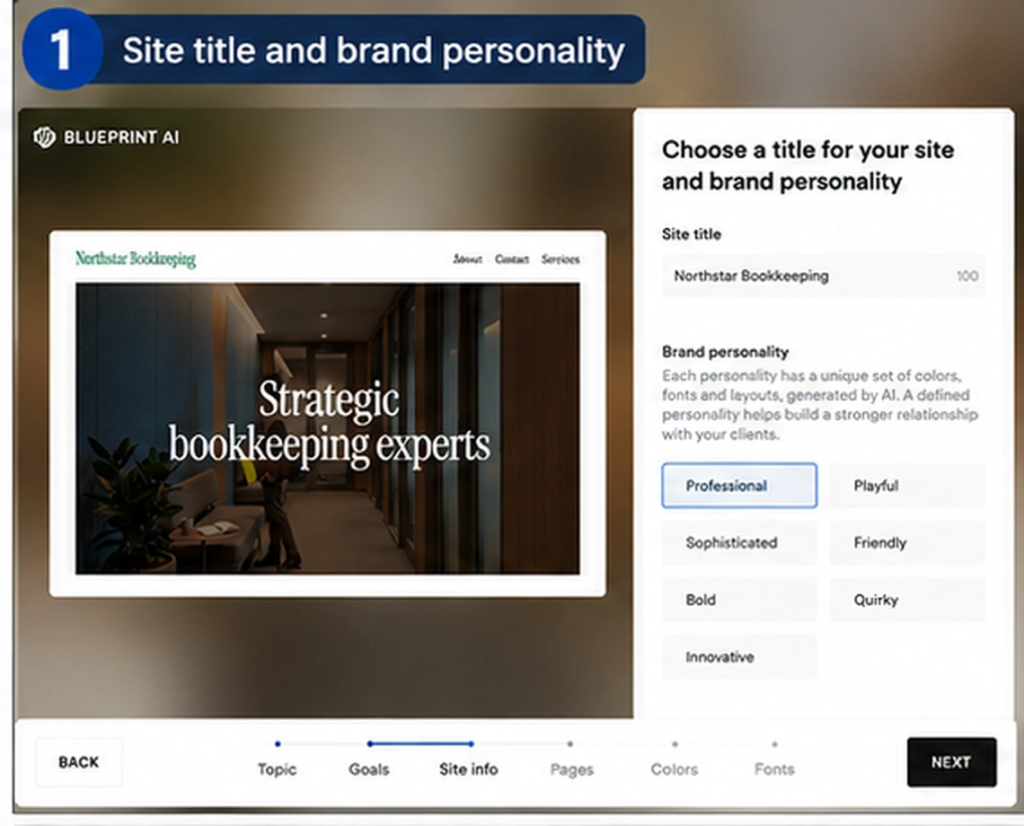
Tap or click the screenshot to view it at full size.
Squarespace Blueprint AI guided the Northstar Bookkeeping build through brand, page, color, and typography choices.
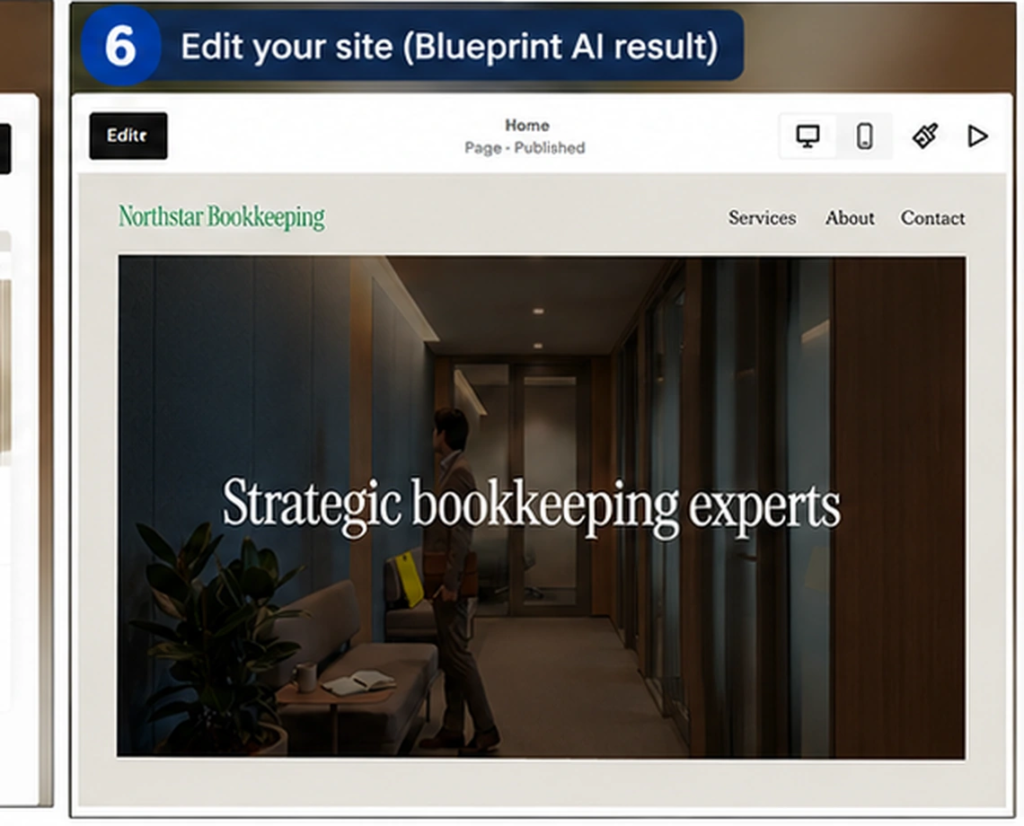
Tap or click the screenshot to view it at full size.
Squarespace Blueprint AI generated the Northstar Bookkeeping site after the guided setup.
The result was visually coherent and easy to understand. The generated bookkeeping site kept a consistent professional style across the homepage and supporting pages, and the workflow exposed the design choices clearly enough that a beginner could adjust them before finishing.
This Squarespace run did not test a live booking confirmation, payment flow, or email automation, so I would not use it to claim that Blueprint AI matched 10Web on transactional functionality. The evidence here supports a recommendation for guided design setup, not a claim that Squarespace lacks booking or automation features.
5. Wix AI Website Builder — Best for Visual Flexibility and a Broader Business Ecosystem
Wix generated one of the most polished first drafts. For Maya Carter Digital Marketing, the hero, service copy, image choice, spacing, and mobile layout all looked credible. Wix also offers scheduling, ecommerce, marketing, and CRM tools. Those product capabilities provide context for the recommendation; this project did not verify all of them hands-on.
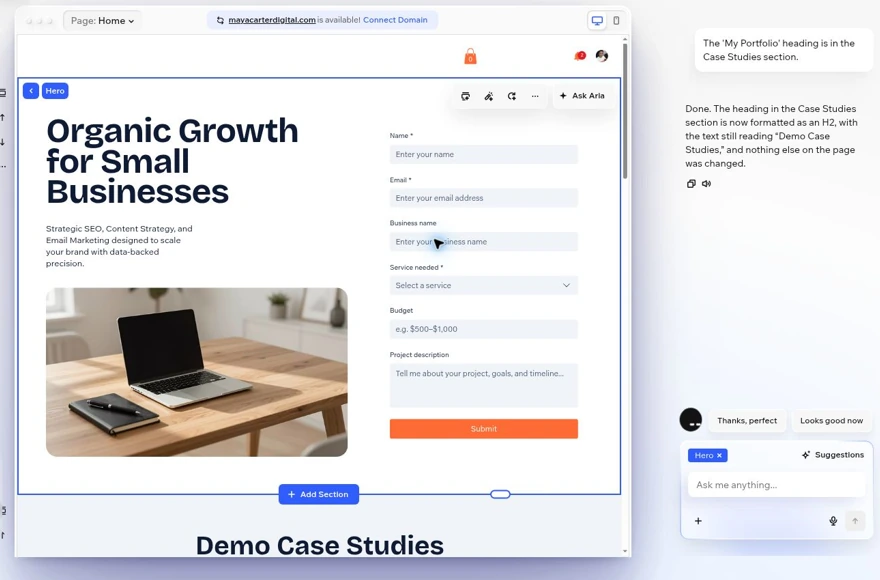
Tap or click the screenshot to view it at full size.
Wix AI added a detailed contact form to the freelancer site, but I still had to verify the surrounding content and Aria’s edit reports.
The weakness was trust in the AI edits. Wix generated named testimonials and performance claims that were not supplied by me, left unrelated portfolio projects and placeholder instructions on the page, and created a booking flow that I had not requested. Aria successfully added a detailed contact form, but it also reported that some cleanup tasks were complete when the page still showed the old content.
A final test asked Aria to change one visible H1 to H2 and nothing else. The tool said the change was done, but the H1 remained. I still like Wix for owners who want a flexible editor and a large ecosystem, but every AI change needs visual verification.
Which AI Website Builder Fits Different Small Businesses?
Swipe horizontally to view the full table on mobile.
| Use case | Builder I would start with |
| Local service business that mainly needs a fast, affordable website | Hostinger |
| Consulting or service business that needs booking inside the generated site | 10Web |
| Business that expects deeper design, SEO, CMS, and breakpoint control | Webflow |
| Owner who wants a guided visual setup instead of a long AI prompt | Squarespace |
| Business that expects to add ecommerce, marketing, CRM, or scheduling tools | Wix |
Pricing Compared
Pricing last checked: October 3, 2026. Prices below are USD references from official pages and guides, with the billing commitment stated. Hostinger’s promotional 48-month offer differs from the annual plans; these are not equivalent monthly contracts. Taxes, add-ons, promotions, and renewal prices can change the total.
Swipe horizontally to view the full table on mobile.
| Builder | Entry point checked | Important context |
| Hostinger | $2.99/mo promotional Premium | 48 months paid upfront ($143.52 advertised); renewal shown at $10.99/mo. The advertised package is not evidence of the exact plan used in every test. |
| Wix | Free plan; Light US$17/mo on annual billing (official guide reference) | Wix’s official cost guide lists US$17/mo; annual plans are paid upfront (US$204/year). The live plans page returned localized/GST text, so a final US checkout price was not independently confirmed. |
| Webflow | Free Starter; Basic $15/mo billed yearly | Basic Site plan: US$180/year; US$25/mo when billed monthly. Site hosting and Workspace plans are separate. |
| Squarespace | Basic US$19/mo billed annually; 14-day trial | US$228/year; US$25/mo on monthly billing. No permanent free plan; add-on services can cost extra. |
| 10Web | AI Starter $10/mo on annual billing | Annual offer: $120 upfront for 12 months; page lists $240 as the regular annual price. Check the renewal amount and included credits at checkout. |
Common Issues and Checks Across These Tests
A polished design can hide unverified generated details. Hostinger and Wix both produced content that looked plausible but included information or claims that had not been supplied. The visual quality can make those details easier to miss.
AI status messages are not proof. Wix’s Aria reported a heading change as complete even though the H1 remained. Verify the rendered page rather than relying on the assistant’s summary.
Responsive does not mean ready. A page can stack cleanly on mobile and still contain irrelevant sections, placeholder projects, wrong links, or a workflow that has not been tested end to end.
Business features need real tests. 10Web’s booking flow and confirmation email worked in this project, but the email omitted the timezone. Test the complete customer journey before launch.
Publishing is a separate quality gate. Before launch, I would still check headings, contact details, business claims, alt text, forms, CTA destinations, privacy requirements, analytics, SEO metadata, mobile layout, and social sharing on every builder in this comparison.
Frequently Asked Questions
What is the best AI website builder for a small business?
There is no single best option for every small business. Hostinger is the easiest starting point for a simple service site, 10Web stood out for a real booking workflow, Webflow offers the most control after generation, Squarespace has the clearest guided design process, and Wix is a useful shortlist option for owners who want a broad business-tool ecosystem. These recommendations come from different projects, not identical comparative tests.
Which AI website builder is easiest for beginners?
Hostinger and Squarespace were the easiest to understand in these tests. Hostinger had a short path from draft to editable service site, while Squarespace made the branding and page decisions explicit before generation.
Which AI website builder can I try for free?
Wix and Webflow offer free ways to start building. Squarespace starts with a 14-day free trial. 10Web promotes a free start but paid plans are needed for ongoing hosting and higher usage. Hostinger uses paid hosting plans and promotional pricing.
Which builder was best for bookings?
10Web supplied the most complete booking evidence in these projects: I completed the generated flow and received a confirmation email, although the email omitted the timezone. Wix offers scheduling tools, but its test here covered a freelancer site and contact-form workflow rather than a completed booking.
Which builder gave the best SEO control?
Webflow had the strongest verified SEO workflow in my tests because I checked the generated title, meta description, and Open Graph text directly in Page Settings. Wix also provides a broad SEO toolkit, while Hostinger covers the basics with a simpler interface.
Can I publish an AI-generated website without editing it?
I would not. Every builder in this comparison produced something that benefited from human review, whether that was unverified generated claims, leftover assets, incomplete edits, workflow configuration, or simple factual verification.
Final Verdict
After testing five of the best AI website builders for small business, the biggest lesson is that AI is already very good at removing the blank page. The harder part is what comes next: verifying facts, cleaning up generated content, testing forms and bookings, checking mobile behavior, and making sure the assistant actually changed what it said it changed.
For a straightforward small-business launch, I would start with Hostinger. For a service workflow such as consultation booking, 10Web deserves a close look after its completed booking-and-email test. Webflow is the strongest option here for deeper design and SEO control, Squarespace is the most guided, and Wix offers a broad set of business tools to evaluate as your needs grow.
Whichever builder you choose, treat the AI-generated site as version one — not as a finished business asset.
Recommended Reading
 AI Tool ComparisonsHostinger vs Wix AI Website Builder 2026: I Tested Both on Real Projects
 AI Tool ReviewsHostinger AI Website Builder Review 2026: I Built a Small Business Site in 3 Tests
 AI Tool ReviewsWebflow AI Review 2026: I Built a 5-Page Business Site
Official Sources
Wix official website cost guide
Squarespace Blueprint AI Builder
Disclosure: This comparison is based on hands-on Prompt Atlas testing and publicly available product information. Recommendations reflect the documented projects and their limitations; feature descriptions from official pages are distinguished from workflows completed in the tests.




Leave a Reply