
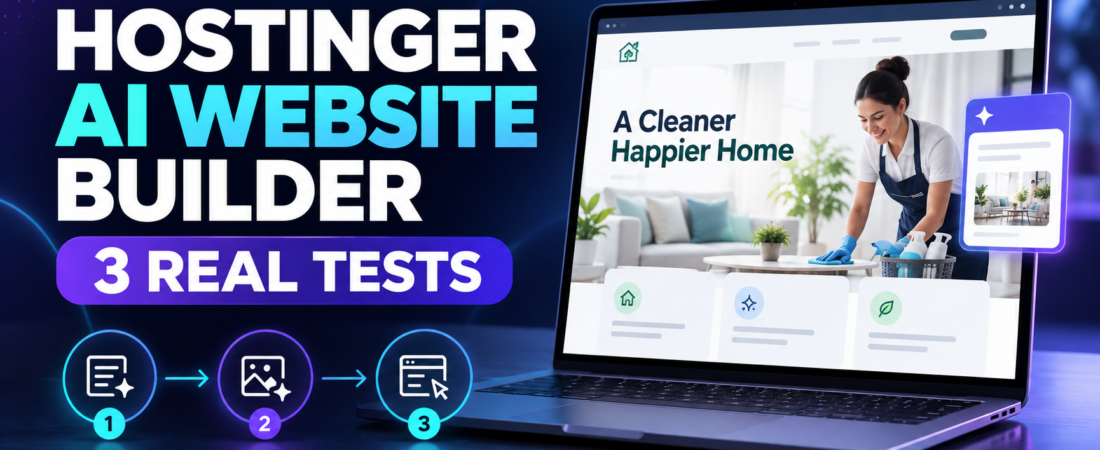
In this Hostinger AI Website Builder review, I tested whether a short business description could become a usable website and then be refined with drag-and-drop controls and conversational AI. I used a separate project for a fictional Austin home-cleaning company, from the first generated page through manual edits and an AI-added contact form.
The result was visually polished and surprisingly usable on both desktop and mobile. But it also showed why AI-generated business sites still require human review: the builder invented trust claims and contact details, merged two requested form fields, and produced a call-to-action style that did not fully match the rest of the site.
Quick Verdict
Hostinger AI Website Builder is a strong choice for beginners and small businesses that want to launch a clean service website quickly without coding. Its generated layouts look professional, the Manual mode makes basic edits straightforward, and Agentic mode can add substantial new sections from plain-language instructions. The trade-off is control: AI output can introduce unsupported claims, inconsistent styling, and small instruction-following errors. Treat the first draft as a starting point, not a finished business asset.
🧩 Main limitation: The AI can create persuasive details that were never supplied, so every claim, phone number, email address, price, and form field needs verification before publication.
Results at a Glance
| Test | Task | Result | Main Finding |
|---|---|---|---|
| 1 | Generate a complete local-service website | Strong | Professional structure, but invented business details and claims |
| 2 | Edit copy, CTA, and site colors manually | Strong | Direct editing was easy; the button still needed a destination link |
| 3 | Add a lead form with Agentic mode and check mobile | Mixed | Visually responsive, but two fields were merged and submission was not tested |
Test 1 — Strong
Task: Generate a complete local-service website
Main finding: Professional structure, but invented business details and claims
Test 2 — Strong
Task: Edit copy, CTA, and site colors manually
Main finding: Direct editing was easy; the button still needed a destination link
Test 3 — Mixed
Task: Add a lead form with Agentic mode and check mobile
Main finding: Visually responsive, but two fields were merged and submission was not tested
What Is Hostinger AI Website Builder?
Hostinger now presents one AI Builder with two ways to work. Manual mode is the familiar drag-and-drop editor, while Agentic mode lets users change a website or build web-app elements through prompts. According to Hostinger, users can switch between the two modes, and the platform also includes hosting, templates, AI content tools, SEO features, and ecommerce capabilities depending on the plan.
Official information: Hostinger Website Builder and Hostinger AI Website Builder. You can also explore more options in our AI tools for business hub.
How I Tested Hostinger AI Website Builder
I created a separate test site rather than modifying Prompt Atlas. The scenario was a fictional residential cleaning business called BrightNest Home Cleaning in Austin, Texas. I assessed three parts of the workflow: initial site generation, hands-on customization, and a more complex Agentic edit that added a contact section. I also reviewed desktop and mobile previews before finishing.
This was a practical website-building test. It did not evaluate advanced SEO tools, ecommerce operations, payment processing, long-term uptime, page-speed performance, traffic, or real lead conversions. I did not publish the fictional business site because its contact details and claims were generated for testing only.
Test 1: Generating a Small Business Website
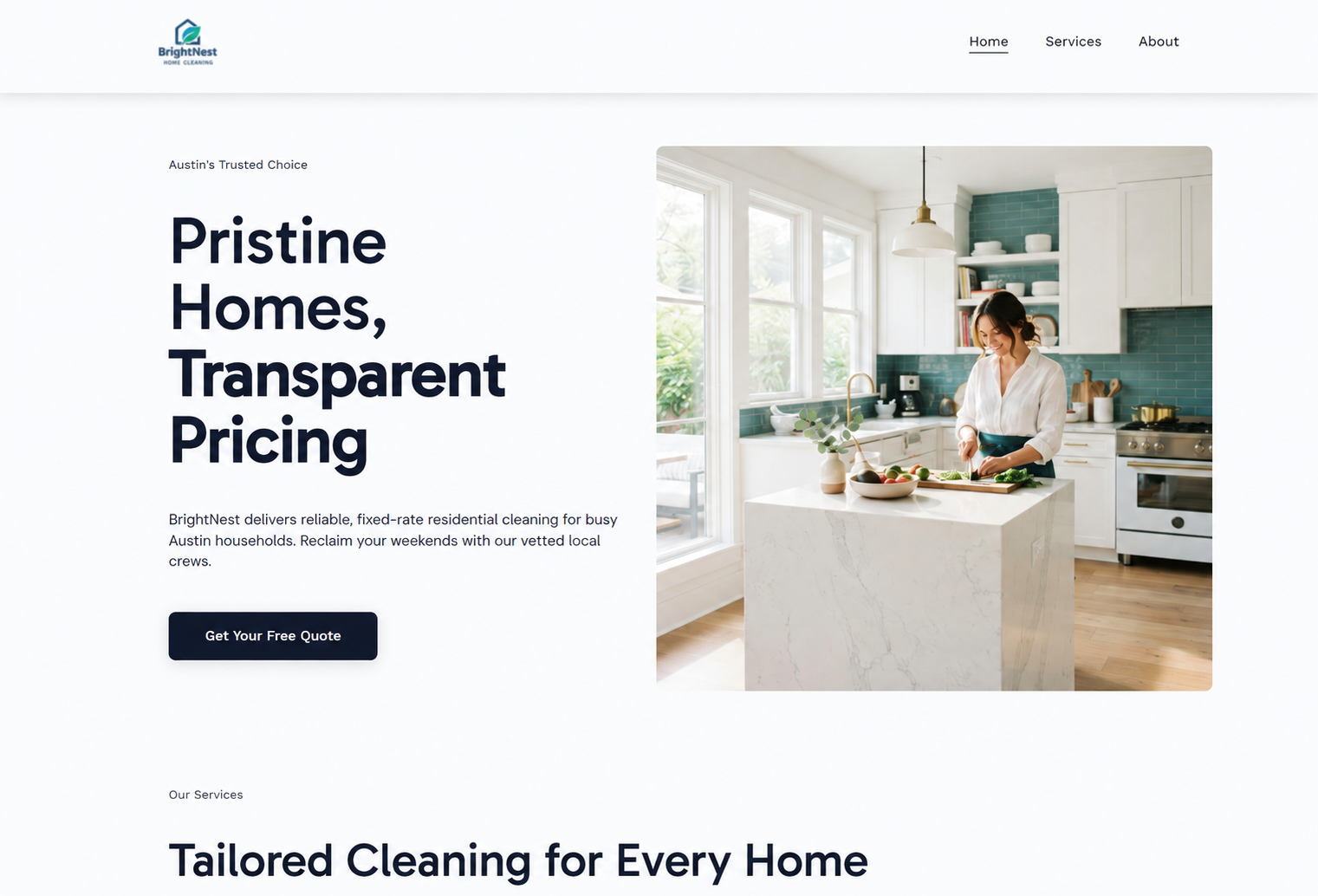
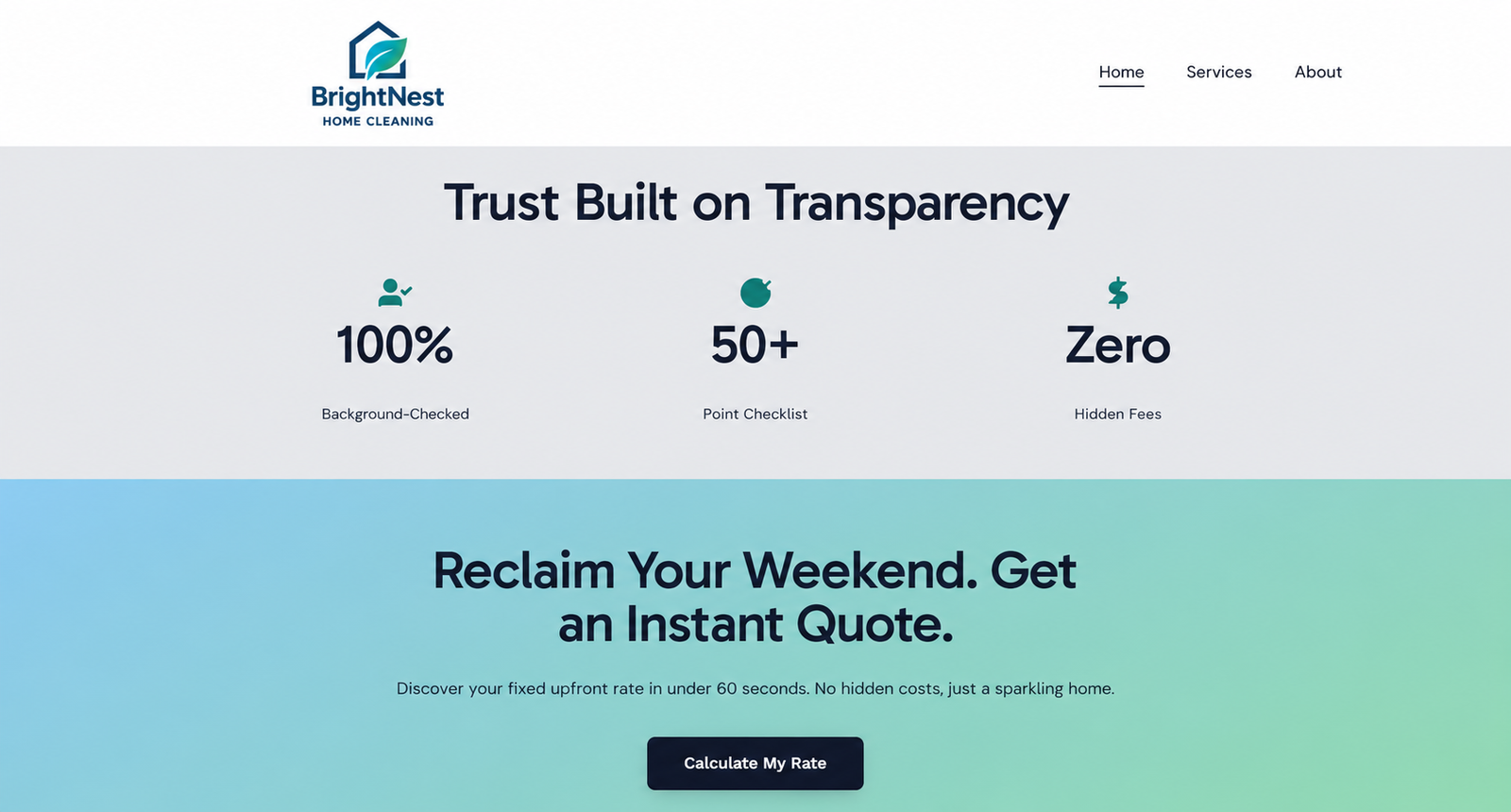
For the first test, I asked the AI to create a site for a residential cleaning company serving Austin. The generated homepage immediately had the structure expected from a local-service website: a logo, navigation, a clear hero section, service cards, trust indicators, a final call to action, and a footer.
The visual hierarchy was the strongest part of the result. The headline was prominent, the photography matched the service category, and the page used a restrained color palette. This was more useful than a blank template because the AI made many initial layout decisions automatically.
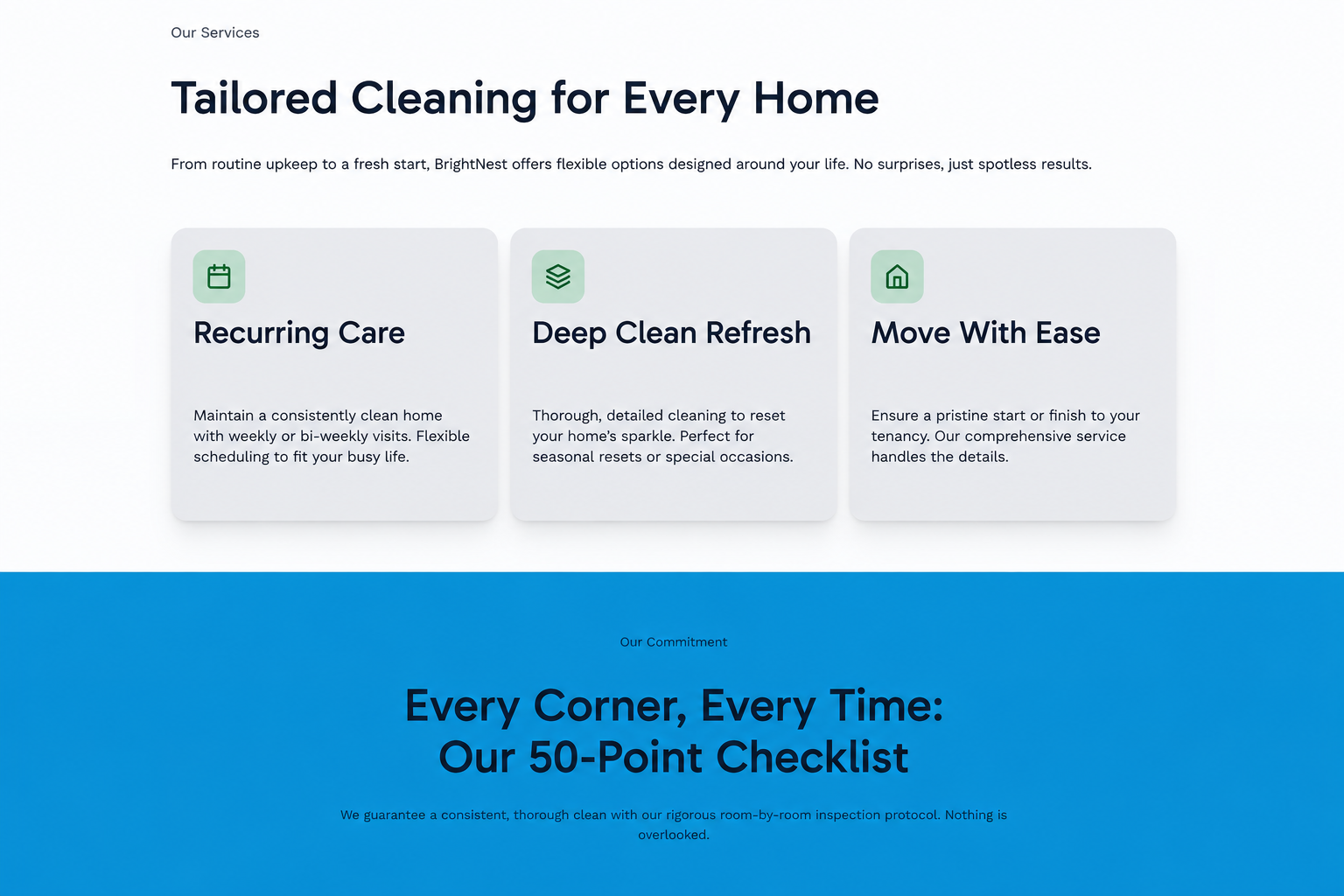
The services section was also logically organized. Recurring cleaning, deep cleaning, and move-related cleaning were separated into easy-to-scan cards. Below that, the builder added a 50-point checklist message and trust statistics.
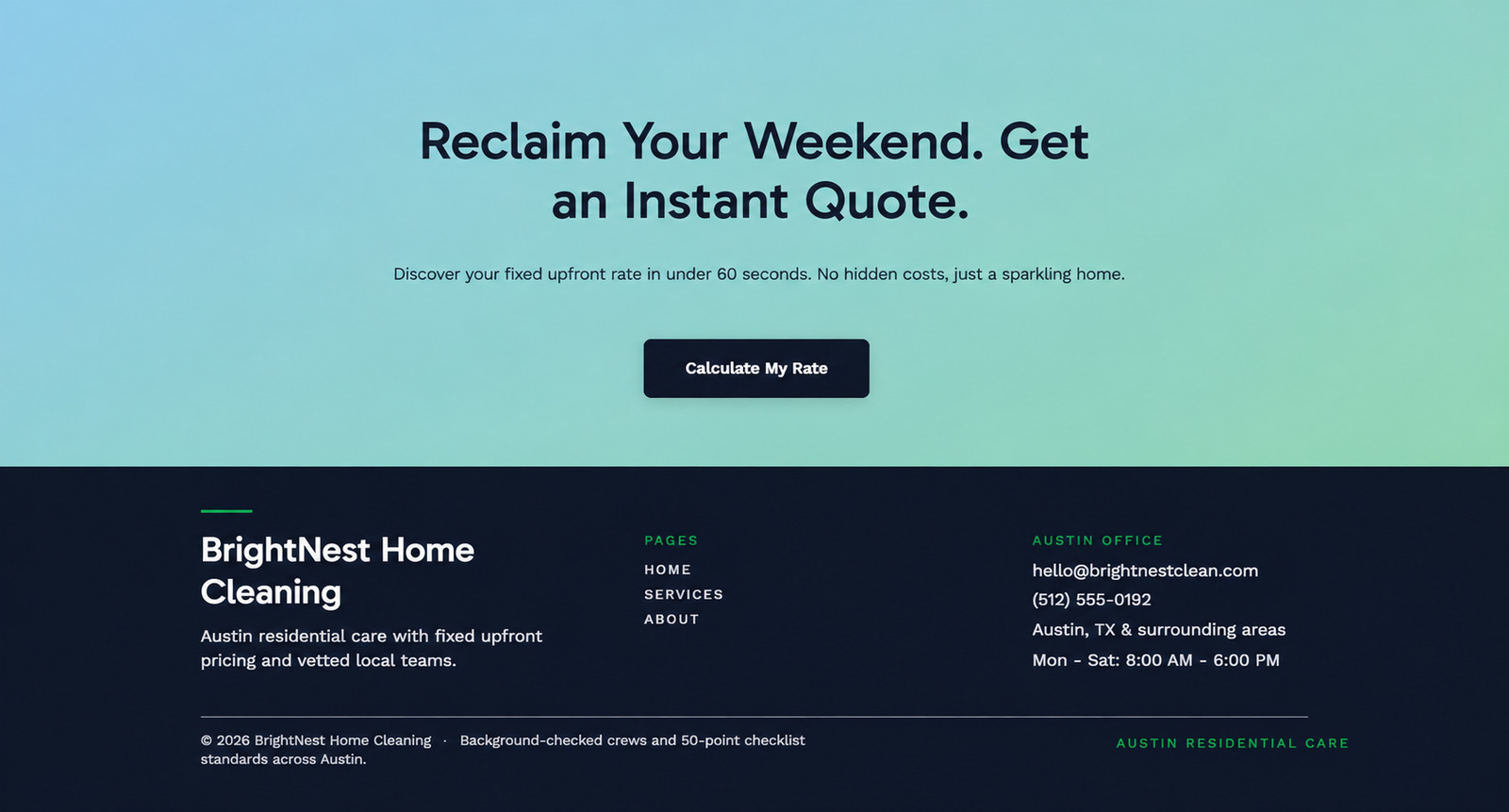
This is also where the most important risk appeared. The page claimed that crews were background-checked, promoted a 50-point checklist, promised zero hidden fees, and displayed a phone number and email address. None of those facts had been supplied in the prompt. They made the site look complete, but they would require verification or removal before going live.
Test 2: Editing Copy and Brand Styling
Next, I switched to Manual mode and changed the main headline to “Reliable Home Cleaning, Built Around Your Schedule.” I also rewrote the supporting paragraph and changed the button text to “Request a Free Estimate.” Editing text directly on the page was intuitive, and the live canvas made it easy to see the result immediately.

I then adjusted the green brand accent to a teal tone. The global color controls showed how many times each color was used, which made a site-wide update more manageable than changing individual elements one by one. The revised hero remained clean in desktop preview and stacked correctly on mobile.
One important functional detail remained: changing the CTA label did not create a working destination. The button still needed to be linked to a form or section. This is a good example of the difference between a visually finished site and a conversion-ready site.
Test 3: Agentic Editing and Mobile Readiness — Hostinger AI Website Builder Review 2026
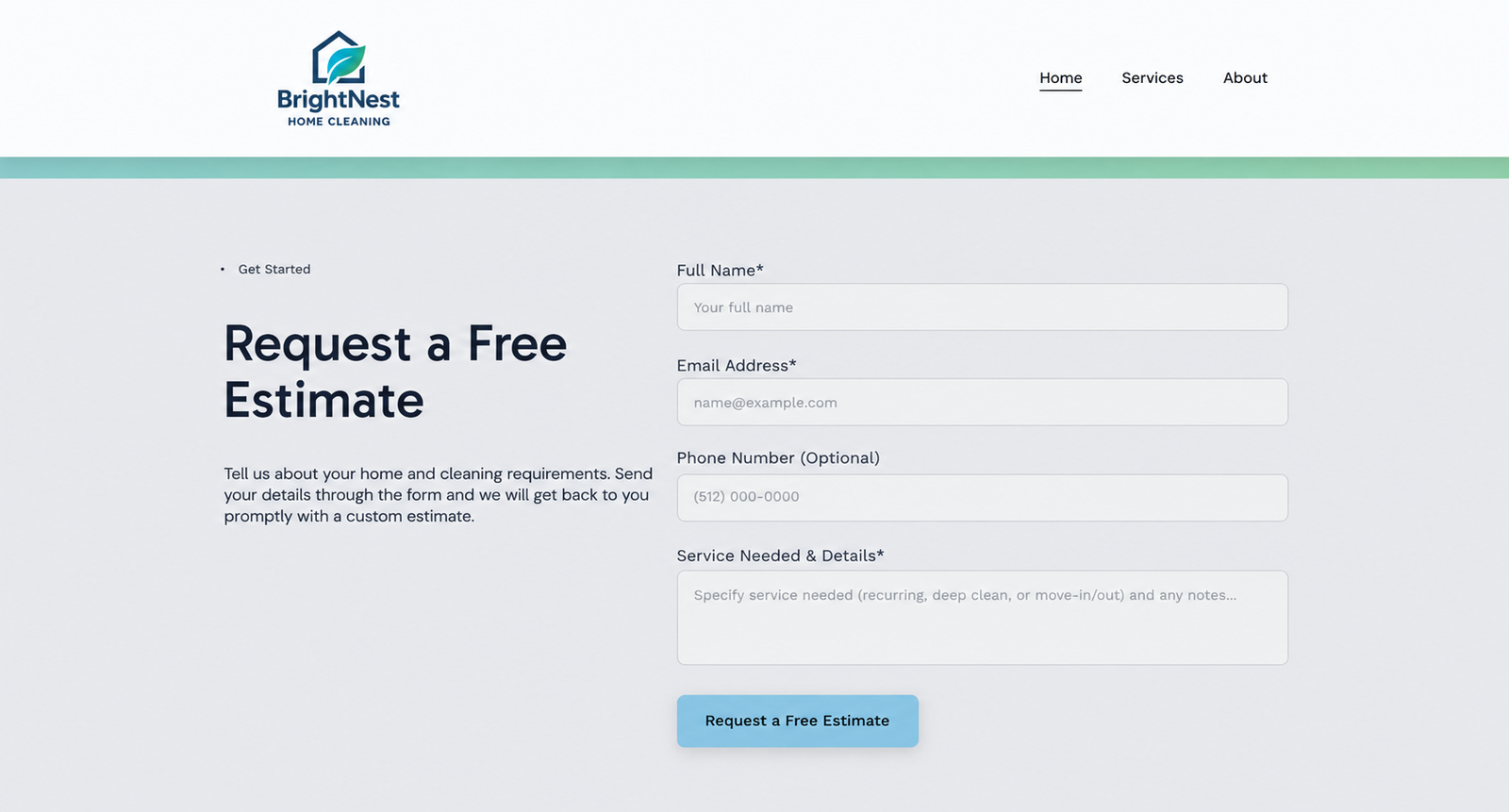
For the third test, I asked Agentic mode to add a contact section at the bottom of the Home page after the final call to action. The requested fields were Name, Email, optional Phone, Service Needed, and Message, followed by a “Request a Free Estimate” button. I also instructed it to preserve the saved sections and edits.
The agent identified the available pages, asked which one should receive the section, summarized the planned change, and requested confirmation before applying it. The extra confirmations slowed the workflow, but they reduced the chance of editing the wrong page or discarding existing work.
In this Hostinger AI Website Builder Review 2026, the finished section preserved the earlier edits and displayed correctly in desktop and mobile previews. Visually, the form was usable and responsive, but it did not fully follow the request: “Service Needed” and “Message” were combined into one field labeled “Service Needed & Details,” the copy introduced an unsupplied promise, and the light-blue button did not match the darker CTA style elsewhere on the page. I inspected the layout and fields, but I did not test an actual form submission or email delivery.
Ease of Use
Hostinger’s strongest usability decision is the combination of Manual and Agentic modes. Manual mode is faster when you know exactly which word, color, or button needs changing. Agentic mode is more useful when a request affects page structure or requires several elements at once. In this test, moving between the two approaches felt more practical than relying on prompts alone.
The interface is approachable, but AI actions may involve clarification and confirmation steps. Beginners may appreciate that caution; users making many small changes may find direct editing faster. For more practical AI workflows, visit our AI for work hub.
Design Quality and Mobile Responsiveness
The generated design was credible enough for a real local business after factual cleanup. Spacing, typography, photography, and section order were coherent, and the mobile preview converted the layouts into a readable single-column experience without obvious clipping or horizontal overflow.
The main visual weakness was consistency after the Agentic edit. The added form fit the page structurally, but its light-blue CTA did not match the established dark-navy buttons. AI can extend a site, but a final brand-consistency pass is still necessary.
Hostinger AI Website Builder Pricing
Hostinger’s public pricing page displayed the following US promotional rates when checked:
| Plan | Promo Rate | 48-Month Total | Renewal Rate |
|---|---|---|---|
| Premium | $2.99/month | $143.52 | $10.99/month |
| Unlimited | $3.99/month | $191.52 | $16.99/month |
| Cloud Startup | $7.99/month | $383.52 | $25.99/month |
Pricing last checked: September 21, 2026. These promotional monthly rates are based on an upfront 48-month purchase, and Hostinger lists prices before VAT. Offers and renewal prices can change, so verify the current terms on the official Hostinger pricing page before buying.
Pros and Cons
Pros
- Generates a complete, visually coherent starting site from a short description
- Combines direct drag-and-drop editing with conversational Agentic changes
- Makes global color and style changes relatively easy
- Produces responsive desktop and mobile layouts
- Includes hosting and supporting website tools in the same platform
Cons
- Can invent business claims, contact details, and promises that sound factual
- Does not always follow field-level instructions exactly
- Agentic edits can introduce visual inconsistencies
- CTA text can look finished even when the button has no destination
- Lowest advertised rates require a long upfront commitment and renew at a higher price
Who Is It Best For?
Hostinger AI Website Builder is best suited to freelancers, local service businesses, creators, and first-time site owners who want a professional starting point without coding. It is especially appealing when the goal is a straightforward brochure site, portfolio, landing page, or small online store managed within one platform.
It is less suitable for teams that need highly controlled design systems, complex custom workflows, or zero-tolerance accuracy without manual review. Those users may outgrow the builder or need developer support.
Where Hostinger AI Website Builder Has Limitations
The main limitation after generation was instruction fidelity. Agentic mode produced a polished section, but it approximated the requested structure instead of following it exactly. That makes it useful for accelerating layout work, while still requiring a manual check of fields, copy, styling, links, and integrations.
Before publishing, verify every factual claim, replace generated contact information, test every button and form, review required privacy disclosures, and compare desktop and mobile previews. That final review determines whether the generated site is simply attractive or genuinely ready for customers.
Final Verdict
Overall, this Hostinger AI Website Builder Review 2026 showed that the platform is easy to use for basic website creation, but its AI editing still has limitations in precision and control.
🏆 Overall verdict: Hostinger AI Website Builder is worth considering if speed, simplicity, and an all-in-one setup matter more than pixel-level control. Across three tests, it created a strong first draft, accepted meaningful manual changes, and added a responsive contact section through Agentic mode. The section worked visually, but it did not reproduce every requested field separately, and form submission was not tested. Its best role is as a fast production assistant, not an autonomous publisher.
Frequently Asked Questions
Is Hostinger AI Website Builder free?
Hostinger says the builder has a 14-day trial, but a paid plan is required to publish. Promotional paid plans started at $2.99 per month when checked, based on a 48-month upfront purchase.
Can beginners use it without coding?
Yes. The tested workflow used generated layouts, direct visual editing, and conversational instructions. No code was required for the three tasks in this review.
Does it create mobile-friendly websites?
The test site adapted to a single-column mobile layout without obvious clipping. Mobile preview should still be checked after every major edit, especially after adding forms or new sections.
Can the AI edit an existing page?
Yes. In Agentic mode, it added a new contact section to the existing Home page while preserving the saved content. The layout displayed correctly, although the requested fields were not reproduced exactly and submission was not tested.
What should be checked before publishing?
Verify all claims and contact details, connect buttons to real destinations, submit a test form, review desktop and mobile layouts, confirm SEO settings, and ensure privacy or consent requirements are covered.
Next step: Explore the Hostinger AI Website Builder or compare more practical reviews in our AI tools for business hub. A paid plan is required to publish a live website.
Leave a Reply