
This Zanda review 2026 examines how the platform handles service setup, practitioner availability, the client portal, and online booking. Zanda promises to bring scheduling, client records, forms, communication, billing, and reporting into one practice management platform. That is a broad feature list, but how easy is it to configure the part clients actually see?
For this Zanda review, I created a fictional solo practice, added two consultation services, defined weekly availability, enabled the client portal, and followed the public booking journey through service and time selection. The sequence showed how administrative settings carry into the client-facing experience.
Quick Verdict
| Category | Hands-on finding |
|---|---|
| Setup | Guided and logically ordered |
| Service configuration | Simple for basic duration and price settings |
| Availability | Clear weekly schedule controls |
| Client portal | Clean and easy to follow |
| Booking flow | Straightforward through date and time selection |
What Is Zanda?
Zanda is practice management software designed for health and allied-health providers. Its official feature list includes calendar management, client records, clinical notes, online forms, automated communication, invoicing, payments, telehealth, reports, and a client portal.
The platform is intended for both solo clinicians and group practices. Zanda also states that it supports multiple practitioners and locations on its Growth plan, while its Starter plan is aimed at one practitioner.
Those broader capabilities matter when comparing practice management systems. For more practical software comparisons, visit the AI Tools for Business hub.
How I Tested Zanda
I used a fictional practice called Clinic Tests and configured a basic appointment-booking scenario. No real patient information was entered.
The test included five steps:
- Create two consultation services.
- Set a standard Monday-to-Friday schedule.
- Enable and open the client portal.
- Choose a service as a prospective client.
- Select an available date and review the appointment summary.
I stopped before completing client registration and submitting the final booking. This review therefore evaluates setup clarity and the visible booking journey, not confirmation delivery, post-booking changes, clinical notes, billing, reporting, telehealth, integrations, data migration, or Zanda’s AI features.
Configuring Services
The onboarding wizard asked me to add common services and displayed three essential fields together: service name, duration, and price.
I created two fictional options:
- Initial Consultation — 60 minutes — $120
- Standard Consultation — 60 minutes — $170
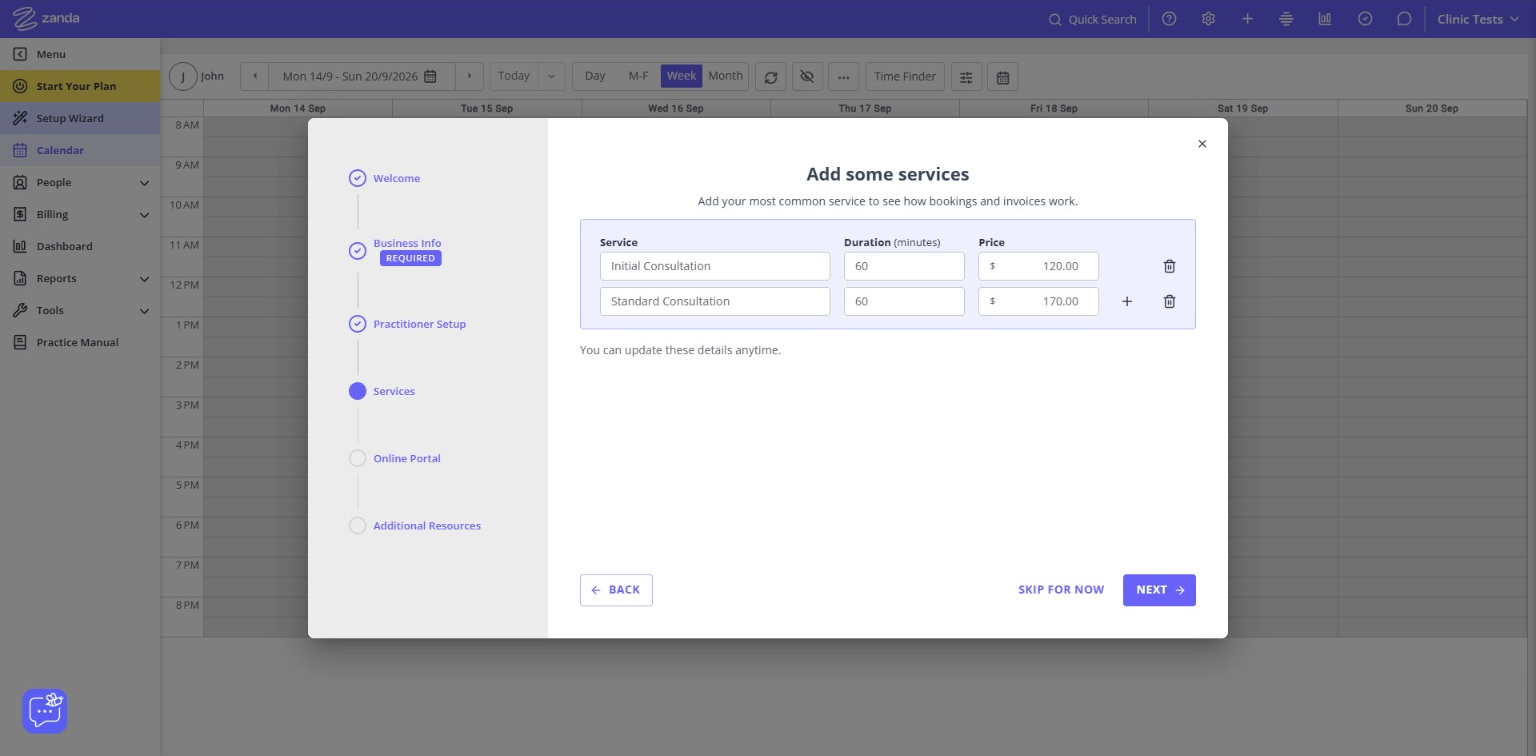
The screen was uncluttered and easy to understand. Adding a second service did not require navigating to another settings page, and both entries remained visible for comparison.
For a simple solo-practice setup, this was efficient. A more complex practice would still need to test details such as practitioner-specific pricing, insurance rules, group services, deposits, and location restrictions.
Zanda handled basic service creation well. The required information was clear, and the workflow did not feel overloaded.
Setting Practitioner Availability
The next useful step was defining when the fictional practitioner could accept bookings. I selected Monday through Friday, from 9:00 AM to 5:00 PM, and left Saturday and Sunday unavailable.
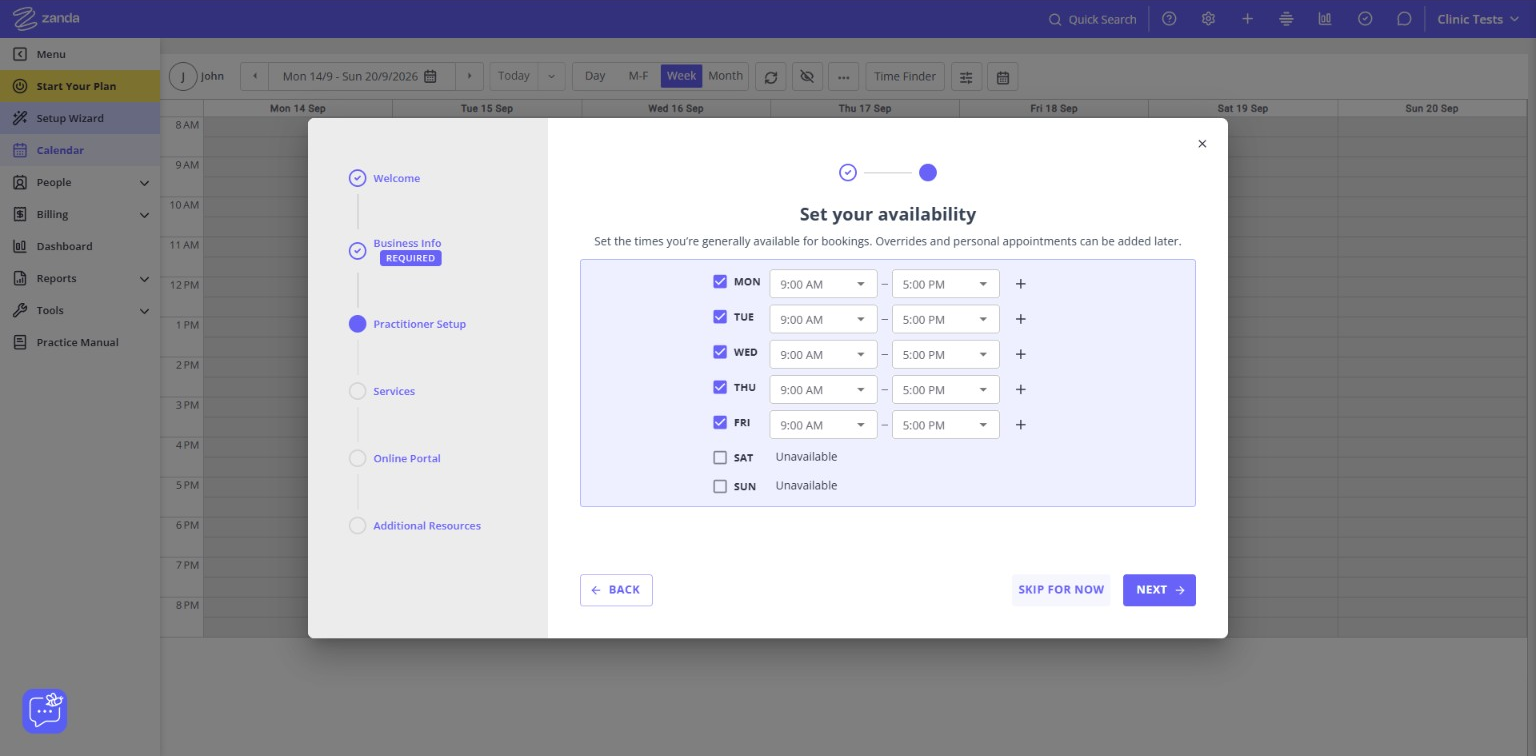
Each weekday had its own checkbox, start time, end time, and an option to add another time block. That structure should accommodate split schedules, such as working in the morning and returning for evening appointments.
The page also explained that overrides and personal appointments could be added later. The standard weekly schedule itself was easy to configure.
The availability controls were one of the strongest parts of onboarding. They were visual, flexible, and understandable without consulting documentation.
Opening the Client Portal
After completing the setup steps, Zanda generated a public client portal for the fictional practice.
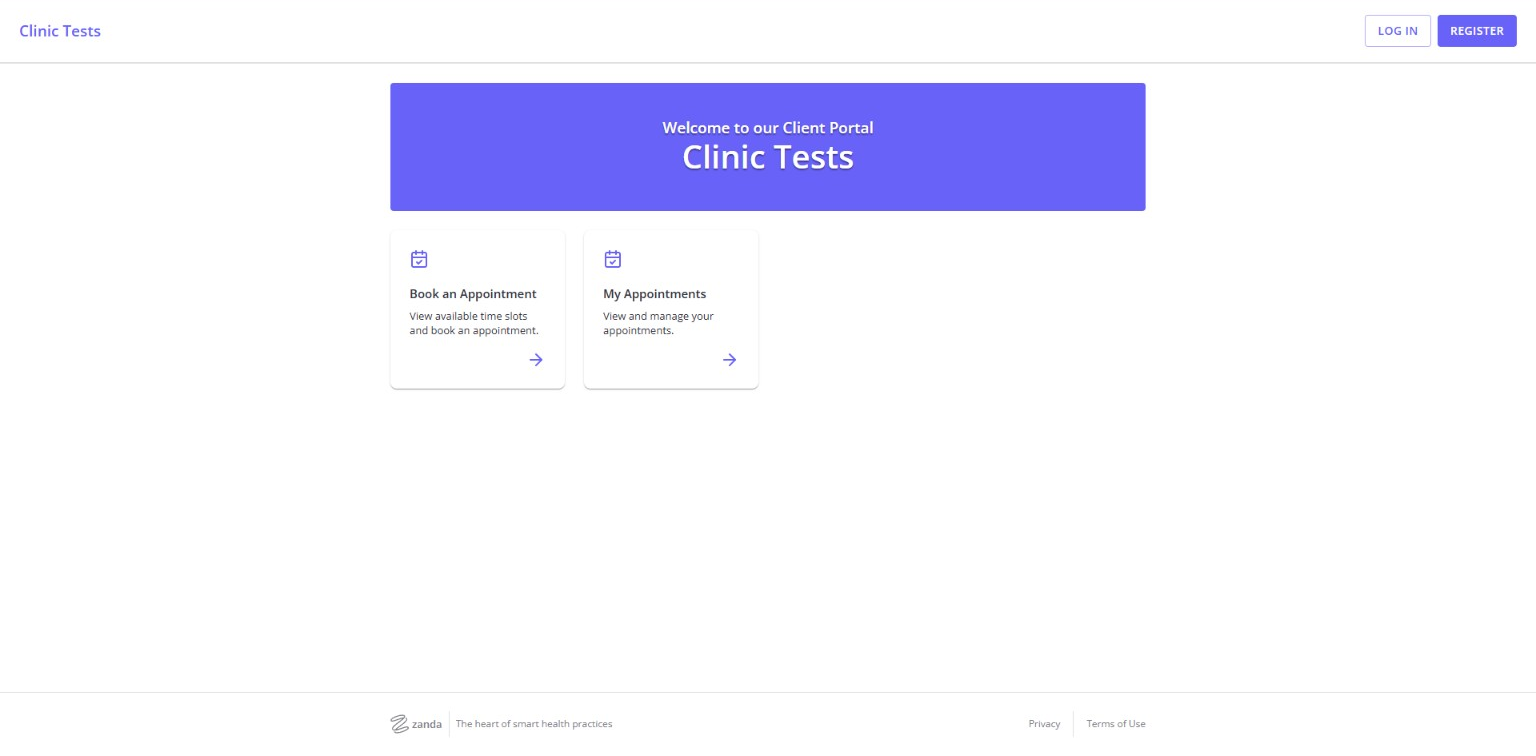
The portal homepage offered two direct choices: Book an Appointment and My Appointments. This is a sensible client-facing design because it avoids exposing the complexity of the administrative platform.
The practice name was clearly displayed, and the booking action was easy to identify. The test account used a minimal design, so I did not evaluate advanced branding or customization.
The portal made a good first impression. It was clean, focused, and did not make the client search for the booking action.
Choosing a Service
The public booking flow displayed both services created during setup, including their descriptions and 60-minute duration.
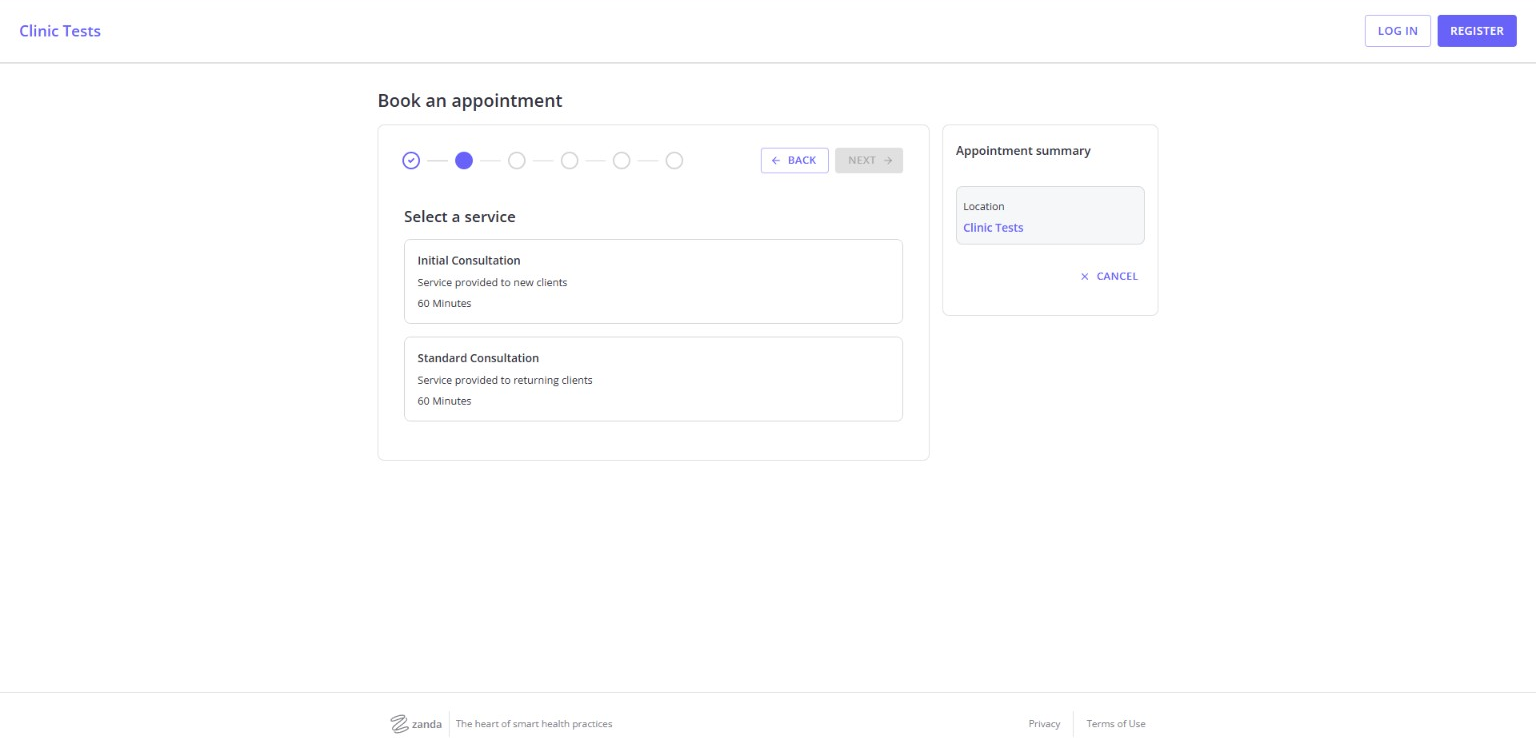
The appointment summary remained visible on the right side of the page, confirming the selected location. This persistent summary reduced uncertainty about what the client had already chosen.
One positive detail was consistency: the service names entered in the administrative setup appeared correctly in the public portal. That sounds basic, but it is important in booking software because unclear service names or missing durations can cause avoidable client questions.
Service selection was simple and consistent with the administrator’s configuration.
Selecting a Date and Time
After choosing Initial Consultation and the fictional provider, the booking flow presented a monthly calendar with available dates. The appointment summary showed the location, service, and provider.
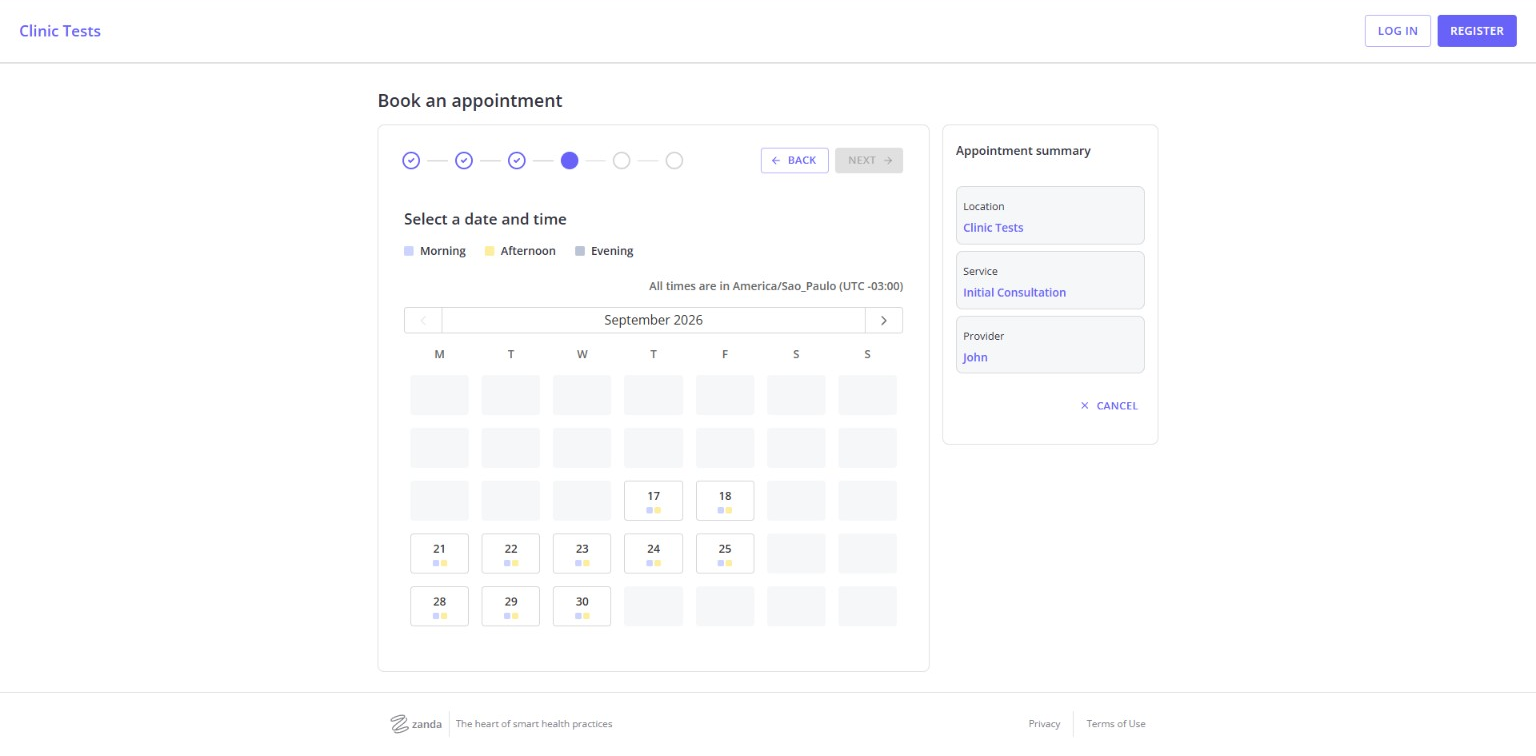
The calendar used small color indicators for morning, afternoon, and evening availability. The page also displayed the practice time zone, which is useful when telehealth or clients in different regions are involved.
After date and time selection, the flow moved to client login or registration before final submission. This made the account requirement visible at the point where a prospective client was ready to continue.
The visible scheduling interface was organized and informative. Registration added another step, while the appointment summary preserved the selected service, provider, date, and time.
What Zanda Did Well
The onboarding sequence was practical
Zanda moved from practitioner availability to services and then to the online portal. The sequence reflected the dependencies of a real booking system: clients cannot choose a service or time until the practice defines them.
Administrative settings carried into the portal
The fictional services and schedule appeared correctly in the client-facing experience. This gave the setup process a clear result rather than leaving configuration scattered across unrelated screens.
The client portal stayed focused
The public interface avoided unnecessary administrative information. Clients could start a booking or manage existing appointments from a simple homepage.
The appointment summary provided context
Keeping the selected location, service, provider, and later the date and time in a visible summary helped make the multi-step flow easier to follow.
Where Zanda Could Be Better
The complete booking required a client account
The flow moved to login or registration before final confirmation. Account-based portals can support security and self-service, but they also introduce another step.
In this Zanda review 2026, the booking workflow was one of the clearest parts of the hands-on test. Practices should test this experience with a real client perspective before launch.
The platform has more depth than the initial test reveals
Zanda includes many settings and modules beyond online booking. That can be valuable, but it also means a practice should plan time to configure templates, communication, billing, permissions, and clinical workflows.
Zanda Pricing in 2026
Pricing is an important part of this Zanda review 2026 because the platform combines online booking with broader practice-management functions.
At the time of this review, Zanda’s official pricing page listed all prices in US dollars and offered a 14-day free trial without requiring a credit card.
The regular Starter price was listed at $19 per month for one practitioner, including up to 1,000 appointments, one user, unlimited clients, 100 GB of storage, appointment reminders, intake forms, integrated billing, and the client booking portal.
The Growth plan had a $49 monthly base price plus $19 for each additional practitioner. It added unlimited appointments, free admin users, multiple locations, room and resource management, advanced waitlist tools, customizable note templates, and broader reporting features.
Zanda was displaying a temporary 50% discount for the first six months when checked. Because promotions can change, confirm the current total directly on the official Zanda pricing page before subscribing.
Optional charges may also matter. The official page listed Telehealth Pro at $9 per month per practitioner and additional SMS messages at $0.09 each. Payment-processing costs vary by region.
Where Zanda Has Limitations
According to Zanda’s official product information, the platform also includes or supports:
- clinical notes and templates;
- online intake forms and e-signatures;
- invoices and integrated payments;
- SMS and email reminders;
- telehealth;
- reports and analytics;
- waitlists;
- multiple locations and practitioners;
- integrations with services such as Stripe, Xero, Mailchimp, Zoom, and calendar platforms;
- BizzyAI tools for drafting and refining practice content.
These capabilities broaden Zanda beyond appointment scheduling, but they were outside this review’s hands-on scope. The evaluation also stopped before final client registration and booking submission, so it does not establish confirmation delivery, intake behavior, payment flow, post-booking changes, long-term usability, or the quality of the wider clinical and administrative modules.
Who Is Zanda Best For?
Based on the setup tested and the official plan structure, Zanda is most relevant to:
- solo clinicians who want booking connected to client administration;
- allied-health and mental-health practices moving beyond a standalone calendar;
- growing practices that need multiple practitioners, locations, or resources;
- practices willing to configure a broader system rather than use only a lightweight scheduler.
It may be less suitable for someone who only needs a basic public booking page and does not plan to use client records, forms, billing, or practice-management features. In that situation, a simpler scheduler may involve less setup.
Zanda Review 2026: Final Verdict
Overall, this Zanda review 2026 found a clear and logically connected setup experience for the portion of the platform I tested.
My hands-on experience with Zanda’s initial booking setup was positive. Creating services, defining availability, publishing the client portal, and moving through service and date selection all worked in a logical sequence. The administrator and client views also remained consistent.
The strongest part was not a flashy feature. It was the way the onboarding steps connected: the information entered behind the scenes became a clear client booking journey.
However, this was a focused test, not a complete audit of the platform. I did not finalize the booking or evaluate clinical documentation, billing, reporting, telehealth, automations, or AI tools. Those areas could materially affect the final buying decision.
For practices interested in an all-in-one system, Zanda deserves a place on the trial list. Use the free trial to reproduce your actual services, practitioner schedules, forms, payment rules, and documentation workflow before committing.
FAQs
Does Zanda support online booking?
Yes. In this test, I created services and practitioner availability, opened the client portal, selected a service, and reached the date-and-time selection stage.
Can solo practitioners use Zanda?
Yes. Zanda’s Starter plan is designed for one practitioner, while the Growth plan supports practices that need additional practitioners and broader operational features.
Did I complete a final Zanda booking?
No. I stopped before client registration, login, and final booking confirmation. Therefore, this review does not verify confirmation messages, intake forms, payments, or post-booking changes.
Is Zanda only an appointment scheduler?
No. Zanda’s official information also lists client records, clinical notes, forms, billing, payments, telehealth, reports, and other practice-management features. Most of those wider features were outside the scope of this hands-on test.

Leave a Reply