
Running a small retail store means making constant decisions about what to reorder, which products could expire, and how to promote slow-moving inventory. AI tools for small retail stores promise to help with those decisions, but a feature list does not show what happens when you give the software a practical inventory task.
For this hands-on test, I used five AI tools on five different small-retail workflows: demand forecasting, perishable inventory analysis, promotional design, dead-stock and reorder analysis, and natural-language inventory search. The scenarios used fictional data or a public product demo, so no real customer or private business data was involved.
The results were useful, but not uniformly reliable. Two tools were strong in the tasks I tested, while three had mixed results. Stocklytic AI presented a reorder quantity I could not fully verify from the displayed figures. Adobe Express AI introduced an incorrect promotional price and unit. OnHand answered a specific product question but failed to respond to a broader reorder query. These limitations matter when an AI recommendation can affect purchasing, pricing, or what a customer is told.
Quick Verdict
⚙️ Best for: Claude for perishable-stock analysis and ShelfLens for surfacing reorder and dead-stock signals. Stocklytic AI clearly presented an urgent reorder recommendation, but its suggested quantity needed further verification.
🧩 Main limitation: AI inventory tools still need human verification. A clear recommendation may not fully explain its calculation, a polished promotion can contain a wrong commercial detail, and an assistant may answer a specific product question while failing on a broader query.
🏆 Overall verdict: There was no single winner. The strongest tool depended on the task. These tests supported using AI to assist with analysis and preparation while keeping final purchasing and publishing decisions under human control.
Results at a Glance
| Tool | Task | Result |
|---|---|---|
| Stocklytic AI | Reordering | Mixed |
| Claude | Perishables | Strong |
| Adobe Express AI | Promotions | Mixed |
| ShelfLens | Stock analysis | Strong |
| OnHand | Product lookup | Mixed |
These ratings reflect only the tasks I personally tested, not every feature each platform offers.
How I Tested These AI Tools for Small Retail Stores
I wanted each test to represent a job a small store owner or manager could realistically face. Rather than asking every tool the same generic question, I matched each platform to a practical workflow and judged only what I actually tested.
For each test, I looked at three things: whether the tool completed the task, whether the result stayed faithful to the supplied data, and how much manual checking would be needed before acting on it.
A Strong rating meant the tool completed the tested task with useful, inspectable results and no material issue identified in that test. A Mixed rating meant it produced something useful but also showed an accuracy problem, an unexplained calculation, or a failure to complete part of the workflow.
These were limited hands-on tests, not a measurement of long-term forecasting accuracy or business results. I did not place real purchase orders or measure changes in sales, waste, or profit.
The screenshots below document the outputs discussed in each test.
Test 1 — Stocklytic AI: Forecasting Demand and Reorder Timing
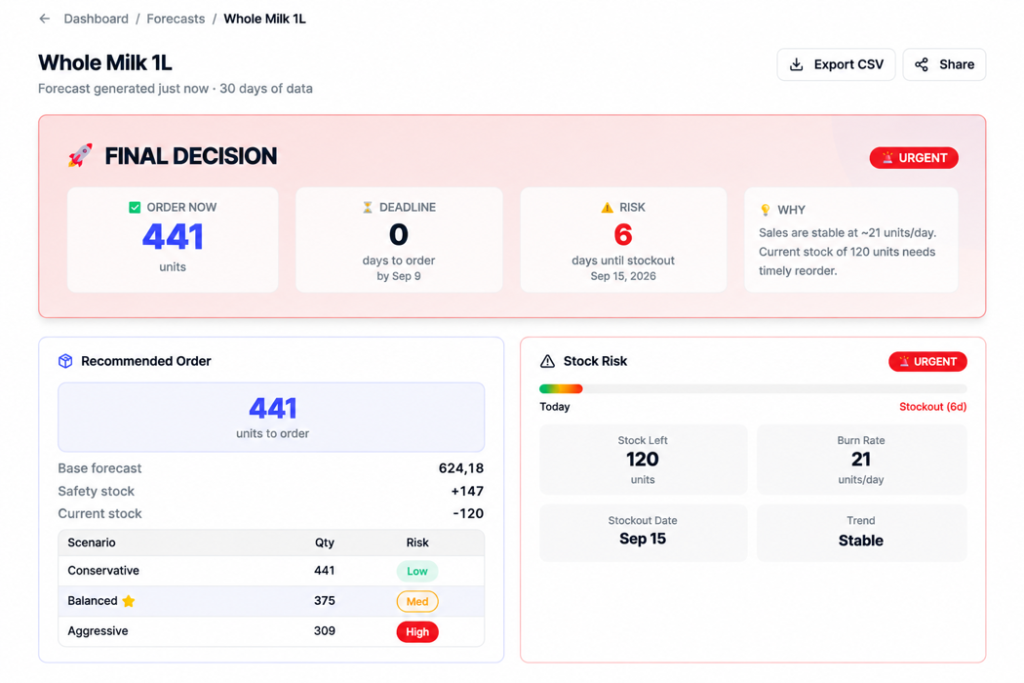
For the first test, I used Stocklytic AI to turn recent inventory and demand data for Whole Milk 1L into a reorder decision. The result screen presented a recommended order quantity, an ordering deadline, and a projected stockout risk.
The tool displayed a base forecast of 624.18 units, current stock of 120 units, and a burn rate of about 21 units per day. It projected a stockout in six days and recommended ordering 441 units immediately.
It also showed three scenarios: Conservative at 441 units with low risk, Balanced at 375 units with medium risk, and Aggressive at 309 units with high risk. In this comparison, the smaller suggested orders were associated with higher stockout risk.
What worked well was the presentation. The interface made the suggested action and urgency easy to find. However, the displayed figures did not fully explain the recommended quantity.
The recommendation panel listed a base forecast of 624.18 units, safety stock of +147, and current stock of −120. Simply combining those figures gives 651.18 units, rather than 441. Another adjustment or planning horizon may explain the difference, but this screen did not show enough information for me to verify it.
That distinction is why I rated the test Mixed. Stocklytic produced a clear operational recommendation, but clarity alone was not enough to establish that the suggested order quantity was justified.
Manual work required: Confirm how the recommended quantity was calculated, then check supplier constraints, available cash, and product shelf life before ordering.
Stocklytic made the urgency and suggested action easy to understand, but I would verify the recommended quantity before creating a purchase order.
Test 2 — Claude: Analyzing Perishable Inventory Before It Expires
Next, I tested whether Claude could reason through a small set of perishable products using only stock, average daily sales, and days remaining until expiration.
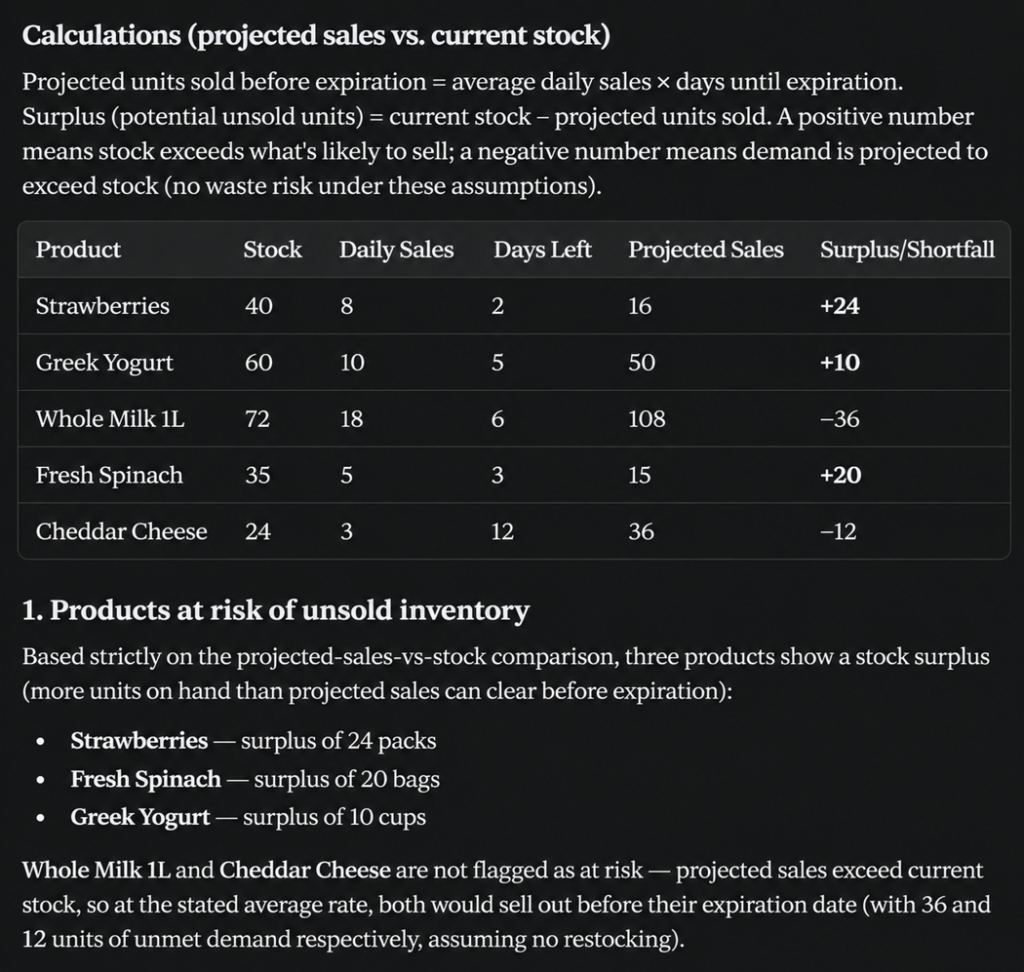
Claude calculated projected sales before expiration and compared them with current stock. It identified Strawberries as having a projected surplus of 24 packs, Fresh Spinach a surplus of 20 bags, and Greek Yogurt a surplus of 10 cups. Whole Milk 1L and Cheddar Cheese were not flagged as waste risks under the stated assumptions because projected demand exceeded current stock.
The strongest part of the response was that it did not stop at arithmetic. It separated products with likely unsold inventory from products likely to sell out, ranked the immediate waste risk, and suggested practical actions.
It also explained that the analysis assumed the stated average sales rate continued and did not account for factors such as promotions or changing demand.
That caution matters. The output was useful for prioritization, but it was still a projection based on a simple set of inputs, rather than a guarantee of what would sell before expiration.
Manual work required: Recheck actual daily sales, expiration dates, and any promotions or replenishment before acting on the projected surplus.
Claude produced the strongest reasoning in this test, calculating the inventory risk while keeping its assumptions visible.
Test 3 — Adobe Express AI: Creating a Weekend Strawberry Promotion
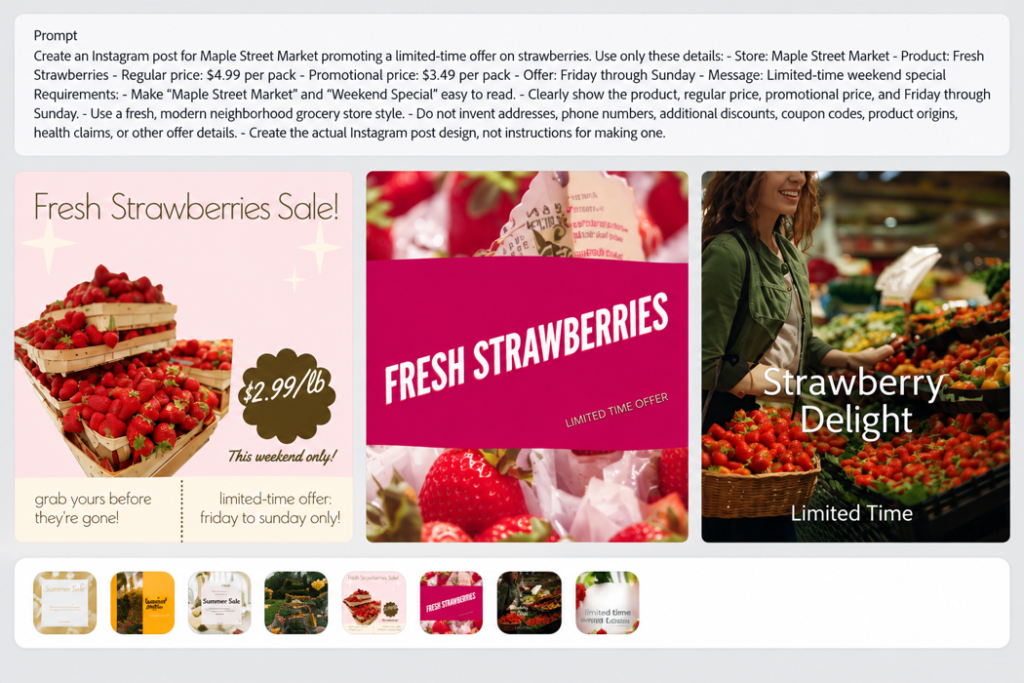
For the third test, I moved from analysis to action. I asked Adobe Express AI to create an Instagram post for Maple Street Market promoting Fresh Strawberries.
The supplied details were tightly controlled: regular price $4.99 per pack, promotional price $3.49 per pack, Friday through Sunday, and a limited-time weekend special. I also explicitly told the tool not to invent additional offer details.
Adobe Express generated multiple promotional designs rather than only giving me copy or instructions. Visually, the results were relevant to strawberries and looked like usable social-media starting points.
The problem was factual accuracy. One design displayed $2.99/lb. That price and unit were not in the prompt. The test supplied $4.99 per pack as the regular price and $3.49 per pack as the promotional price.
This is the kind of error that makes AI-generated retail promotions require careful review. A design can look polished enough to publish while changing a commercial detail. A wrong price or unit can confuse customers and require the store to correct an offer after publication.
The output was therefore useful as a design draft, but it was not ready to publish without correction.
Manual work required: Verify every visible price, unit, date, product name, and offer condition before publishing an AI-generated promotion.
Adobe Express created a useful promotional direction, but the incorrect price and unit had to be fixed before publication.
Test 4 — ShelfLens: Finding Reorder Needs and Dead Stock
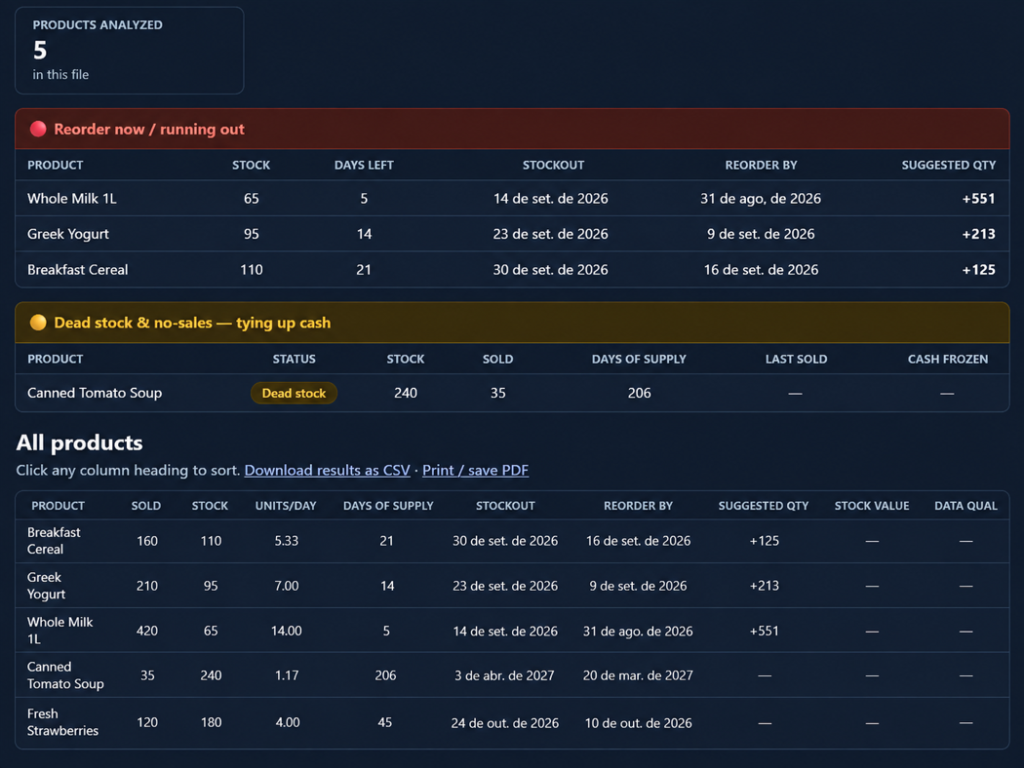
ShelfLens took a different approach. I used it to analyze a small retail inventory file and surface two operational problems at the same time: products running low and products tying up cash in slow-moving inventory.
The results separated three products into the reorder section: Whole Milk 1L, Greek Yogurt, and Breakfast Cereal. It also flagged Canned Tomato Soup as dead stock, showing 240 units on hand, 35 sold, and 206 days of supply.
“Dead stock” was the tool’s label. Because the product had recorded sales, I would interpret that flag as a reason to investigate slow movement or overstock, rather than proof that the item would not sell.
The tool exposed the underlying product table with units sold, current stock, units per day, days of supply, stockout dates, reorder dates, and suggested quantities. That made the result easier to inspect than a recommendation without supporting metrics.
For a small retailer, this split is useful because overstock and stockouts compete for the same cash. ShelfLens made both risks visible in the same analysis.
The output described its figures as estimates, so I would not treat the suggested quantities as automatic purchase orders. But the test produced a practical starting point for deciding which products needed attention.
Manual work required: Validate suggested reorder quantities against supplier terms, current sales changes, and available cash. Investigate slow-moving items before deciding on discounts or discontinuation.
ShelfLens surfaced both stockout and slow-moving inventory risks clearly enough to support a focused human review.
Test 5 — OnHand: Asking Natural-Language Questions About Demo Inventory
For the final test, I used OnHand’s retail demo to see whether a store employee could ask inventory questions in normal language instead of searching through product records manually.
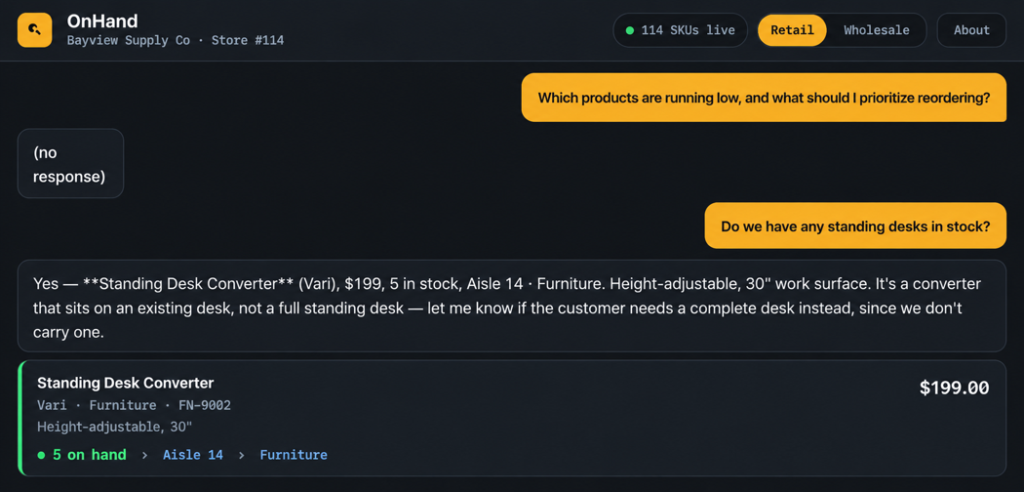
I first asked a broad operational question: “Which products are running low, and what should I prioritize reordering?” The demo returned “(no response).” That was a limitation in this session, so I could not verify its usefulness for broad reorder analysis.
I then used a specific product question suggested by the interface: “Do we have any standing desks in stock?”
This time the result was much stronger. OnHand found a Vari Standing Desk Converter for $199, reported five units in stock, identified Aisle 14 and the Furniture category, and clarified that the item was a converter that sits on an existing desk rather than a complete standing desk.
That clarification was useful because it prevented a related product from being presented as an exact match. In a store-floor setting, this distinction could help an employee explain what is actually available.
The two queries together are why I rated this test Mixed. The assistant was useful and specific for the product lookup, but the broader reorder question failed to produce an answer. This demo session did not establish how reliably it would perform across other questions or a real store’s inventory.
Manual work required: Verify critical stock information in the POS or inventory system, and do not assume that success on a product lookup means broader operational queries will also work.
OnHand handled the specific product lookup well, but its failure on the broader reorder question limited what I could verify.
Which AI Tool Was Best for Each Retail Inventory Task?
Best for clearly presenting a reorder recommendation: Stocklytic AI. It made the suggested quantity, deadline, and stockout risk easy to find. However, I could not fully reconcile the recommended quantity with the displayed figures, so I would verify the calculation before using it for a purchase order.
Best for reasoning about perishable stock: Claude. It calculated projected surplus and shortfall, separated the products needing attention, and stated the assumptions limiting the analysis.
Best for creating a promotional design draft: Adobe Express AI. It produced usable visual directions, but the invented $2.99/lb detail required correction. I would use the output as a starting point and check all commercial information before publishing.
Best for spotting both stockout and slow-moving inventory problems: ShelfLens. Its output made the competing inventory risks visible together and exposed the underlying product metrics. Its dead-stock flag still required interpretation.
Best for specific store-floor product questions: OnHand. The successful standing-desk query demonstrated a useful product lookup and an important clarification. The failed broad query showed the boundary of what I could verify in the demo.
What These Tests Taught Me About AI for Small Retail Stores
The biggest lesson from these five tests is that “AI for inventory” is not one job. Forecasting, waste reduction, promotion creation, slow-moving stock detection, and store-floor search require different capabilities.
Claude and ShelfLens provided the strongest analytical results in these tests, with calculations or inventory metrics that could be inspected. Stocklytic made its recommendation easy to understand, but the displayed figures did not fully explain the suggested order quantity.
That distinction matters: a clear recommendation is useful, but the numbers behind it must also be verifiable before a store acts on it.
The most direct factual error appeared in the marketing test. Adobe Express produced something visually convincing while changing the price and unit. Presentation quality and factual reliability need separate checks.
OnHand showed another limitation: performance varied by question. A broad query failed, while a specific product lookup worked well. The practical approach is to use a tool for the narrow task it has demonstrated it can perform and test additional workflows separately.
These sessions also did not measure business outcomes. A useful forecast screen does not establish forecasting accuracy over time, and a suggested inventory action does not prove that waste will fall or profit will rise.
Across all five tests, I would keep purchasing decisions, promotional details, and customer-facing stock claims under human review.
Final Verdict: Are AI Tools Worth It for Small Retail Stores?
Based on these tests, yes—as task-specific assistants with human verification.
Claude was strong at identifying likely perishable surplus while stating its assumptions. ShelfLens was strong at surfacing reorder needs and slow-moving inventory. Stocklytic AI presented a clear reorder recommendation, but I could not fully verify the suggested quantity from the displayed figures. Adobe Express AI was useful creatively but introduced an incorrect price and unit. OnHand handled a specific inventory lookup well but failed on the broader reorder question I tried first.
That leaves two Strong results and three Mixed results across these five tasks. It also explains why I would not choose a single overall winner: the tools performed different jobs, and their limitations appeared in different places.
For a small retail store, a realistic starting point is one clearly defined task with data that can be checked. Use AI to surface risks, calculate scenarios, create drafts, or retrieve information, then verify the output before making a purchasing or customer-facing decision.
Use AI to reduce the work, not to remove the final human decision.
For another hands-on comparison, read our ChatGPT vs Gemini for small business review.
Sources and Test Notes
The scenarios, stores, products, and inventory data used in these tests were fictional or part of a public product demo. Screenshots document the hands-on outputs discussed in this article.
The ratings describe these specific test sessions. They are not a comprehensive assessment of every platform feature, a guarantee of future performance, or evidence of measured improvements in sales, waste, or profitability.
Frequently Asked Questions
Can AI manage inventory without human oversight?
No. AI can help organize inventory information and suggest actions, but stock counts, prices, suppliers, and reorder decisions still need verification.
What kind of work was tested in this article?
The tests focus on practical inventory-related tasks for small retail stores, including how tools handle structured information and business constraints.
What data should a retailer prepare first?
Use current, consistently formatted product, stock, pricing, and supplier information. Poor or outdated inputs will weaken any tool’s output.
Do these results apply to every retail business?
No. Store size, catalog complexity, software stack, and data quality can materially change the result.
Leave a Reply