

Finding the best AI tools for real estate agents can be difficult. Many platforms promise to save time, improve marketing, or automate client follow-up, but feature pages do not always show how these tools perform in practical situations.
For this guide, I tested five AI tools using realistic real estate tasks:
- ChatGPT for writing a property listing
- Claude for analyzing a home inspection report
- Perplexity for neighborhood research
- Canva for creating a property marketing graphic
- HubSpot for CRM management and lead follow-up
The property used in several tests was a fictional single-story home in Tampa, Florida. The goal was not to find one perfect tool, but to understand which platforms are genuinely useful for different parts of a real estate agent’s workflow.
How I Tested These AI Tools for Real Estate Agents
Each tool received a task related to its main strength. I evaluated the results based on:
- Usefulness for a real estate professional
- Accuracy and compliance with the information provided
- Ease of use
- Quality of the final output
- Whether the tool acknowledged missing or uncertain information
- How much human review was still required
The tests used fictional property and client information where appropriate. This made it possible to evaluate the tools without exposing real client data or publishing unverified property claims.
Quick Verdict
- Best for property listing copy: ChatGPT
- Best for inspection analysis: Claude
- Best for neighborhood research: Perplexity
- Best for visual marketing: Canva
- Best for CRM and follow-up: HubSpot
1. ChatGPT Best for Property Listing Copy
What I Tested
I asked ChatGPT to write a complete property listing for a fictional home in Tampa, Florida.
The prompt included an asking price of $425,000, three bedrooms, two bathrooms, 1,640 square feet, a single-story layout, a 2016 build date, an updated kitchen with quartz countertops and stainless-steel appliances, a two-car garage, a fenced backyard, and a covered patio.
I also instructed ChatGPT to create a headline, a 150-to-180-word description, and a short call to action. The prompt prohibited invented claims about schools, commute times, neighborhood amenities, safety, HOA fees, property condition, energy efficiency, market trends, or additional renovations.
What Happened
ChatGPT produced a complete listing with a clear headline, a persuasive description, and a call to action. The description used the supplied facts without adding unsupported neighborhood or lifestyle claims.
It also identified information that should be confirmed with the seller before publication, such as the exact address, lot size, verified square footage, seller disclosures, roof age, HVAC details, HOA information, flood-zone information, and included appliances.
The response was also careful not to use exclusionary housing language or imply that the property was suitable for a particular type of buyer.
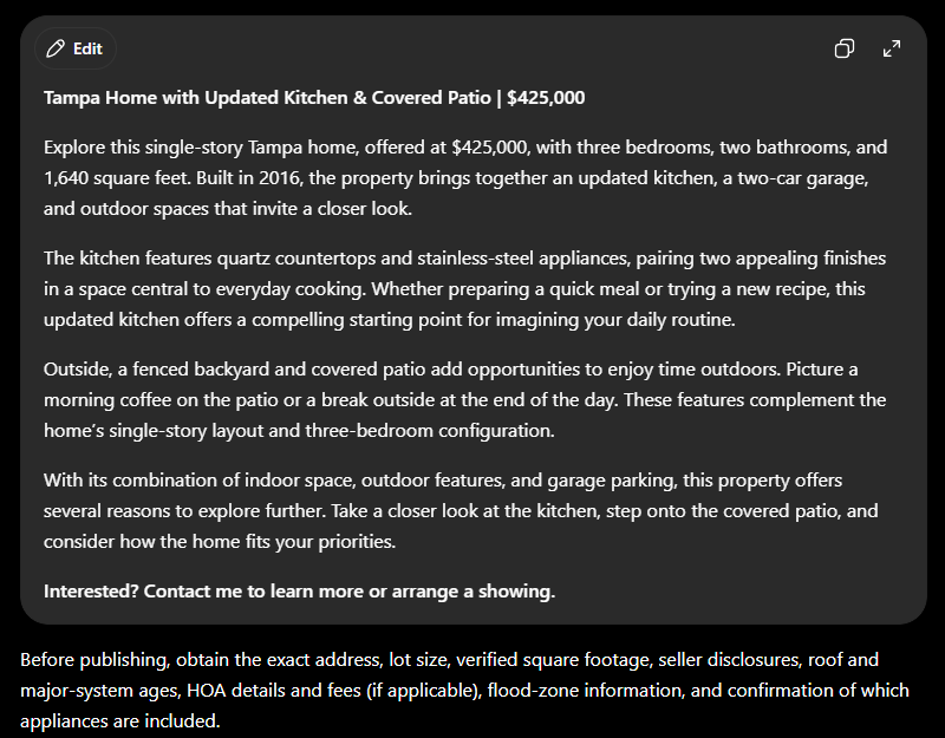
ChatGPT generated a property listing from supplied facts while identifying information that should be verified before publication.
What I Liked
ChatGPT performed well because it followed several constraints at the same time. It produced marketing copy while still respecting the difference between verified property facts and information that had not been provided.
What Could Be Better
The output was still only a draft. ChatGPT had no access to the actual property, listing documents, photographs, disclosures, or local MLS requirements. An agent would still need to verify every fact before publishing the description.
Best for: Real estate agents who need help writing listing descriptions, brainstorming marketing ideas, preparing buyer communication, or organizing property information.
2. Claude Best for Home Inspection Analysis
What I Tested
I gave Claude a fictional home inspection scenario and asked it to summarize the main findings and identify useful next steps before a contingency deadline.
The information included an aging roof with missing shingles, a living room ceiling stain, a double-tapped electrical breaker, rust on the exterior HVAC cabinet, corrosion near a water-heater connection, a bedroom window latch problem, a cracked bathroom floor tile, and a loose kitchen cabinet handle.
What Happened
Claude created an executive summary explaining which items required attention before the deadline. It identified the aging roof, ceiling stain, and double-tapped breaker as priority-one findings. The HVAC rust and water-heater corrosion were treated as priority-two issues. The window latch, cracked tile, and loose cabinet handle were categorized as lower-priority repairs.
Claude also created a findings table with separate columns for what was known, what remained uncertain, the recommended next step, and priority level.
For example, it did not assume that the missing roof shingles automatically meant the entire roof needed replacement. Instead, it recommended an evaluation by a licensed roofing contractor.
It also created questions to ask before negotiating, including whether the seller had records of previous roof repairs, ceiling leaks, electrical work, HVAC service, or water-heater maintenance.
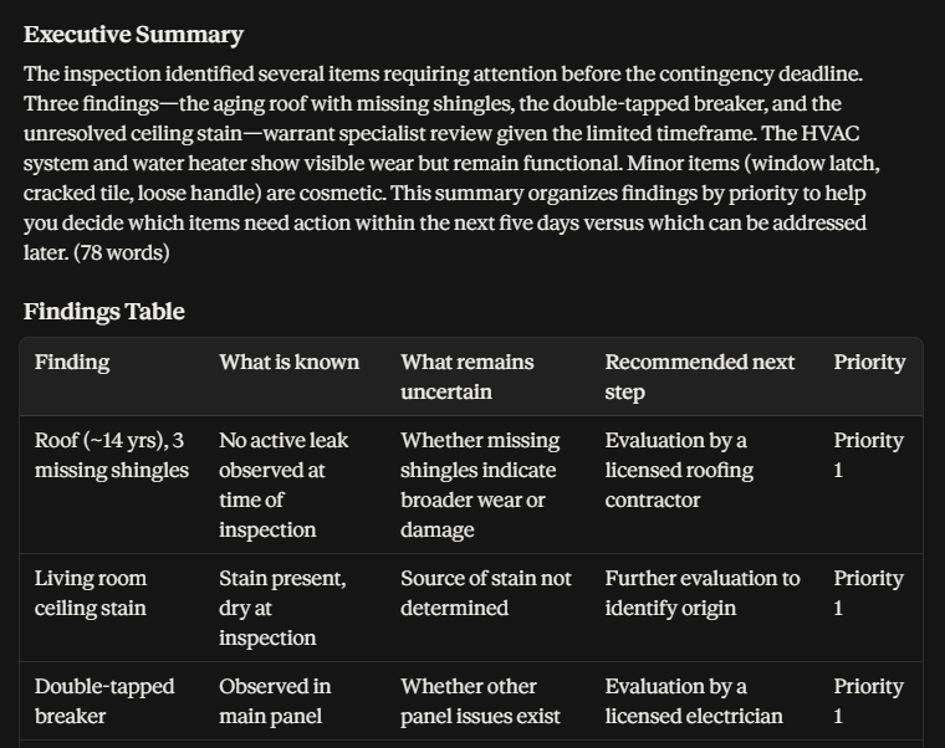
Claude organized inspection findings by priority and separated known information from uncertainty.
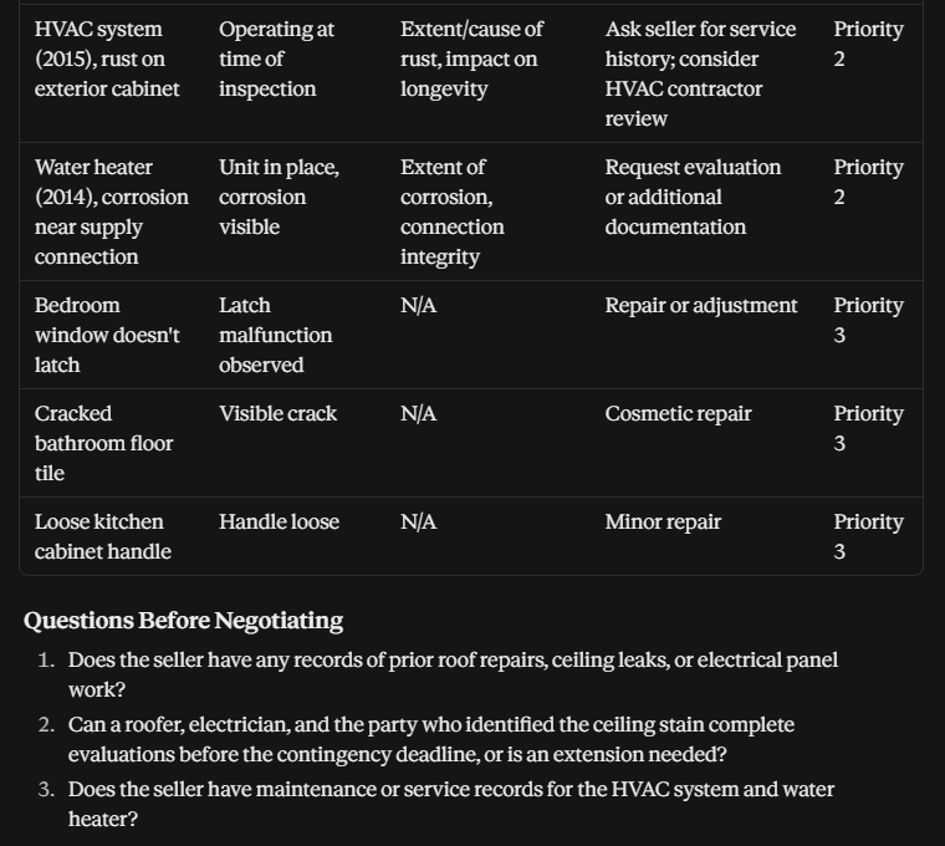
Claude generated follow-up questions to support inspection-related negotiations.
What I Liked
Claude was particularly strong at organizing a long document into a usable decision-support summary. It preserved important uncertainty instead of presenting every observation as a confirmed diagnosis.
What Could Be Better
The quality of the result depended on the quality of the inspection information provided. Claude could organize and explain the findings, but it could not independently verify the condition of the property. The summary should therefore be treated as a planning aid rather than a professional inspection opinion.
Best for: Real estate agents, buyers, and transaction teams who need to summarize inspection reports, organize repair items, or prepare questions before negotiations.
3. Perplexity Best for Neighborhood Research
What I Tested
I asked Perplexity to research the Seminole Heights area of Tampa for a fictional property. The prompt requested official neighborhood or planning-area information, parks and recreation, public transportation, flood-zone verification guidance, relevant local improvement projects, and sources that could be checked by a buyer or agent.
What Happened
Perplexity returned a neighborhood briefing supported by numerous citations. The response referenced official City of Tampa planning information, parks such as Rivercrest Park and Robles Park, HART public transportation, FEMA flood-map resources, and a Rivercrest Park boardwalk and seawall improvement project.
One useful feature was the inclusion of an important limitation column. Perplexity noted that Seminole Heights can refer to different areas and that the exact proximity of parks or transportation stops could not be determined without the property’s address.
It also correctly explained that a neighborhood name alone is not enough to determine a property’s flood zone. The exact street address would need to be checked through FEMA’s official mapping tools.
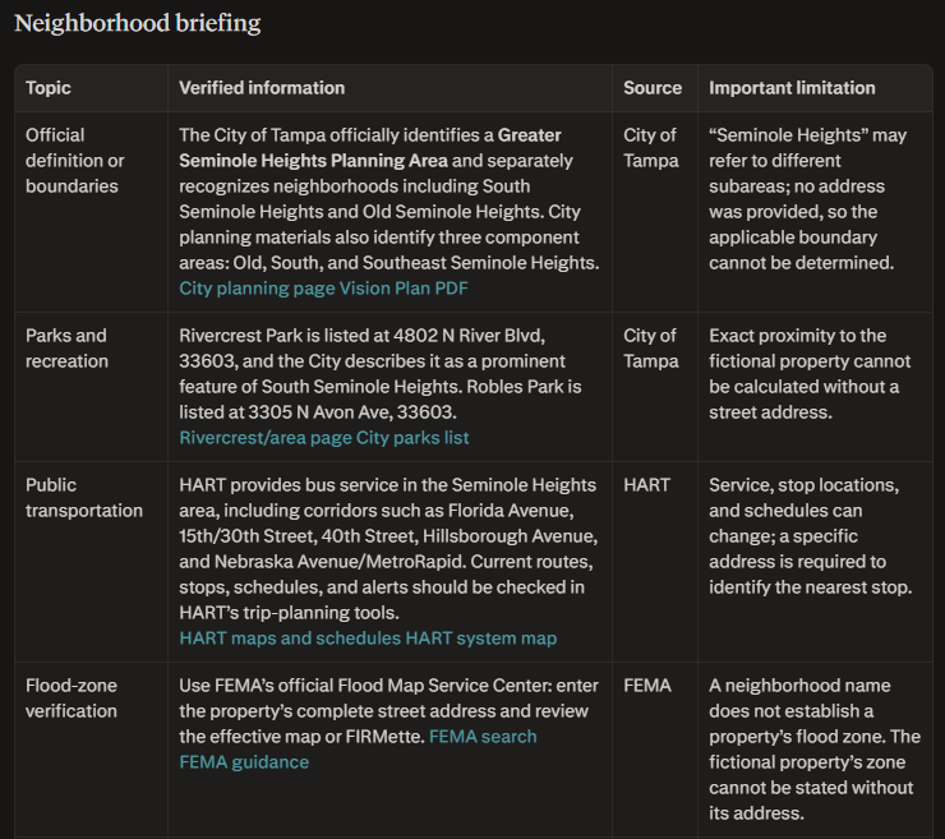
Perplexity compiled a neighborhood briefing using official sources and visible citations.
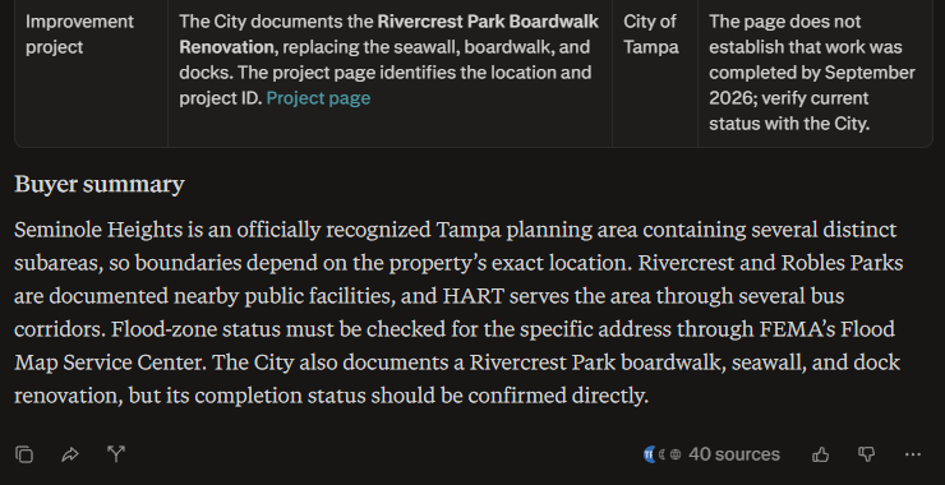
Perplexity identified geographic uncertainty and explained why the exact property address was required.
What I Liked
Perplexity made it faster to find and compare multiple sources. The visible citations made it easier to identify which claims came from official sources and which details required additional verification.
What Could Be Better
The research still required human review. One source association involving Robles Park needed additional verification because the available information did not establish its exact relationship or proximity to the fictional property.
Best for: Real estate agents who need preliminary research on neighborhoods, transportation, public facilities, development projects, or buyer questions.
4. Canva Best for Real Estate Visual Marketing
What I Tested
I used Canva to create a one-page Instagram graphic for the fictional Tampa property. The design prompt requested a clean real estate style, navy blue, white, and muted gold, a layout readable on a phone, no property photograph, and no invented details.
What Happened
Canva created a polished Just Listed graphic using the supplied property information. The final design included Tampa, Florida, the $425,000 price, three beds, two baths, 1,640 square feet, the updated kitchen, covered patio, fenced backyard, and a Schedule a Showing call to action.
The design used a navy, white, and muted-gold color scheme with geometric elements and a simple house outline. The layout was designed to be readable on a mobile screen.
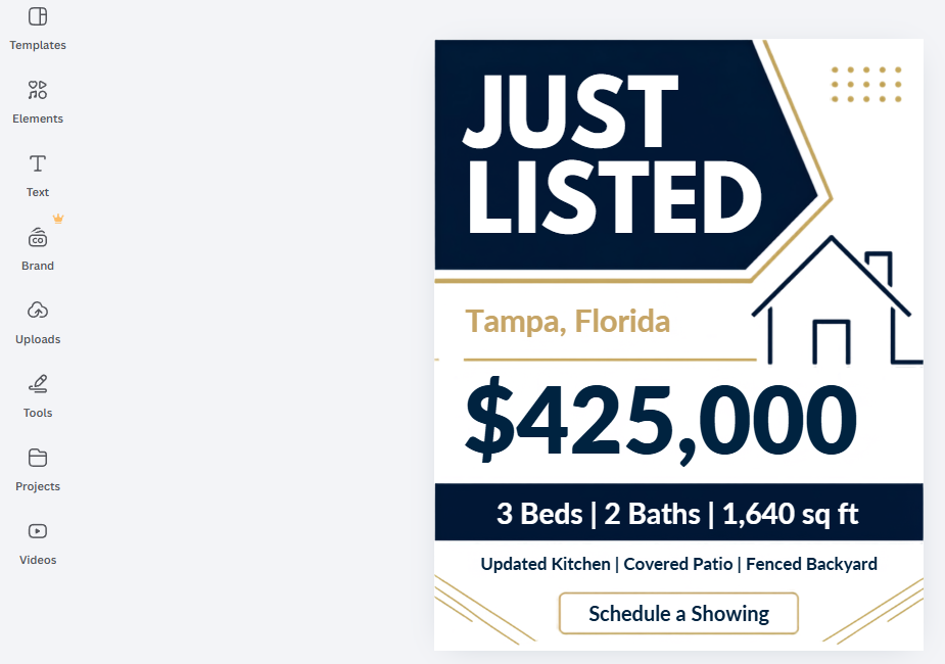
Canva transformed verified property details into a mobile-friendly Just Listed marketing graphic.
What I Liked
Canva made it much faster to create a usable marketing visual. Instead of starting with a blank page, I received a structured design that could be refined manually.
What Could Be Better
The initial result still required manual adjustments to branding, spacing, and layout. For a real listing, an agent would also need to add an approved property photograph, correct contact information, brokerage branding, and any legally required disclosures.
Best for: Real estate agents who need social media graphics, listing presentations, open-house materials, or other visual marketing assets without hiring a designer for every task.
5. HubSpot Best for CRM and Lead Follow Up
What I Tested
I used HubSpot’s Breeze Assistant to create a fictional CRM contact and prepare a follow-up message. The fictional contact was Emma Carter, using the email address emma.carter@example.com.
The prompt instructed HubSpot to create the contact as a lead, leave the contact owner unassigned, avoid creating or associating a company, add a note with the buyer’s property requirements, create a high-priority follow-up task, and avoid sending any emails.
The note described a buyer interested in a $425,000 Tampa home with three bedrooms, a covered patio, and a fenced backyard. It also recorded a budget of up to $450,000, a two-to-three-month purchase timeline, and an interest in arranging a showing the following week.
What Happened
HubSpot created the fictional contact successfully. It displayed Emma Carter, emma.carter@example.com, lead status, no assigned owner, and no associated company.
It also created the note and a high-priority follow-up task related to the Tampa property. The assistant explicitly confirmed that no email had been sent.
For the second part of the test, I asked Breeze Assistant to create a personalized follow-up email using only the information stored in the contact record and note.
The resulting draft included a subject line, mentioned the $425,000 Tampa home, referred to the buyer’s stated requirements, asked what day and time would work for a showing, did not claim that the property was available, did not claim that a showing had been confirmed, did not add unsupported neighborhood, school, financing, or market details, and remained under 120 words.
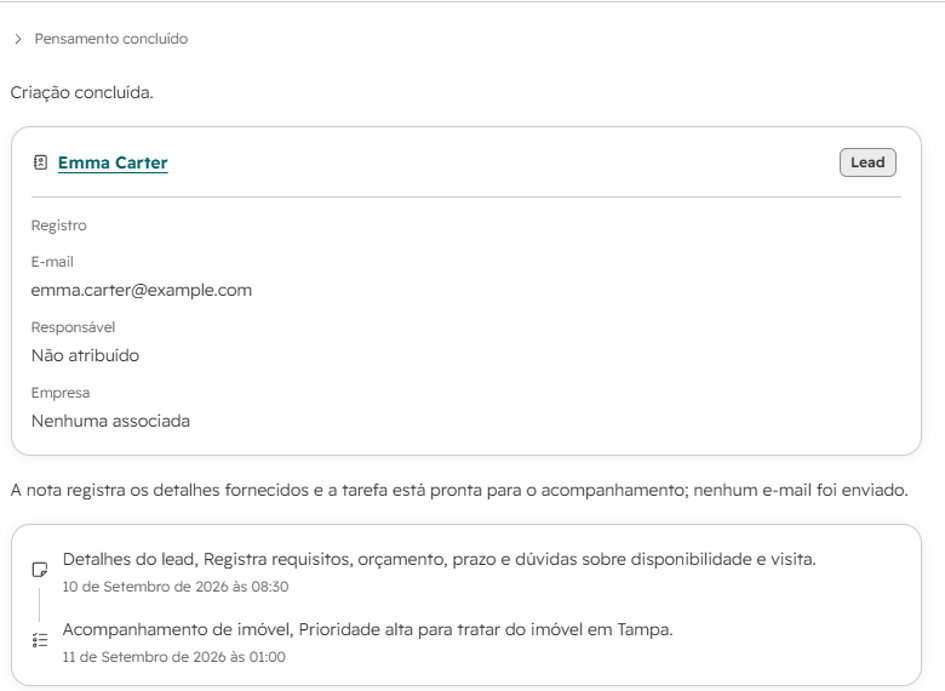
HubSpot created a fictional CRM contact, note, and follow-up task without sending an email.
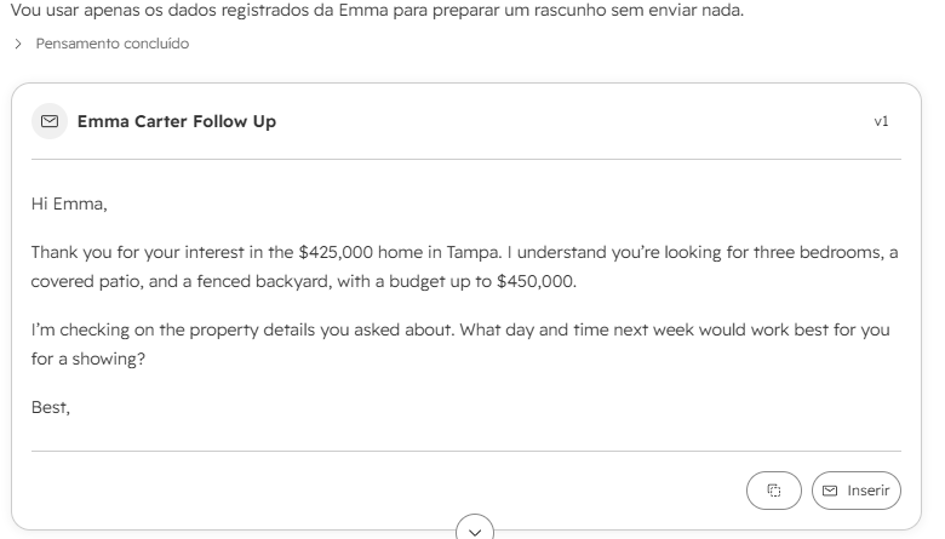
HubSpot generated an English follow-up email draft using only the information stored in the CRM record.
What I Liked
HubSpot demonstrated how an AI assistant can connect CRM data, notes, tasks, and follow-up writing in one workflow. The most important positive result was that the assistant respected the instruction not to send the email. It created a draft instead, leaving the final decision with the user.
What Could Be Better
CRM actions should always be reviewed before confirmation. A real business would need to verify contact details, permissions, task dates, ownership settings, and whether any automation could trigger a message.
The HubSpot interface in this test was displayed in Portuguese because of the account settings, although the generated email itself was in English.
Best for: Real estate professionals who want to organize leads, record buyer requirements, create follow-up tasks, and prepare personalized communication.
Final Verdict Which AI Tool Is Best for Real Estate Agents
After testing all five tools, there was no single winner for every real estate task.
ChatGPT was the most versatile option for writing listing copy and organizing marketing ideas. Claude was especially useful for summarizing inspection information and distinguishing confirmed facts from issues requiring further investigation. Perplexity was the strongest research tool when citations and source verification mattered.
Canva was the easiest option for creating visual marketing materials quickly, while HubSpot offered the most complete workflow for CRM organization and lead follow-up.
The best choice depends on the problem an agent wants to solve:
- Use ChatGPT for listing drafts, marketing plans, and general assistance.
- Use Claude for inspection reports, documents, and structured summaries.
- Use Perplexity for research that requires visible sources.
- Use Canva for social media graphics and listing visuals.
- Use HubSpot for CRM records, tasks, and follow-up workflows.
The most practical approach is to start with the task that consumes the most time in your business. Test one tool in a real workflow, review the result carefully, and measure whether it actually reduces manual work.
Overall, these AI tools for real estate agents can support writing, research, marketing, and follow-up when human review remains part of the process.
AI can help real estate professionals write faster, research more efficiently, and organize client follow-up. However, property facts, legal requirements, inspection findings, client information, and marketing claims still require human review before publication or action.
Frequently Asked Questions
Can AI replace a real estate agent’s judgment?
No. It can assist with research, drafting, organization, and marketing, but agents must verify facts and make the final professional decisions.
What should be checked before publishing AI-assisted property content?
Check property facts, prices, availability, location details, compliance requirements, privacy concerns, and any language that could mislead a buyer or renter.
Do the results apply to every real estate market?
No. Laws, listing data, audience expectations, and available integrations vary by market and by account.
How should an agent start using AI?
Begin with one repeatable task, create a review checklist, and measure whether the tool improves speed without reducing accuracy or trust.
Leave a Reply