
Canva has evolved far beyond a simple drag-and-drop design tool. Its AI features can now help create designs, generate images, write marketing copy, edit visuals, and repurpose content.
But can Canva AI actually produce useful work for a small business?
For this Canva AI review, I tested it on five practical tasks using the same fictional handmade home decor business throughout the experiment.
I wasn’t looking for impressive demos or perfect outputs after multiple attempts. I wanted to see what Canva AI could produce during a realistic small-business workflow — and how much manual work would still be required.
The results were generally strong, but one lesson appeared repeatedly:
Canva AI works better as a workflow accelerator than as a one-click replacement for human review.
Quick Verdict: Is Canva AI Worth It?
Yes — especially if you already use Canva for your marketing.
In my tests, Canva AI was particularly effective at generating a lifestyle visual, writing constrained marketing copy, and turning an existing social post into another format.
But it wasn’t flawless.
One generated design contained garbled text inside the AI-created product image. An AI editing task was unavailable with the access I was using and prompted me to upgrade. And when Canva successfully repurposed an existing design, it carried the original visual flaw into the new version.
Canva AI Test Results
| Test | Result |
|---|---|
| Social media design | Good, but needed editing |
| Lifestyle marketing image | Strong |
| Marketing copy | Strong |
| AI image editing | Blocked in my test |
| Content repurposing | Strong, with an inherited flaw |
Bottom line: Canva AI can remove a lot of the blank-page work involved in small-business marketing, but I wouldn’t publish its output without reviewing it first.
How I Tested Canva AI
I used one fictional business scenario across all five tests: a small online store selling personalized handmade wall decorations.
The tasks were based on work a solo small-business owner might realistically need to do:
- Create an Instagram promotional design.
- Generate a lifestyle marketing image.
- Write an Instagram caption without inventing product claims.
- Edit an existing image.
- Repurpose an existing Instagram post into an Instagram Story.
I used the first result rather than repeatedly regenerating outputs until I got something I liked.
That distinction matters.
This isn’t a test of what Canva AI can eventually produce after enough attempts and manual corrections. It’s a test of what a small-business owner might encounter during normal use.
Test 1: Creating a Social Media Design
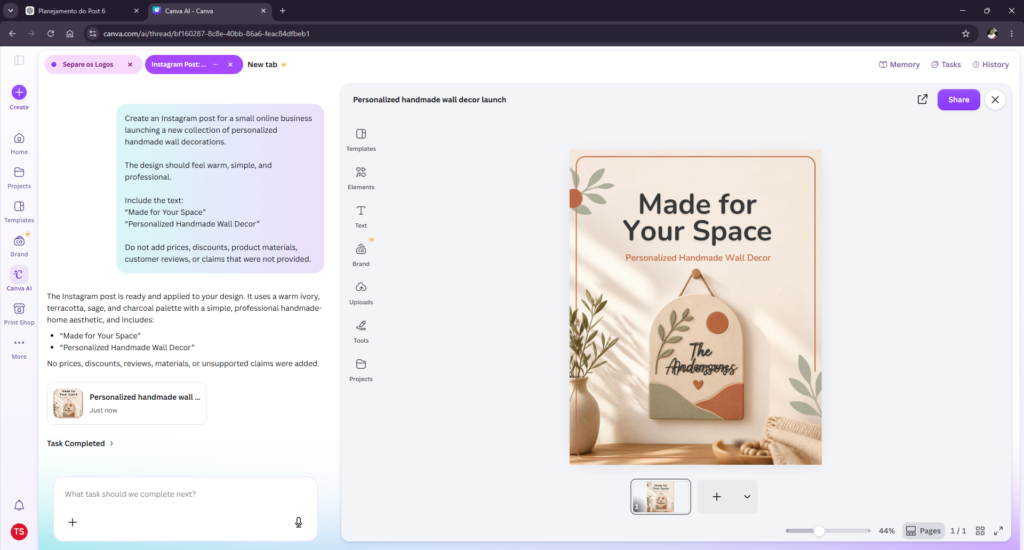
For the first test, I asked Canva AI to create an Instagram post for a new collection of personalized handmade wall decorations.
The brief specified a warm, simple, professional visual style and required two pieces of text:
“Made for Your Space”
“Personalized Handmade Wall Decor”
I also explicitly told Canva not to add prices, discounts, product materials, customer reviews, or unsupported claims.
What happened
Canva produced an attractive promotional design with a warm visual direction and a wall decoration as the central product.
It followed several important instructions correctly.
The main headline was accurate. The product description appeared correctly. It didn’t add a fake discount, price, customer review, or unsupported commercial claim.
Visually, it was also reasonably close to the aesthetic I requested.
But there was a noticeable problem.
The AI-generated wall decoration itself contained garbled, unreadable writing.
That’s the kind of mistake that can be easy to miss when looking quickly at an otherwise polished design.
My take
This was a useful starting point, not a finished marketing asset.
A small-business owner could edit the visual and potentially save time compared with starting from a blank canvas. But I wouldn’t have published the first result as-is.
Test 1 result: Good, but needs editing.
Test 2: Generating a Lifestyle Marketing Image
Next, I tested Canva AI as an image generator.
I asked it to create a realistic lifestyle image featuring a tasteful wall decoration displayed naturally in a bright, welcoming living room.
The wall decoration needed to be the visual focus, while the room remained simple and realistic.
I also prohibited text, logos, people, prices, and promotional labels.
What happened
This was one of Canva AI’s strongest results.
It generated a convincing living-room scene with a decorative piece mounted prominently on the wall.
The room was bright and visually coherent, and the wall decoration was clearly the focal point without overwhelming the rest of the composition.
It also respected the restrictions in the prompt.
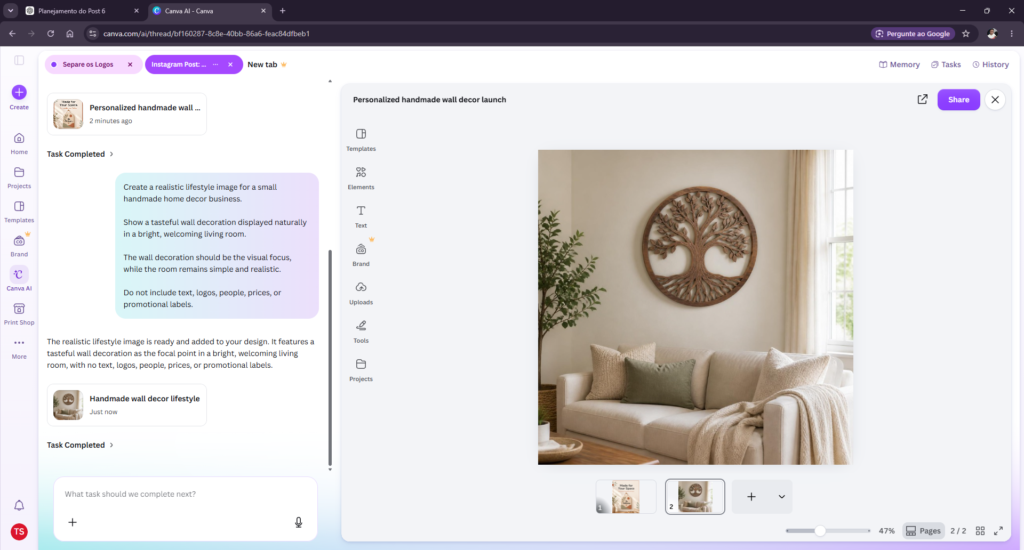
At first glance, the image looks surprisingly usable.
But there’s an important distinction for an e-commerce business.
The wall decoration in this image doesn’t represent a real product from the fictional store. Canva invented both the product and the room.
That makes the image potentially useful for concept development, mood boards, campaign inspiration, or other illustrative purposes.
It would be much more problematic to use it as if it were an accurate photograph of a real product being sold.
My take
The visual quality impressed me, but small businesses should distinguish between AI-generated marketing concepts and faithful product representation.
For inspiration and campaign ideation, this was a strong result.
Test 2 result: Strong.
Test 3: Writing Marketing Copy Without Inventing Facts
Visual generation isn’t the only reason a small-business owner might use Canva AI.
For Test 3, I asked it to write an Instagram caption.
I supplied only four facts:
- The products were handmade.
- They could be personalized using customer-provided information.
- They were designed for wall display.
- They could be purchased for personal use or as gifts.
The caption had to remain under 100 words and use a warm, simple, professional tone.
More importantly, I explicitly prohibited invented materials, prices, discounts, shipping times, guarantees, customer reviews, sustainability claims, and other unsupported product features.
What happened
Canva AI handled the restrictions well.
The caption opened with:
“Made for your space, or for someone special.”
It then described the handmade and personalized nature of the products, positioned them for personal use or gifting, and ended with a natural call to action.
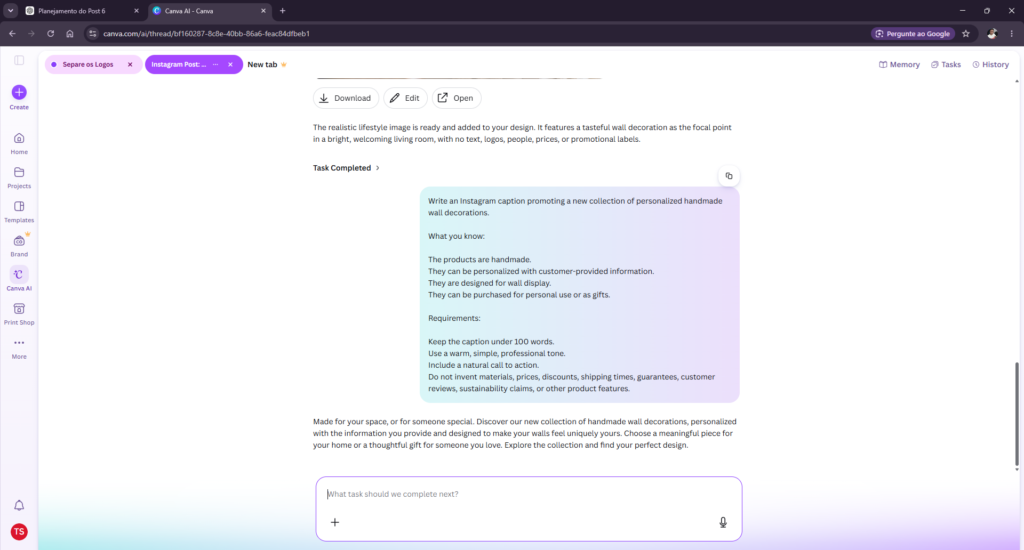
I didn’t find invented prices, materials, discounts, shipping promises, reviews, or sustainability claims in the response.
That’s important.
AI-generated marketing copy becomes much less useful if a business owner has to fact-check fabricated product characteristics in every paragraph.
My take
This was one of the cleanest outputs in the test.
The writing wasn’t radically different from what a general-purpose AI assistant can produce, but having copy generation available inside the same environment as the designs can make the workflow more convenient.
Test 3 result: Strong.
Test 4: Editing an Existing Image With AI
For Test 4, I wanted to see whether Canva AI could modify an image rather than generate a new one.
I used the lifestyle image from Test 2 and asked Canva to remove the large plant on the left while preserving the wall decoration, sofa, lighting, colors, and the rest of the room.
What happened
I couldn’t complete the task with the access I was using.
Instead, Canva displayed this message:
“Just a heads up, completing this task requires a premium feature.”
It then prompted me to upgrade.
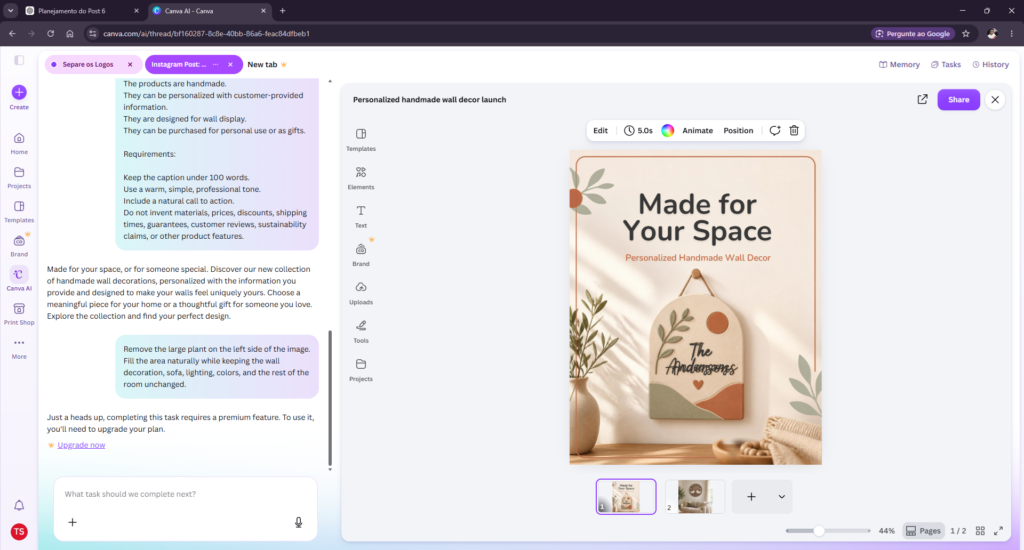
This wasn’t a quality failure because Canva never actually performed the requested edit.
It was an access limitation encountered during my test.
That’s an important distinction. I’m not concluding from this single test that every AI image-editing feature requires the same plan or that the feature itself performs poorly.
I simply couldn’t evaluate the requested edit with the access available during this test.
My take
This is worth considering if AI photo editing is one of the main reasons you’re evaluating Canva.
Canva offers free and paid access, and some advanced features and higher AI usage are tied to paid plans.
Rather than relying on pricing quoted in an older review, check Canva’s official pricing page for the plans, features, and pricing currently available in your region.
Test 4 result: Blocked in my test.
Test 5: Repurposing an Existing Design
The final test was designed to evaluate something broader than an individual AI feature: workflow.
I asked Canva to take the Instagram post from Test 1 and turn it into a vertical Instagram Story.
It had to preserve:
“Made for Your Space”
and
“Personalized Handmade Wall Decor”
while maintaining the same core visual direction and avoiding new product claims.
What happened
Canva successfully produced a vertical version of the original design.
It retained the warm visual style, kept both required pieces of text, and reorganized the composition for the taller format.
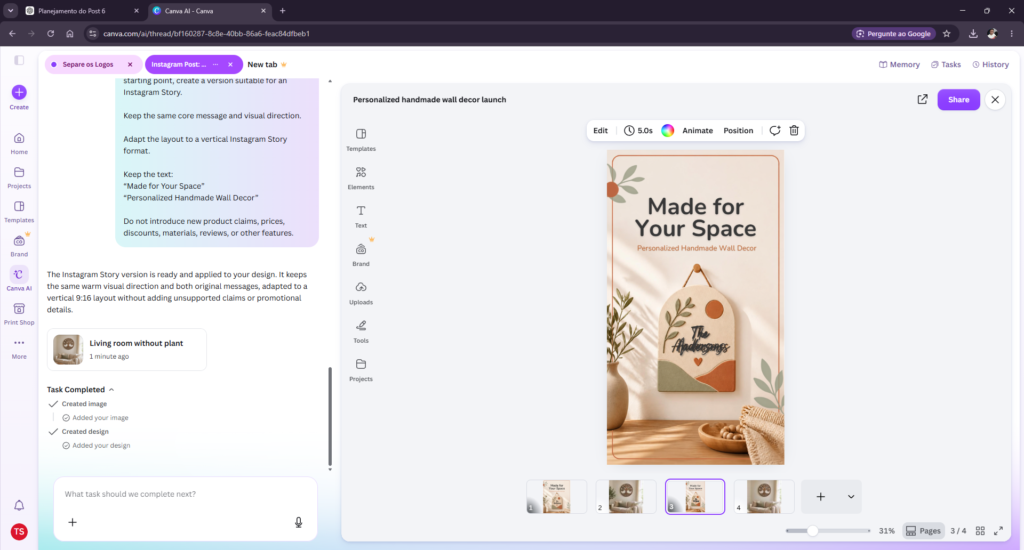
This was a good demonstration of why Canva AI can be useful inside an existing Canva workflow.
Instead of rebuilding the campaign asset from scratch, I could ask Canva to adapt work that already existed.
There was one catch.
The original AI-generated decoration contained unreadable text — and the Story version preserved that flaw.
My take
That’s a useful reminder about AI-assisted workflows:
Automation can reproduce mistakes just as efficiently as it reproduces good work.
The repurposing itself worked well, but reviewing the source asset before scaling it into additional formats is still essential.
Test 5 result: Strong, with an inherited flaw.
What This Canva AI Review Revealed
Across the five tests, a clear pattern emerged.
Canva AI’s biggest advantage wasn’t that every individual AI output was exceptional.
It was the ability to move between different parts of a marketing workflow without constantly switching tools.
I could create a promotional design, generate a separate visual, write marketing copy, attempt an image edit, and then reuse an earlier design in another format.
For a solo small-business owner, that convenience matters.
But so does review.
The garbled visual text from Test 1 is exactly the kind of small error that could reach customers if someone assumes an AI-generated design is ready simply because it looks polished at first glance.
The same problem appeared again in Test 5 because the new asset inherited the flaw from the original.
That changed how I viewed Canva AI by the end of the experiment.
Its strongest argument isn’t necessarily:
“AI will make the finished marketing content for you.”
A better argument is:
“AI can help you move through your marketing workflow faster.”
That’s a smaller promise — but based on my tests, it’s a much more credible one.
Canva AI Free vs Paid Plans: What Should Small Businesses Know?
Canva offers a free plan alongside paid options that provide additional premium features and greater access to AI-powered tools.
Because pricing, plan names, AI limits, and availability can change or vary by market and billing option, I don’t recommend choosing a plan based on a fixed price quoted in a review.
Instead, check Canva’s current official pricing information before subscribing.
For a small business, I also wouldn’t upgrade simply because a plan includes more AI.
The better question is:
Will the premium features eliminate enough repetitive work in your actual workflow to justify the cost?
Our Test 4 provides a practical example.
If AI-assisted image editing is something you regularly need, encountering a premium restriction matters much more than it would for someone who mainly wants Canva for occasional social graphics or copy assistance.
Start with the tasks you actually perform, then decide whether the restrictions you’re encountering justify paying for more access.
Canva AI Pros and Cons
Pros
Fast starting point for marketing assets
The first design wasn’t perfect, but Canva AI eliminated the blank canvas and quickly produced something that could be edited.
Strong conceptual image generation in my test
The lifestyle visual was one of the most convincing outputs across the five tasks.
Good instruction-following for constrained copy
Canva avoided the unsupported product claims I explicitly prohibited in Test 3.
Integrated workflow
Design, imagery, copy, editing, and repurposing can all be approached within the Canva environment.
Useful content repurposing
The Instagram Story adaptation preserved the core campaign direction without requiring a complete rebuild.
Cons
AI-generated visuals still require inspection
The garbled writing in Test 1 made an otherwise polished asset unsuitable for immediate publication.
AI imagery can misrepresent real products
A convincing lifestyle image isn’t automatically an accurate e-commerce product image.
Access limitations can interrupt the workflow
The image-editing operation I requested in Test 4 triggered an upgrade requirement instead of completing the edit.
Repurposing can preserve existing mistakes
The flaw from the original design remained in the Story adaptation.
Who Is Canva AI Best For?
Based on these tests, I think Canva AI makes the most sense for small-business owners who already create their own:
- social media graphics,
- campaign visuals,
- simple marketing copy,
- promotional assets,
- and variations of the same content for multiple channels.
Its value becomes less obvious if you only need text generation.
There are dedicated AI assistants that can handle writing, research, analysis, and other text-heavy tasks.
Canva’s advantage in this context is different.
The AI sits inside the design workflow.
That means the question isn’t necessarily whether Canva has the best AI system for every individual task.
It’s whether having these capabilities together helps you get usable marketing work done faster.
In my tests, the answer was generally yes.
If you’re comparing several tools for different parts of your business workflow, you can also see our broader guide to the best AI tools for small business.
Is Canva AI Better Than Using Separate AI Tools?
Not necessarily.
And I don’t think that’s the most useful way to evaluate it.
A dedicated AI assistant may be more capable for a specific writing, research, or reasoning task. A dedicated image generator may offer different controls or output quality.
Canva AI’s practical advantage is convenience and integration.
For someone already building marketing materials in Canva, generating a visual, drafting copy, and adapting an existing design without leaving the same environment can remove friction.
That advantage becomes especially relevant for a solo business owner who doesn’t want to manage a complicated stack of separate creative tools.
If your work is primarily text-based, however, that integrated design environment may matter much less.
Final Verdict: Is Canva AI Worth It in 2026?
After five practical small-business tests for this Canva AI review, my answer is:
Canva AI is useful — but treat it as a creative assistant, not an autopilot.
The strongest results came from lifestyle image generation, constrained marketing copy, and repurposing an existing design.
The social design test also showed real potential, but one visual mistake was enough to prevent me from publishing the first result unchanged.
And the image-editing test demonstrated that the AI experience you get can also depend on the features available with your account.
For a solo small-business owner already using Canva, its AI tools can make the platform considerably more useful because they reduce the number of separate steps between an idea and a usable campaign asset.
But I’d keep one rule:
Review everything before it reaches a customer.
Check text embedded in generated images. Verify that AI imagery accurately represents anything you’re actually selling. Review marketing claims. And inspect repurposed assets instead of assuming that a successful conversion also corrected problems in the source material.
Canva AI saved work in these tests.
It didn’t eliminate the need for judgment.
FAQ
Is Canva AI free?
Canva offers AI functionality with free access, but usage and available features can differ between free and paid plans. Some premium capabilities may require an upgrade. Check Canva’s current official pricing and feature information for the access available with each plan.
Can Canva AI generate images?
Yes. Canva includes AI-powered tools capable of generating visual content from text descriptions. In my lifestyle-image test, it successfully generated a complete living-room scene from the prompt.
Can Canva AI write social media captions?
Yes. In Test 3, Canva AI generated an Instagram caption from the supplied product information and respected the restrictions against several types of unsupported claims.
Is Canva AI good for small businesses?
Based on my five tests, it can be particularly useful for small businesses that create their own marketing visuals and social content. Its biggest practical advantage was helping different parts of the creative workflow happen within the same environment.
Does Canva AI replace a designer or marketer?
I wouldn’t treat it that way based on these tests.
Canva AI generated useful starting points and some strong outputs, but it also produced an obvious visual error, preserved that error when repurposing content, and still required judgment about whether generated imagery accurately represented a real product.
Can I use AI-generated Canva images as real product photos?
I’d be cautious.
In my test, Canva generated an attractive but entirely fictional wall decoration. For e-commerce, customers should be able to understand what the actual product they’re purchasing looks like.
AI-generated conceptual imagery shouldn’t be presented in a way that could mislead customers about the real product.
Leave a Reply