

Tally and Jotform calculated the service quotes correctly—but both initially accepted 1.5 bicycles. Fixing that quantity rule took different approaches, and checking the stored responses exposed a repair that only looked successful on screen.
I used the same fictional mobile bike tune-up rules in Tally and Jotform: $65 per bike, optional chain cleaning, a travel surcharge, and weekend service. Four valid quotes matched in both tools. The useful question was what happened when a quantity was missing, fractional, or changed after the first calculation—and whether the stored response matched the screen.
This is a focused comparison of free-plan quote calculators, rather than a review of every feature. For a separate single-tool experiment, see my Tally calculated-fields guide, which uses a printing quote in editor preview. Here, the scenario is bicycle service and the evidence includes live submissions and stored records in both products.
Quick Verdict
✓ Same prices, now matched input designs: Both tools stored $65, $221, $185, and $160 with required 1–5 selection fields. Jotform was checked on October 16; Tally on October 17.
↔ My choice: For a low-volume pilot, either tested dropdown design is a reasonable starting point. The test gave no functional reason to prefer Jotform or Tally once the input designs matched; choose by plan limits and editor preference.
⚠ What changed: The initial numeric fields accepted fractions. The October 17 Tally selection retest also blocked empty and unsupported choices without showing the old $127.50 estimate. The earlier failures remain documented below.
Tally vs Jotform: What the Tests Showed
If columns extend beyond your screen, swipe horizontally to see the rest.
| Check | Tally | Jotform |
|---|---|---|
| Four valid quotes, original and corrected runs | All four matched the independent rule and stored correctly. | All four matched the independent rule and stored correctly. |
| Initial 1.5-bike quantity | Accepted and stored 1.5 with $127.50. | Accepted and stored 1.5 with $127.50. |
| Final quantity control | Required dropdown, options 1–5, added and tested October 17. | Required dropdown, choices and calculation values 1–5. |
| Final invalid-input experience | Empty or unsupported selection hides the quote; required warning blocks completion. | No fractional option; an empty selection hides the quote and triggers a required warning on submission. |
| ZIP missing for Outside | Displayed $221, but blocked completion until ZIP was filled. | Displayed 221, but blocked completion until ZIP was filled. |
| Setup work actually recorded | AI follow-up needed undoing; a numeric-entry guard was tested, then replaced by a required dropdown. | Initial formula needed rebuilding; a hide-only repair failed; quantity input was replaced. |
How I Tested: One Reproducible Bike-Service Quote
I used Tally Free and Jotform Starter free access. Browser actions were automated through a browser-assisted workflow; the evidence consists of captured form states and response-table checks. This was not a panel of small-business owners or a timed usability study. No web-editor version number was recorded.
The fictional business services bicycles at the customer’s address. The rules were deliberately small enough to check with a calculator:
- Bike count: whole numbers from 1 to 5; required.
- Base tune-up: $65 per bike.
- Chain cleaning: optional, $18 per bike.
- Travel: Local adds $0; Outside adds $25 once and requires a ZIP field.
- Weekend: optional, $30 once.
- Excluded: tax, discounts, payment collection, booking availability, and real contact details. ZIP 12345 was synthetic.
Total = 65 × bikes
      + (chain cleaning selected ? 18 × bikes : 0)
      + (Outside selected ? 25 : 0)
      + (weekend selected ? 30 : 0)
This expression describes the price rule; it is not a promise that the same text can be pasted unchanged into either editor. AI helped create the initial forms. Once configured, the quote arithmetic was deterministic, not a language model deciding a price for each visitor.
I defined the expected amounts independently, then checked four separate layers: the amount before submission, the validation response, whether completion actually occurred, and the value stored afterward. A thank-you screen alone was not enough. A mathematically correct amount for 1.5 bikes was still invalid under the business rule.
If columns extend beyond your screen, swipe horizontally to see the rest.
| Case | Input or change | Independent expected amount |
|---|---|---|
| 1 — baseline | 1 bike, Local, no extras | $65 |
| 2 — full quote | 2 bikes, chain, Outside, ZIP 12345, weekend | $130 + $36 + $25 + $30 = $221 |
| 3 — remove chain | From the full selections, turn chain off | $130 + $25 + $30 = $185 |
| 4 — change travel zone | Chain off, switch Outside to Local; weekend stays on | $130 + $30 = $160 |
| 5 — missing or text quantity | Fresh blank; text entry; and the Tally fill-then-clear path | No acceptable quote or completed response |
| 6 — range limits | Quantity 0 or 6 | No acceptable quote or completed response |
| 7 — fraction | 1.5, Local, no chain, weekend selected | Invalid business input, even though arithmetic gives $127.50 |
I also attempted the full $221 case without its conditional ZIP. Original runs and the first corrections took place on October 16, 2026. On October 17, I added the matching Tally dropdown design and repeated the valid prices, invalid selections, and conditional ZIP check. The final comparison uses required 1–5 lists in both tools, checked on separate days.
Original Results: Correct Quotes Did Not Mean Correct Validation
Four valid amounts matched—and were stored
Both live forms displayed and stored all four valid totals: $65, $221, $185, and $160. Removing chain cleaning removed $36 for two bikes. Switching Outside to Local removed $25 and hid the ZIP field. Those changes did not leave the old charges in the tested final totals.
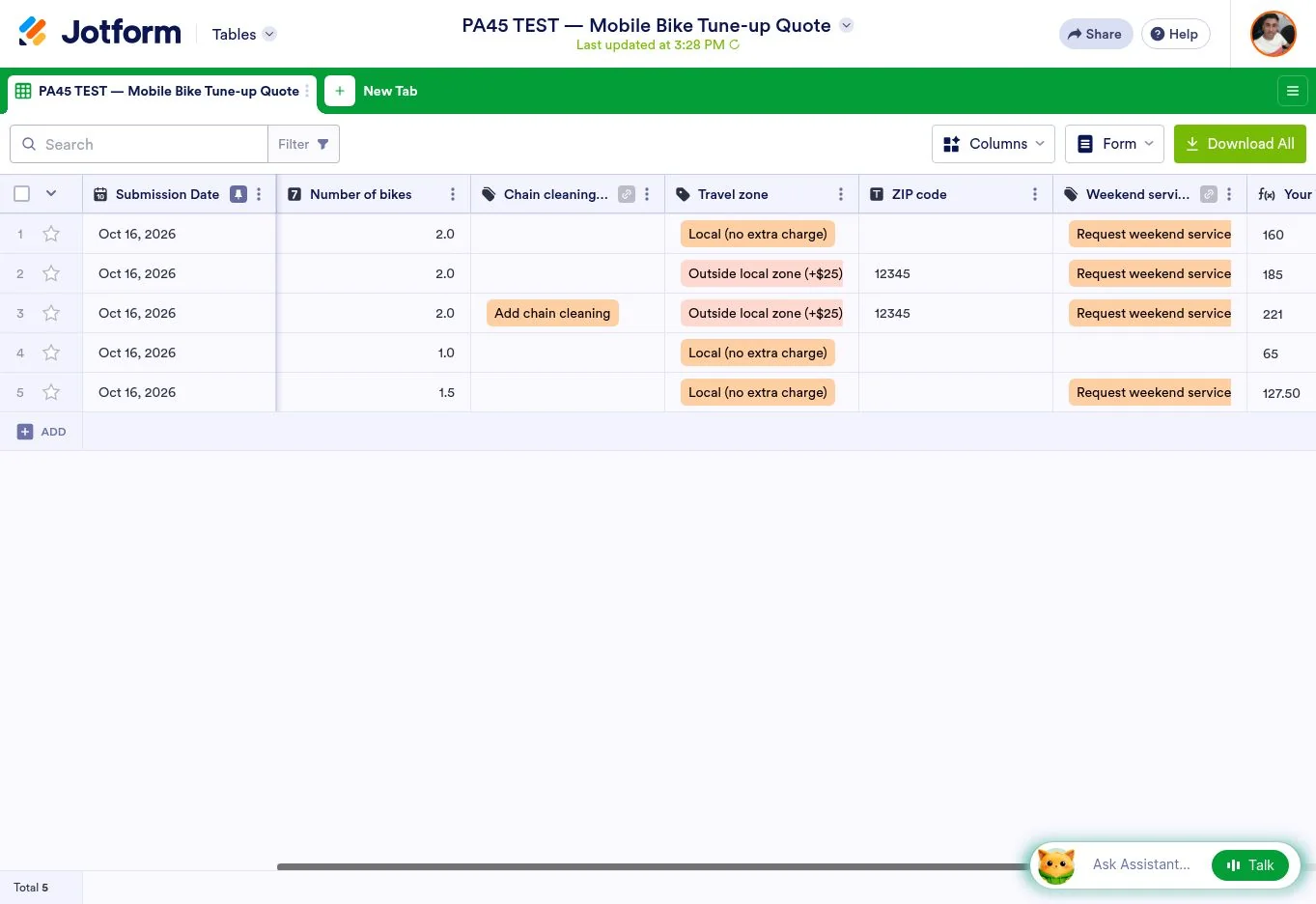
Both numeric fields accepted 1.5
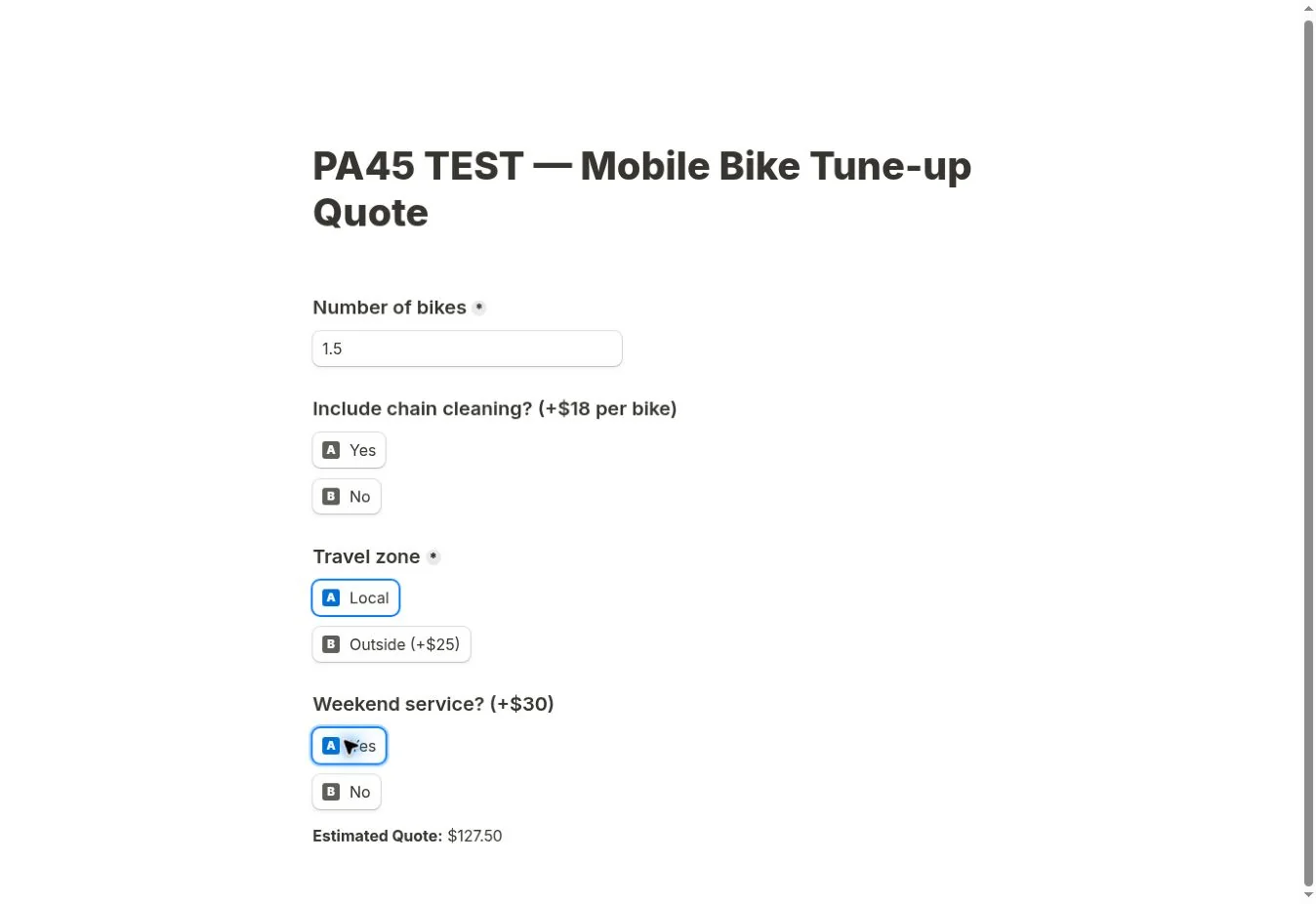
The initial fields had a required setting and bounds of 1 and 5. Neither configuration enforced the additional whole-number rule. With 1.5 bikes, Local travel, and weekend service, both forms displayed $127.50, completed, and stored the fractional quantity.
The numeric range allowed fractions; the business needed whole-number quantities.
Tally also accepted a quantity that had been erased
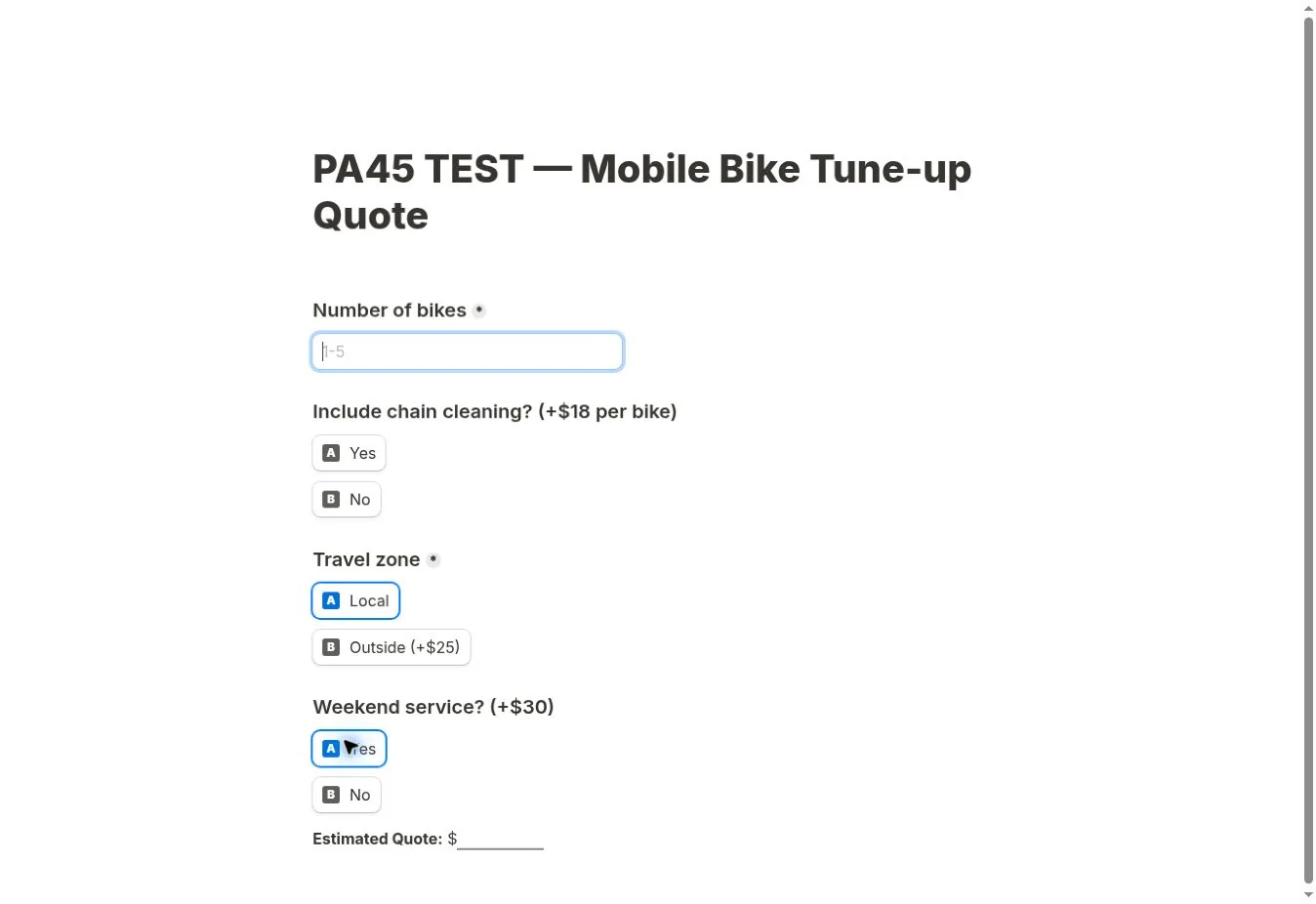
A fresh blank quantity produced a required warning and blocked completion. But after a number was entered and then cleared, the live Tally form accepted the response. This path produced two completed records with both quantity and total blank.
Follow-up inspection confirmed Required, minimum 1, and maximum 5. The “is not empty” rule controlled the calculation and quote display. It explains the blank amount, but the reason the earlier submission succeeded remains unresolved.
Other invalid inputs were blocked, although amounts still appeared
For 0 and 6, the original numeric limits prevented completion in both forms, but calculation output could still appear. Missing conditional ZIP also blocked both forms, even while the valid arithmetic total was $221. Alphabetic text did not remain in the numeric controls; fresh empty validation then blocked submission.
These results are why I separated a displayed calculation from an accepted quote. A visitor seeing a number is not proof that the form has accepted valid business input.
Complementary Tests: Blocking Invalid Tally Submissions
October 16, before the dropdown retest: I kept numeric entry and added Tally’s “Hide button to disable completion” action when quantity differed from all five allowed integers. The completion rule blocked the tested invalid submissions, including Enter.
It still displayed $127.50 for 1.5 bikes, $30 for 0, and $420 for 6 with weekend selected. Erasing a filled quantity left a blank amount. No new invalid records were stored, but visitor feedback remained poor. The October 17 dropdown below replaced this configuration.
Complementary Tests: Why Jotform Needed a Different Input
Hiding the button did not stop Enter submission
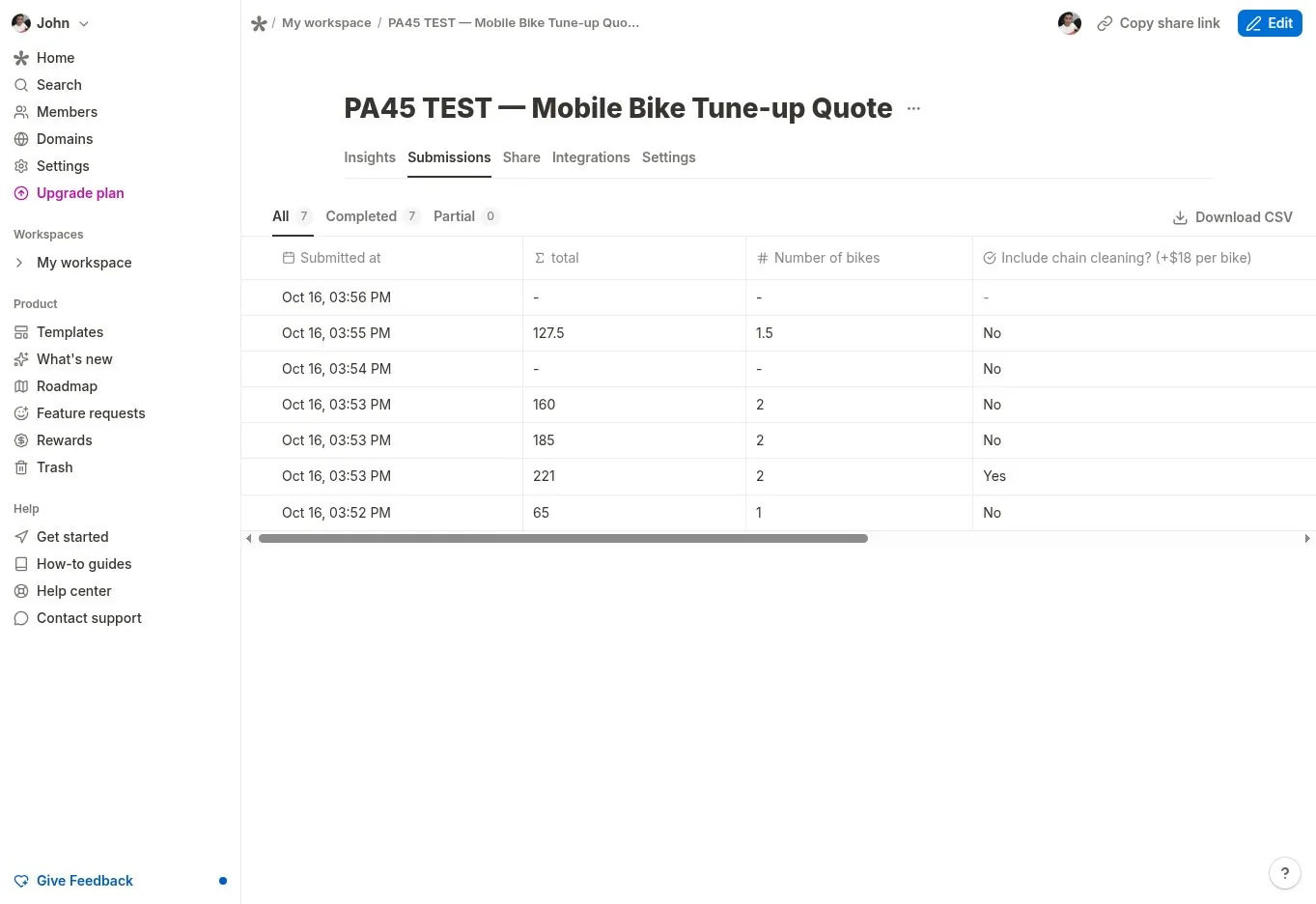
I first tried a Jotform rule that hid both the quote and Submit Quote when the Number value did not equal any of the five permitted integers. The screen looked blocked with 1.5. Pressing Enter in the quantity field nevertheless completed the form, storing 1.5 and a blank total.
I preserved the failed attempt and disabled that rule before changing the input field.
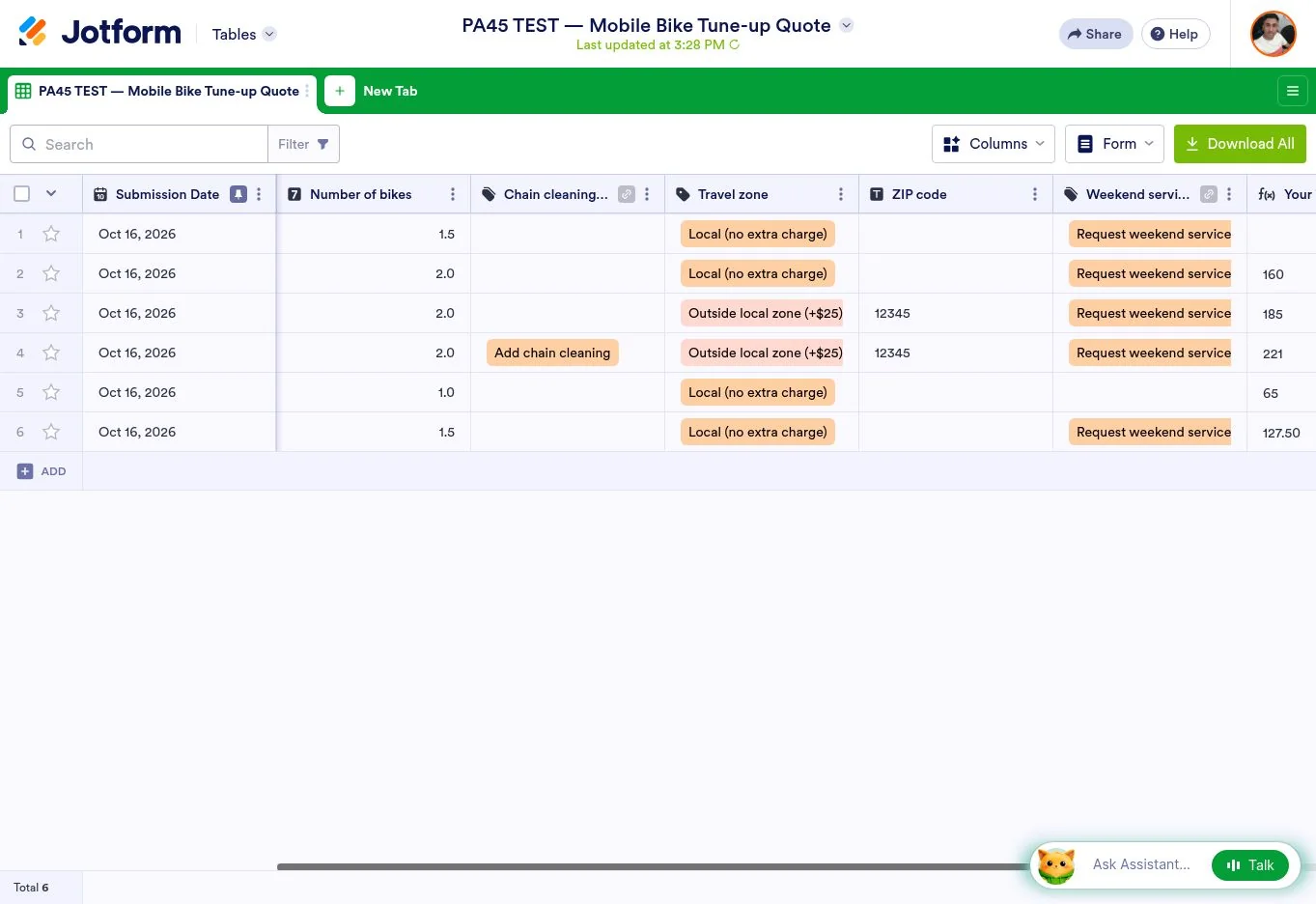
Four old rules were already disabled. A separate attempt to disable Submit through another action offered no matching target, so I discarded it.
The final design uses five permitted choices
I replaced free numeric entry with a required list: 1, 2, 3, 4, or 5. Each choice supplied its matching number to the formula—its “calculation value.” I changed both quantity references to this new field and kept every price rule unchanged.
Following Jotform’s calculation-value mechanism, I used 0 for the unselected placeholder. A rule hid the quote while selection was empty; Submit stayed visible so required validation could explain the missing answer.
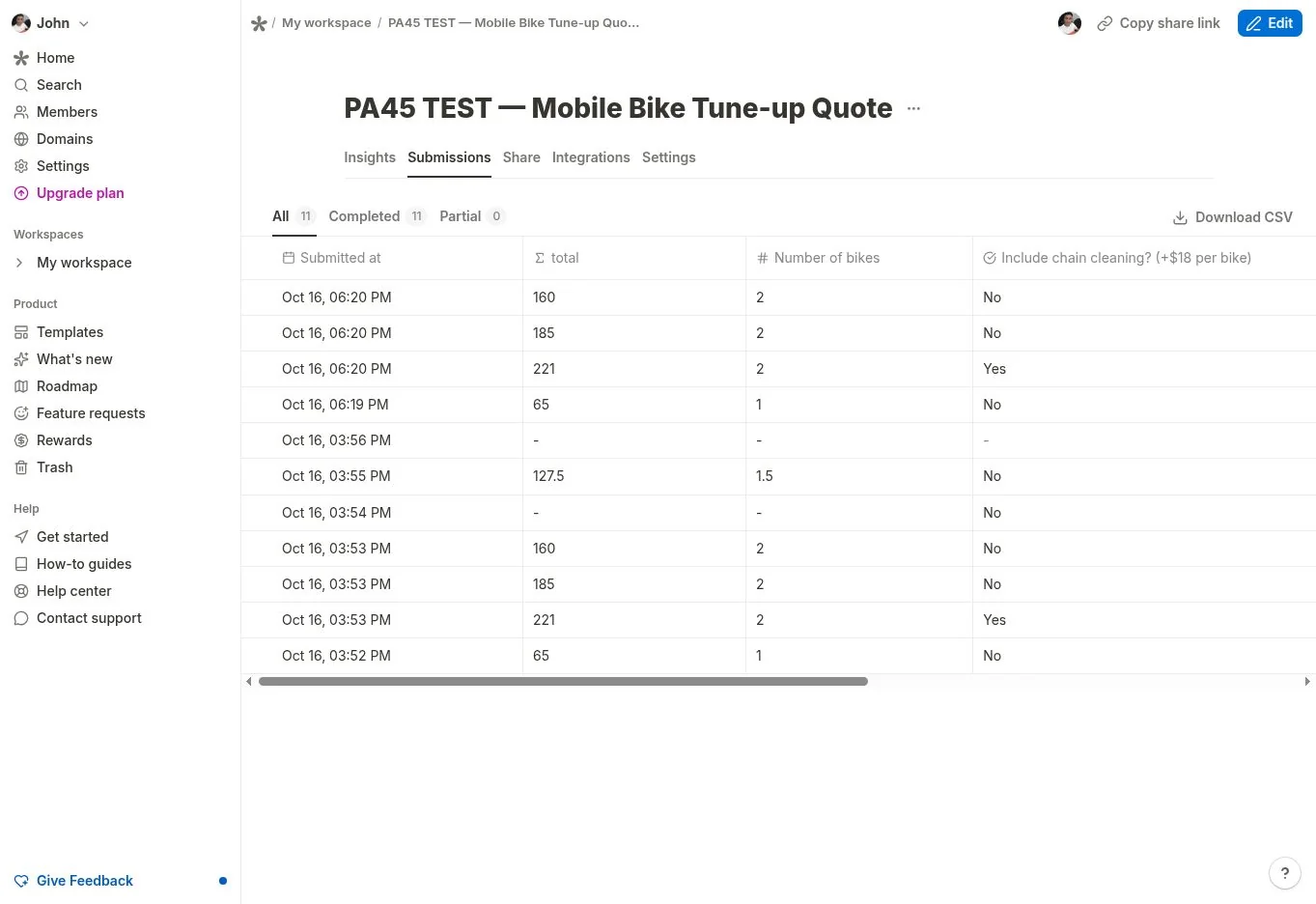
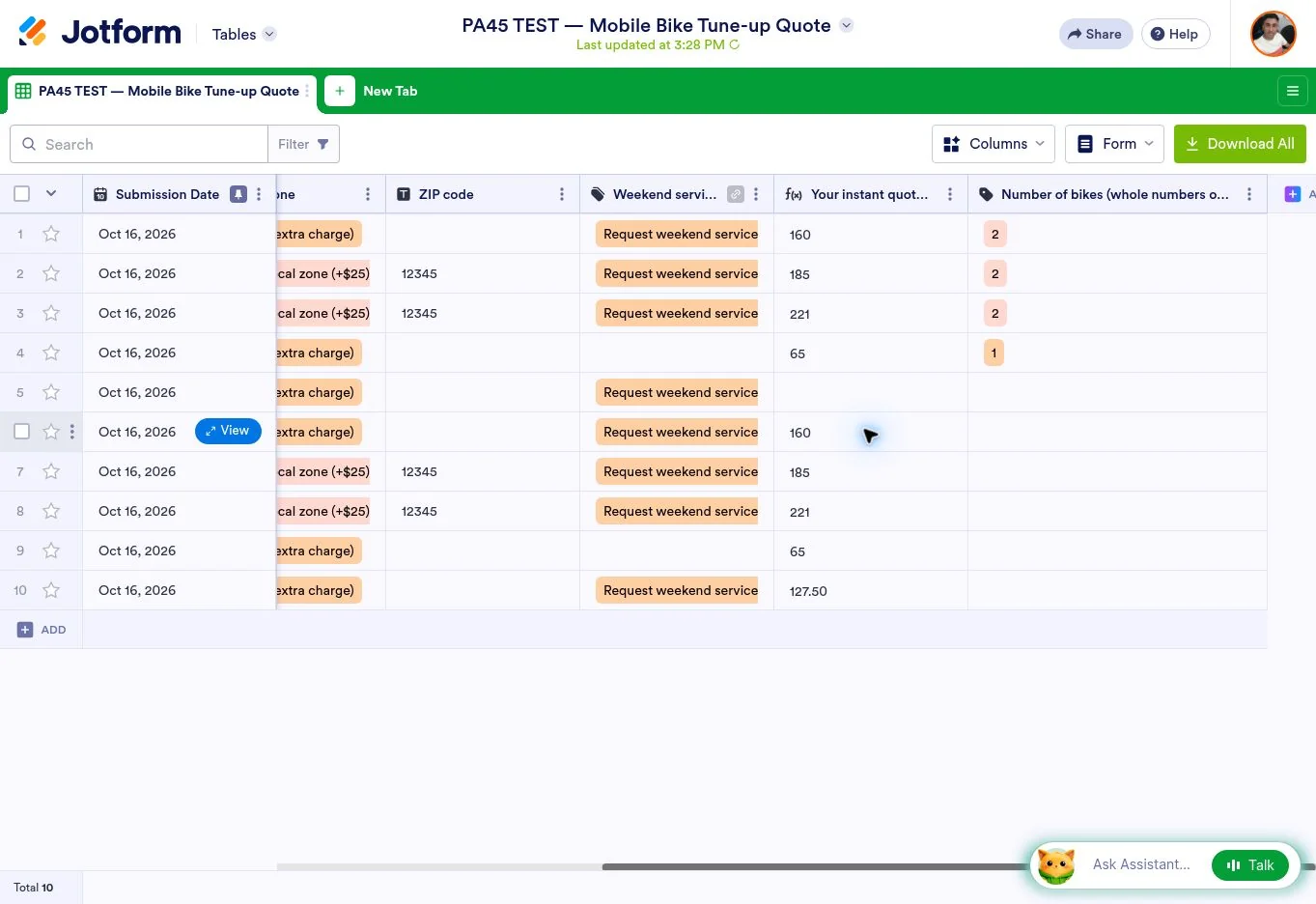
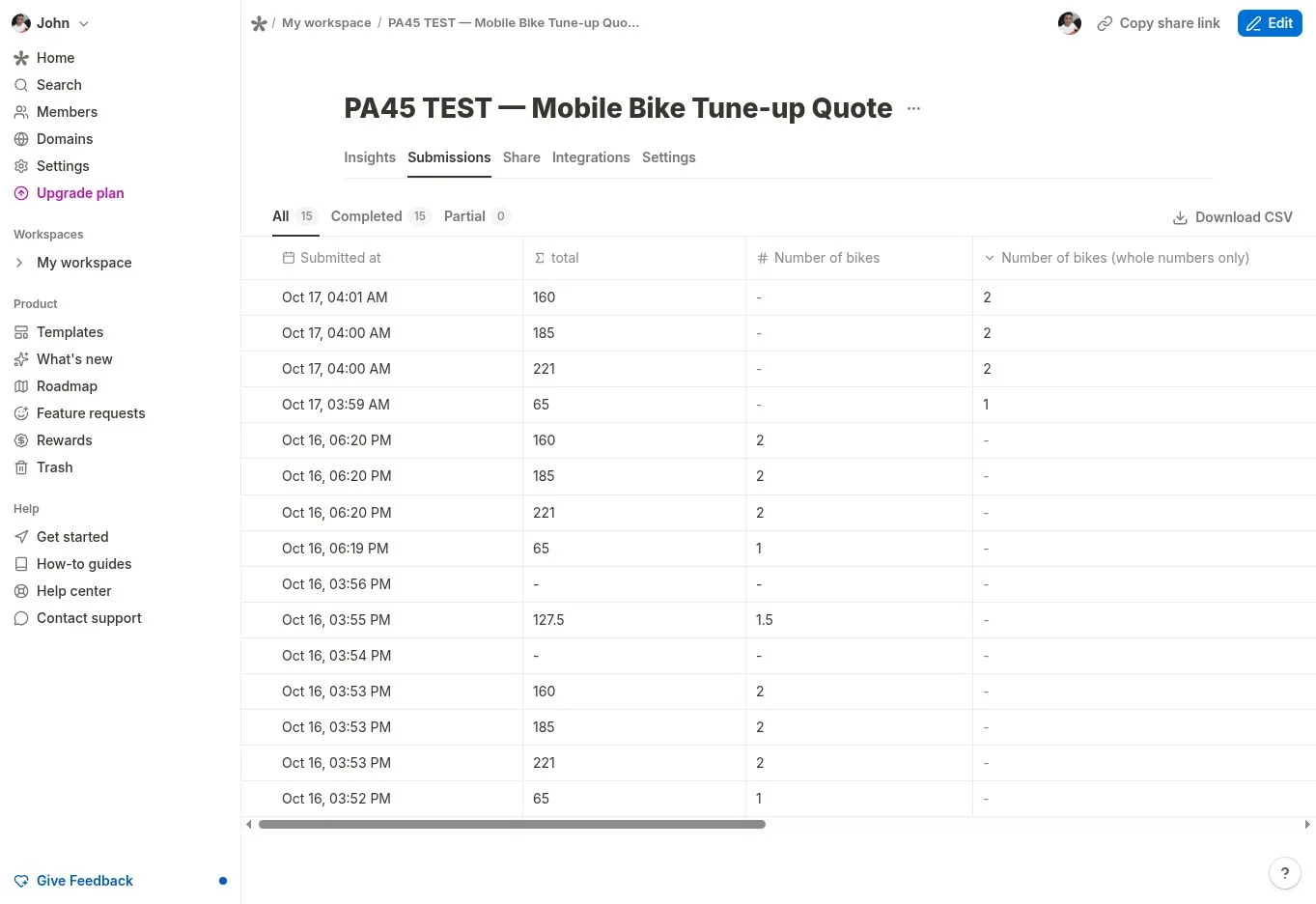
The original Number field was made non-required and hidden, preserving the old evidence column. New quantities were stored in the new “Number of bikes (whole numbers only)” column. A blank old column in a new row therefore does not mean the new quantity was lost.
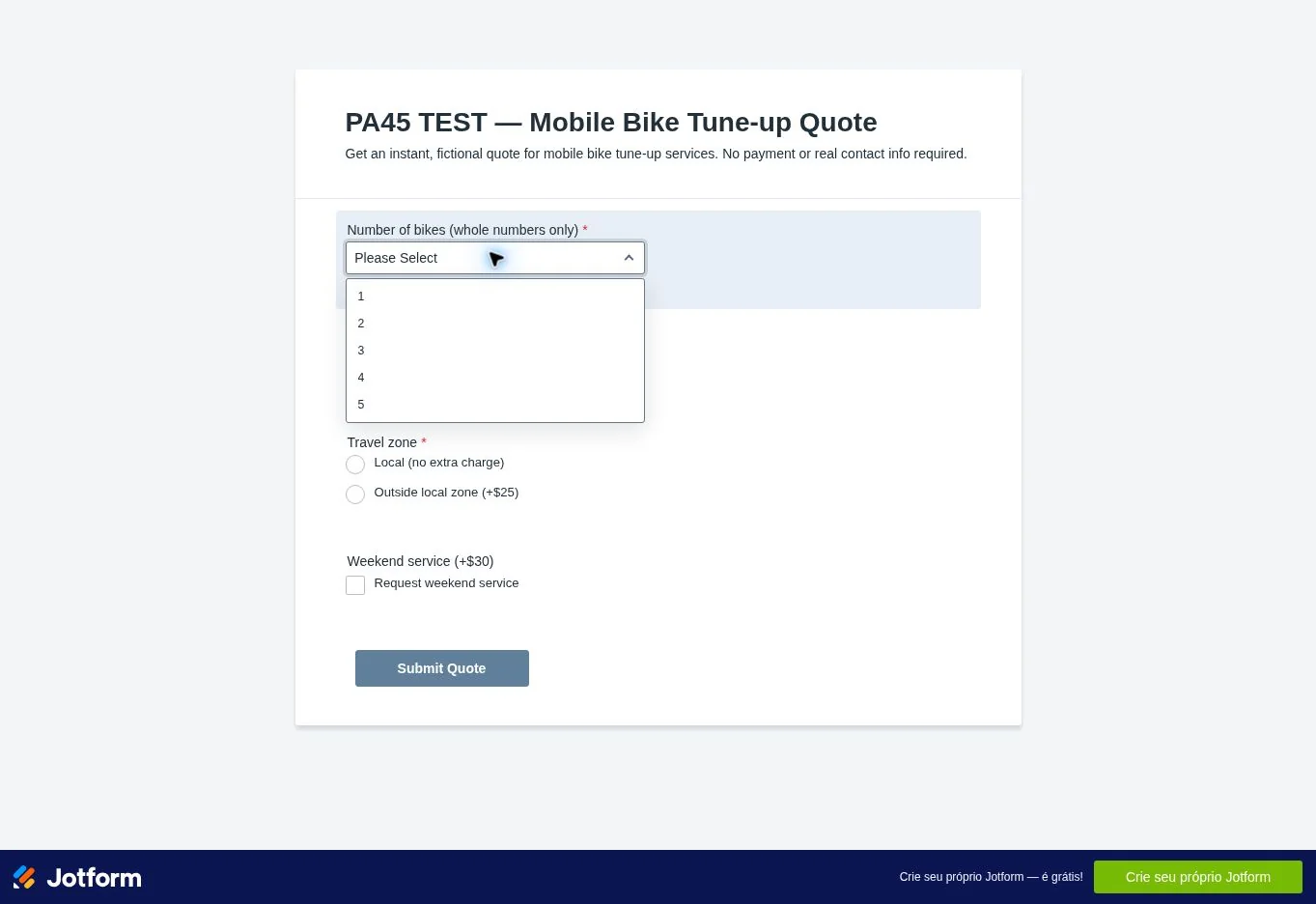
Typing 1.5 into the dropdown did not select a quantity. Submission showed “This field is required.” Enter activation also stayed on the form. The original missing-ZIP check still blocked completion, and all four valid totals were submitted and stored correctly.
The list did not expose a clear option after a choice was selected, despite an empty-option display setting. I checked a fresh empty selection; that differs from erasing a previously entered number.
After the Corrections: The Stored Values Still Matched
I repeated the valid cases after the changes because a fix for invalid input can break ordinary pricing. Each final regression matched the independent arithmetic, the visible amount, and the stored response.
If columns extend beyond your screen, swipe horizontally to see the rest.
| Case | Independent total | Tally displayed → stored | Jotform displayed → stored |
|---|---|---|---|
| 1 bike, Local, no extras | $65 | $65 → 65 | 65 → 65 |
| 2 bikes, all extras, Outside | $221 | $221 → 221 | 221 → 221 |
| Remove chain | $185 | $185 → 185 | 185 → 185 |
| Switch to Local | $160 | $160 → 160 | 160 → 160 |
What I Learned from Testing
Configuration work mattered more than the first successful total. Tally’s initial follow-up through its assistant introduced extra calculation fields and reduced the full case to $130; that change was undone before the recorded valid submissions. The weekend option also needed to be optional. Jotform’s initial JavaScript-like expression did not work in this widget configuration, so the calculation was rebuilt with field tokens and assigned choice values.
The October 17 retest exposed a concrete setup difference: Tally used the numeric option labels directly in its formulas, while my Jotform configuration used separately assigned calculation values. Both stored the correct prices. In either editor, trace the quantity from the input through the formula to the saved response.
The most consequential corrective check was ordinary keyboard submission. A hidden button looked reassuring in the intermediate Jotform form, but its stored response proved the repair had failed. For a service business, checking the response table is a practical part of testing—not an optional finishing step.
My practical lesson: define acceptable inputs before polishing the form, then inspect what was actually saved. For a few staff-prepared quotes, a spreadsheet or handheld calculator may be enough.
October 17 Retest: The Same Selection Design in Tally
I added a required dropdown with five options: 1, 2, 3, 4, and 5. I made the original Number field optional and hid it, preserving its old response column. I removed the earlier five-clause completion rule, changed the quote-display condition to the new selection, and changed both quantity references in the formulas.
Tally’s formula editor could use the numeric option labels directly: 65 × selected bikes for the base and total + 18 × selected bikes for chain cleaning. Travel, weekend pricing, and the conditional ZIP rule stayed unchanged. During editing I rebuilt the chain expression after an incomplete edit; I checked the live totals before recording the submissions.
| Check | Before submission and validation | Completion and storage |
|---|---|---|
| Four valid quotes | $65, $221, $185, and $160 matched independent calculations. | All four completed; stored totals 65/221/185/160 and new dropdown quantities 1/2/2/2. |
| Type 1.5, 0, 6, or text | No matching option; no quote after the unselected entry was dismissed. “Please select an option” on submission. | Click and Enter activation did not complete; no extra stored record. |
| Empty quantity; choose 2 then Backspace | No quote with no selection. Backspace cleared the selected 2; required warning appeared. | Enter on Submit stayed on the form; no blank record. |
| Outside without ZIP | $221 displayed; “Please enter a value” blocked submission. | After ZIP 12345, the $221 case completed and stored correctly. |
| Remove chain; switch Outside to Local | $221 became $185; then $160, with ZIP hidden. | The $185 and $160 cases stored correctly; Local had no stored ZIP. |
The response count increased from 11 to 15: exactly four new valid records. The original blank and fractional records remain below them. In the new rows, the old Number column is blank because quantity now lives in “Number of bikes (whole numbers only).” This retest resolves the earlier input-design mismatch; it does not erase the original numeric-field findings.
Who Should Use Each Tool?
Choose Tally when its free-volume policy fits your needs. Its unlimited forms and submissions remain subject to fair use. The final required dropdown passed the same four-price and invalid-selection checks.
Jotform is also a valid option within Starter’s limits. This test did not establish a functional reason to prefer it over Tally, or vice versa. If both plans fit, choose the editor you prefer maintaining. I did not measure setup speed or compare their full integration libraries.
Test Limitations and Who Should Skip These Prototypes
- Staged comparison: Jotform’s dropdown was checked October 16; Tally’s was added October 17. Both now use required lists with options 1–5 and the same prices. I did not rerun Jotform on October 17.
- History remains relevant: The original Tally erased-number cause was not isolated. Its first numeric-entry correction still showed invalid arithmetic; the later dropdown prevents that input instead. Jotform’s list did not expose the same clear action in the earlier run.
- Scope: One fictional task with browser-assisted actions, not a timed usability study. Editor versions were not recorded. Mobile respondent behavior, concurrency, malicious requests, accessibility conformance, and long-term reliability were not tested.
- Who should skip: Anyone needing a customer-ready system with verified tax, bookings, payments, discounts, notifications, or integrations. These prototypes are not certified or established as ready for commercial use.
Pricing Last Checked: October 16, 2026
Both experiments used free access without an upgrade or credit card. This pricing comparison focuses on the plans that supported the actual test, not a forecast of paid operating costs.
If columns extend beyond your screen, swipe horizontally to see the rest.
| Plan used | Price and relevant published limits | What the experiment established |
|---|---|---|
| Tally Free | $0; unlimited forms and submissions within Tally’s fair-use guidelines. Calculations and conditional logic are included. | The final required dropdown, calculations, conditional ZIP validation, live submissions, and stored-result checks worked without a paid upgrade. |
| Jotform Starter | $0; 5 forms, 100 monthly submissions, 100 MB available space, and 500 total stored submissions shown on the official pricing page. | The calculation widget, required dropdown, conditional ZIP, and stored results were available on the free account. |
Official sources: Tally pricing, Tally fair-use policy, and Jotform pricing. The Jotform Starter panel was checked in the rendered official page. Tally’s free calculations and logic are also documented in its calculated-fields guide.
Both test forms displayed vendor branding. Paid branding or limit upgrades were outside the test. Jotform displayed a time-limited annual promotion during the check; I have not treated that offer as a permanent subscription price. Check the vendor’s current billing terms before upgrading.
Final Verdict
Either corrected dropdown design handled this calculator in the recorded tests. Tally’s free-volume policy may decide the choice if Starter’s limits are too small. Within both plans’ limits, the results give no functional reason to prefer one platform; editor preference can decide.
Keep the independent price checks and inspect saved responses before customer use. A correct preview alone missed the original problems.
Frequently Asked Questions
Which should I choose, Tally or Jotform?
For this 1–5-bike quote, either tested dropdown setup worked. Choose Tally if its free-volume policy matters; if both free plans fit, choose the editor you prefer. The test established no functional winner.
Does hiding a Submit button prevent submission?
Not reliably in the Jotform configuration I tried: Enter still submitted it. Use a documented completion control or required input validation, then verify keyboard behavior and stored records.
Why is the old Jotform quantity column blank in new responses?
I preserved the original Number field for the earlier evidence and hid it. The final responses use the new “Number of bikes (whole numbers only)” column.
Does the formula above work unchanged in both editors?
It expresses the shared pricing rule. Each editor needs its own field references and calculation setup; it is not a universal paste-in formula.







Leave a Reply