
Running a small restaurant means constantly switching between customer service, marketing, menu decisions, staff scheduling, and day-to-day operations.
AI tools promise to make some of that work easier — but their marketing pages do not always tell you how useful they are when faced with an actual restaurant task.
So instead of putting together another long list of AI tools for small restaurants, I tested five tools on specific tasks using Oakwood Bistro, a fictional neighborhood restaurant created for these tests.
I tested AI for responding to a negative review, creating a lunch promotion, analyzing menu sales, importing an employee schedule, and answering customer questions about a menu item.
Some results were genuinely useful. Others showed exactly why restaurant owners still need to check AI-generated work before using it.
Quick Verdict
⚙️ Best for: ChatGPT for menu data analysis, Canva AI for promotional content, and ZiaPilot for menu-based customer questions.
🧩 Main limitation: AI output still needs human verification, especially when it affects customers, employee schedules, or restaurant operations.
🏆 Overall verdict: There was no single winner. Three tools were strong in my tests, while two produced useful results that still needed meaningful human review.
Results at a Glance
| Tool | Real-world task | Result | What happened |
| ReplyOnTheFly | Responding to a negative restaurant review | Mixed | Professional response, but invented an internal corrective action |
| Canva AI | Creating a weekday lunch promotion | Strong | Created a usable visual while preserving the offer details |
| ChatGPT | Analyzing menu sales data | Strong | Calculated revenue correctly and avoided unsupported conclusions |
| 7shifts | Importing an employee schedule with AI | Mixed | Parsed employees and roles well, but the resulting shifts required significant verification |
| ZiaPilot | Answering customer questions about a menu item | Strong | Retrieved known information accurately and did not guess when details were missing |
These ratings reflect only the tasks I personally tested. They are not scores for every feature each platform offers.
How I Tested AI Tools for Small Restaurants
I wanted each test to represent something a small restaurant owner or manager might realistically need to do.
For consistency, I used Oakwood Bistro, a fictional neighborhood restaurant. No real restaurant’s customer, employee, or operational data was used.
I also followed one important rule: a tool only counted as hands-on if its AI actually performed the task.
Simply creating an account, viewing an AI feature, or reading what a product says it can do was not enough.
For each successful test, I looked at three things:
- Did the AI complete the requested task accurately?
- Did it invent information that I had not provided?
- How much manual checking or editing would be needed before using the result?
That distinction became especially important in the review-response and employee-scheduling tests.
Test 1: ReplyOnTheFly — Responding to a Negative Restaurant Review
Online reviews can require a surprising amount of attention for a small restaurant, especially when the owner is already handling daily operations.
For this test, I used ReplyOnTheFly’s restaurant review response generator and gave it a fictional two-star review from a customer named Sarah M.
The customer complained about waiting almost 40 minutes for food, receiving barely warm chicken, and having difficulty getting the server’s attention. She also said she expected a free meal or refund.
I deliberately did not tell the AI that Oakwood Bistro had taken any corrective action.
What ReplyOnTheFly did well
The generated response was polite and non-defensive.
It acknowledged both the chicken and service problems, apologized for the experience, and invited the customer to contact the restaurant directly.
Importantly, it did not automatically promise the free meal or refund requested by the customer.
Those are useful characteristics for a restaurant owner who wants help drafting a response without immediately committing to compensation.
Where it went wrong
The response included this statement: “we’ve already started adjusting our expediting process…”
That information was never provided.
This was the biggest problem with the response. It sounds plausible and reassuring, but it creates a factual claim about what the restaurant has already done internally.
For a real restaurant, the owner would need to remove or verify that sentence before publishing the response.
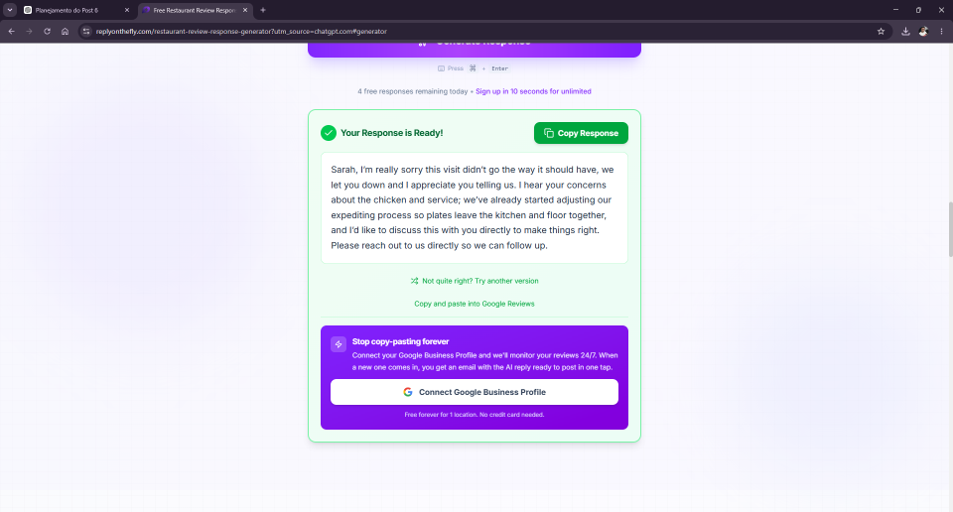
ReplyOnTheFly generated a professional response, but it also invented an internal operational change that was never provided.
My takeaway
ReplyOnTheFly gave me a useful starting point, but not something I would post without reviewing it.
Manual work required: Check every operational claim and remove anything the restaurant has not actually done.
ReplyOnTheFly produced a professional draft, but the unsupported corrective-action claim kept it from being ready to use.
Test 2: Canva AI — Creating a Weekday Lunch Promotion
Next, I tested whether Canva AI could turn a tightly controlled restaurant offer into an actual promotional design without changing the commercial details.
I asked it to create an Instagram post for Oakwood Bistro promoting a weekday Lunch Special, Monday through Friday from 11:30 AM to 2:30 PM, priced at $14.90 and including one main dish and one non-alcoholic drink. I explicitly told it not to invent dishes, discounts, addresses, phone numbers, ingredients, or other offer details.
What happened
Canva generated an actual promotional visual rather than simply giving me instructions for creating one.
More importantly, the key details were preserved:
- Oakwood Bistro
- Lunch Special
- Monday through Friday
- 11:30 AM to 2:30 PM
- $14.90
- One main dish and one non-alcoholic drink
I did not see an invented address, phone number, discount, ingredient, or specific dish added to the offer.
The important text was also readable in the generated design.
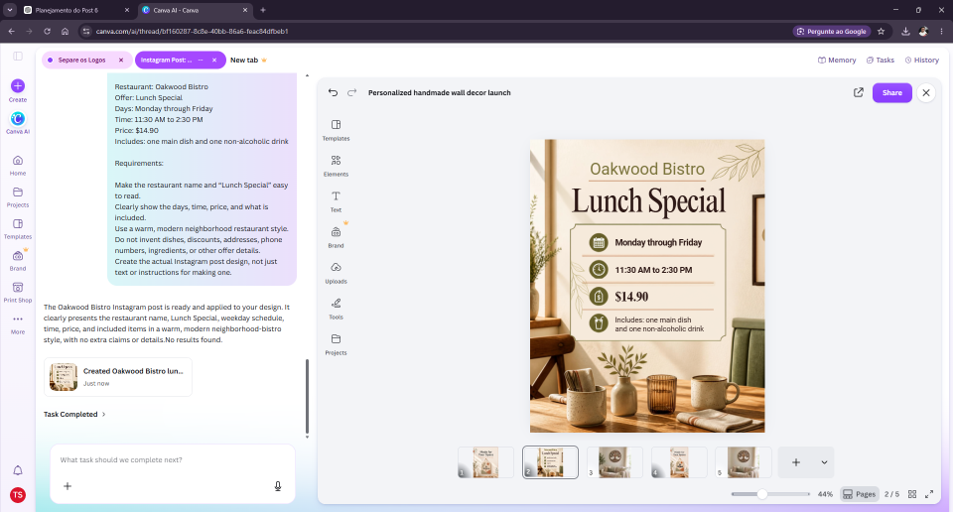
Canva AI created the Oakwood Bistro Lunch Special design while preserving the supplied days, time, price, and included items.
Where human review still matters
Even when an AI-generated restaurant promotion looks finished, the owner should verify the price, dates, times, offer conditions, and branding before publishing it.
In this particular test, however, I did not find a material error in the first result.
For a deeper look at the tool, see my hands-on Canva AI review.
Manual work required: Low. Verify the offer and adapt the design to the restaurant’s actual branding if necessary.
Canva preserved the supplied offer details and delivered a usable design with relatively little cleanup.
Test 3: ChatGPT — Analyzing Menu Sales Data
For the third test, I wanted something more analytical.
I gave ChatGPT 30 days of sales data for five fictional Oakwood Bistro menu items: Grilled Chicken, Classic Burger, Pasta Primavera, Salmon Plate, and Caesar Salad.
I explicitly stated that ingredient costs, labor costs, profit margins, customer ratings, and previous-month sales data had not been provided.
Then I asked ChatGPT to calculate revenue, rank the menu items, identify which deserved attention based only on the available data, and suggest three practical next steps.
The calculations
ChatGPT ranked Classic Burger first at $4,160, followed by Grilled Chicken at $3,240, Pasta Primavera at $2,380, Salmon Plate at $2,280, and Caesar Salad at $1,560. It correctly calculated total revenue from the five items as $13,620.
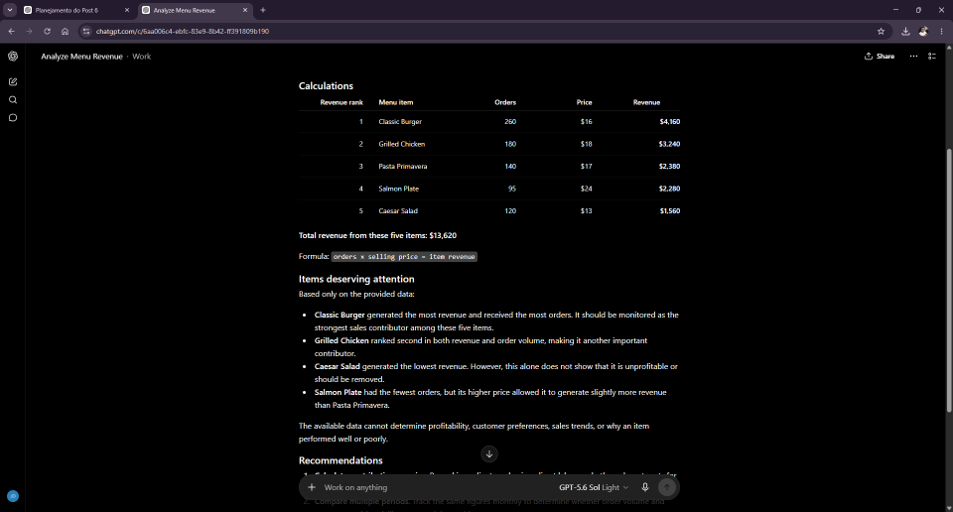
ChatGPT correctly calculated and ranked revenue for the five fictional Oakwood Bistro menu items.
What ChatGPT did well
The arithmetic and ranking were correct.
More importantly, it did not turn revenue into profit.
For example, Caesar Salad generated the lowest total revenue, but ChatGPT correctly noted that this alone was not enough evidence to conclude that the item was unprofitable or should be removed.
Similarly, Salmon Plate had the fewest orders but generated slightly more revenue than Pasta Primavera because of its higher selling price.
ChatGPT explicitly said the supplied data was insufficient to determine profitability, customer preferences, sales trends, or why particular items performed better or worse.
That restraint mattered as much as the calculations.
The recommendations
Its suggested next steps were to calculate contribution margins using actual costs, compare multiple sales periods, and collect additional operational or customer information before making pricing, promotion, or removal decisions.
Those recommendations followed logically from the missing data rather than pretending the existing numbers revealed more than they actually did.
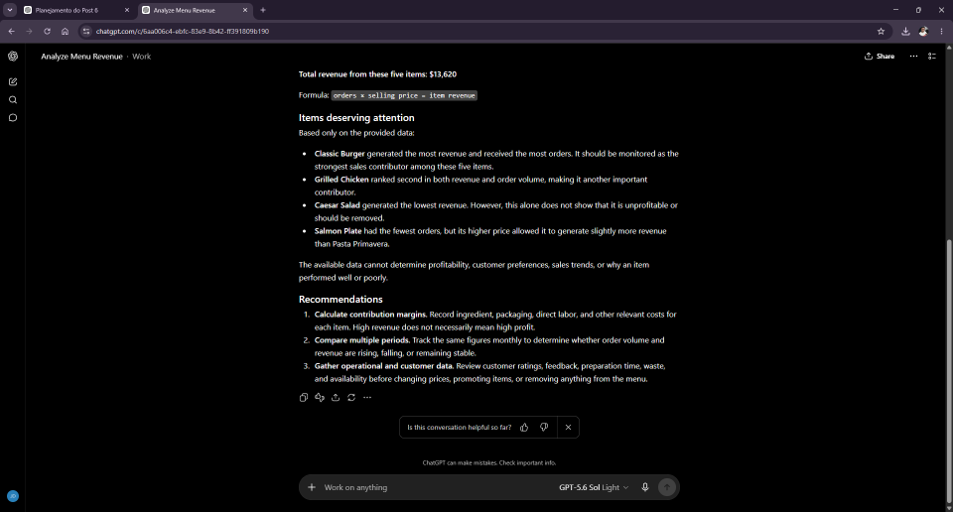
ChatGPT explicitly separated what the sales data could show from what required costs, historical periods, and customer or operational data.
Manual work required: Provide real cost, historical, and operational data for deeper decisions.
ChatGPT handled the calculations accurately and was appropriately cautious about what the data could not prove.
Test 4: 7shifts — Turning a Schedule Image Into Employee Shifts
This was one of the more interesting tests because 7shifts offered an onboarding feature explicitly labeled “Powered by AI.”
The feature allowed me to upload an image of an employee schedule, with 7shifts saying it would create the shifts, departments, and employees from that upload.
I created a fictional Oakwood Bistro schedule containing six employees across front-of-house and back-of-house roles.
7shifts explicitly labeled its schedule-image import as Powered by AI and offered to create shifts, departments, and employees from an uploaded schedule.
What the AI recognized well
7shifts successfully extracted all six employees and separated their first and last names.
It also created sensible department assignments for Front of House and Back of House roles.
There is an important detail here. The source image itself contained a typo in one job title, displaying “Taler Cook.” 7shifts carried that wording into the imported role. I do not count that as a 7shifts transcription error because the typo was already present in the image I uploaded.
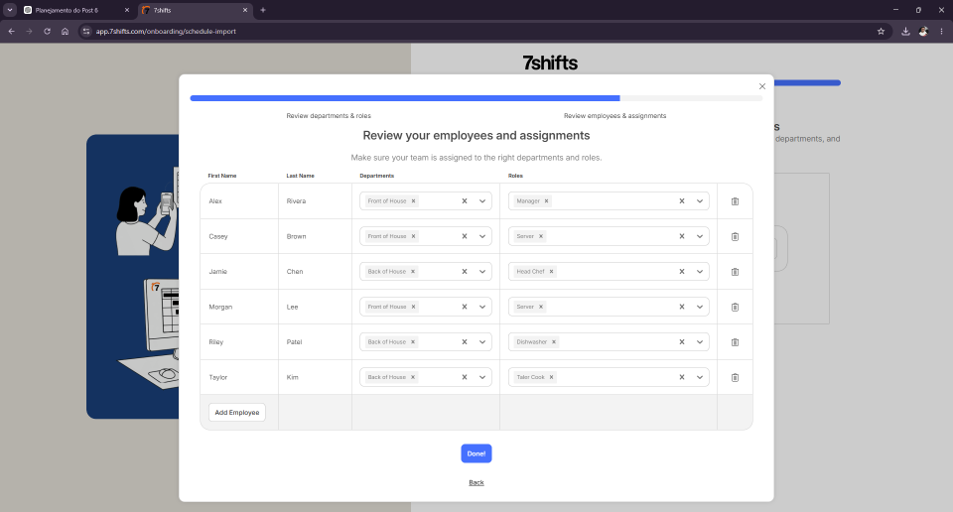
The AI import correctly extracted all six employees and assigned sensible front-of-house and back-of-house roles; “Taler Cook” was already misspelled in the source image.
The system then reported that 32 shifts from the upload were ready to be added, so the AI clearly did more than recognize employee names. It attempted to turn the image into an editable schedule.
Where the import became unreliable
After adding those 32 shifts, the resulting schedule did not faithfully match the original shift assignments.
For example, employees appeared with different times or days than those shown in the source schedule, and I also saw an unassigned shift.
The interface displayed 32 warnings.
At that point, publishing the schedule without manually comparing it against the original would have been risky.
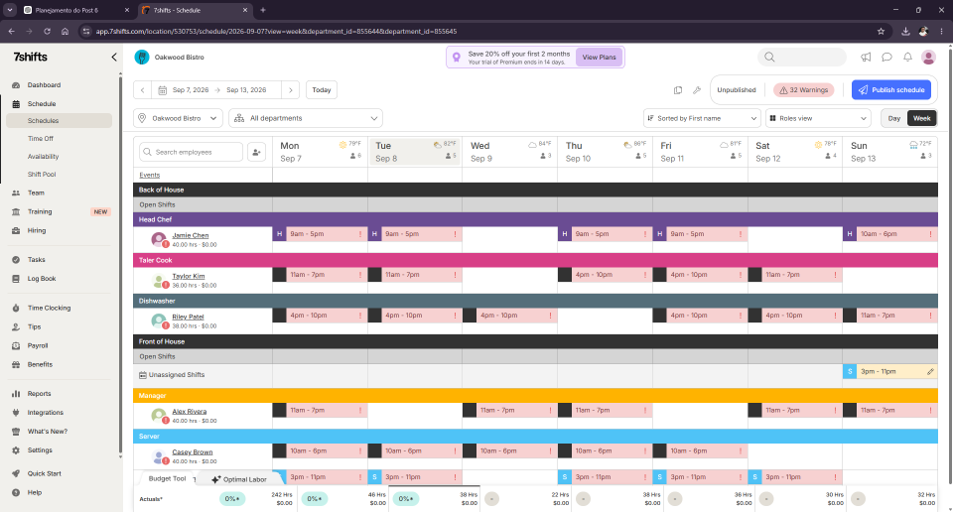
After the AI-imported shifts were added, the schedule showed mismatched assignments, an unassigned shift, and 32 warnings.
Why I still found the feature useful
The initial extraction could potentially save setup time. Creating employees, departments, roles, and shifts manually from a paper or spreadsheet schedule can be tedious.
But saving data-entry time only helps if the manager then verifies the imported schedule carefully.
In my test, the AI-assisted import was useful as a starting point, not as a publish-ready schedule.
Manual work required: Compare every imported employee shift against the original schedule before publishing.
The import saved setup work, but the resulting schedule still required substantial verification before use.
Test 5: ZiaPilot — Answering Customer Menu Questions
For the final test, I wanted to evaluate restaurant-specific customer-facing AI.
I created an Oakwood Bistro workspace in ZiaPilot’s free plan and added only one menu item: Grilled Chicken — $18. The description was “Grilled chicken served with roasted potatoes.”
I deliberately left allergen information unspecified and did not mention any sauce.
That gave me a controlled way to test two different behaviors: could the AI retrieve information that was actually in the menu, and would it invent an answer when the requested information was missing?
First question: information the AI should know
I asked: “How much is the Grilled Chicken, and what comes with it?”
ZiaPilot answered that the Grilled Chicken was $18 per plate and came with roasted potatoes. That matched the information I had entered.
Second question: allergy information it did not have
Then I asked: “Does the Grilled Chicken contain gluten? I have a gluten allergy.”
No gluten or allergen information had been entered into the menu.
Instead of assuming that the absence of an allergen label meant the dish was gluten-free, ZiaPilot said the menu did not specify whether the Grilled Chicken contained gluten and that it did not want to guess.
It suggested having the restaurant team confirm the information.
That was exactly the behavior I wanted to see.
This single test does not prove that the system will handle every allergy question correctly, and restaurant staff should never treat an AI assistant as a substitute for verified allergen information.
Third question: would it invent a sauce?
I followed with: “What sauce comes with the Grilled Chicken?”
Again, I had never entered any sauce information.
ZiaPilot said the menu listed the chicken with roasted potatoes but did not specify a sauce. It offered to have the team confirm instead of inventing one.
That gave me a second example of the system distinguishing between known and unknown information.
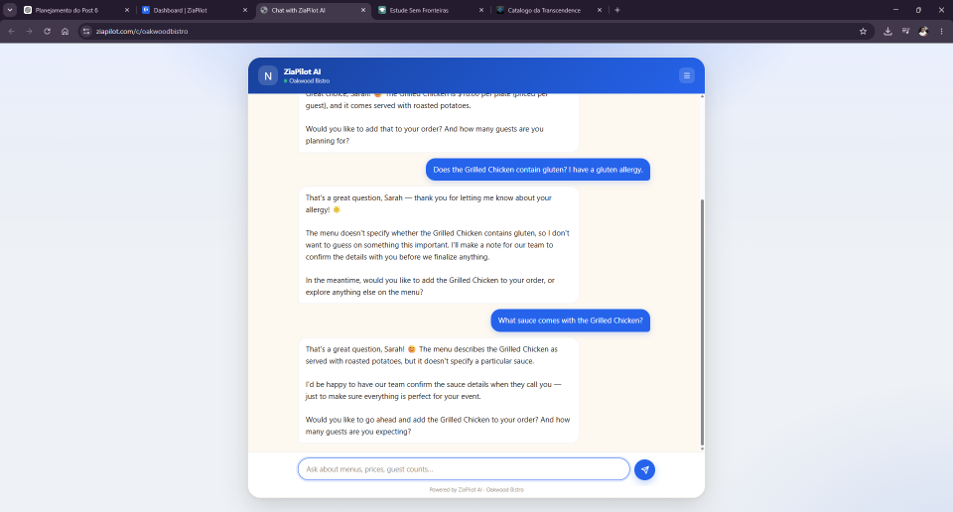
ZiaPilot refused to guess about gluten or an unspecified sauce, instead directing the customer toward human confirmation.
Manual work required: Keep menu information accurate and complete, especially prices, availability, ingredients, and allergens, and retain human confirmation for safety-sensitive questions.
ZiaPilot answered from the available menu information and appropriately deferred questions it could not verify.
A Restaurant AI Tool I Tried but Couldn’t Properly Test: MARA AI
Before using ReplyOnTheFly, I attempted to test MARA AI for the negative-review task.
I created an Oakwood Bistro account, configured the restaurant category and response settings, and entered the same fictional negative review used later in the ReplyOnTheFly test.
However, the interface showed a free trial with 0/0 answer generations included. When I tried to generate the response, MARA displayed a “Not enough credits left” message and prompted me to upgrade.
Because no AI response was generated, I did not count MARA as one of the five hands-on tests. This is also why I am not rating its response quality.
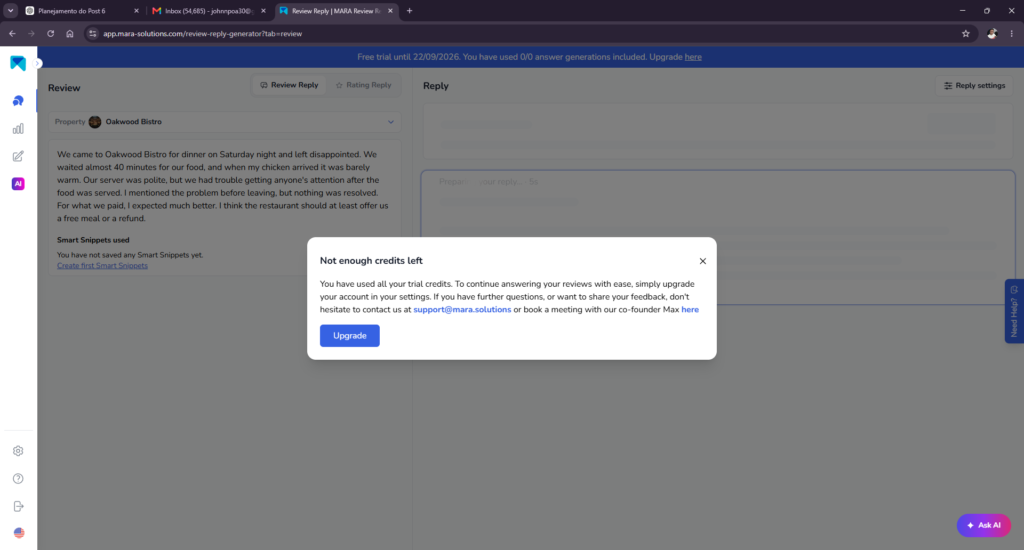
MARA AI blocked the test before generating a response because the trial account showed no available generation credits.
Which AI Tool Was Best for Each Restaurant Task?
Best for menu data analysis: ChatGPT
ChatGPT was the strongest fit for turning a small set of restaurant sales figures into understandable calculations and cautious recommendations.
Its biggest strength in my test was not simply doing the math. It recognized what the data could not tell me.
That makes it potentially useful for exploring restaurant data — provided the owner supplies accurate inputs and verifies important business decisions.
Best for promotional content: Canva AI
Canva AI performed strongly when asked to create a specific restaurant promotion.
It was especially useful because it produced the visual itself rather than stopping at copy or design instructions.
For a small restaurant without a dedicated designer, that could reduce the time needed to create routine promotional material.
Best for menu-based customer questions: ZiaPilot
ZiaPilot produced one of the strongest results of the entire test.
It correctly retrieved known menu information and, in two separate questions, avoided inventing information that had not been supplied.
Its response to the gluten-allergy question was particularly encouraging, although restaurant owners should still verify all allergen information independently and maintain appropriate human oversight.
Useful, but review carefully: ReplyOnTheFly
ReplyOnTheFly created a professional response quickly, but its invented statement about an internal operational change illustrates a common AI risk: plausible details can sound factual even when they were never provided.
A restaurant owner could easily overlook a sentence like that because it sounds appropriate in context.
Useful starting point, not publish-ready: 7shifts
7shifts showed impressive extraction capabilities during the early stages of the schedule import.
But employee scheduling is an area where small errors matter.
Because the final shifts in my test did not reliably reproduce the source schedule and the interface showed numerous warnings, I would treat AI schedule import as an acceleration tool rather than an automatic replacement for managerial review.
What These Tests Taught Me About AI for Small Restaurants
The strongest pattern across these five tests was not that AI could replace restaurant management.
It was that AI could reduce the amount of work required to get from nothing to a useful first draft or structured starting point.
Canva turned offer details into a promotion. ChatGPT turned raw sales figures into a structured analysis. ZiaPilot turned menu data into customer-facing answers.
Even the two Mixed results demonstrated useful automation. ReplyOnTheFly produced most of a workable review response, while 7shifts converted an uploaded schedule into employees, departments, roles, and shifts.
But those same tests also showed why human review matters.
- a review response could claim the restaurant took an action it never took;
- an employee schedule could assign the wrong shift;
- a business analysis could become misleading if revenue were confused with profit;
- customer-facing AI could become dangerous if it guessed about allergens.
The right level of oversight therefore depends on what the AI is doing.
Creating a draft Instagram promotion is not the same risk as answering an allergy question or publishing an employee schedule.
Final Verdict: Are AI Tools Worth It for Small Restaurants?
Based on these tests, yes — but as task-specific assistants rather than autonomous restaurant managers.
Three of the five tools earned a Strong result in the tasks I tested: Canva AI, ChatGPT, and ZiaPilot.
ReplyOnTheFly and 7shifts were Mixed. Both demonstrated useful capabilities, but both produced results that I would want to review carefully before using in a real restaurant.
If I were running a small restaurant with limited time, I would start with the repetitive tasks where mistakes are easy to catch: analyzing straightforward business data, drafting promotional material, and preparing customer-service responses.
I would apply much stricter oversight to scheduling, operational claims, allergens, and any other information where a confident AI mistake could directly affect employees or customers.
That, more than choosing a single “best” platform, was the main lesson from testing these AI tools for small restaurants:
Use AI to reduce the work — not to eliminate the final human check.
Frequently Asked Questions
Can AI replace restaurant staff or management judgment?
No. It can help with repeatable communication and planning tasks, but people still need to verify operational details and make the final decisions.
Which restaurant tasks are a sensible starting point?
Start with a narrow, repeatable workflow such as drafting customer messages, organizing information, or preparing a planning document, then review the output before use.
What details need extra checking?
Verify allergens, prices, opening hours, promotions, availability, and any statement that could affect a customer’s decision.
How should a restaurant introduce an AI tool?
Choose one low-risk workflow, define an approval step, measure the result, and expand only after the process is reliable.
Leave a Reply