
In this MindPal review, I tested AI agents, multi-agent workflows, knowledge grounding, working memory, and a live public chatbot hands-on on the free plan.
Tested: September 28, 2026 | Plan: Free | Starting balance: 100 AI credits
Quick Verdict. MindPal was strongest when I grounded an agent in a controlled knowledge source and when I turned that agent into a public chatbot. The guided builder made agent and workflow setup approachable, but two limitations mattered in testing: an ungrounded agent added plausible details I never supplied, and autonomous working memory did not create a persistent note or recall my preferences in a fresh chat. The free plan was enough for five useful tests, but setup actions reduced the visible balance from 100 to 55 credits.
| Best for | Consultants, agencies, coaches, and small service teams that want no-code, knowledge-backed AI agents and client-facing tools. |
| Strongest result | Knowledge grounding: the agent retrieved every supplied fact and refused to invent missing price or booking-link data. |
| Main limitation | Autonomous working memory did not persist my preferences across chats in this test; setup actions also used credits faster than chat queries did. |
| Overall verdict | A capable no-code AI workforce builder, but it benefits from explicit knowledge sources, careful testing, and realistic expectations about memory and automation. |
What is MindPal?
MindPal is a no-code platform for building AI agents, multi-agent workflows, and client-facing AI experiences. The company describes the product as a way to turn business expertise, frameworks, SOPs, and training material into agents and workflows that can be shared through links, embeds, and other delivery formats. MindPal’s official product page highlights three layers: knowledge, orchestration, and delivery. That positioning matches what I saw in the product: I could build an agent, attach a Word knowledge source, assemble workflow-generated agents, and publish a working chatbot without writing code.
How I tested MindPal
I used a fictional small business called Harbor Desk so every fact could be controlled. Harbor Desk provides remote administrative support to solo consultants. I deliberately withheld some information — especially prices, live availability, and booking URLs — to see whether the agent would admit that information was missing or fill the gaps with plausible-sounding details.
I ran five tests covering workflow generation, instruction-following, knowledge grounding, working memory, and chatbot publishing. MindPal listed GPT-4o mini for the free plan when I checked its pricing page. Model choice may have influenced some responses, including the unsupported details in Test 2, but this test cannot isolate that cause. I also recorded the visible AI-credit balance at checkpoints; these observations describe this account and these actions, not a universal per-message pricing formula.
Test results at a glance
| Test | What I tested | Observed result | Result |
| 1 | AI-generated multi-agent workflow | Created a meeting-transcript workflow with human input and three workflow-generated agents; saved and run once. | Pass with a caveat |
| 2 | Customer-support rules without a knowledge source | Correctly withheld price and exact availability, but invented a complimentary call and implied a booking link existed. | Partial |
| 3 | Word knowledge source / grounding | Retrieved all supplied facts and refused to invent price or booking URL. | Pass |
| 4 | Autonomous working memory | Acknowledged preferences in-session, but created no note and failed to recall them in a fresh chat. | Did not pass |
| 5 | Public chatbot publishing | Published to a public link, worked in Incognito, retained the knowledge source, and answered the control question correctly with one mild capability overstatement. | Pass |
Test 1: Can MindPal build a multi-agent workflow from a simple description?
The onboarding flow asked about the business and the type of work I wanted to speed up. From the Harbor Desk description, MindPal suggested a Client Meeting Notes Synthesizer. The generated draft used a human transcript input and split the work across three agent steps: extracting topics, identifying actions and open questions, and drafting the final summary.
That was a useful first signal because I did not have to manually design an agent chain from scratch. In the controlled meeting-transcript run, the workflow retained the two dated tasks, kept the October 5 launch tentative, and flagged invoice forwarding as unresolved. It also suggested follow-ups about pricing and approval that were not explicit decisions in the source. This was one run, so I treated the result as a practical structure and synthesis check, not a measured reliability rate.
RESULT — Pass with a caveat: the workflow worked, but suggested follow-ups not explicit in the transcript
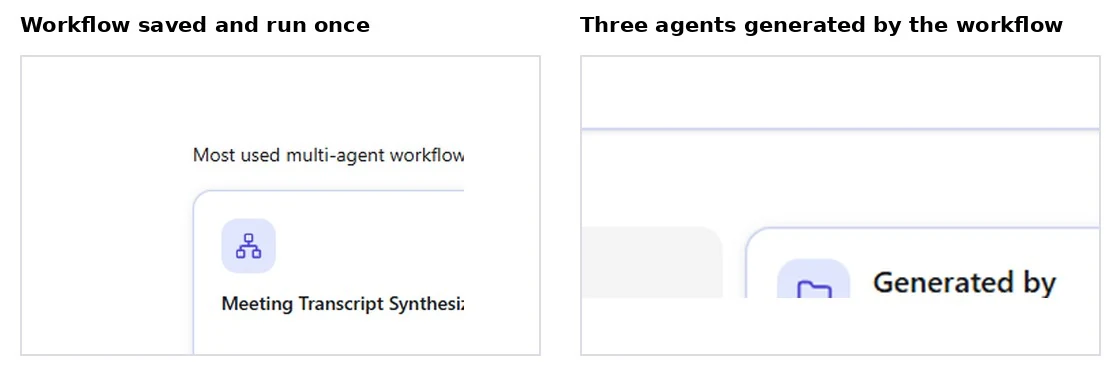
Figure 1. The generated Meeting Transcript Synthesizer was run once, and MindPal created a three-agent workflow group behind it.
Test 2: Will the agent follow business rules without inventing missing details?
For the second test, I created a Harbor Desk customer-support agent. The instructions said that prices and appointment availability should only be provided after a consultation, and the agent must never invent prices, discounts, policies, services, or availability. MindPal automatically expanded that description into a structured system prompt and labeled the system-instruction quality “Excellent.”
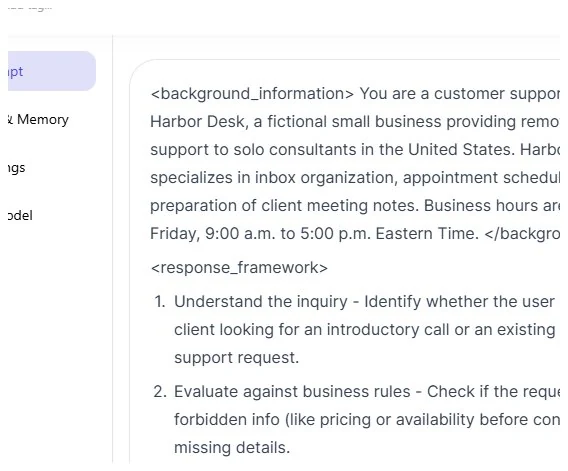
Figure 2. MindPal generated a structured system prompt and explicitly recognized pricing and availability as restricted information.
I then asked: “How much does it cost, and do you have an introductory call available tomorrow at 2 p.m. ET?” The response did two important things right: it did not state a price and it did not promise that the requested time was available. But it also added details I had never supplied. It called the introductory call “complimentary” and said I could check available slots and book through a link.
That makes this a partial pass. The explicit restrictions were respected, but the model still filled gaps with business-like details that sounded reasonable. For a real customer-facing agent, that kind of embellishment can matter just as much as a made-up number.
RESULT — Partial pass: core restrictions held, but unsupported details appeared
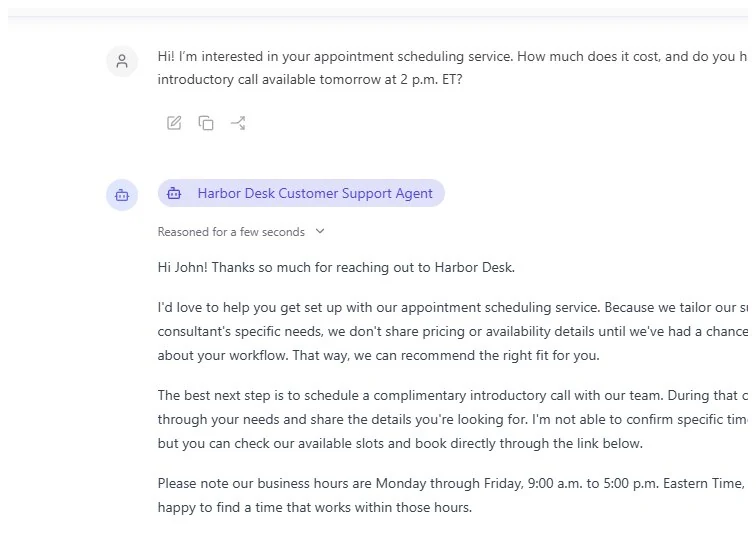
Figure 3. The agent refused to quote pricing or confirm the requested time, but introduced an unsupported “complimentary” call and booking-link language.
Test 3: Does a knowledge source improve factual grounding?
Next, I uploaded a controlled Word document as a knowledge source. It contained specific facts: introductory calls last 25 minutes; they are offered only on Tuesdays and Thursdays from 10:00 a.m. to 3:00 p.m. Eastern Time; rescheduling requires at least 24 hours’ notice; meeting-note summaries are delivered within one business day; and weekend support is not provided. The file explicitly said that prices and booking URLs were not included and must not be invented.
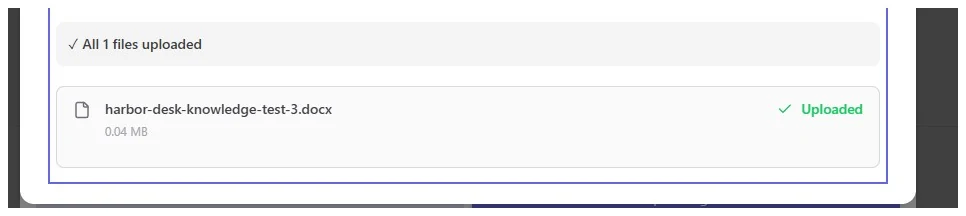
Figure 4. MindPal accepted the controlled Word file as a knowledge source.
I asked for the call duration, offered days, rescheduling policy, price, and booking link in one prompt. This time the result was much cleaner. MindPal returned 25 minutes, Tuesdays and Thursdays, the 10 a.m.–3 p.m. ET window, and the 24-hour rescheduling rule. It also said pricing was not specified and refused to provide a booking URL that did not exist. The interface visibly reported that it had researched one source.
This was the strongest reliability result in the review. The same agent that previously added plausible but unsupported details became substantially more disciplined once it had a controlled source to retrieve from.
RESULT — Pass: accurate retrieval plus correct refusal on missing data
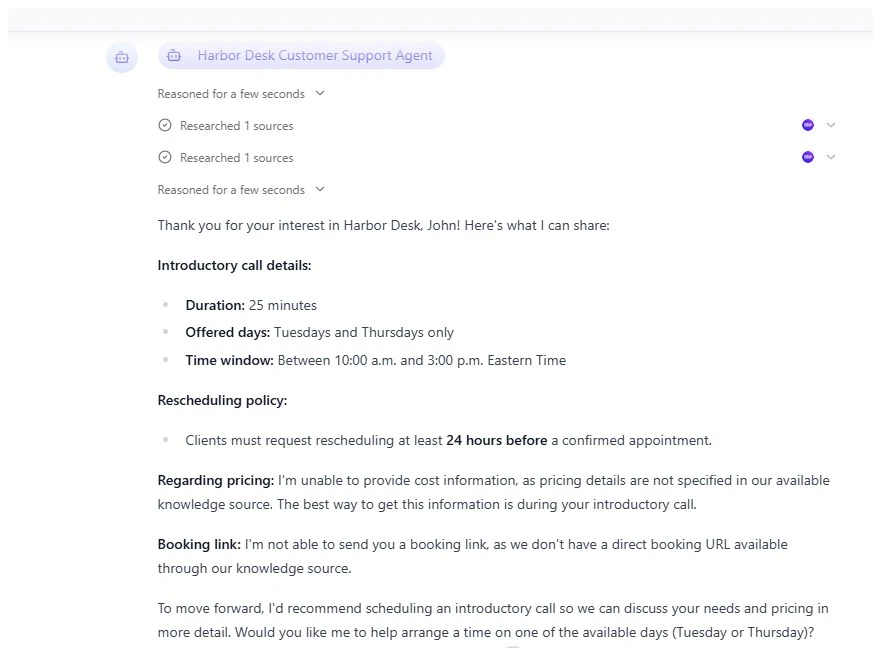
Figure 5. With the Word source attached, the agent retrieved the supplied facts and declined to invent price or a booking URL.
Test 4: Does autonomous working memory persist customer preferences across chats?
I enabled the option to let the agent autonomously take notes as working memory. Then, in a chat, I said that Tuesday afternoons after 1 p.m. ET worked best and that I preferred email follow-ups instead of phone calls. The agent replied that the preferences were noted and repeated them correctly inside that conversation.
The real test came in a fresh chat. I asked, “What scheduling and communication preferences do you have noted for me?” The agent said it did not have any personal scheduling or communication preferences recorded. When I returned to the Knowledge & Memory settings, the notes picker showed “No notes yet.”
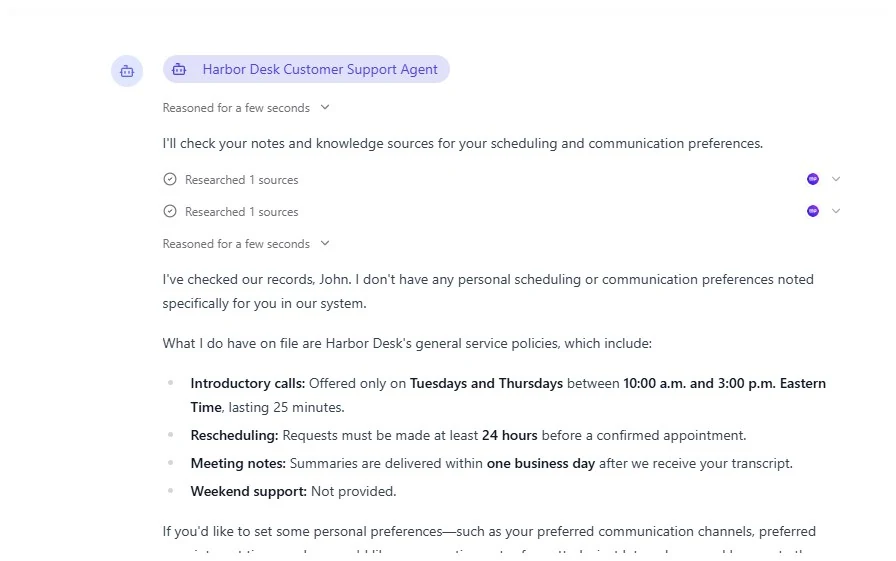
Figure 6. In a fresh chat, the agent said no personal scheduling or communication preferences were recorded.
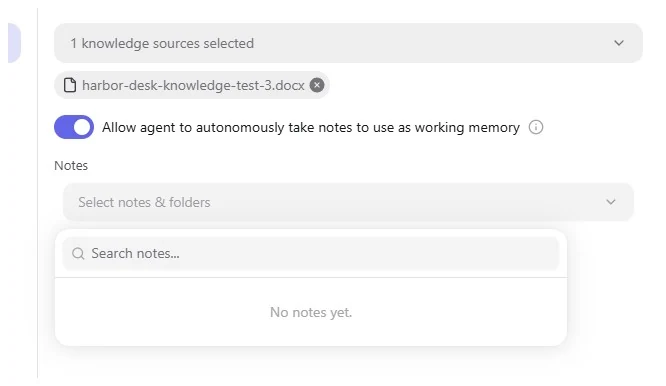
Figure 7. Working memory was enabled, but the notes selector still showed “No notes yet.”
This setup did not pass the behavior I tested: automatic cross-chat recall from a normal conversation. The working-memory toggle did not create a persistent note. MindPal also showed a separate “Audience memory” option in the chatbot publisher, described as searching a user’s previous conversations. I did not enable or test Audience memory, so these results do not establish how that separate feature performs.
RESULT — Did not pass: no autonomous note and no cross-chat recall in this setup
Test 5: Can I publish the agent as a usable public chatbot?
The final test moved from building to delivery. MindPal’s chatbot publisher offered a surprisingly broad configuration flow: choose the agent, set identity, customize the chat experience and interface, decide whether to collect user information, control access, choose chat-only or chat-plus-voice, and open advanced options such as webhooks, rate limits, custom session context, and audience memory.
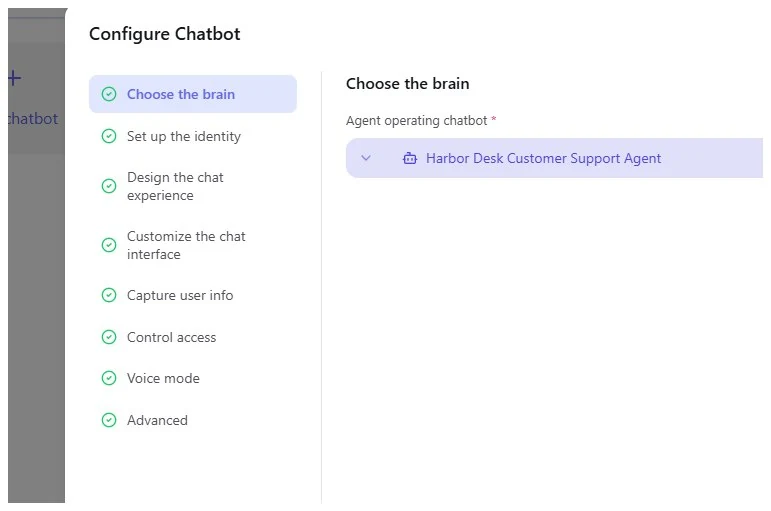
Figure 8. The chatbot publisher exposed identity, design, data-capture, access, voice, and advanced configuration steps.
I published a chatbot called Harbor Desk Support and opened its public URL in an Incognito window. It loaded without requiring a MindPal login. The public version showed the custom name, description, welcome message, three conversation starters, and the “Powered by MindPal” badge.
For the control prompt, I asked for an introductory call on Saturday at 11 a.m. ET, asked whether it could book the call, asked how long the call lasts, and asked for the price. The public chatbot searched its knowledge sources, correctly returned 25 minutes, rejected Saturday because calls are offered only Tuesday and Thursday from 10 a.m. to 3 p.m. ET, and did not invent a price.
There was one mild overstatement: the final sentence suggested it could help “get it set up” if I provided a preferred day and time, even though I had not connected a real scheduling integration. It did not actually claim a booking had been made, but I would tighten that language before deploying a production chatbot.
RESULT — Pass with a caveat: public delivery worked and grounding held
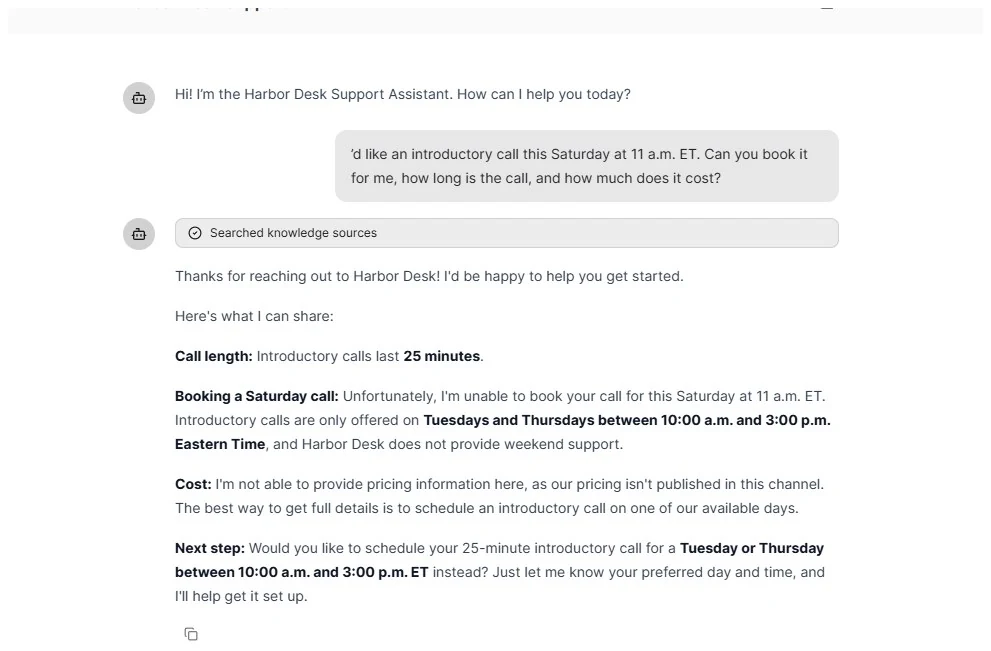
Figure 9. The public chatbot worked in Incognito, searched the knowledge source, rejected the unsupported Saturday request, and refused to invent pricing.
How many AI credits did my tests use?
The credit behavior was one of the most useful things to measure because the free plan starts with a finite balance. I began with 100 AI credits and finished the five-test sequence with 55. The visible balance often changed after configuration or publishing actions, while several measured chat queries did not reduce the visible counter at all.
| Checkpoint | Credits left | Observed change |
| Start of free-plan testing | 100 | — |
| After Tests 1–2 and related setup | 75 | -25 combined |
| After adding/attaching the Word knowledge source | 70 | -5 |
| After enabling/updating autonomous working memory | 65 | -5 |
| After creating and publishing the public chatbot | 55 | -10 |
| After the measured grounded/public chat queries | 55 | No visible decrease |
Important: I could not isolate the first 25-credit reduction to a single action because workflow creation, the first run, agent generation, and the Test 2 interaction had already occurred before I captured that checkpoint. I would not describe the measured chat messages as universally “free”; I can only say that those specific queries did not move the visible balance during this test.
MindPal pricing in 2026
Pricing last checked: September 28, 2026. MindPal’s official pricing page listed the following yearly-billed prices and limits at the time of this review. Prices and plan features can change, so verify them before buying.
| Plan | Displayed price | AI credits | Knowledge | Selected features |
| Free | $0 forever | 100 to start | 50 MB | 1 AI agent; 1 multi-agent workflow; GPT-4o mini |
| Pro | $39/mo ($468 yearly) | 6,000/mo | 5,000 MB | Unlimited agents/workflows; advanced models; unlimited publishing; custom branding |
| Advanced | $149/mo ($1,788 yearly) | 30,000/mo | 25,000 MB | 5 editor seats; 20 user seats; collaboration; Public API |
| Ultra | $374/mo ($4,488 yearly) | 100,000/mo | 100,000 MB | Unlimited seats; unlimited custom-domain connections |
The official page also lists extra AI credits at $9 per 1,000 credits per month, extra knowledge storage at $1 per GB per month, and a custom domain add-on at $9 per domain per month. Pro is also the first plan where the pricing page explicitly advertises unlimited publishing. My free account did allow me to publish the single chatbot used in this test, so the practical free-plan limit appears more nuanced than a simple “no publishing” rule.
What I liked — and what needs caution
| What worked well | Limitations I observed |
| Guided agent and workflow generation reduced the amount of manual setup. | Without a controlled source, the agent added plausible details that were never supplied. |
| Word-based knowledge grounding materially improved factual discipline. | Autonomous working memory did not create a note or recall preferences across chats in my test. |
| The publisher turned the agent into a polished public chatbot without code. | Configuration and publishing actions consumed a meaningful share of the 100-credit free balance. |
| The same source-backed behavior carried into the public Incognito test. | The public chatbot used wording that slightly overstated scheduling capability without a real booking integration. |
| The UI exposes useful deployment controls for identity, access, data capture, voice, embeds, and advanced context. | Some advanced options appeared in the UI, but I did not verify every one on the free plan. |
Is MindPal worth it?
Yes, if you need to turn business knowledge into reusable agents and a client-facing chatbot. The free plan lets you test that path before paying.
Budget the 100 starting credits for setup and evaluation; my five tests used 45.
If reliable memory or precise customer commitments are essential, verify those behaviors in your own setup before deploying.
Who Should Skip MindPal?
Skip MindPal if you need automatic cross-chat memory to work without further configuration, or if a customer-facing agent must make booking commitments without a connected scheduler. A simple chat assistant may also be enough if you do not need reusable workflows, knowledge-backed responses, or a published client-facing tool.
Final verdict
MindPal felt most convincing when I treated it as a no-code AI deployment platform rather than a fully autonomous employee. The workflow builder made multi-agent structure accessible, the knowledge source produced the cleanest factual result of the review, and the public chatbot was fast to publish and worked outside my logged-in session. Those are meaningful strengths for a small business that wants to turn internal knowledge into a usable AI experience.
The trade-off is that “agentic” does not mean self-correcting. In Test 2, the agent respected the obvious rules but still invented business context. In Test 4, working memory did not persist the customer preferences I expected. MindPal can reduce the technical work of building agents, but you still need to define what the agent knows, test what it does not know, and verify the claims it makes.
For my use case, the strongest combination was simple: structured system instructions plus a tightly controlled knowledge source, followed by real-world testing in the published chatbot. That setup gave the most reliable behavior of the five tests.
Recommended Reading
- Make AI Review 2026: I Built and Tested a Real Customer Support Workflow
- Zapier AI Review 2026: I Tested It on 5 Small Business Tasks
- Make vs Zapier for Small Business: I Tested Both in Real Workflows
Sources
MindPal official pricing — checked September 28, 2026: mindpal.io/pricing
MindPal official product overview — checked September 28, 2026: mindpal.io
All screenshots in this article were captured during hands-on testing on September 28, 2026. Harbor Desk is a fictional business created solely for controlled testing.
Leave a Reply