
HubSpot vs Apollo vs Clay shows why AI sales tools can solve very different problems. Choosing an AI sales tool depends less on the length of its feature list and more on where the friction is in your sales process. Do you need to qualify and follow up with leads already in your CRM? Do you need to find a large, targeted prospect audience? Or do you need to combine enrichment, research, and personalization into a custom workflow?
For this comparison, I tested HubSpot, Apollo, and Clay through five practical sales workflows each. The tests were hands-on and focused on what the tools actually returned, including incomplete results, plan restrictions, and steps that still required human review.
HubSpot vs Apollo vs Clay: Results at a Glance
| Tool | Strongest fit | What the tests showed | Main limitation |
|---|---|---|---|
| HubSpot | Managing and following up with existing leads | Fact-based qualification, CRM planning, follow-up drafts, and a multi-step sequence | Requires careful CRM review and does not replace the seller’s judgment |
| Apollo | Finding and narrowing outbound audiences | Large prospect pools, ICP filters, fit scoring, TAM views, and outreach actions | Tracking and advanced filters can depend on setup, data flow, or plan level |
| Clay | Building custom enrichment and research workflows | Profile enrichment, work-email lookup, scraping, search, and controlled AI notes | Credits, source quality, email verification, and cleanup remain the operator’s responsibility |
How I Tested These AI Sales Tools
I used five workflows in each platform, but the workflows were matched to the tool’s primary sales job rather than treated as identical feature-for-feature prompts. HubSpot was tested with a fictional commercial-cleaning sales scenario. Apollo was tested through its AI Assistant, audience, website-visitor, scoring, and TAM workflows using Prompt Atlas as the company context. Clay was tested with a small prospecting table containing founders and marketing-services companies.
I looked for five things in every session:
- Whether the tool completed the requested sales task.
- Whether the result was tied to the information provided.
- Whether missing information and uncertainty were made visible.
- How much manual work was still required before a seller could act.
- Whether setup, credits, data quality, or plan restrictions changed the result.
These are small hands-on tests, not a statistical accuracy benchmark. Counts displayed by prospecting tools are interface results from the test sessions, not an independent audit of every record in the database.
1. HubSpot: Best for CRM-Centered Sales Follow-Up
HubSpot’s role in this comparison was the CRM side of selling: qualify incoming opportunities, preserve context, decide what should happen next, and prepare follow-up without losing control of the record. I used its Breeze Assistant together with a fictional BrightPath Office Services scenario.
Qualify and prioritize five commercial-cleaning leads
I gave HubSpot the service rules and five fictional leads. BrightPath serves commercial offices within 20 miles, accepts weekly and twice-weekly recurring contracts, does not accept residential or one-time jobs, and can onboard two new commercial clients in the next 30 days.
The assistant classified Lead E, Lead D, and Lead A as qualified; Lead C as needing more information; and Lead B as not a fit. It also explained why:
- Lead E: three commercial offices within 20 miles, weekly recurring need, and responsibility for vendor contracts.
- Lead D: a 45-person software company 10 miles away, twice-weekly cleaning, a two-week target, and a director approval step.
- Lead A: a 30-person marketing office 15 miles away, weekly recurring cleaning, vendor-selection involvement, and a proposal request.
- Lead C: a commercial accounting office with a recurring need, but an unknown location and unresolved decision process.
- Lead B: a residential, one-time request outside the stated service area.
The response also separated facts from assumptions. It did not invent prices, contract terms, availability guarantees, start dates, final decision authority, or whether Lead E’s three offices represented one or several onboardings.
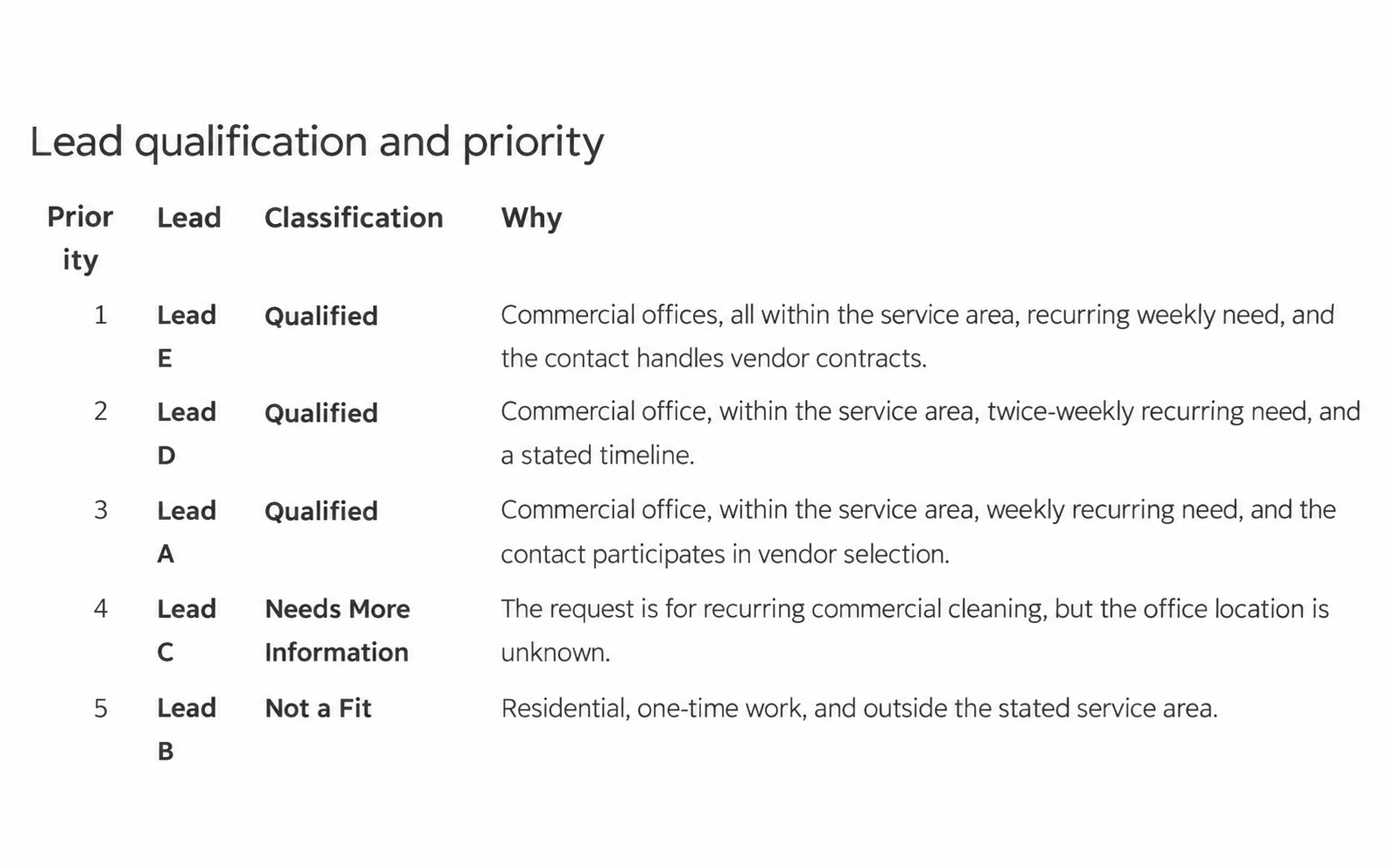
The useful part was the combination of qualification, reasoning, and explicit uncertainty. A seller would still need to verify the record, but the output gave the team a defensible starting point.
Draft a fact-based follow-up email
For the second test, I asked HubSpot to prepare a follow-up for Lead D. The known details were a 45-person software company, an office 10 miles away, interest in twice-weekly cleaning beginning in two weeks, and a requirement for director approval.
The draft acknowledged those facts and asked four practical questions: whether the director had reviewed the request, whether twice-weekly cleaning was still preferred, who should coordinate after a decision, and whether there was anything else to know about the office. It did not invent a price, promise availability, or claim that approval had been granted.
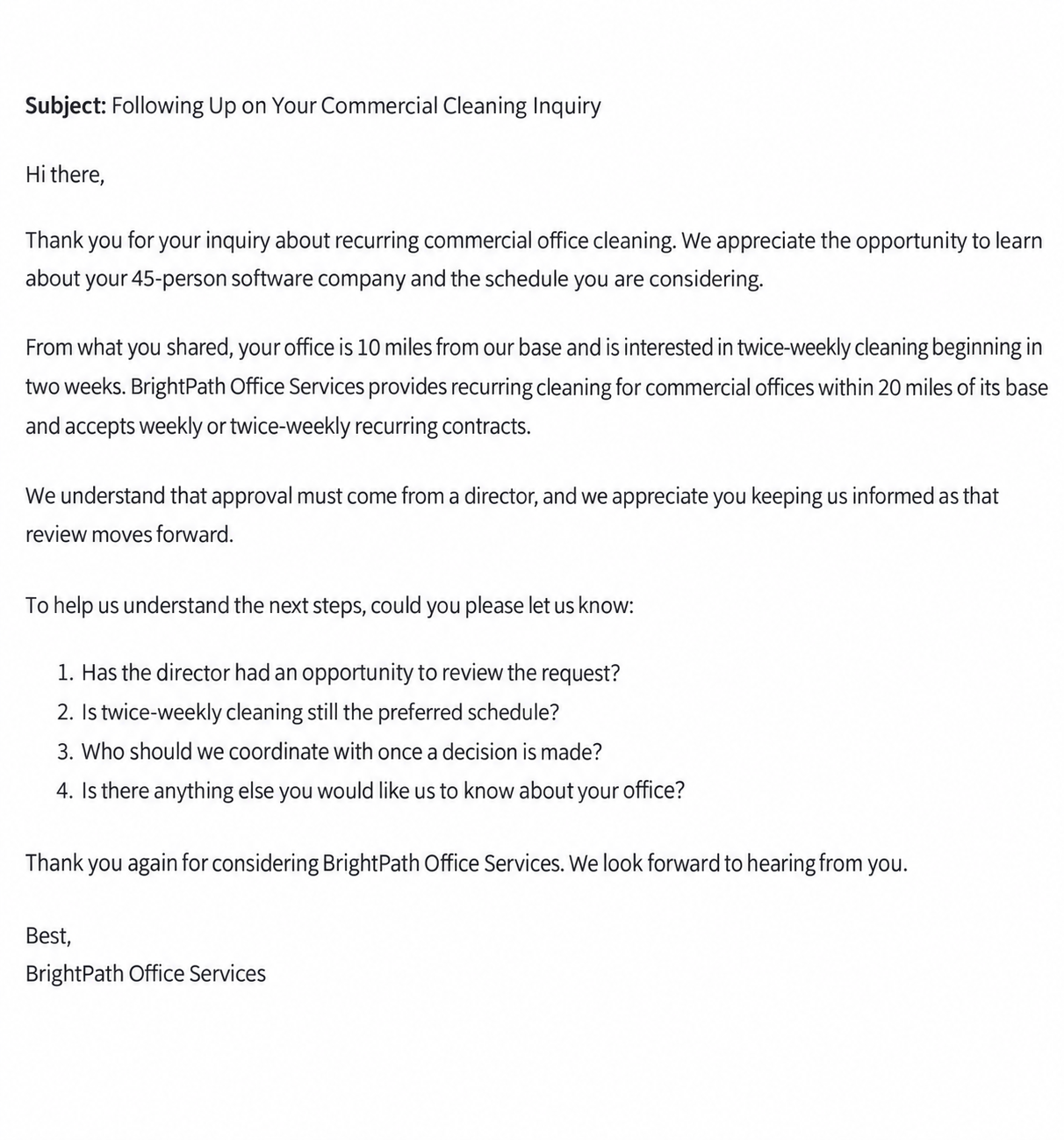
The message was usable as a draft, but it still needed a seller to confirm the recipient, scope, timing, and permission to send.
Build a CRM follow-up plan
Next, I asked HubSpot to turn the five-lead analysis into a working follow-up plan. The resulting table connected each lead’s qualification status to supporting evidence, the next action, missing information, and a timing dependency.
This test exposed an important distinction. The earlier qualification table ranked Lead E first by fit. The follow-up plan recommended handling Lead D first because the stated start date was closest and director approval created an immediate dependency. The recommended handling order was:
- Lead D: confirm the approval path and the two-week timing.
- Lead A: respond to the explicit proposal request after gathering requirements.
- Lead E: clarify scope and how the three offices should be onboarded.
- Lead C: validate location and qualification details.
- Lead B: close out promptly as not a fit.
The plan was more operationally useful than a single lead score because it told a seller what to do next and what information was blocking progress.
Create a three-step follow-up sequence
For Lead A, HubSpot generated a three-step sequence with timing, purpose, and a short email for each stage. The first message was scheduled for two business days after the initial email and asked for cleaning scope, office requirements, decision-makers, and a preferred start date. The second followed four business days later and checked whether the request was still active. The third followed five business days after that and closed the loop respectfully while leaving a path to continue.
The sequence was restrained. It did not pretend that a proposal could be prepared before the scope was known, and it gave the lead permission not to reply if the timing was no longer right.
The sequence was a practical draft, although a real team would still need to check sending rules, ownership, timing, and compliance before activating automation.
Update a lead after new information arrives
In the final HubSpot test, Lead D replied that director approval was still pending, the schedule might change from twice-weekly to once weekly, the start might move from two weeks to next month, and the company was still comparing vendors.
HubSpot kept the lead qualified but marked it as active, pending approval, and in need of re-qualification. It recommended logging the reply, updating the qualification notes, creating a follow-up task for about one week later, and keeping the next message informational rather than overly sales-forward. Because no recipient details were supplied, the response email correctly used placeholders instead of pretending it was ready to send.
This was a good example of CRM-aware reasoning: the lead was not incorrectly closed, but its earlier assumptions were not treated as permanent facts.
HubSpot Takeaway: CRM-Aware Follow-Up
HubSpot’s best result was continuity. The assistant could move from qualification to a follow-up plan, sequence, and updated record without losing the reason behind the recommendation. That makes it a natural fit for sellers who already have leads and need a reliable process for moving them forward.
The main limitation is that the tool’s usefulness depends on the CRM record and the seller’s review. A neat task, note, or email draft is not proof that the lead is ready, the data is current, or the message may be sent.
2. Apollo: Best for Prospecting and Audience Building
Apollo’s tests focused on the top and middle of the funnel: translating a company description into an audience, finding prospects, adding intent context, and turning a broad market into a more actionable pool.
Build a target audience from a company website
I used Prompt Atlas as the website context and asked Apollo’s AI Assistant to help find companies to sell to. The initial flow produced a broad audience of U.S. founders, CEOs, and COOs at small businesses in marketing, retail, professional services, and consulting. The interface reported 72,622 leads in the U.S. after the first refinement.
I then narrowed the audience to founders and CEOs at companies with 10–50 employees. Apollo reported 45,482 leads and offered next actions such as saving the audience, starting outreach, or filtering further.
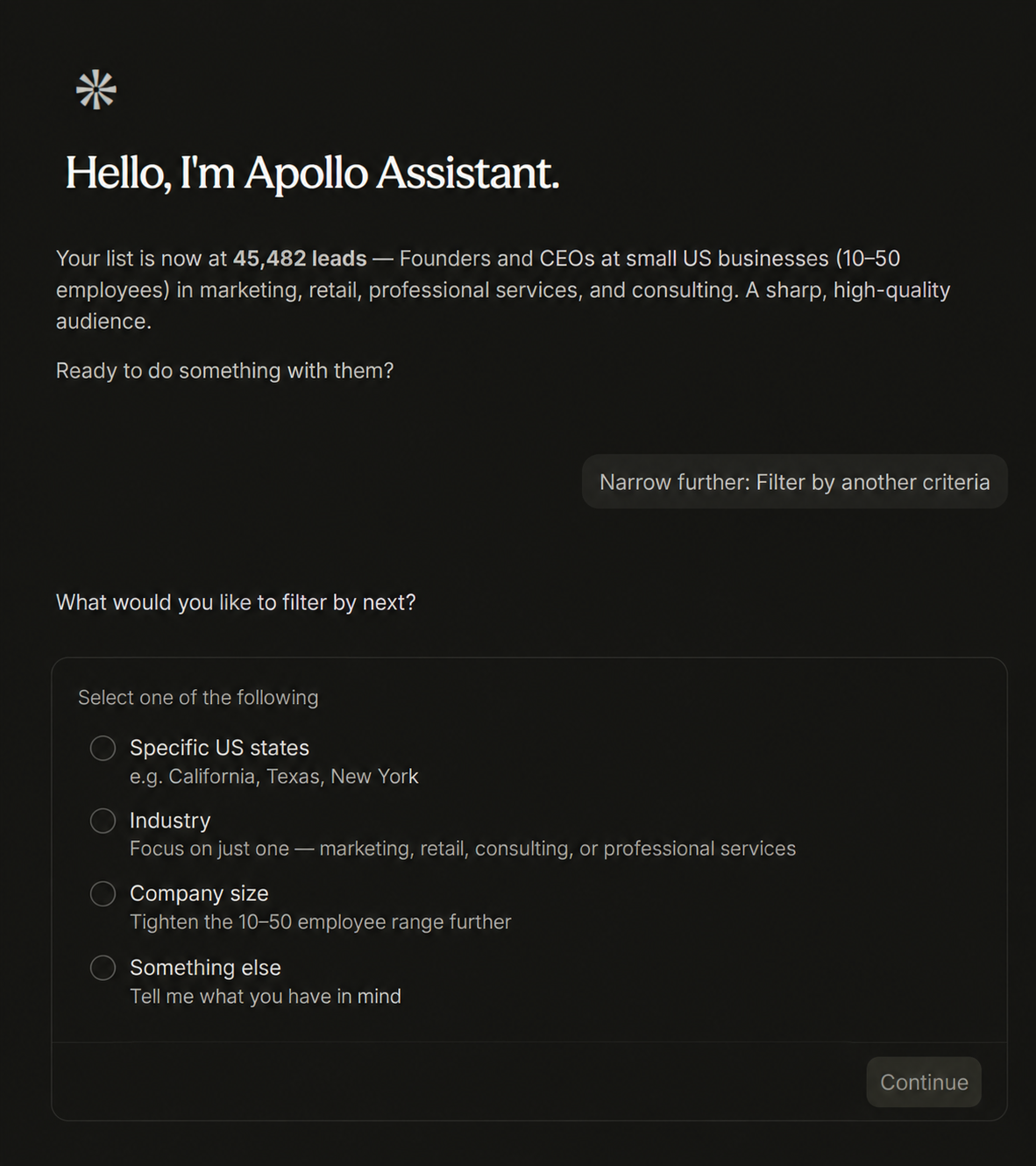
The output was useful for defining a starting audience quickly. The number itself should not be confused with qualified buying intent; the list still needs filters, research, and review.
Turn website visitors into leads
This test was intentionally important because visitor intent can be more useful than a generic contact list. Apollo provided a website-visitor workflow, a tracking script, and a place to add the Prompt Atlas domain. The script was designed to identify companies globally and people in the United States.
However, the session did not produce a successful connection. The domain showed an inactive status and a message to check the script. The website-visitor view also reported that no data had arrived yet and advised waiting after the pixel was installed.
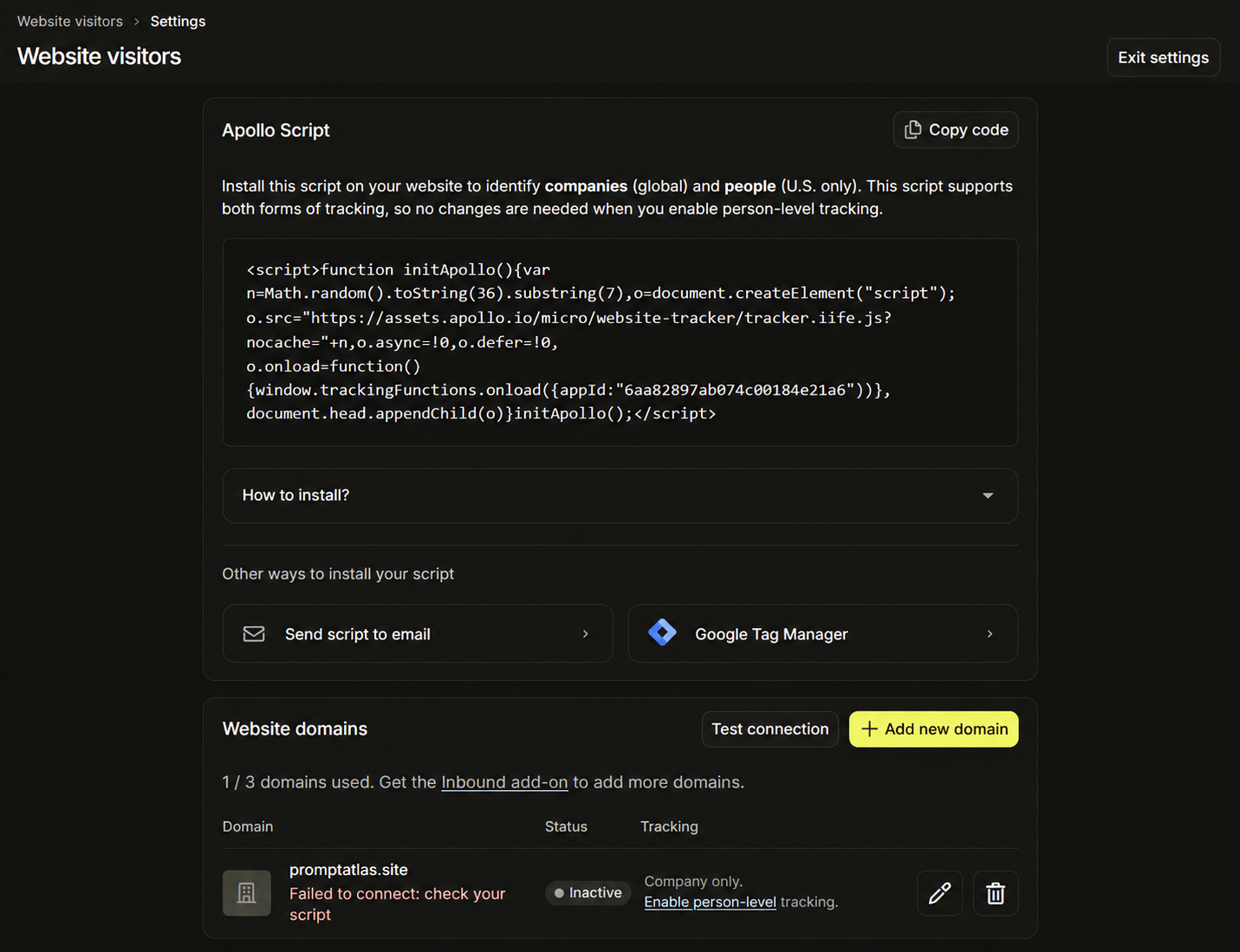
This is not evidence that Apollo’s visitor product never works. It is evidence that the workflow was not ready to use in this session and would require implementation, verification, and time for data to flow.
Build an AI-Ready SMB Founder Fit Score
For the third test, I asked Apollo to build a measurement fit score for prospect accounts. Apollo generated a Context Center profile from Prompt Atlas and used it as the ICP lens. The resulting score was named AI-Ready SMB Founder Score.
The scoring context included U.S. founders, CEOs, co-founders, and owners at companies with 10–50 employees, relevant industries, AI and productivity keywords, technology signals, and seniority. Apollo reported 29 criteria across four score tiers and previewed how contacts would be distributed.
The important limitation appeared during execution: filtering directly by score tier and by current AI technology usage required a higher plan. Apollo could still save and run the score, but the most precise filters were not available in the tested plan.
The score translated a broad company description into a repeatable qualification lens, but the value of that lens depends on which filters the account can actually activate.
Narrow a prospect pool and choose an action
After the fit-score workflow, Apollo reported a large pool of 245,671 contacts. By applying available filters—titles, company size, industries, states, company keywords, and verified email—the pool was narrowed to 3,644 prospects.
The resulting audience included founders, CEOs, co-founders, and owners at 10–50-person companies in selected U.S. states and industries. The company-keyword filter focused on signals such as AI tools, productivity, marketing automation, and sales enablement. Apollo then offered four concrete next steps: add the prospects to a sequence, save them to a list, run AI research, or export them to CSV.
This was one of Apollo’s most seller-friendly moments because the output ended with a decision. It did not leave the user with a count alone; it showed how to turn the pool into an outreach or research workflow.
Create a structured view of the total addressable market
In the final Apollo workflow, I asked for a structured view of companies and how the audience could expand. Apollo separated the market into a core pool, an expansion pool, and a signal-based pool.
The expansion pool covered content, media, education, and consulting companies. The signal-based pool focused on hiring for AI and automation roles, but activating that hiring filter required a plan upgrade. Apollo reported a 708K-company TAM in the tested view and recommended adding company keywords, filtering for headcount growth, narrowing by founding year, and unlocking higher-value signals where appropriate.
The structured view helped make a large market understandable, but it remained a planning aid. A TAM count is not proof that every company is a fit or ready to buy.
Apollo Takeaway: Prospecting Scale With Guardrails
Apollo was the fastest of the three tools at turning a vague outbound goal into an audience with filters and next actions. It is especially attractive when a salesperson or SDR team starts with an empty pipeline and needs to find relevant companies and contacts at scale.
The main limitations were operational. Website-visitor tracking needed implementation and did not return data in the session. Advanced scoring and technology filters were gated by plan. Large counts also need to be treated as a starting point for qualification, not as a ready-to-contact list.
3. Clay: Best for Custom Research and Enrichment Workflows
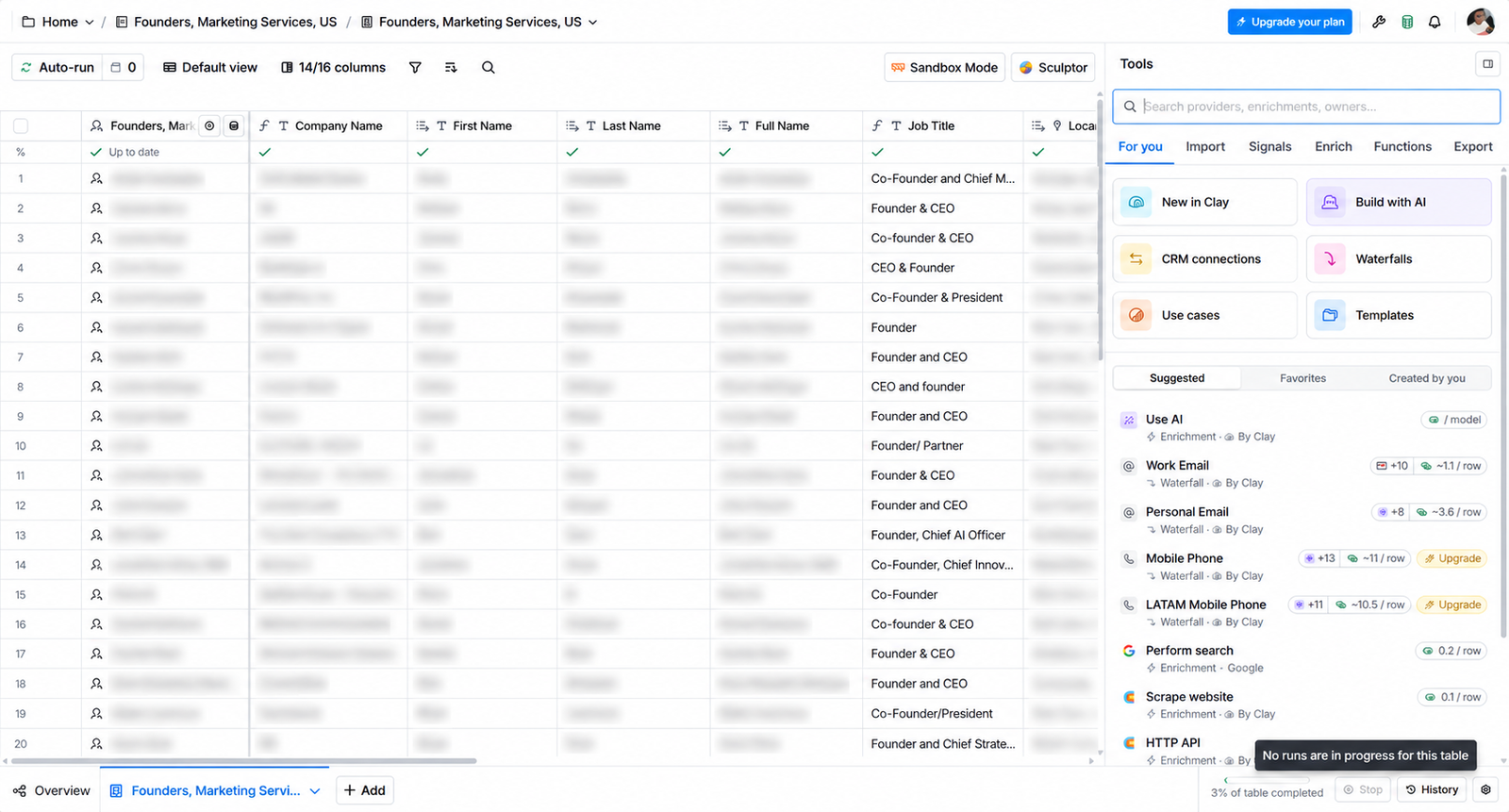
Clay was tested as a table-based research workspace. I used a 20-row table containing founders and marketing-services companies, with LinkedIn profiles, company domains, and output columns. The purpose was to see how several research steps could be connected—not to claim that one small table proves database-wide accuracy.
Enrich a person from a LinkedIn profile
The first workflow enriched a person record from a LinkedIn profile. The columns checked connections, headline, summary, and jobs count. The output added useful context beside the source row, which made it easier to decide whether the record deserved further research.
The important distinction is that enrichment adds fields; it does not automatically prove that the information is current, complete, or strategically relevant. I would use this step to prioritize review and to feed later research, not as a substitute for checking the source.
The table format made the output easy to inspect, especially when the source fields remained visible next to the generated fields.
Look for a work email
The second workflow asked Clay to populate a work-email field from the available person and company data. A value appeared for the test row, showing that the enrichment path can return a contact field when a match is available.
I did not perform an independent deliverability test, send an email, or treat the returned value as permission to contact anyone. In a production workflow, the address would need validation, a recorded verification date, and the appropriate privacy and email-marketing review.
The field was populated, but the sales decision still required verification outside the lookup itself.
Generate an evidence-based outreach angle
This was Clay’s strongest test. I passed only a profile headline and summary into an AI column and required one short outreach angle for a publication that reviews AI tools. The prompt limited the output to 25 words, prohibited invented needs or budgets, and required the fallback No clear signal found. when the source text did not support a useful angle.
The preview showed both behaviors. Some rows received short angles tied to visible profile evidence. Other rows returned the fallback instead of manufacturing relevance. That restraint is valuable in prospecting: a model that declines to invent a reason to contact someone is more trustworthy than one that produces a polished sentence for every row.
The quality came from the prompt design as much as from the AI. Visible source fields, a word limit, and a defined failure state made the output easier to audit.
Scrape a company website
For the fourth workflow, I used orbitmedia.com as the company-domain input. Clay returned the page title, description, social links, extracted keywords, links, emails, phone numbers, images, and body text.
The page title and description were immediately useful as structured company signals. The larger extracted groups were more mixed: body text and broad link collections can contain navigation noise and need a cleanup step before they are useful for sales research.
The scraper can collect a lot of context quickly, but the operator still has to decide which fields answer the research question.
Search for a company and a relevant topic
For the last workflow, I searched the company name together with the phrase “AI tools and services.” The sample returned five results, with Orbit Media Studios shown first in the test row.
This was useful for discovery. It helped surface a company page and a starting point for manual research. It did not prove that the company uses a particular AI product, wants a service, or has buying intent.
Search ranking is a research signal, not a qualification decision.
Clay Takeaway: Flexible Research With More Setup
Clay’s strength was composability. A person record could be enriched, checked for a work email, passed through an evidence-constrained AI column, connected to a company website, and used in a search workflow. That is compelling for growth teams, agencies, and sales-operations users who need a custom research process.
The trade-off is that Clay asks the operator to own more of the workflow. Credits can grow when a step is run across many rows. Enriched fields need freshness checks. Emails need verification. Scraped text needs cleanup. Search results need interpretation. The tool gives you building blocks, not a guarantee that every output is ready for outreach.
Which Tool Should a Salesperson Choose?
| If your main problem is… | Start with… | Why |
|---|---|---|
| You have leads but follow-up is inconsistent | HubSpot | It keeps qualification, notes, tasks, sequences, and drafts close to the CRM record. |
| You need to build an outbound list from scratch | Apollo | It is designed around audience discovery, filters, contacts, and outreach actions. |
| You need to combine several data sources and research steps | Clay | Its table model lets you connect enrichment, scraping, search, and controlled AI outputs. |
| You want one tool for a small, process-oriented sales team | HubSpot first | The CRM workflow may be more valuable than a large list if the bottleneck is managing existing opportunities. |
| You have a growth or sales-ops person who can maintain data workflows | Clay or Apollo plus Clay | Custom enrichment and research can add context before a seller acts, provided the data is reviewed. |
A practical stack can also combine the tools: Apollo for finding and narrowing prospects, Clay for additional research and personalization, and HubSpot for the CRM record and follow-up process. Whether that combination makes sense depends on the team’s plan levels, integrations, data rules, and willingness to maintain it.
What These Tests Do Not Prove
These sessions do not prove a universal winner, database-wide accuracy, deliverability, reply rates, conversion rates, or return on investment. The tests used small samples and fictional or controlled scenarios. Apollo counts were observed in the interface rather than independently audited. Clay email output was not deliverability-tested. HubSpot drafts were not sent.
The results also reflect the tested account state. A tracking feature that is inactive today may work after correct implementation. A filter that is locked on one plan may be available on another. Data coverage varies by geography, role, industry, and source freshness. Treat the comparison as a practical starting point for your own trial.
Final Verdict
There is no single best AI sales tool for every business.
Choose HubSpot when your sales problem is process. It was the most complete tool in these tests for turning lead information into qualification, notes, tasks, follow-up, and an updated CRM record.
Choose Apollo when your sales problem is prospect volume and targeting. It produced the clearest audience-building and filtering workflow, with useful next actions for sequencing, research, saving, or export. Allow time for implementation and check which signals your plan unlocks.
Choose Clay when your sales problem is research complexity. It offered the most adaptable way to combine enrichment, scraping, search, and AI formatting. Use it when someone on the team can define the workflow, watch credits, and review the data before outreach.
My take: for a typical small B2B sales team, I would start with HubSpot if leads are already arriving and being lost in follow-up. I would start with Apollo if the team has no reliable prospecting engine. I would add Clay when research and personalization become repetitive enough to justify a more configurable workflow.
For more practical comparisons, see Prompt Atlas’s guide to AI tools for business and the AI Tools section. Check the official HubSpot, Apollo, and Clay websites for current plans, availability, and product details before making a purchase decision.
FAQs
Is HubSpot better than Apollo for sales?
It depends on the bottleneck. HubSpot was stronger in this comparison for managing and following up with existing leads. Apollo was stronger for finding and narrowing outbound prospects. They solve different parts of the sales process.
Is Apollo or Clay better for lead generation?
Apollo is the more direct choice when you want a ready-made prospecting database, audience filters, and outreach actions. Clay is better when lead generation requires a custom sequence of enrichment, research, scraping, and AI formatting.
Can I trust AI-generated sales emails without review?
No. In the tests, the strongest drafts were useful because they stayed close to known facts and exposed missing information. A seller should still verify the recipient, permission, claims, timing, offer, and next step before sending.
Do these tools replace a salesperson?
No. They reduce repetitive work and help organize decisions, but the tests still required human review for fit, data freshness, approval status, email validity, plan restrictions, and whether a prospect should actually be contacted.

Leave a Reply