
Introduction
Make vs Zapier for small business is a comparison that looks simple until you actually try to build something useful. Both platforms promise to connect apps, automate repetitive work, and increasingly add AI to the workflow. But the experience of turning that promise into a working small-business automation can be very different.
I recently tested both platforms hands-on for Prompt Atlas. Rather than comparing marketing pages, I built practical workflows involving Gmail, AI processing, customer-support tasks, filters, internal triage, and draft replies. The tests were related, but they were not a perfectly controlled laboratory comparison with identical prompts and identical workflows. This article compares what actually happened while I used each platform.
That distinction matters. Zapier and Make are both capable automation tools, but the amount of setup, troubleshooting, manual work, and plan friction I encountered was not the same.
Quick Verdict
⚙️ Best for: Make was the better fit in my testing for small businesses that want visual control and are comfortable learning how a workflow is structured.
🧩 Main limitation: Neither platform is truly effortless. Make required trigger and polling troubleshooting, while Zapier introduced more setup friction and plan-related limitations in my tests.
🏆 Overall verdict: Make wins this hands-on comparison for me. Its visual Scenario Builder and AI-assisted workflow experience felt easier to understand and modify once the automation was taking shape.
This is not a claim that Make will be easier for everyone. Zapier may still be the better choice for users who prefer its workflow model, need a particular integration, or already have automations built there. My verdict is based on the workflows I personally built and tested.
How I Compared Make and Zapier
The comparison draws on two recent Prompt Atlas hands-on reviews. In the Zapier test, I worked with Gmail automations, filters, AI by Zapier, Copilot-assisted setup, and customer-support scenarios. In the Make test, I built a Gmail → Make AI Agent → internal triage workflow, with the agent also able to create a customer-facing Gmail draft.
I focused on four practical questions: How quickly could I understand the workflow? How much manual configuration was required? What happened when AI was added? And how much troubleshooting was needed before the automation behaved reliably?
Make vs Zapier: Quick Comparison
| Area | Make | Zapier |
| Visual workflow | Very clear in my test | Clear, but felt more step/configuration driven |
| AI-assisted building | Maia worked inside the visual builder | Copilot helped, but I still hit setup friction |
| AI customer-support task | Strong once configured | Useful output, with plan/tool limits visible |
| Troubleshooting | Trigger scope and polling caused issues | Authentication, setup, and plan limitations caused friction |
| My hands-on preference | Winner | Capable, but less comfortable for me |
Getting Started: Which Felt Easier to Build With?
Zapier presents automation as a sequence of steps. That structure is understandable, and the editor makes it clear which app or action belongs to each stage. In my testing, however, getting from the initial idea to a reliable workflow required more manual setup than I expected.
The Gmail workflow below is a good example. The automation itself is logical: detect a new email, apply filter conditions, then add a label. The interface is organized, but each step still needs to be configured and verified.
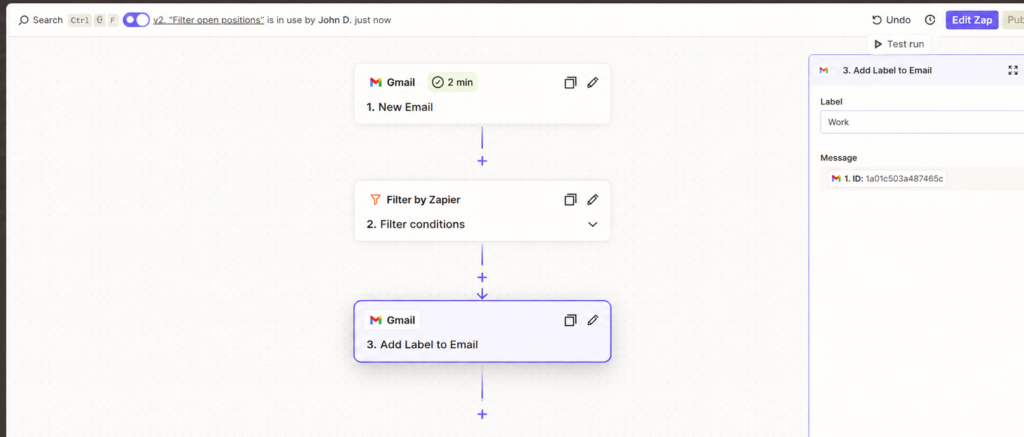
Zapier workflow editor showing a Gmail trigger, Filter by Zapier, and a Gmail labeling action.
Make also required configuration, but I found its Scenario Builder easier to reason about because I could see the modules and connections as one visual system. When I changed the workflow, the relationship between the trigger, AI agent, and Gmail actions remained visible.
This is where my experience differs from a common assumption that Zapier is automatically the easier option for beginners. For me, Make’s visual structure reduced the mental effort of understanding what the automation was doing.
Round winner: Make.
Adding AI to the Workflow
Both platforms now treat AI as more than a text-generation add-on. During my Zapier testing, AI by Zapier could analyze a customer issue and return structured fields such as the main issue, priority level, inquiry category, internal summary, recommended next action, and a customer reply.
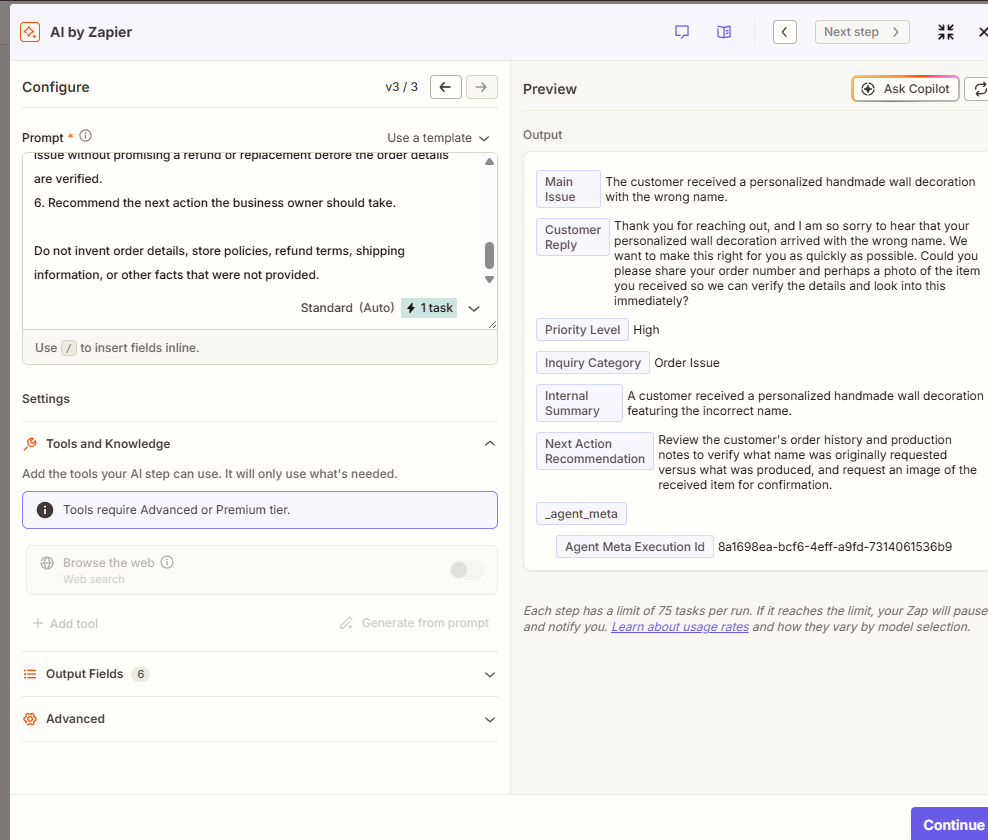
AI by Zapier analyzing a personalized-order problem and returning structured support fields.
The result was useful. The AI recognized that the customer had received a personalized wall decoration with the wrong name, classified the case as high priority, and recommended verifying the order before taking action. That is exactly the kind of guardrail a small business needs.
But the same screen also exposed an important limitation during my test: tool use required an Advanced or Premium tier. That did not make the AI output bad, but it affected how far I could take the workflow under the access I was testing.
Make’s AI Agent became part of a broader automation rather than just a single AI step. The agent could classify the request, assign priority, recommend the next action, create an internal triage email, and call a Gmail tool to prepare a customer-facing draft.
Round winner: Make, by a smaller margin.
Zapier produced useful AI output. Make won this round because the agent felt more naturally integrated into the workflow I was building.
Handling a Consequential Customer Request
The strongest comparison came from customer-support scenarios where the automation needed judgment rather than blind execution. One Make test used an angry customer demanding an immediate full refund, mentioning a late delivery, poor quality, a possible chargeback, and an uncertain order number.
I deliberately did not give the system a refund policy authorizing an automatic refund. The correct behavior was therefore to verify the case rather than invent a policy or promise money back.
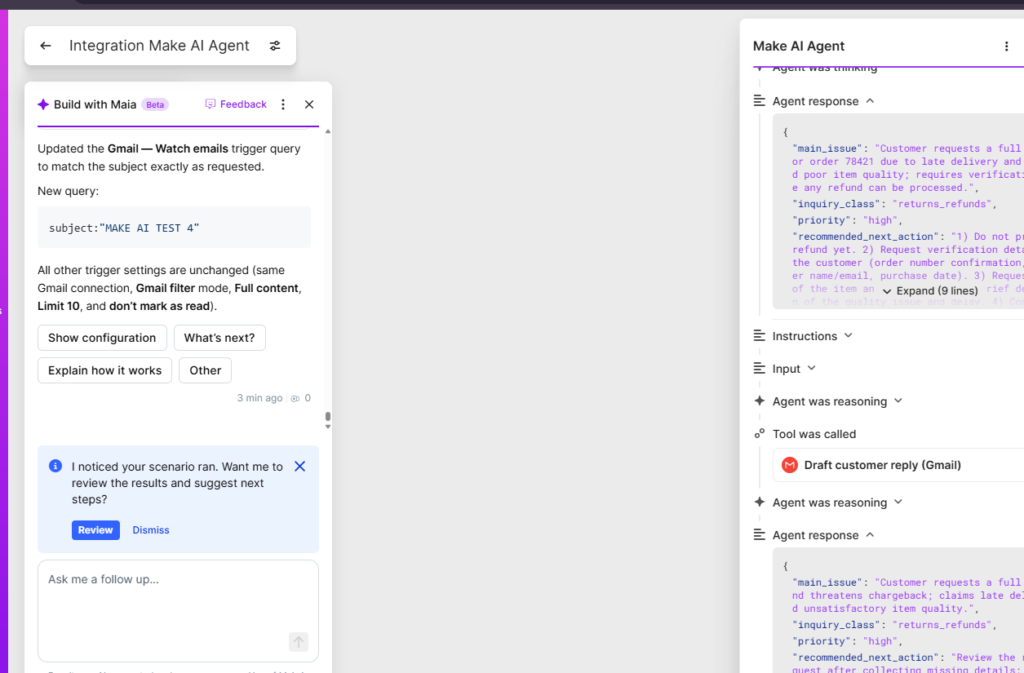
Make AI Agent classified the refund request as high priority and explicitly avoided promising a refund before verification.
The agent did exactly that. Its recommendation included the instruction not to promise a refund yet and to request verification details first. It also called the Gmail drafting tool instead of directly making the consequential business decision.
Zapier also handled a customer-support test responsibly. In the personalized-order example above, it recommended checking order history and production notes, verifying the requested name, and asking for an image before promising a return or replacement.
So this round is not about one platform being safe and the other being reckless. Both produced sensible guarded responses in the tested scenarios. Make gets the edge because the AI decision was connected to a more complete triage-and-draft workflow.
Round winner: Make, narrowly.
Where Each Platform Struggled
Zapier: setup and access friction
My Zapier review was not a smooth one-click experience. I encountered more manual setup than expected, a plan limitation while trying to extend the AI workflow, and an authentication error before getting parts of the workflow working. None of those issues means Zapier is unreliable in general, but they mattered in a hands-on review because they increased the amount of work required.
Make: trigger scope and polling behavior
Make had different problems. A broad Gmail trigger initially picked up the original test message, replies, and even triage messages, creating duplicate or loop-like processing. I had to tighten the Gmail query to exact test subjects. I also encountered polling/checkpoint behavior where an email that had already passed the trigger was not picked up until I sent a new message and reran the scenario.
This was an important reminder: an AI agent can make good decisions and still sit inside a poorly configured automation. The surrounding trigger logic matters just as much as the model.
Ease of Use: My Hands-On Experience
After testing both, I preferred Make. The visual Scenario Builder made it easier for me to understand the complete automation, and Maia helped modify configuration using natural language while keeping the workflow visible. I could see what changed instead of treating the automation as a black box.
That is a personal hands-on conclusion, not a universal usability ranking. A user who prefers linear step-by-step configuration may feel more comfortable in Zapier. Existing app support, team habits, and the complexity of the automation can also change the decision.
AI Capabilities in 2026
Both products are evolving quickly. Make currently positions Maia as a conversational builder inside its visual Scenario Builder, and Make AI Agents are available as part of its AI automation stack. Zapier has also expanded AI by Zapier and its agent-oriented automation features. Because these products change frequently, capability and plan comparisons should be checked against the current official pages before making a long-term purchasing decision.
Pricing and Usage Limits
I would not choose between Make and Zapier using the headline monthly price alone. Their usage models are different, and AI adds another layer of consumption.
Make uses credits. Standard non-AI module execution generally consumes credits, while AI features can use credits according to the connection type, model, operations, and token usage. Zapier uses tasks for completed work actions, while AI by Zapier now applies model-tier multipliers to AI steps on eligible paid plans.
For a small business, the practical question is not simply ‘Which plan is cheaper?’ It is ‘How often will this workflow run, how many steps will execute, how much AI processing will it use, and what happens when the workflow scales?’ Check the current official pricing pages before subscribing.
Which Is Better for Small Businesses?
In my Make vs Zapier for small business testing, I would start with Make if I wanted to build a flexible AI-powered workflow and expected to inspect or change the logic myself. The visual structure made more sense to me, and the final Gmail + AI Agent workflow became genuinely useful once the trigger issues were fixed.
I would still consider Zapier when its app coverage better matches the business, when a team already knows the platform, or when its more linear workflow model feels easier to maintain. The Zapier AI output I tested was useful; my preference for Make came mainly from the overall building experience and the amount of friction I encountered.
Final Verdict: Make vs Zapier for Small Business — Which Is Better?
My hands-on winner is Make.
Zapier is capable, and it produced useful automation and AI results in my tests. But I had to work through more setup friction, access limitations, and an authentication problem. With Make, I also had to troubleshoot real issues—especially Gmail trigger scope and polling—but the visual workflow made those problems easier for me to understand and correct.
The biggest reason I preferred Make was not a feature-count advantage. It was the experience of building. I could see the workflow, understand how the modules interacted, use AI assistance while keeping control, and turn the final scenario into a practical customer-support system.
If you want the full test evidence behind this comparison, read my Make AI Review 2026 and Zapier AI Review 2026. For a broader look at automation and other business AI tools, see Prompt Atlas’s AI Tools for Business hub.
Frequently Asked Questions
Which platform is easier to learn?
The answer depends on the workflow. Simpler automations may feel quicker in Zapier, while Make can be attractive when you want more visible control over branching and data flow.
Can either platform automate a process without supervision?
Not safely by default. Important workflows need testing, monitoring, and a clear human path for exceptions or uncertain outputs.
What should a small business compare before choosing?
Compare setup time, integrations, branching needs, maintenance, error handling, permissions, usage limits, and total cost for the workflow you actually plan to run.
Will the result be the same for every team?
No. This comparison focuses on a practical workflow, so your team’s technical comfort and process complexity may lead to a different choice.
Leave a Reply