
Zapier has long been known for connecting apps and automating repetitive work. But as AI becomes a bigger part of the platform, there is another question for small-business owners:
If you’re comparing Zapier with other AI tools for everyday business tasks, see my guide to the [Best AI Tools for Small Business in 2026].
Does AI actually make automation easier?
For this Zapier AI review, I tested the platform through five practical small-business tasks. Instead of reviewing a feature list, I worked through realistic automation scenarios involving workflow creation, customer inquiries, AI-generated responses, and a final multi-step automation that created a real Gmail draft.
The results were promising — but not friction-free.
Zapier AI can help turn plain-language instructions into useful automations. However, my testing also revealed plan restrictions, manual configuration, and troubleshooting along the way.
Here’s what happened.
Quick Verdict
⚙️ Best for: Automating repetitive workflows across multiple business apps
🧩 Main limitation: Useful AI workflows can still require manual setup and troubleshooting
🏆 Overall verdict: Powerful, but not effortless
Zapier AI impressed me most when I moved beyond asking AI to suggest an automation and actually used AI inside a working multi-step workflow.
In my final test, a customer inquiry moved from Zapier Forms to AI by Zapier, where it was analyzed and turned into structured business information and a customer response. That response was then passed into Gmail and used to create a real draft.
That demonstrated practical AI automation rather than just a workflow suggestion.
But getting there required more work than the phrase “AI automation” might suggest. During my testing, I encountered plan restrictions, setup friction, field mapping, and an authentication error that required troubleshooting.
For a small-business owner, that distinction matters:
Zapier AI can reduce repetitive work once an automation is running, but it doesn’t eliminate the work required to build and verify that automation.
How I Tested Zapier AI
I wanted this review to reflect the kind of automation a small-business owner might actually try to build.
Rather than judging Zapier AI from demonstrations or marketing materials, I worked through five progressively more practical tests involving workflow creation, AI processing, customer inquiries, and multi-step automation.
I paid particular attention to four questions:
- Did the AI understand what I wanted?
- Could it turn the request into a useful workflow?
- Could I actually execute the workflow?
- How much manual work remained?
The final test was particularly important because I wanted to see whether AI-generated output could move beyond Zapier and become a useful action inside another business application.
Zapier AI Test Results at a Glance
| Test | What I Tested | Result |
|---|---|---|
| Test 1 | Initial AI-assisted automation setup | Mixed |
| Test 2 | Form workflow using AI by Zapier | Blocked during setup |
| Test 3 | Copilot workflow for customer inquiries | Good, but plan-limited |
| Test 4 | Customer inquiry processing with Zapier Forms + AI | Blocked by plan limitation |
| Test 5 | Multi-step Form → AI → Gmail workflow | Strong, but setup-heavy |
The progression matters.
The earlier tests exposed some of the friction involved in building AI-powered automations. The final test showed what Zapier AI could do once the necessary pieces were successfully connected.
Test 1 — Initial AI-Assisted Automation Setup
My first test focused on the initial experience of using Zapier’s AI assistance to help create an automation.
The appeal was immediately clear: instead of manually planning every part of a workflow from scratch, I could describe what I wanted and use AI to help structure the automation.
That is also how Zapier currently describes Copilot. According to its documentation, Copilot can create a basic workflow outline from a description and help configure, test, and refine the individual steps. The feature is currently in open beta.
But my test also revealed an important limitation that continued throughout the review:
AI assistance does not mean hands-off automation.
The workflow still needed review and configuration before I could rely on it.
What worked: AI made it easier to move from a business idea toward a structured automation.
What remained manual: Reviewing the proposed workflow and configuring the necessary steps.
The first test showed useful AI guidance, but the workflow still depended on manual review and configuration.
Test 2 — Moving Toward an AI-Powered Workflow
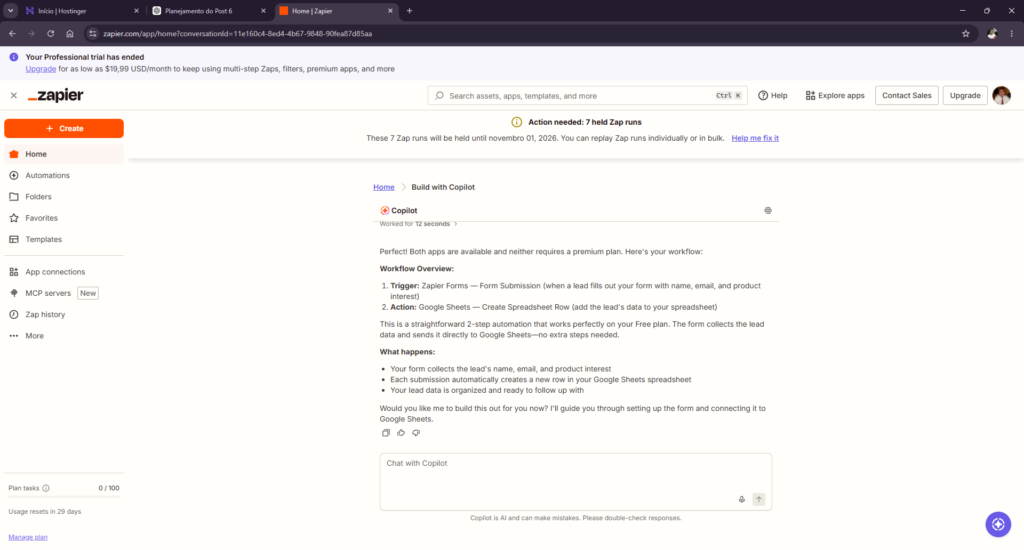
For the second test, I moved closer to an actual small-business workflow by trying to combine incoming information with an AI processing step.
The idea was practical: information entering the workflow could be analyzed by AI before being passed to another action.
This type of structure could potentially be useful for customer inquiries, leads, support requests, or other repetitive incoming information.
But I wasn’t able to complete the intended end-to-end workflow during this test.
That distinction matters.
I don’t interpret an incomplete setup as evidence that the underlying AI could not perform the task. Instead, it showed that getting from an automation idea to a working workflow could involve more configuration than expected.
What worked: The workflow concept was practical and the automation structure was taking shape.
What blocked the test: I couldn’t successfully complete the intended workflow during this attempt.
This attempt stopped during setup, so it demonstrated friction rather than Zapier AI’s output quality.
Test 3 — Building a Customer Inquiry Workflow with Copilot
For Test 3, I used Copilot to help create a workflow for handling customer inquiries.
This test demonstrated one of the most useful aspects of AI-assisted automation: I could describe the business goal instead of specifying every technical step upfront.
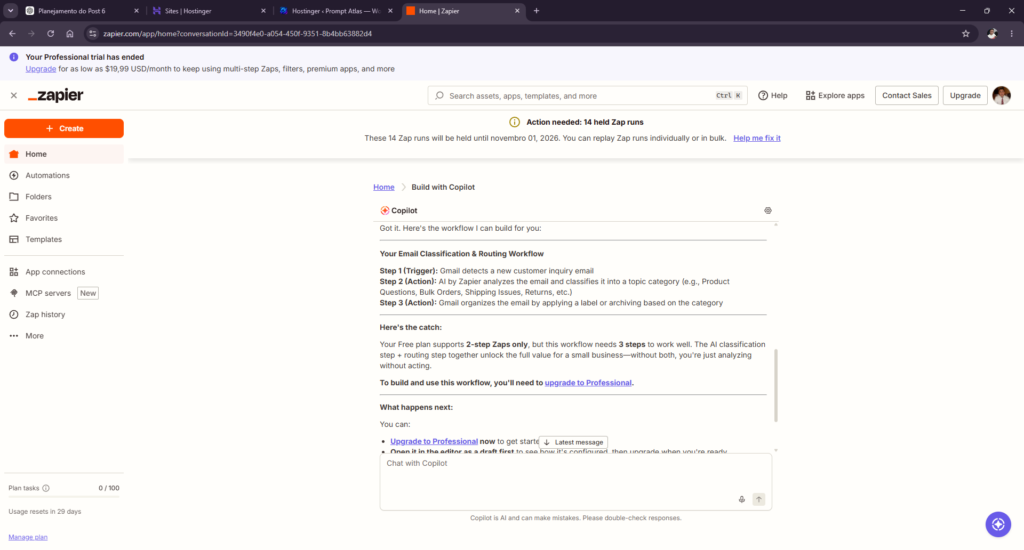
Copilot understood the request, asked which email service I wanted to use, and proposed a workflow involving:
Gmail → AI by Zapier → Gmail
That structure made sense.
An incoming customer message could be passed to AI for processing, with the resulting output then used in Gmail for the next step.
The problem was not the logic of the workflow.
The multi-step automation ran into the plan limitations I encountered during testing.
Zapier’s current pricing documentation confirms that Free accounts support two-step Zaps, while Professional accounts support multi-step workflows and Premium apps.
What worked: Copilot understood the business goal and proposed a logical multi-step workflow.
What limited the test: The complete workflow required capabilities beyond the Free plan I encountered during testing.
Copilot produced a useful structure, although the plan limits prevented a complete end-to-end test.
Test 4 — Processing a Customer Inquiry with AI by Zapier
Test 4 pushed further into a realistic customer-service use case.
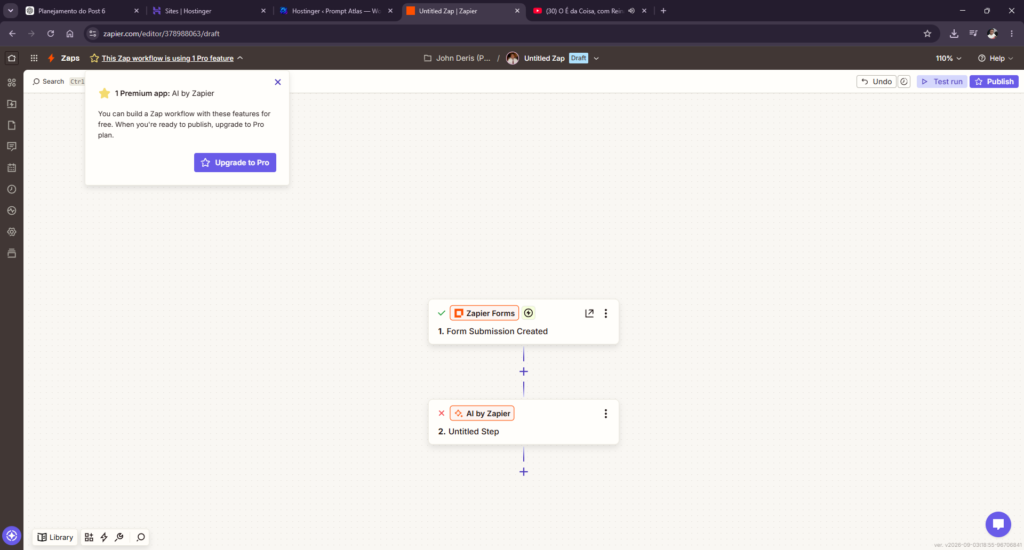
The goal was to take a customer inquiry submitted through Zapier Forms and process that information using AI by Zapier.
This time, the limitation became explicit during the test: access to AI by Zapier prevented me from completing the intended workflow under the plan conditions I was using.
That matches Zapier’s current documentation. As of this review, AI by Zapier is available on Professional, Team, and Enterprise plans rather than Free.
I don’t count that as an AI-quality failure.
The plan restriction prevented the test from reaching the point where the AI output itself could be fairly judged.
But it revealed something equally relevant to a small-business buyer:
A workflow can make sense technically and still depend on paid features before you can actually use it.
What worked: The intended Form → AI structure was clear.
What blocked completion: Access to AI by Zapier under the plan conditions of the test.
The paid-plan requirement blocked the intended AI processing before its output could be evaluated.
Test 5 — Building a Multi-Step Small-Business Workflow
For my final test, I wanted something more demanding.
Instead of testing AI as an isolated feature, I built a multi-step workflow around a realistic customer-service scenario.
The final automation was:
Zapier Forms → AI by Zapier → Gmail
The customer inquiry described a personalized handmade wall decoration that had arrived with the wrong name.
I instructed the AI to identify the problem, classify the inquiry, assign a priority level, create an internal summary, recommend the next action, and draft a customer response.
There was another important requirement:
The AI could not invent order details, store policies, refund terms, shipping information, or promise a replacement before the order details were verified.
This time, the workflow worked.
AI by Zapier Analyzed the Customer Inquiry
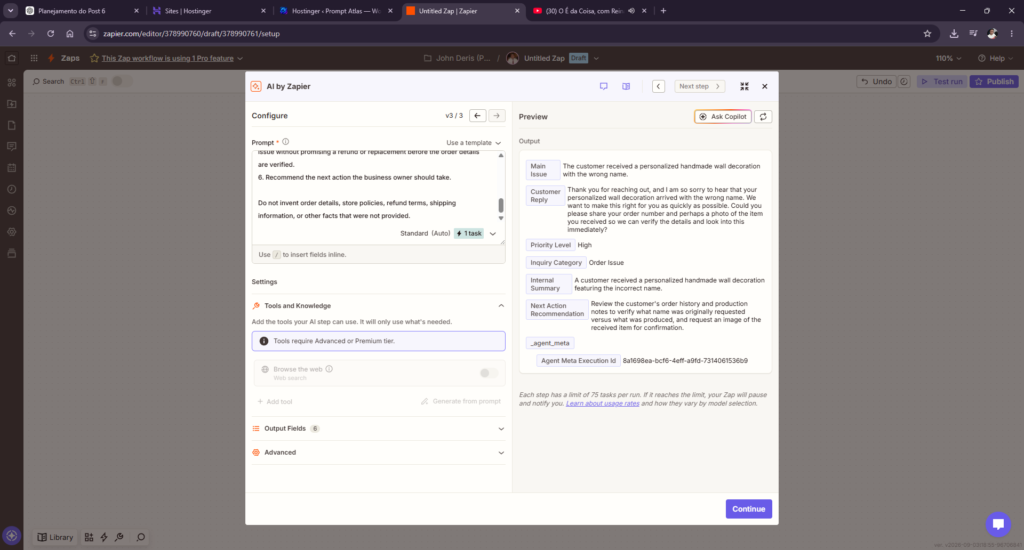
AI by Zapier returned structured information rather than only producing a generic customer-service response.
It identified the main problem as the customer receiving a personalized handmade wall decoration with the wrong name.
It also returned:
Priority Level: High
Inquiry Category: Order Issue
The AI created an internal summary and recommended reviewing the customer’s order information and production details while requesting an image of the item for confirmation.
Most importantly, it did not immediately promise a refund or replacement.
That matched the instructions well.
Zapier’s documentation confirms that AI by Zapier can return defined output fields that can then be mapped into later steps of a Zap.
The AI Response Became a Real Gmail Draft
The second half of this test was what made the result much more meaningful.
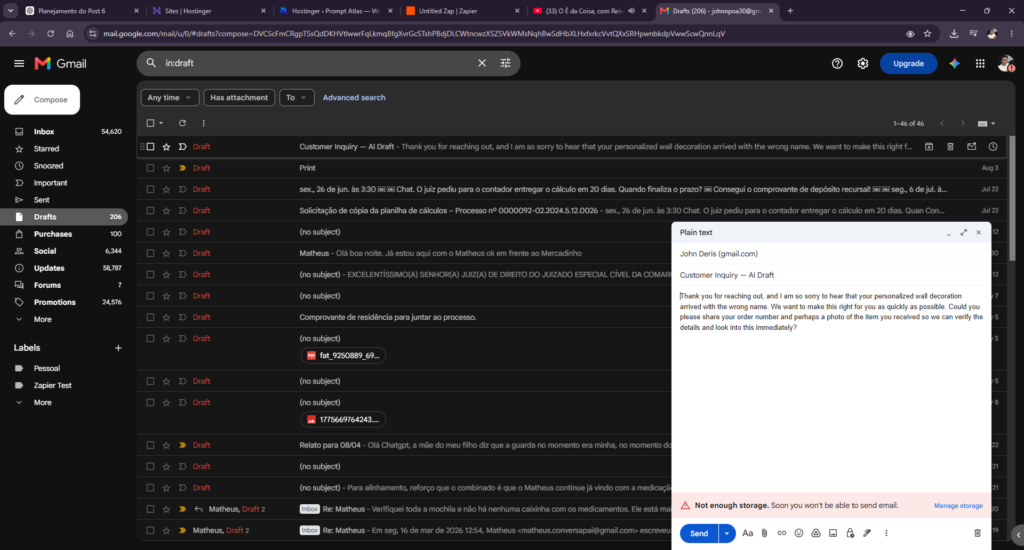
I mapped the Customer Reply generated by AI by Zapier into Gmail’s Create Draft action.
Zapier successfully created the draft.
The email contained the AI-generated response asking the customer for additional information so the problem could be verified before deciding how to resolve it.
In other words, the AI output didn’t simply stay inside the AI step.
It became usable input for another business application.
This gave me the complete workflow I wanted to test:
Customer input → AI analysis → generated response → Gmail draft
The downside was the setup.
The fields had to be mapped correctly, the individual steps needed testing, and I encountered an authentication error during the broader setup process that required troubleshooting.
Once everything was configured correctly, however, the workflow performed a genuinely useful business task.
Once configured, the final workflow handled a practical task well; getting there still required substantial setup.
What Zapier AI Did Well
The most interesting thing about Zapier AI wasn’t necessarily the quality of the AI writing.
It was what could happen after the AI produced an output.
A standalone AI assistant can analyze a customer inquiry and write a response. Zapier can take that output and move it into the next part of a business workflow.
Test 5 demonstrated that clearly.
The AI processed the inquiry, returned structured information and a customer response, and that response became a Gmail draft without requiring me to manually copy and paste it between applications.
For small businesses dealing with repetitive processes across multiple tools, that is where the potential becomes much more interesting.
Where Zapier AI Fell Short
The biggest weakness I encountered was friction.
Describing an automation in plain language can make the starting point easier, but building a reliable workflow still requires understanding what the trigger and actions are doing, connecting apps, mapping fields, testing results, and sometimes troubleshooting errors.
Plan restrictions also affected what I could build during the tests.
That doesn’t make Zapier AI ineffective.
It means the experience can be very different depending on what you expect.
Someone already comfortable with basic automation concepts may find that AI accelerates the process.
A complete beginner should still expect a learning curve.
Zapier AI Pros and Cons
Pros
- Natural-language assistance makes workflow creation more approachable.
- Copilot can help structure automation ideas.
- AI by Zapier can return structured information for later workflow steps.
- AI output can be passed into other business applications.
- Useful potential for repetitive small-business processes.
- My final Form → AI → Gmail workflow worked successfully.
Cons
- Setup can still require significant manual work.
- Some useful workflows require paid-plan capabilities.
- Field mapping and app configuration still matter.
- Errors can require manual troubleshooting.
- Beginners shouldn’t assume AI makes automation completely hands-off.
Zapier AI Pricing and Plan Limitations
This is one area where I recommend checking Zapier’s current plans before building an automation.
At the time of this review, Zapier’s Free plan includes two-step Zaps and access to Copilot with daily message limits. The Professional plan adds multi-step Zaps and unlimited Premium apps.
AI by Zapier itself is currently available on Professional, Team, and Enterprise plans. Zapier also introduced model-tier-based task usage for AI by Zapier in June 2026, meaning task consumption can vary depending on the model tier selected.
Because plans and AI features can change, I would check Zapier’s current pages before choosing a subscription.
Is Zapier AI Good for Small Businesses?
Zapier AI makes the most sense for small businesses with repetitive processes involving multiple applications.
Customer inquiries are a good example.
If information repeatedly needs to be collected, analyzed, classified, and moved into another tool, automating that sequence can remove repetitive manual steps.
The value becomes more compelling when the same process happens frequently.
Saving a few minutes once isn’t particularly meaningful. Removing several manual steps from something that happens every day can be.
But there is a tradeoff.
You need to be willing to spend some time building, testing, and maintaining the automation before expecting it to save time.
For a solo business owner, I would start with one repetitive workflow with a clear outcome, rather than trying to automate the entire business at once.
Is Zapier AI Easy to Use?
AI makes it easier to describe what you want.
That doesn’t make the entire automation process effortless.
My tests still required decisions about which apps to use, how information should move between steps, which fields should be mapped, and whether the final output was correct.
So I would describe Zapier AI as making automation more approachable, rather than making automation automatic.
That’s an important distinction.
Zapier AI Review 2026: Final Verdict
After five practical tests, my strongest result came at the end.
Zapier Forms collected the customer inquiry. AI by Zapier analyzed it and produced structured business information plus a customer response. Gmail then received that response and created a real draft.
That is useful automation.
But the earlier friction matters too.
Across the testing process, I encountered plan limitations, configuration work, field mapping, and troubleshooting.
So my conclusion isn’t that Zapier AI makes automation effortless.
It’s that Zapier AI can make useful small-business automation more approachable — as long as you’re prepared to configure, test, and troubleshoot the workflow.
Final Rating
Automation potential: Excellent
AI assistance: Very good
Ease of setup: Moderate
Beginner friendliness: Moderate
Overall: Strong, with a learning curve
For a small business with repetitive workflows across several apps, Zapier AI is worth exploring.
For someone expecting to describe a complicated business process once and have AI handle everything else automatically, my tests suggest lowering those expectations.
Final verdict: Powerful, but not effortless.
Frequently Asked Questions
What is Zapier AI?
Zapier includes several AI-assisted capabilities. In this review, I primarily tested Zapier Copilot, which helps users build and configure workflows through natural-language instructions, and AI by Zapier, which can process information inside a Zap and return outputs for later steps.
Can Zapier AI create multi-step workflows?
Zapier Copilot can help create workflows containing a trigger and multiple actions. Whether you can run the resulting workflow depends on your plan and the features involved. Zapier currently lists multi-step Zaps under its Professional plan and above.
Does Zapier AI work with Gmail?
It did in my test.
I passed the customer response generated by AI by Zapier into Gmail’s Create Draft action, and Zapier successfully created the draft.
Is Zapier AI good for beginners?
It can make the starting point easier because you can describe an automation in ordinary language.
However, my testing still required configuration, field mapping, testing, and troubleshooting. Beginners should expect some learning.
Does Zapier AI eliminate manual work?
No.
The strongest workflow I tested automated a useful sequence after it was configured, but building and verifying that workflow still required manual work.
For that reason, I see Zapier AI primarily as an automation accelerator, not an autopilot.
Frequently Asked Questions
Is Zapier AI a replacement for a complete business process?
No. It can help build and operate automations, but the process still needs clear triggers, actions, permissions, and a review path for exceptions.
When is Zapier AI most useful for a small business?
It is most useful when a business has a repetitive task with dependable inputs and a clear outcome, such as moving information between connected services.
Should every automation run without supervision?
No. Test normal cases and edge cases first, then monitor failures, duplicate actions, permissions, and usage costs after launch.
What should be checked before adopting it?
Check the integrations you actually need, setup time, error handling, data permissions, task limits, and the cost at your expected volume.
Leave a Reply