
Tekmetric is an all-in-one shop management platform built for auto repair businesses. Instead of handling inspections, estimates, customer approvals, technician work, parts, and payments in separate tools, Tekmetric tries to connect those stages inside one repair-order workflow.
For this Tekmetric review, I followed a repair order from the Job Board through a digital vehicle inspection, estimate building, customer authorization, work in progress, and checkout. The clearest strength was the continuity from one operational stage to the next.
Rather than presenting isolated features, the platform kept the customer, vehicle, recommended work, approvals, technician activity, and payment connected to the same repair-order journey.
Quick Verdict
| Best for | Repair shops that want inspections, estimates, approvals, technician workflow, and payments connected in one platform. |
| What stood out | The continuity from inspection findings to customer authorization and completed work. |
| Starting price | $199/month on monthly billing; discounted annual pricing is available. |
What Is Tekmetric?
Tekmetric is cloud-based auto repair shop management software. Its current feature set includes digital vehicle inspections, estimate building, parts and inventory tools, customer communication, invoicing, reporting, technician workflow, payments, and optional marketing capabilities.
The important point is not simply the length of the feature list. During my test, the platform was structured around the repair order. Inspection findings could feed into recommended work, estimates could be shared with customers, approved jobs could move into technician execution, and the repair order could continue through payment.
This makes Tekmetric different from a lightweight scheduling or invoicing app. It is trying to be an operational system for the shop rather than a single-purpose tool.
For businesses interested in connecting different apps and workflows instead, see my hands-on Make review.
How I Tested Tekmetric for This Tekmetric Review
I used Tekmetric’s official self-guided product tour rather than a live production account. I followed the repair-order workflow through the Job Board, Digital Vehicle Inspection, estimate building, customer approval, technician progress, and checkout. The findings in this review therefore describe the workflow and interface I directly observed—not long-term performance, onboarding speed, or integration reliability inside an active repair shop.
I evaluated how repair orders are organized, how inspections feed into estimates, how customers receive and authorize work, and how approved jobs progress toward technician activity and payment.
I also kept screenshots only when they added distinct evidence. That is why this review uses four core images rather than documenting every click in the tour.
1. Job Board and Repair-Order Workflow
The first useful screen was the Job Board. It presented repair orders in operational stages rather than as an isolated list of invoices. That immediately made the product easier to understand: the shop can see what is waiting for an estimate, what is already in progress, and what has been completed.
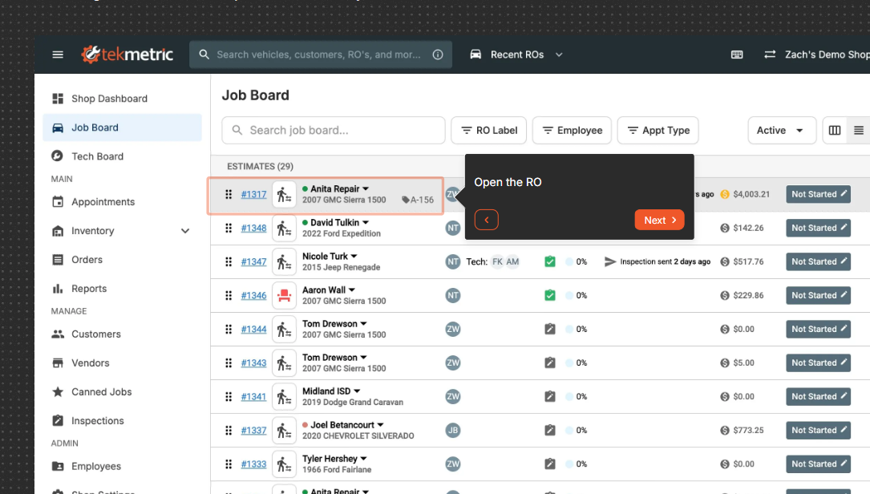
Tekmetric Job Board showing repair orders organized by workflow stage.
Alt text: Tekmetric Job Board showing repair orders and shop workflow
Opening a repair order kept the customer, vehicle, services, inspection information, estimate, and work status tied together. For a busy repair shop, that connected structure is potentially more useful than switching among unrelated systems for the front counter and the technicians.
The workflow also exposed previously declined jobs and the ability to bring that work back into a future estimate, keeping earlier recommendations connected to later customer decisions.
2. Digital Vehicle Inspections
Digital Vehicle Inspections were one of the strongest parts of the tour. The inspection screen showed individual tasks, condition indicators, findings, completion progress, and the ability to attach visual evidence.
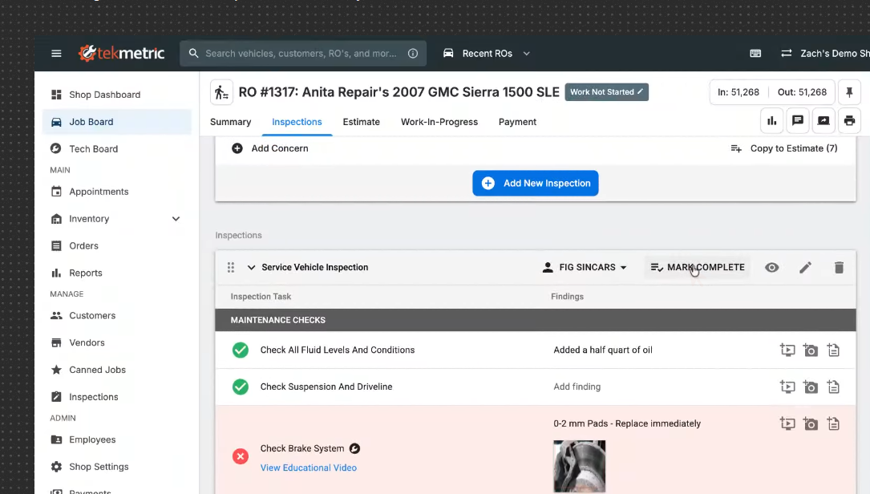
Digital Vehicle Inspection showing findings and inspection progress.
Alt text: Tekmetric digital vehicle inspection showing findings and inspection tasks
In the guided example, inspection findings included items such as brake-pad condition and windshield damage. The system also demonstrated adding photos or videos and sharing the inspection with the customer.
This matters because the inspection is not presented as a dead-end checklist. Tekmetric’s current product documentation says shops can share DVI results by text or email and use findings when building repair recommendations. The customer can therefore see evidence before deciding whether to approve work.
For me, the value here was the connection between documentation and the next operational step. The inspection can become part of the estimate instead of remaining a separate technician note.
3. Estimate Building, Parts, and Declined Work
After the inspection, the tour moved into estimate building. I could see labor and parts organized inside the repair order, along with pricing, quantities, taxes, and service totals.
The workflow demonstrated selecting parts through integrated suppliers and adding those parts directly to the estimate. This kept parts selection inside the same estimating process instead of separating it from the repair order.
Another useful detail was declined-job history. Previously declined work could be surfaced and added to a new estimate. For a shop that regularly follows up on maintenance or repairs that customers postpone, that could make the repair history more actionable.
The estimate itself remained connected to the inspection and repair order, which was consistent with the strongest theme I saw throughout the test: fewer breaks between operational stages.
4. Sharing the Estimate and Customer Authorization
The customer-approval workflow was more flexible than I expected. The tour showed estimates being shared by email or SMS, including a direct estimate link. From the customer-facing view, recommended jobs could be reviewed before authorization.
Tekmetric also demonstrated multiple authorization methods: digital signature, paper signature, verbal in-person authorization, phone call, text message, and email. The customer-facing flow showed the total and an authorization step rather than simply presenting a static quote.
The customer-facing view showed how the shop-side estimate connects to digital approval. Recommended work, pricing, and authorization remained tied to the same repair order.
For a repair business, that connection can reduce the number of disconnected steps between identifying work and recording a decision. Tekmetric’s current documentation also states that customer authorizations are stored digitally.
5. Technician Workflow and Time Tracking
Once work was approved, the repair order moved into Work-In-Progress. The interface associated jobs with a technician and showed labor information and job status.
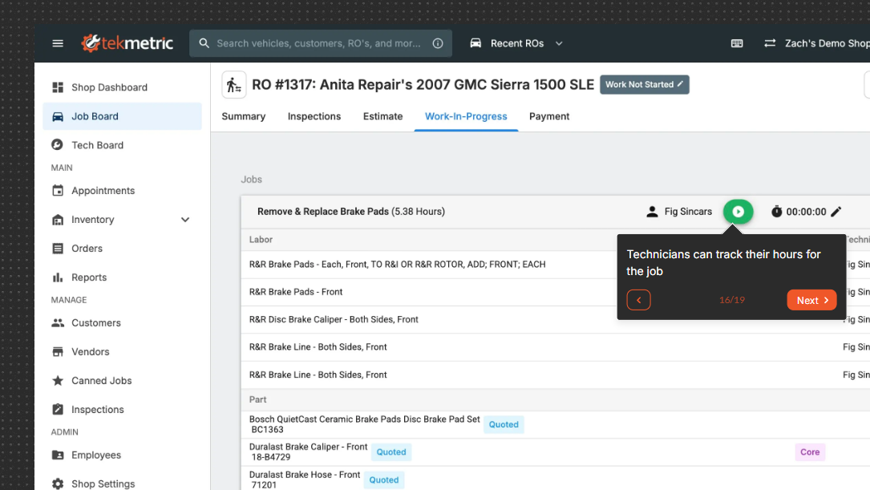
Work-In-Progress view with technician job tracking.
Alt text: Tekmetric Work-In-Progress screen showing technician time tracking
The tour demonstrated technicians clocking into individual jobs, stopping timers, and marking work complete. Tekmetric’s support documentation explains that technician assignments can also help managers see workload and compare time clocked on a job with billed labor.
This was another area where the connected workflow made sense. The technician is not working from an unrelated task list; the work is attached to the same repair order that contains the inspection, estimate, approval, parts, and customer information.
I would still want to evaluate how convenient the time-clock process feels during a real working day, especially on mobile devices or in a high-volume shop.
6. Payments and Customer Checkout
The final part of the tour covered payment. The repair-order summary separated labor, parts, fees, taxes, payments, and the remaining balance, which made the financial end of the workflow easy to follow.
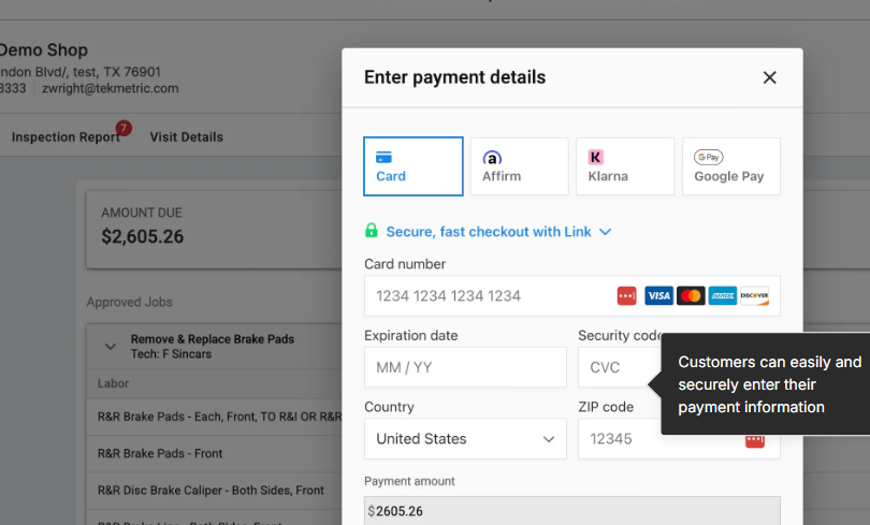
Customer checkout shown in the Tekmetric product tour.
Alt text: Tekmetric customer payment screen with card, Affirm, Klarna and Google Pay options
The customer checkout I saw included card payment and additional payment or financing choices. Tekmetric’s current public pricing and feature pages also list cards, Apple Pay, Google Pay, Text-to-Pay, and Buy Now, Pay Later capabilities.
Tekmetric Pricing in 2026
Pricing last checked: September 17, 2026. Tekmetric may change plans, features, or pricing after publication.
Tekmetric currently prices subscriptions per shop rather than per user or repair order. Its public pricing page lists unlimited users, unlimited repair orders, and unlimited support across the main plans.
| Plan | Monthly | Annual billing |
| Start | $199/month | $179/month |
| Grow | $349/month | $309/month |
| Scale | $439/month | $409/month |
Start includes core functions such as inventory and vendor management, Digital Vehicle Inspections, Smart Jobs, and digital authorizations and invoicing. Grow adds capabilities including labor guidance and time/job clocks, while Scale adds features such as two-way texting, a real-time shop dashboard, Technician Board, and employee performance analytics.
Tekmetric also lists Enterprise with custom pricing and offers additional products or add-ons. Because pricing and packaging can change, I would verify the current plan page before purchasing.
Does Tekmetric Offer a Free Trial?
Tekmetric currently promotes free self-guided product tours and personalized demos rather than a traditional time-limited production account. Shops should confirm the current access options directly with Tekmetric.
The distinction is important. The tour is useful for understanding workflow and interface design, but it does not let a reviewer reproduce every real-world condition involving staff permissions, live integrations, actual customers, payment processing, or weeks of shop data.
What I Liked Most
The strongest aspect of Tekmetric in this Tekmetric review was workflow continuity. I could follow a logical path from repair order to inspection, estimate, authorization, technician work, and payment without the product feeling like six unrelated modules.
I also liked how much customer communication was integrated into that process. Inspections can carry visual evidence, estimates can be shared electronically, and approvals can be recorded using several methods.
Finally, the technician side did not appear disconnected from the front-office process. Work-In-Progress and job clocks linked execution back to approved services.
Where Tekmetric Has Limitations
The main methodological limitation is that this evaluation used a guided product environment rather than Tekmetric inside an operating repair shop. It does not establish onboarding speed, long-term usability, integration reliability, supplier availability, real customer-message delivery, or performance after months of daily use.
Payments and financing also depend on merchant activation, transaction type, provider requirements, and the shop’s current setup. Any business relying on a specific parts supplier, labor guide, accounting system, CRM, marketing platform, payment method, or financing option should confirm that exact workflow before switching.
Cost is another consideration. A starting price of $199 per shop per month is a meaningful software expense for a very small operation, especially if the shop needs higher-tier features or paid add-ons.
The platform is also broad. That can be an advantage for a shop replacing multiple disconnected tools, but it may be more system than a solo mechanic needs if the requirement is only basic scheduling, estimates, or invoices.
Who Is Tekmetric Best For?
Tekmetric makes the most sense for repair shops that want a connected operating workflow and expect multiple people or roles to interact with the same repair order.
A shop that values Digital Vehicle Inspections, electronic estimates and approvals, technician tracking, parts workflow, reporting, and integrated payment options is more likely to benefit from the breadth of the platform.
A very small operation looking for the cheapest possible single-purpose tool should compare simpler alternatives before committing. Likewise, any shop that depends on a specific accounting, parts, CRM, or marketing integration should confirm that exact integration before switching systems.
If your priority is automating workflows between existing business apps rather than replacing them with an all-in-one platform, see my Zapier review.
Final Verdict: Is Tekmetric Worth Considering in 2026?
Yes, Tekmetric is worth considering for an auto repair shop that wants to connect the customer-facing and technician-facing parts of a repair order. The evaluation showed a coherent workflow rather than a collection of isolated features.
The Digital Vehicle Inspection and customer-authorization stages stood out most to me because they connect technical findings to something the customer can actually review and approve. Technician time tracking and the payment workflow then carry that same repair order toward completion.
But this Tekmetric review should not be read as a claim that I ran the software in a live shop.
I tested the official interactive environment, inspected the workflow closely, and documented what it allowed me to verify. A real implementation would still need to prove onboarding, integrations, staff adoption, and day-to-day reliability.
For Prompt Atlas, Tekmetric also gives us a useful foundation for a future comparison of auto repair shop platforms. Once I test additional tools under comparable conditions, I can compare them directly instead of relying on feature lists alone.
FAQ
How much does Tekmetric cost?
Tekmetric’s current public pricing starts at $199 per month on monthly billing for the Start plan. Grow is listed at $349 per month and Scale at $439 per month, with lower monthly equivalents when billed annually.
Does Tekmetric charge per user?
No. Tekmetric says its core subscriptions are priced per shop and include unlimited users and unlimited repair orders.
Can customers approve estimates digitally?
Yes. The product tour demonstrated electronic estimate sharing and multiple authorization methods, including digital signature, text, email, phone, paper, and in-person authorization.
Can Tekmetric send digital vehicle inspections to customers?
Yes. Tekmetric’s current documentation says Digital Vehicle Inspection findings can be shared with customers by text or email, including photos, videos, and inspection details.
Leave a Reply